Welcome Guest ( Log In | Register )

Outline · [ Standard ] · Linear+

Home Networking ASUS Malaysia Networking User & Technical Support, Managed by ASUS Malaysia Representative

views
     
cskean
post Mar 24 2017, 10:14 PM

Look at all my stars!!
*******
Senior Member
2,551 posts

Joined: Jan 2003
From: Cheras / Ampang


Hi guys, I have a RT-N14UHP router.

Was thinking using it to extend the wireless coverage in my working place. (not sure what is the correct term of this, was it repeater or ?)

My office is 6 sty, and usually my working area will be at 2nd, 3rd and 4th....

Now the lan cable is located at 3rd flr, how should I set up the N14UHP so that the 2nd & 4th floor can have better wifi coverage?


cskean
post Oct 28 2018, 12:10 AM

Look at all my stars!!
*******
Senior Member
2,551 posts

Joined: Jan 2003
From: Cheras / Ampang


QUOTE(sHawTY @ Oct 11 2018, 09:04 AM)
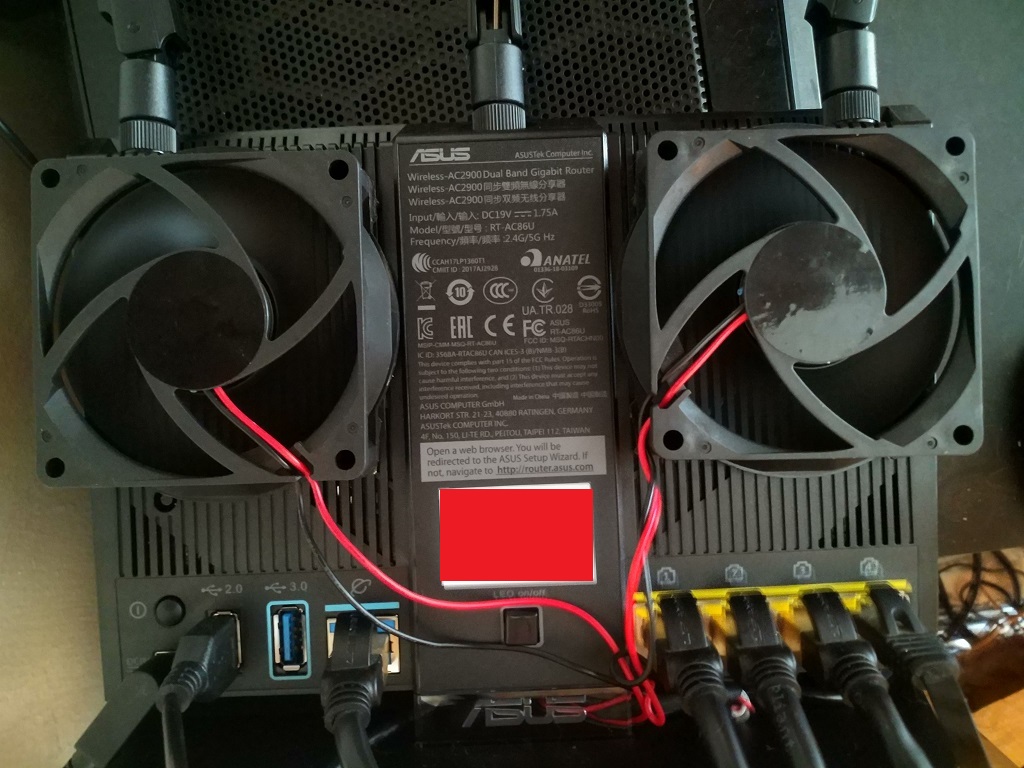
ASUS RT-AC86U definitely doesn't need extra cooling unlike the older ASUS RT-AC68U, but I just installed 2 fans anyway to suck the hot air out (not blow air in)

Without fans the router runs at 70°C ~ 72°C
With fans the router runs at 52°C ~ 55°C

user posted image

user posted image
*
Hi there, mind to share where to buy this cooling fan (blow out type) and the cost of it?
cskean
post Oct 28 2018, 12:42 AM

Look at all my stars!!
*******
Senior Member
2,551 posts

Joined: Jan 2003
From: Cheras / Ampang


ASUSmy

Hi, any news regarding the Asus RT-AX88U on when will it be available in MY and the RRP for it?
cskean
post Oct 29 2018, 07:02 PM

Look at all my stars!!
*******
Senior Member
2,551 posts

Joined: Jan 2003
From: Cheras / Ampang


QUOTE(ASUSmy @ Oct 29 2018, 10:30 AM)
Hi cskean,

It is estimated to be available around December 2018.

Do follow our FB for more updates.

Thank you
*
Any idea about the RRP for this device?

cskean
post Nov 24 2018, 08:06 AM

Look at all my stars!!
*******
Senior Member
2,551 posts

Joined: Jan 2003
From: Cheras / Ampang


Problem solved~

This post has been edited by cskean: Nov 25 2018, 09:59 AM
cskean
post Dec 3 2018, 11:27 PM

Look at all my stars!!
*******
Senior Member
2,551 posts

Joined: Jan 2003
From: Cheras / Ampang


ASUSmy

May I know what is the optimal setting for the GT-AC5300? I'm using Unifi 800MB.

Thanks~
cskean
post Dec 8 2018, 11:10 PM

Look at all my stars!!
*******
Senior Member
2,551 posts

Joined: Jan 2003
From: Cheras / Ampang


ASUSmy

I notice GT-AC5300 has released a firmware. Just wondering will my setting reset once I update to the latest firmware?
cskean
post Dec 8 2018, 11:17 PM

Look at all my stars!!
*******
Senior Member
2,551 posts

Joined: Jan 2003
From: Cheras / Ampang


QUOTE(sHawTY @ Dec 8 2018, 11:12 PM)
No
*
Have you updated to the latest firmware? Any improvement?

cskean
post Apr 1 2020, 11:28 PM

Look at all my stars!!
*******
Senior Member
2,551 posts

Joined: Jan 2003
From: Cheras / Ampang


Sorry guys, too long didn't log into my Asus GT-AC5300 router, anyone mind to share with me what is the address I should type into the address bar?

I tried router.asus.com, but didn't show up anything.

cskean
post Apr 1 2020, 11:41 PM

Look at all my stars!!
*******
Senior Member
2,551 posts

Joined: Jan 2003
From: Cheras / Ampang


QUOTE(yongtjunkit @ Apr 1 2020, 11:39 PM)
192.168.1.1 is the default one, failing that your can go to the ASUS support section of the website and download the ASUS discovery software to search for the router

https://www.asus.com/us/support/FAQ/1037094/
*
I tried 192.168.1.1, but same like router.asus.com.

I manage to find the router ip address manually, but thanks for your recommendation too. Will give it a shot...

cskean
post Apr 2 2020, 12:11 AM

Look at all my stars!!
*******
Senior Member
2,551 posts

Joined: Jan 2003
From: Cheras / Ampang


Anyone care to share how to remove someone (unknown/suspicious) users from my wifi network?

So happen that I notice there are few unknown devices appear in my wifi list. But I didn't manage to find a way to remove them without changing password?

I'm using Asus GT-AC5300.

Million thanks in advance...

cskean
post Apr 2 2020, 05:27 PM

Look at all my stars!!
*******
Senior Member
2,551 posts

Joined: Jan 2003
From: Cheras / Ampang


QUOTE(yongtjunkit @ Apr 2 2020, 07:50 AM)
Use MAC address blocking to black list that MAC address

https://www.asus.com/my/support/FAQ/1000904/
*
QUOTE(sHawTY @ Apr 2 2020, 02:05 PM)
First of all, make sure the firmware for your GT-AC5300 is updated to the latest version: 3.0.0.4.384.81695 released on 26 March 2020

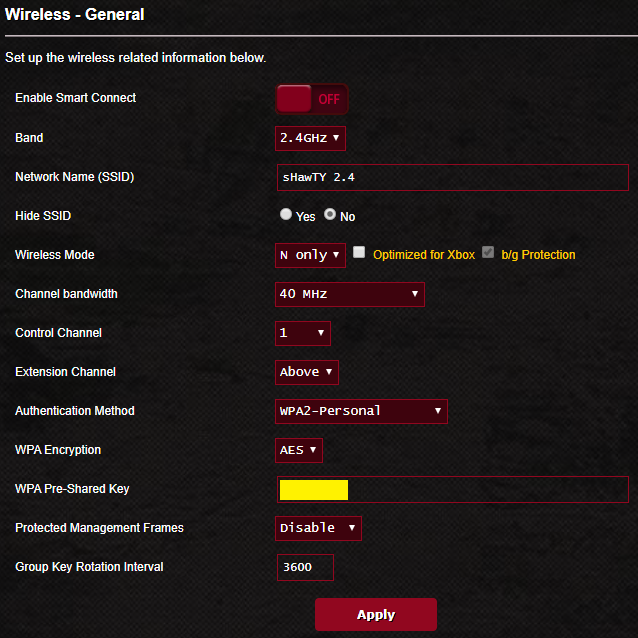
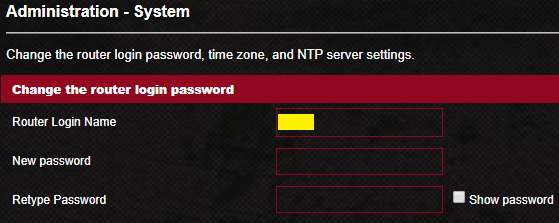
Then if you are sure someone hacked into your network, the best method is to change the WiFi password & the router login & password as well to boost security
For WiFi password, go to: Wireless > WPA Pre-Shared Key
Make sure you change the password for 2.4GHz, 5GHz-1 & 5GHz-2

user posted image

For router login & password change, go to: Administration > System
It's also a good idea to change the login username as well. Avoid using "Admin" as the username as it's widely used on all routers all over the world

user posted image
*
Thanks for the suggestion notworthy.gif notworthy.gif
cskean
post Jul 22 2020, 10:43 PM

Look at all my stars!!
*******
Senior Member
2,551 posts

Joined: Jan 2003
From: Cheras / Ampang


Hi guys, need some advice for the setting of GT-AC5300. Currently I'm using Unifi 800Mb.

Router Firware version : 3.0.0.4.384_81974-gb2967e4
Cable used from Modem to Router : Cat 7

I've tested the the internet speed using LAN cable directly with my laptop and manage to obtain full Download and Upload speed.

However when I tried to speedtest using my device as below :

1. Laptop with Wirelss AC-9560 160mhz
2. Samsung Galaxy Note 10 Plus

In 5Ghz mode, the fastest speed I can get is,

1. If stand directly in front of the router, max is D : 140~150Mbps U : 100Mbps.

2. On 2nd floor, D : 100~110Mbps U : 60~70Mbps only.


Previously before few firmware updates, if standing in front of the router to test with the same devices, can easily hit appx D : 500Mbps and 2nd floor can get ard D : 250~300Mbps...

Hopefully some experts here can enlighten me with a better setting for this GT-AC5300 so that I can fully optimize the speed and performance of this great router with my Unifi 800Mb~

Million thanks in advance~
cskean
post Jul 23 2020, 12:47 PM

Look at all my stars!!
*******
Senior Member
2,551 posts

Joined: Jan 2003
From: Cheras / Ampang


QUOTE(ASUSmy @ Jul 23 2020, 11:42 AM)
Hi cskean,

Can you try factory reset on the router and redo the setup then test again?

Thank you
*
Mine is a China Set, mind to elaborate on which setting should I pay more concern after a factory reset?
cskean
post Jul 24 2020, 12:25 AM

Look at all my stars!!
*******
Senior Member
2,551 posts

Joined: Jan 2003
From: Cheras / Ampang


QUOTE(ASUSmy @ Jul 23 2020, 01:28 PM)
Hi cskean,

After factory reset just now normal setup to connect to Internet and test the speedtest again.

Once tested okay then you can start enabling the features you want.

Thank you
*
Alright, will try it out and see whats the result would be~

Thanks a lot~

cskean
post Mar 10 2021, 05:50 PM

Look at all my stars!!
*******
Senior Member
2,551 posts

Joined: Jan 2003
From: Cheras / Ampang


Hi there...

I'm using GT-AC5300(CN ver, running Asus firmware) as my main router for my Unifi 800.

I'm thinking of setting up Aimesh on my 1st floor, as the coverage seems to be weak at the rear rooms.

Yet to decide which Aimesh compatible router to choose, but there are some queries in my mind that need some asnwer for it...

1. If I choose a AX router as the Aimesh node, will those device that connected to it, get to enjoy Wifi 6 speed & features?

2. Just how does the Aimesh system works when it come to which router/aimesh that my devices will auto connect to? By signal strength?

3. Can I check from my devices whether which router it is current connected to, since Aimesh is using the same SSID as my main router? Or I can check from the web base Asus dashboard?

Hopefully some sifus here can enlighten me🤗
cskean
post Mar 11 2021, 02:04 AM

Look at all my stars!!
*******
Senior Member
2,551 posts

Joined: Jan 2003
From: Cheras / Ampang


QUOTE(blacktubi @ Mar 10 2021, 06:46 PM)
1- Yes you will have WiFi 6 on the node but dont expect it to be super fast as it is still on wireless backhaul. On a dual-band model, expect around 250Mbps speed. Tri-band model will bring it to 500Mbps.
2- Roaming is decided by signal strength.
3- Yes, the AiMesh dashboard will show which band and what are the devices that a currently connected to a particular unit.
*
Thx for the reply. So will there be any issue if pair AC main router together with AX Aimesh node to form a mesh Wifi? Such as instability wifi connection between main router & Aimesh node and so on?

Any recommended Asus Aimesh ready router, below RM500? Total built up area ard 2600~2800sf, 2 sty house?
cskean
post Mar 11 2021, 11:08 PM

Look at all my stars!!
*******
Senior Member
2,551 posts

Joined: Jan 2003
From: Cheras / Ampang


QUOTE(jpong1 @ Mar 11 2021, 10:42 AM)
ASUS RT-AX56U
*
Whats the main difference between AX55 & AX56U? Price seems to be 40% more for AX56U...
cskean
post Mar 12 2021, 03:28 PM

Look at all my stars!!
*******
Senior Member
2,551 posts

Joined: Jan 2003
From: Cheras / Ampang


QUOTE(afif92 @ Mar 12 2021, 12:28 AM)
no usb port so many features in there like sharing storage, internet usb dongle are removed.
*
QUOTE(sHawTY @ Mar 12 2021, 10:36 AM)
AX55 doesn't have any USB port, so you can't use the USB print function, USB download master, and some other features that are only available on ASUS routers with a USB port
*
I'm purely using the Aimesh for wider Wifi coverage only. Currently my HP Officejet Pro 8730 is connected via wifi from the main router.

So the features like sharing storage, internet usb dongle, usb print function, usb download master (which all of these I totally have no idea what does it use for) mostly won't be using it, at least in the near future...

If this is the scenario, so AX55 would be sufficient enough for my purpose right?

cskean
post Jun 21 2021, 12:54 PM

Look at all my stars!!
*******
Senior Member
2,551 posts

Joined: Jan 2003
From: Cheras / Ampang


Hi guys, I'm using Asus GT-AC5300 (fw : 3.0.0.4.386_42643) with Unifi 800.

There are 2 5Ghz band, and the 2nd 5Ghz is the gaming 5Ghz, right?

Recently I notice that my 2nd 5Ghz band download & upload speed are much slower compare to the 1st 5Ghz band.

Usually the 1st 5Ghz is around 4xxMbps download & 1xxMbps upload, where as the 2nd 5Ghz is around 5xxMbps download & 2xxMbps upload.

But now the 2nd 5Ghz has become 1xxMbps download & 4~5xMbps upload only. I tried restart the router, sometimes it will back to normal, but not sure for long long it will back to the slower speed again.

So, 1st thing I wanna confirm is whether we can sef which 5Ghz band to becone the gaming 5Ghz or by default must be the 2nd 5Ghz band?

Other than this,I'm only able to achieve 6xxMbps download speed with my Samsung Galaxy Note10+ when testing it wifi 5Ghz. Is this the max wifi speed that this router can achieve? Or does it because my gadget wifi is not able to get higher than this?

2 Pages  1 2 >Top
 

Change to:
| Lo-Fi Version
0.0412sec    0.54    7 queries    GZIP Disabled
Time is now: 11th December 2025 - 09:47 PM