

QUOTE(ASUSmy @ Nov 29 2018, 06:33 PM)
Currently firmware only can select 5/6, will feedback to software RD on your request.
Thank youI want to use port 5 & 6 for aggregation for my NAS
Port 1 & 2 is used for my PC & my PS4
Thank you
Home Networking ASUS Malaysia Networking User & Technical Support, Managed by ASUS Malaysia Representative
|
|
 Nov 29 2018, 07:40 PM Nov 29 2018, 07:40 PM
Show posts by this member only | IPv6 | Post
#9501
|
 
All Stars
14,909 posts Joined: Jul 2005  
|
QUOTE(ASUSmy @ Nov 29 2018, 06:33 PM) Currently firmware only can select 5/6, will feedback to software RD on your request. Thank youI want to use port 5 & 6 for aggregation for my NAS Port 1 & 2 is used for my PC & my PS4 Thank you |
|
|
|
|
|
Nov 30 2018, 12:09 AM
|

Senior Member
3,795 posts Joined: Jan 2003 From: .: Old Klang Road :.  
|
QUOTE(ahpaul82 @ Nov 22 2018, 12:17 AM) What does this mean ? ASUSmy, it always appear in system log : kernel: osl_pktfastfree: free skb for NULL ctfpool Model : ASUS RT-N14UHP Firmware Version:3.0.0.4.380_8287 [attachmentid=10117782]  what happen to my wireless router?  |
 |
Nov 30 2018, 09:10 AM
|

Senior Member
2,319 posts Joined: Mar 2010
|
QUOTE(ahpaul82 @ Nov 30 2018, 12:09 AM) ASUSmy, Hi ahpaul82,what happen to my wireless router? May I know is there any problem on the router when this message came out? Thank you |
|
|
Nov 30 2018, 09:17 AM
Show posts by this member only | IPv6 | Post
#9504
|
|
Senior Member
3,795 posts Joined: Jan 2003 From: .: Old Klang Road :.
|
QUOTE(ASUSmy @ Nov 30 2018, 09:10 AM) Hi ahpaul82, May I know those scripts will cause any issue? May I know is there any problem on the router when this message came out? Thank you Wi-Fi signals doesn't seems quite good recently..  |
|
|
Nov 30 2018, 09:18 AM
Show posts by this member only | IPv6 | Post
#9505
|

Junior Member
466 posts Joined: Dec 2005
|
QUOTE(ASUSmy @ Nov 29 2018, 06:39 PM) Hi aimeh, Hi @ASUSmy, I had tried but no hope. What kind of setting I should put on the Maxis router? Is the SIP setting on asus router or maxis router?You can have a look at the youtube below on how to do the setup. https://www.youtube.com/watch?v=iBRbk1FSFj0 Thank you |
|
|
Nov 30 2018, 09:22 AM
|
|
Senior Member
2,319 posts Joined: Mar 2010
|
QUOTE(aimeh @ Nov 30 2018, 09:18 AM) Hi @ASUSmy, I had tried but no hope. What kind of setting I should put on the Maxis router? Is the SIP setting on asus router or maxis router? Hi aimeh,Are you able to connect to the Internet with the ASUS router? And is the modem given is from TM or from Maxis? Thank you |
|
|
|
|
|
Nov 30 2018, 09:44 AM
|
|
Senior Member
2,319 posts Joined: Mar 2010
|
QUOTE(ahpaul82 @ Nov 30 2018, 09:17 AM) May I know those scripts will cause any issue? Hi ahpaul82,Wi-Fi signals doesn't seems quite good recently.. Don't think it is related to the WiFi, it is something related to NAT Acceleration. May I know what is your Internet package and can you try turning off the NAT Acceleration. Thank you |
|
|
Nov 30 2018, 09:48 AM
Show posts by this member only | IPv6 | Post
#9508
|
|
Senior Member
3,795 posts Joined: Jan 2003 From: .: Old Klang Road :.
|
QUOTE(ASUSmy @ Nov 30 2018, 09:44 AM) Hi ahpaul82, I'm using Unifi 30MB. Don't think it is related to the WiFi, it is something related to NAT Acceleration. May I know what is your Internet package and can you try turning off the NAT Acceleration. Thank you Okay, will your suggestion tonight and see how. |
|
|
Nov 30 2018, 10:25 AM
|

Junior Member
266 posts Joined: Jul 2008
|
QUOTE(ASUSmy @ Nov 29 2018, 06:37 PM) Hi St. Teh, Thanks for the updateThere is no setting, it is plug and play. Have you try testing using different server? And may I know what router model are you using? Thank you Currently using AC68, May i know how to test using different server? |
|
|
Nov 30 2018, 10:32 AM
|
|
Senior Member
2,319 posts Joined: Mar 2010
|
QUOTE(St. Teh @ Nov 30 2018, 10:25 AM) Thanks for the update Hi St. Teh,Currently using AC68, May i know how to test using different server? The sever that I mean is the Speedtest server. Try different server to see the speed. Thank you Attached thumbnail(s) 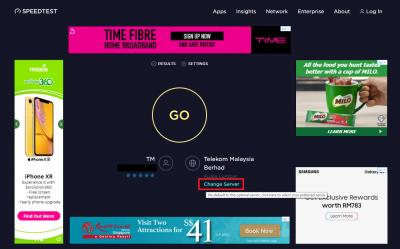
|
|
|
Nov 30 2018, 11:24 AM
|
|
Junior Member
466 posts Joined: Dec 2005
|
QUOTE(ASUSmy @ Nov 30 2018, 09:22 AM) Hi aimeh, Hi @ASUSmy,Are you able to connect to the Internet with the ASUS router? And is the modem given is from TM or from Maxis? Thank you I'm able to connect the Internet with the ASUS RTN66U. The modem given is from TM, the huawei model, and the router is given by Maxis, the MA131 model. Thanks. |
|
|
Nov 30 2018, 12:39 PM
|

Senior Member
4,743 posts Joined: Jan 2003 From: u noe EARTH ? wher all human being is there 
|
QUOTE(ASUSmy @ Nov 29 2018, 06:29 PM) Hi milky, the lyra trio is repeater mode?I cannot tell how much it will drop because it depend on environment but what I can say is it is better than repeater mode. Thank you btw recently i bought 1 ac86u for my in law house when i'm infront of the router.. i can get 460mbps when i go back to my room which is direct below of the router placement i get 170mbps.. is that normal?? This post has been edited by milky: Nov 30 2018, 12:40 PM |
|
|
Nov 30 2018, 02:11 PM
|

Junior Member
41 posts Joined: Sep 2011
|
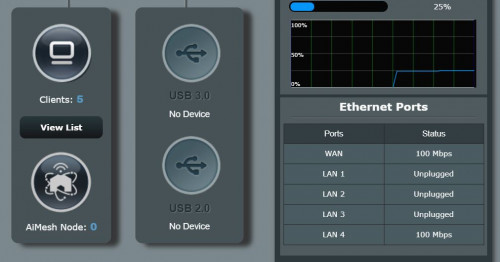
I just get Turboed by Unified to 500Mbps and but speed test suggest I only have around 100Mbps. When I log into The Asus RT-AC68U router, it show status WAN 100Mbps and LAN4 100Mbps. May I know is this is TM BTU limit or AC68U setup issue?
 |
|
|
|
|
|
Nov 30 2018, 02:25 PM
|
|
Senior Member
2,319 posts Joined: Mar 2010
|
QUOTE(milky @ Nov 30 2018, 12:39 PM) the lyra trio is repeater mode? Hi milky,btw recently i bought 1 ac86u for my in law house when i'm infront of the router.. i can get 460mbps when i go back to my room which is direct below of the router placement i get 170mbps.. is that normal?? Maybe you can have a read on below link, let you understand more about 2.4GHz and 5GHz. And there is link related to mesh system too. https://www.howtogeek.com/222249/whats-the-...should-you-use/ Thank you |
|
|
Nov 30 2018, 02:31 PM
|
|
Senior Member
2,319 posts Joined: Mar 2010
|
QUOTE(willgo @ Nov 30 2018, 02:11 PM) I just get Turboed by Unified to 500Mbps and but speed test suggest I only have around 100Mbps. When I log into The Asus RT-AC68U router, it show status WAN 100Mbps and LAN4 100Mbps. May I know is this is TM BTU limit or AC68U setup issue? Hi willgo,Please check your PC LAN port spec what is the speed and if you have a gigabit LAN port PC, please plug to modem and check the speed on windows. Thank you |
|
|
Nov 30 2018, 02:42 PM
|
|
Senior Member
2,319 posts Joined: Mar 2010
|
QUOTE(aimeh @ Nov 30 2018, 11:24 AM) Hi @ASUSmy, Hi aimeh,I'm able to connect the Internet with the ASUS RTN66U. The modem given is from TM, the huawei model, and the router is given by Maxis, the MA131 model. Thanks. That's mean the VOIP is not working only? Do you plug in the LAN cable from ASUS LAN port 3 to the Maxis router WAN port and restart all the devices including the modem? Thank you |
|
|
Nov 30 2018, 02:59 PM
|
|
Junior Member
466 posts Joined: Dec 2005
|
QUOTE(ASUSmy @ Nov 30 2018, 02:42 PM) Hi aimeh, HI ASUSmy,That's mean the VOIP is not working only? Do you plug in the LAN cable from ASUS LAN port 3 to the Maxis router WAN port and restart all the devices including the modem? Thank you yes just the VOIP is not working. i did tried that but seems like not working as the sound of the tel is not the same as previous one. Wanted to make sure something here: Do i need to do a factory reset on the Maxis Router? Or i just keep the default settings that with the Maxis configured for SIP and WAN ? Thanks. |
|
|
Nov 30 2018, 03:47 PM
|
|
Senior Member
2,319 posts Joined: Mar 2010
|
QUOTE(aimeh @ Nov 30 2018, 02:59 PM) HI ASUSmy, Hi aimeh,yes just the VOIP is not working. i did tried that but seems like not working as the sound of the tel is not the same as previous one. Wanted to make sure something here: Do i need to do a factory reset on the Maxis Router? Or i just keep the default settings that with the Maxis configured for SIP and WAN ? Thanks. No need to configure anything, no need to factory reset on the Maxis router. Thank you |
|
|
Nov 30 2018, 03:51 PM
|
|
Junior Member
466 posts Joined: Dec 2005
|
QUOTE(ASUSmy @ Nov 30 2018, 03:47 PM) Hi aimeh, Ok. I will try and let you know about the result. Might do it next week as got ppl is using, not suitable to do a reset right now No need to configure anything, no need to factory reset on the Maxis router. Thank you  |
|
|
Nov 30 2018, 04:11 PM
|
|
Junior Member
266 posts Joined: Jul 2008
|
QUOTE(ASUSmy @ Nov 30 2018, 10:32 AM) Hi St. Teh, Thanks for the update. The sever that I mean is the Speedtest server. Try different server to see the speed. Thank you Will try it tonite |
| Change to: |  0.0264sec 0.0264sec
 0.50 0.50
 6 queries 6 queries
 GZIP Disabled GZIP Disabled
Time is now: 11th December 2025 - 06:15 PM |
 Quote
Quote