

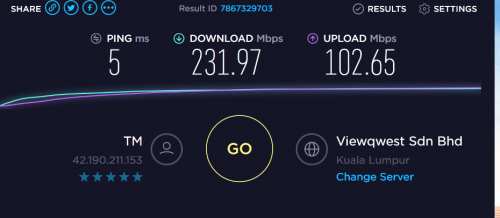
using cable router ac55uhp
cable cat6
from modem to router cat5e
motherboard asrock z370 gaming k6 tq
This post has been edited by keyo: Dec 10 2018, 11:29 AM
Home Networking ASUS Malaysia Networking User & Technical Support, Managed by ASUS Malaysia Representative
|
|
 Dec 10 2018, 11:28 AM Dec 10 2018, 11:28 AM
|
 
Junior Member
345 posts Joined: Jun 2009  
|
hi still not get 500
using cable router ac55uhp cable cat6 from modem to router cat5e motherboard asrock z370 gaming k6 tq This post has been edited by keyo: Dec 10 2018, 11:29 AM |
|
|
|
 |
Dec 10 2018, 12:00 PM
|

Senior Member
2,319 posts Joined: Mar 2010
|
QUOTE(keyo @ Dec 10 2018, 11:28 AM) hi still not get 500 Hi keyo,using cable router ac55uhp cable cat6 from modem to router cat5e motherboard asrock z370 gaming k6 tq  Have you try to do a factory reset on the router? Try reset it and test again. Thank you |
|
|
Dec 10 2018, 02:44 PM
|

Junior Member
245 posts Joined: Jul 2007
|
QUOTE(keyo @ Dec 10 2018, 11:28 AM) hi still not get 500 Earlier i also facing some problem like u.using cable router ac55uhp cable cat6 from modem to router cat5e motherboard asrock z370 gaming k6 tq After checking, only detected that is antivirus took too many resources from my pc and caused the speed cannot achieve at maximum level. Try to disable and close ur antivirus/internet security software and test. i using 55u with my old pc with Antivirus on = 4xx mbps without antivirus = 6-700 mbps. The spec on the PC sometimes also playing a factor for not achieve max speed. |
|
|
Dec 10 2018, 09:53 PM
|

Senior Member
839 posts Joined: Aug 2009
|
QUOTE(ASUSmy @ Dec 10 2018, 10:24 AM) Hi G K Lai, Oh I see, thanks!From the log given, it seen like the router detected disconnection from the modem, is the DSL signal from the modem are okay when the problem happen? Dec 8 02:54:16 pppd[445]: Serial link appears to be disconnected. Thank you I did not aware and was not using the computer when the disconnect and re-connection happens, so I don't know how was the DSL signal at that time. However, I just try to set PPP Echo Interval from the original 6, to 30, as Maxis provided router's default value, and no more disconnection for for the past 24 hours already. Don't know if it is by coincidence or this value actually have the effect.  Thank you again for your reply.  |
|
|
Dec 12 2018, 02:36 AM
Show posts by this member only | IPv6 | Post
#9565
|

Newbie
17 posts Joined: Nov 2018
|
Hi Asus
If i buy RT-AC68U from China, can i configure unifi and use it in malaysia? Thank you. |
|
|
Dec 12 2018, 02:05 PM
|
|
Junior Member
245 posts Joined: Jul 2007
|
ASUSmy,
Would like to check if in the event my router Lan 4 port got problem, is it possible to switch my IPTV using Lan 3 port? If yes, how? |
|
|
|
|
|
Dec 12 2018, 02:50 PM
|
|
Senior Member
2,319 posts Joined: Mar 2010
|
QUOTE(wanjun23 @ Dec 12 2018, 02:36 AM) Hi Asus Hi wanjun23,If i buy RT-AC68U from China, can i configure unifi and use it in malaysia? Thank you. You can try selecting the ISP profile at LAN->IPTV->UNIFI. If no profile, you can set the VLAN manually. Thank you |
|
|
Dec 12 2018, 03:07 PM
|
|
Senior Member
2,319 posts Joined: Mar 2010
|
QUOTE(ulala2 @ Dec 12 2018, 02:05 PM) ASUSmy, Hi ulala2,Would like to check if in the event my router Lan 4 port got problem, is it possible to switch my IPTV using Lan 3 port? If yes, how? You can try set it manually using at LAN->IPTV. Thank you |
|
|
Dec 12 2018, 03:24 PM
|
|
Junior Member
245 posts Joined: Jul 2007
|
QUOTE(ASUSmy @ Dec 12 2018, 03:07 PM) Hi ulala2, When i select IPTV Manual setting, it come out with few area to configure, what should we put there?You can try set it manually using at LAN->IPTV. Thank you |
|
|
Dec 12 2018, 03:38 PM
|

Newbie
10 posts Joined: Sep 2010
|
QUOTE(keyo @ Dec 10 2018, 11:28 AM) hi still not get 500 Off Qos ?need to off only can run 500mbpsusing cable router ac55uhp cable cat6 from modem to router cat5e motherboard asrock z370 gaming k6 tq |
|
|
Dec 12 2018, 04:41 PM
|

Senior Member
5,714 posts Joined: Mar 2007 
|
QUOTE(ulala2 @ Dec 12 2018, 03:24 PM) When i select IPTV Manual setting, it come out with few area to configure, what should we put there? VLAN500 for Internet, VLAN600 for unifiTV. |
|
|
Dec 12 2018, 05:05 PM
|
|
Junior Member
245 posts Joined: Jul 2007
|
QUOTE(SilentVampire @ Dec 12 2018, 04:41 PM) VLAN500 for Internet, VLAN600 for unifiTV. in AC86U, only have VID and PRIOSo i guess i need to fill in as Internet VID=500, PRIO=0 Lan 3 VID=600, PRIO=0 Am i right? |
|
|
Dec 12 2018, 05:23 PM
|
|
Senior Member
5,714 posts Joined: Mar 2007
|
QUOTE(ulala2 @ Dec 12 2018, 05:05 PM) in AC86U, only have VID and PRIO Yes. You got it.So i guess i need to fill in as Internet VID=500, PRIO=0 Lan 3 VID=600, PRIO=0 Am i right? |
|
|
|
|
|
Dec 13 2018, 01:35 AM
|

Junior Member
879 posts Joined: Jan 2007
|
ASUSmy,
do you have any update/solution for the multicast issue faced by the AC86U users? I'm referring to this problem: https://forum.lowyat.net/index.php?showtopi...post&p=90534068 This post has been edited by neuromancerx: Dec 13 2018, 01:35 AM |
|
|
Dec 13 2018, 12:22 PM
|
|
Junior Member
245 posts Joined: Jul 2007
|
QUOTE(neuromancerx @ Dec 13 2018, 01:35 AM) ASUSmy, I have the similar issue even i switch my Lan 4 to Lan 3 as IPTV.do you have any update/solution for the multicast issue faced by the AC86U users? I'm referring to this problem: https://forum.lowyat.net/index.php?showtopi...post&p=90534068 After power off the equipment and reconnect, it always show that Hypptv equipment is wired connected but no internet. Tries few method, the best is switch off the Hypptv equipment totaly by pull off the incoming power supply for some second and reconnect only work. |
|
|
Dec 13 2018, 02:17 PM
|

Senior Member
1,436 posts Joined: Feb 2005
|
QUOTE(neuromancerx @ Dec 13 2018, 01:35 AM) ASUSmy, I have been waiting for the fix for 3 months.do you have any update/solution for the multicast issue faced by the AC86U users? I'm referring to this problem: https://forum.lowyat.net/index.php?showtopi...post&p=90534068 |
|
|
Dec 13 2018, 04:56 PM
|
|
Senior Member
2,319 posts Joined: Mar 2010
|
QUOTE(neuromancerx @ Dec 13 2018, 01:35 AM) ASUSmy, do you have any update/solution for the multicast issue faced by the AC86U users? I'm referring to this problem: https://forum.lowyat.net/index.php?showtopi...post&p=90534068 QUOTE(ulala2 @ Dec 13 2018, 12:22 PM) I have the similar issue even i switch my Lan 4 to Lan 3 as IPTV. After power off the equipment and reconnect, it always show that Hypptv equipment is wired connected but no internet. Tries few method, the best is switch off the Hypptv equipment totaly by pull off the incoming power supply for some second and reconnect only work. QUOTE(stinky @ Dec 13 2018, 02:17 PM) I have been waiting for the fix for 3 months. Hi neuromancerx, ulala2 & stinky,Sorry for the delay, our RD still looking into the problem, will update ASAP once got the fix firmware. In the meantime you can try use the remote control to go stand by mode and on again to see whether the HyppTV will have display or not. Thank you |
|
|
Dec 13 2018, 05:22 PM
|
|
Senior Member
1,436 posts Joined: Feb 2005
|
QUOTE(ASUSmy @ Dec 13 2018, 04:56 PM) Hi neuromancerx, ulala2 & stinky, Good to know it is still being worked on.Sorry for the delay, our RD still looking into the problem, will update ASAP once got the fix firmware. In the meantime you can try use the remote control to go stand by mode and on again to see whether the HyppTV will have display or not. Thank you I always standby from remote. And when wake up from remote, still the same. 60 seconds wait for Hypptv to connect |
|
|
Dec 14 2018, 04:25 AM
|

Senior Member
857 posts Joined: Mar 2009
|
Just want to ask, currently using RT-AC5300. I thought the 2.4ghz signal support up to 1000Mbps but my speedtest only manage to get below 100Mbps. 5ghz signal doing fine as I manage to get 400+ Mbps
This post has been edited by shadowblack: Dec 14 2018, 04:27 AM |
|
|
Dec 14 2018, 06:04 AM
Show posts by this member only | IPv6 | Post
#9580
|
|
Senior Member
5,714 posts Joined: Mar 2007
|
QUOTE(shadowblack @ Dec 14 2018, 04:25 AM) Just want to ask, currently using RT-AC5300. I thought the 2.4ghz signal support up to 1000Mbps but my speedtest only manage to get below 100Mbps. 5ghz signal doing fine as I manage to get 400+ Mbps Nope. It doesn’t. Click my signature and read ALL the green text for more info. |
| Change to: |  0.0266sec 0.0266sec
 0.49 0.49
 6 queries 6 queries
 GZIP Disabled GZIP Disabled
Time is now: 13th December 2025 - 10:02 AM |
 Quote
Quote