Welcome Guest ( Log In | Register )

Outline · [ Standard ] · Linear+

Home Networking ASUS Malaysia Networking User & Technical Support, Managed by ASUS Malaysia Representative

views
     
ulala2
post Oct 10 2018, 10:36 PM

Getting Started
**
Junior Member
245 posts

Joined: Jul 2007
I'm using ASUS RT-AC55UHP, technically it should able to achieve 1 GB in wired and 300mb on 2.4g and 866 in 5g.

With Cat 6 cable, in both wired and wireless max i only can achieved 2xx closed to 300mb.

Is there someone else use this router can achieve more than 500 mb?
ulala2
post Oct 10 2018, 11:32 PM

Getting Started
**
Junior Member
245 posts

Joined: Jul 2007
QUOTE(jusbella @ Oct 10 2018, 11:04 PM)
Is because the CPU can't handle vlan tagging with that speed. If you using TIME then you can reach 800++mbps, that because TIME doesn't use vlan tagging.

Anyway new firmware coming soon and we all hope can fix the slow speed issue, blacktubi will test it out once latest firmware available and he'll report here.
*
So meaning is not my pc problem, is the router problem?

my firmware version is:

Version 3.0.0.4.382.50702
2018/07/16 32.96 MBytes

This post has been edited by ulala2: Oct 10 2018, 11:33 PM
ulala2
post Oct 12 2018, 10:02 PM

Getting Started
**
Junior Member
245 posts

Joined: Jul 2007
QUOTE(ASUSmy @ Oct 11 2018, 10:30 AM)
Hi kwai_83,

You can try setup the router as shown on the video below.

https://www.youtube.com/watch?v=iBRbk1FSFj0&t=1s

Thank you
*
after updated the firmware, still stop at 270mb....
ulala2
post Nov 28 2018, 06:02 PM

Getting Started
**
Junior Member
245 posts

Joined: Jul 2007
Just like to ask if i have AC86U as my router at ground floor, what can i do on my old AC55U to boost my wifi at 1st floor? And how?

TQ
ulala2
post Dec 5 2018, 08:59 AM

Getting Started
**
Junior Member
245 posts

Joined: Jul 2007
Dear All,

Just a quick update to any1 here who using China 360 antivirus and system tool...

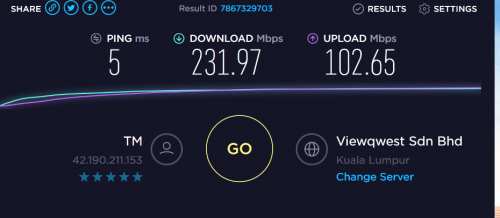
Recently my internet speed unable to achieved 800mbps, make a complaint to TM, they come and check line already provided with 800 mbps using their laptop. After searching around my laptop and desktop, noticed that whenever i off my 360 antivirus and tool i managed to get 825mbps, with 360 antivirus on only managed to get 4-500mbps.

So not sure whether this software took too much RAM or some setting or anything which prevent u to achieve full speed.

TQ
ulala2
post Dec 10 2018, 02:44 PM

Getting Started
**
Junior Member
245 posts

Joined: Jul 2007
QUOTE(keyo @ Dec 10 2018, 11:28 AM)
hi still not get 500
user posted image
using cable router ac55uhp
cable cat6
from modem to router cat5e
motherboard asrock z370 gaming k6 tq
*
Earlier i also facing some problem like u.
After checking, only detected that is antivirus took too many resources from my pc and caused the speed cannot achieve at maximum level.
Try to disable and close ur antivirus/internet security software and test.

i using 55u with my old pc with Antivirus on = 4xx mbps

without antivirus = 6-700 mbps.

The spec on the PC sometimes also playing a factor for not achieve max speed.
ulala2
post Dec 12 2018, 02:05 PM

Getting Started
**
Junior Member
245 posts

Joined: Jul 2007
ASUSmy,

Would like to check if in the event my router Lan 4 port got problem, is it possible to switch my IPTV using Lan 3 port?

If yes, how?
ulala2
post Dec 12 2018, 03:24 PM

Getting Started
**
Junior Member
245 posts

Joined: Jul 2007
QUOTE(ASUSmy @ Dec 12 2018, 03:07 PM)
Hi ulala2,

You can try set it manually using at LAN->IPTV.

Thank you
*
When i select IPTV Manual setting, it come out with few area to configure, what should we put there?
ulala2
post Dec 12 2018, 05:05 PM

Getting Started
**
Junior Member
245 posts

Joined: Jul 2007
QUOTE(SilentVampire @ Dec 12 2018, 04:41 PM)
VLAN500 for Internet, VLAN600 for unifiTV.
*
in AC86U, only have VID and PRIO

So i guess i need to fill in as

Internet VID=500, PRIO=0
Lan 3 VID=600, PRIO=0

Am i right?
ulala2
post Dec 13 2018, 12:22 PM

Getting Started
**
Junior Member
245 posts

Joined: Jul 2007
QUOTE(neuromancerx @ Dec 13 2018, 01:35 AM)
ASUSmy,

do you have any update/solution for the multicast issue faced by the AC86U users?

I'm referring to this problem: https://forum.lowyat.net/index.php?showtopi...post&p=90534068
*
I have the similar issue even i switch my Lan 4 to Lan 3 as IPTV.

After power off the equipment and reconnect, it always show that Hypptv equipment is wired connected but no internet.

Tries few method, the best is switch off the Hypptv equipment totaly by pull off the incoming power supply for some second and reconnect only work.
ulala2
post Mar 31 2019, 02:09 PM

Getting Started
**
Junior Member
245 posts

Joined: Jul 2007
Did asus resolve Ac86 unable to detect unifi IPTV after re-switch on the router?

Keep unable to detect unifi IPTV, any quick solution?

This post has been edited by ulala2: Mar 31 2019, 02:19 PM
ulala2
post Apr 1 2019, 05:07 PM

Getting Started
**
Junior Member
245 posts

Joined: Jul 2007
QUOTE(ASUSmy @ Apr 1 2019, 10:44 AM)
Hi ulala2,

You can refer to my signature before for the firmware. Remember to do a factory reset after the update.

Thank you
*
Dear ASUSMy,

Download the firmware provided, updated it and factory reset after update but still not working.

When i switch back to my RT-AC55, it work well.


Change to:
| Lo-Fi Version
0.0344sec    0.49    7 queries    GZIP Disabled
Time is now: 5th December 2025 - 12:17 AM