

QUOTE(jusbella @ Nov 19 2024, 07:45 PM)
Yes can if you know astro vlan id. Then change accordingly will do.

Do I get that from their call centre?Home Networking ASUS Malaysia Networking User & Technical Support, Managed by ASUS Malaysia Representative
|
|
 Nov 19 2024, 08:29 PM Nov 19 2024, 08:29 PM
|
 
Senior Member
3,435 posts Joined: Oct 2008 From: Kota Bharu   
|
QUOTE(jusbella @ Nov 19 2024, 07:45 PM) Yes can if you know astro vlan id. Then change accordingly will do. Do I get that from their call centre? |
|
|
|
|
|
Nov 19 2024, 10:16 PM
|

Senior Member
3,037 posts Joined: Dec 2011
|
QUOTE(FaezFarhan @ Nov 19 2024, 08:29 PM) Do I get that from their call centre? You may try.Normally you can get from technician when they came to do installation for you |
|
|
Nov 20 2024, 08:50 AM
|
|
Junior Member
116 posts Joined: Jul 2005
|
QUOTE(Dozz @ Nov 16 2024, 11:39 AM) Hi Suggest you set bridge mode on maxis router and let your asus to do the PPPoE login. That's what i've done to my home setup.. Backup 4G dongle works as well for the internet connection.Just got ASUS RT BE88U router yesterday, successfully setup it up running but i encounter an issue! Here my setup: TM modem to Maxis router to do the PPPoE login, from Maxis router to RT BE88U for wireless router. I have been using this setup for years with my previous ASUS router without issue, with RT BE88U whenever i reboot the router, it wont connect to internet and the internet light is red in BE88U. I have to unplug the Ethernet cable from maxis router (port 1) to another port (port 2) then the light will turn green and connected to internet. I have to do it all over again every time BE88U reboot. Can anyone here suggest a fix for this annoying issue please? |
|
|
Nov 20 2024, 09:31 AM
Show posts by this member only | IPv6 | Post
#16164
|

Junior Member
46 posts Joined: Apr 2009
|
QUOTE(ASUSmy @ Nov 18 2024, 09:47 AM) Hi orangubat, The case is solved. I called up Unifi and requested a new password, and reinstalled the routers with the new password and everything is working fine now. So something must have gone wrong with the old password. Thanks all.Can you help to double check the user name and password for the UNIFI account is correct. If the user name and password are confirm correct, can you call up TM and request them to refresh your port/connection after you change to ASUS router. Thank you |
|
|
Nov 20 2024, 11:20 AM
|

Senior Member
2,149 posts Joined: Aug 2005 From: Malaysia
|
QUOTE(joeyrm @ Nov 20 2024, 08:50 AM) Suggest you set bridge mode on maxis router and let your asus to do the PPPoE login. That's what i've done to my home setup.. Backup 4G dongle works as well for the internet connection. Thanks for the suggestion, i will set it this tonight |
|
|
Nov 20 2024, 04:37 PM
|
|
Junior Member
116 posts Joined: Jul 2005
|
QUOTE(Dozz @ Nov 20 2024, 11:20 AM) Thanks for the suggestion, i will set it this tonight Ohh. forgot to mention, you may need to use superadmin/operator mode to do that. you can search online for the default password as i totally forgot it.. i have changed the password on my router. Dozz liked this post
|
|
|
|
|
|
Nov 21 2024, 01:21 AM
Show posts by this member only | IPv6 | Post
#16167
|

Junior Member
72 posts Joined: Aug 2013
|
I'm trying to set up my AX-55 as a repeater for a U Mobile 5G router (the box shaped one if it helps).
I have followed all the steps as listed in the online repeater setup guide and FAQ on what to do if the repeater won't connect to the internet, but the repeater's connection seems to have stopped working after the first 10 minutes. Devices connected to the repeater network are no longer connected to the internet. Is there something specific to the U Mobile routers that I need to watch out for? |
|
|
Nov 22 2024, 11:38 AM
|
|
Newbie
30 posts Joined: Oct 2006
|
Hi,
I'm using TUF-AX6000. The DDNS setting has been successfully set up and I can connect to the router when away. However, after using it for some time (approx a week), it doesn't work anymore, and checking the DDNS lookup https://iplookup.asus.com/nslookup.php found that the IP doesn't sync. So I restarted the router after a few minutes looked at the DDNS again, it was updated, however it was captured with the DDNS before the restart and not the latest IP that running. May I know how to fix this problem? Current WAN IP: 100.xxx.... 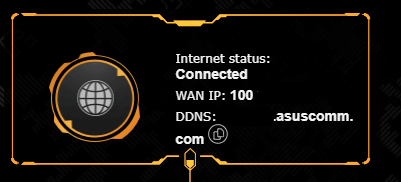 However Asus DDNS lookup it is not updated to the current WAN IP: 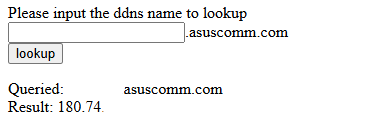 Thank you. |
|
|
Nov 22 2024, 12:31 PM
Show posts by this member only | IPv6 | Post
#16169
|
|
Junior Member
932 posts Joined: Dec 2019
|
QUOTE(toi @ Nov 22 2024, 11:38 AM) Hi, You’re behind CGNAT, you no longer have your own public facing dedicated IP, instead you’re sharing an IP address with multiple users, so you can no longer port forward your servicesI'm using TUF-AX6000. The DDNS setting has been successfully set up and I can connect to the router when away. However, after using it for some time (approx a week), it doesn't work anymore, and checking the DDNS lookup https://iplookup.asus.com/nslookup.php found that the IP doesn't sync. So I restarted the router after a few minutes looked at the DDNS again, it was updated, however it was captured with the DDNS before the restart and not the latest IP that running. May I know how to fix this problem? Current WAN IP: 100.xxx.... However Asus DDNS lookup it is not updated to the current WAN IP: Thank you. TM public IP is only provided to 500Mbps and above subscribers, TIME can be changed upon request afaik |
|
|
Nov 22 2024, 02:22 PM
|
|
Newbie
30 posts Joined: Oct 2006
|
QUOTE(yenchenje @ Nov 22 2024, 12:31 PM) You’re behind CGNAT, you no longer have your own public facing dedicated IP, instead you’re sharing an IP address with multiple users, so you can no longer port forward your services Hi, Thanks for the info.TM public IP is only provided to 500Mbps and above subscribers, TIME can be changed upon request afaik But it is strange, according to the info in year 2023, this is only applicable to the plan 30mbps, 50mpbs and 100mbps. Will try request it.  |
|
|
Nov 22 2024, 05:30 PM
|

Junior Member
566 posts Joined: Jun 2005 From: Somewhere over the rainbow
|
QUOTE(toi @ Nov 22 2024, 02:22 PM) Hi, Thanks for the info. I wouldn't expose your router interface to the internet; if you need remote access, it's better to setup a VPN.But it is strange, according to the info in year 2023, this is only applicable to the plan 30mbps, 50mpbs and 100mbps. Will try request it. |
|
|
Nov 22 2024, 06:37 PM
Show posts by this member only | IPv6 | Post
#16172
|
|
Junior Member
932 posts Joined: Dec 2019
|
QUOTE(toi @ Nov 22 2024, 02:22 PM) Hi, Thanks for the info. TM has revised it in 2024 to be 300mbps and belowBut it is strange, according to the info in year 2023, this is only applicable to the plan 30mbps, 50mpbs and 100mbps. Will try request it. TIME unsure toi liked this post
|
|
|
Nov 22 2024, 07:35 PM
Show posts by this member only | IPv6 | Post
#16173
|
|
Senior Member
2,608 posts Joined: Nov 2020
|
QUOTE(yenchenje @ Nov 22 2024, 06:37 PM) TM has revised it in 2024 to be 300mbps and below time, 200 is privateTIME unsure 500 (and maybe 600?) is being slowly migrated to cgnat can still move back on request with CS |
|
|
|
|
|
Nov 25 2024, 01:09 AM
Show posts by this member only | IPv6 | Post
#16174
|
|
Newbie
6 posts Joined: Mar 2010
|
Hi,
wondering if I can get some assistance. been using my XT8 with Time Internet for the last 4 years or so. Moved to a new location where Time is not available so decided to go with CelcomDigi 1gbps fibre. The fibre modem provided by TM is skyworth GPON ONT. Been trying to connect the XT8 directly to the Skyworth with no success so far, tried to copy the VLAN ID (629) from the the TP Link router provided by CelcomDigi but not working at all. The WebGUI is just showing status of the XT8 as "not connected to the internet". appreciate the assistance I could get on this. edited for grammar & spelling This post has been edited by medi88: Nov 25 2024, 01:12 AM |
|
|
Nov 25 2024, 01:59 AM
|
|
Senior Member
1,443 posts Joined: Sep 2021
|
QUOTE(medi88 @ Nov 25 2024, 01:09 AM) Hi, why you don't take UNIFI ????wondering if I can get some assistance. been using my XT8 with Time Internet for the last 4 years or so. Moved to a new location where Time is not available so decided to go with CelcomDigi 1gbps fibre. The fibre modem provided by TM is skyworth GPON ONT. Been trying to connect the XT8 directly to the Skyworth with no success so far, tried to copy the VLAN ID (629) from the the TP Link router provided by CelcomDigi but not working at all. The WebGUI is just showing status of the XT8 as "not connected to the internet". appreciate the assistance I could get on this. edited for grammar & spelling |
|
|
Nov 25 2024, 11:13 AM
|
|
Senior Member
2,608 posts Joined: Nov 2020
|
QUOTE(medi88 @ Nov 25 2024, 01:09 AM) Hi, LAN2 of TM ONT to WAN of Asus right, other LAN ports will not workwondering if I can get some assistance. been using my XT8 with Time Internet for the last 4 years or so. Moved to a new location where Time is not available so decided to go with CelcomDigi 1gbps fibre. The fibre modem provided by TM is skyworth GPON ONT. Been trying to connect the XT8 directly to the Skyworth with no success so far, tried to copy the VLAN ID (629) from the the TP Link router provided by CelcomDigi but not working at all. The WebGUI is just showing status of the XT8 as "not connected to the internet". appreciate the assistance I could get on this. edited for grammar & spelling VLAN629 should be correct PPPoE Username and password setup correctly? |
|
|
Nov 25 2024, 06:02 PM
|
|
Newbie
6 posts Joined: Mar 2010
|
QUOTE(PRSXFENG @ Nov 25 2024, 11:13 AM) LAN2 of TM ONT to WAN of Asus right, other LAN ports will not work the username & password is correct, triple checked it.VLAN629 should be correct PPPoE Username and password setup correctly? There's only one 2.5GE WAN port as per the picture below.... the unifi personnel mentioned that for 1 gbps, this is the latest fibre modem that they use... 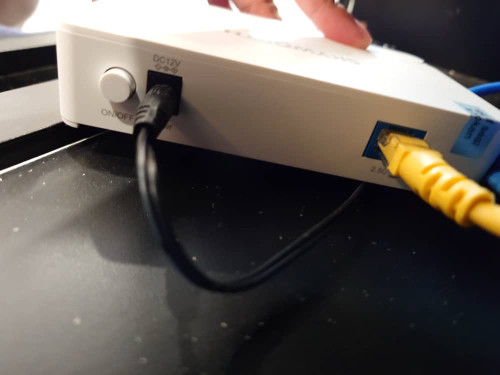 |
|
|
Nov 25 2024, 06:03 PM
|
|
Newbie
6 posts Joined: Mar 2010
|
QUOTE(tng55 @ Nov 25 2024, 01:59 AM) why you don't take UNIFI ???? just saw an opportunity to reduce the amount of bills to pay since I use celcomdigi mobile.... 😁 |
|
|
Nov 25 2024, 06:37 PM
|
|
Newbie
6 posts Joined: Mar 2010
|
QUOTE(medi88 @ Nov 25 2024, 06:02 PM) the username & password is correct, triple checked it. and just as I posted this, it just miraculously work today..... 😅😅😅There's only one 2.5GE WAN port as per the picture below.... the unifi personnel mentioned that for 1 gbps, this is the latest fibre modem that they use... |
|
|
Nov 25 2024, 07:31 PM
Show posts by this member only | IPv6 | Post
#16180
|
|
Senior Member
2,608 posts Joined: Nov 2020
|
QUOTE(medi88 @ Nov 25 2024, 06:37 PM) and just as I posted this, it just miraculously work today..... 😅😅😅 Hmm possibly could have been a PPPoE session thing as well, where it still thinks the old router is logged in and won't let another device log in with the same credentialsHad that before on TIME Either way good that it's working now medi88 liked this post
|
| Change to: |  0.0301sec 0.0301sec
 0.37 0.37
 6 queries 6 queries
 GZIP Disabled GZIP Disabled
Time is now: 13th December 2025 - 02:56 AM |
 Quote
Quote