

Hi, saw the RT-AC1200HP just now at a local shop, is it a new model? How good is it?
Home Networking ASUS Malaysia Networking User & Technical Support, Managed by ASUS Malaysia Representative
Home Networking ASUS Malaysia Networking User & Technical Support, Managed by ASUS Malaysia Representative
|
|
 Sep 21 2015, 10:15 PM Sep 21 2015, 10:15 PM
Return to original view | IPv6 | Post
#1
|
 
Senior Member
3,435 posts Joined: Oct 2008 From: Kota Bharu   
|
Hi, saw the RT-AC1200HP just now at a local shop, is it a new model? How good is it?
|
|
|
|
|
|
Oct 25 2019, 04:18 AM
Return to original view | Post
#2
|
|
Senior Member
3,435 posts Joined: Oct 2008 From: Kota Bharu
|
Guys I'm using the RT-AC1300UHP, does it support AiMesh? I also have forgotten the login password lol
|
|
|
Dec 6 2019, 07:47 PM
Return to original view | Post
#3
|
|
Senior Member
3,435 posts Joined: Oct 2008 From: Kota Bharu
|
RT-AC1300UHP doesn’t support aimesh right?
This post has been edited by FaezFarhan: Dec 7 2019, 06:17 AM |
|
|
Dec 7 2019, 12:50 PM
Return to original view | Post
#4
|
|
Senior Member
3,435 posts Joined: Oct 2008 From: Kota Bharu
|
QUOTE(blacktubi @ Dec 7 2019, 12:45 PM) Nope Going for the RT-AC86U & the RP-AC55 for my aimesh setup. Do you think it’s a good choice? |
|
|
Dec 8 2019, 02:12 AM
Return to original view | Post
#5
|
|
Senior Member
3,435 posts Joined: Oct 2008 From: Kota Bharu
|
QUOTE(blacktubi @ Dec 7 2019, 01:11 PM) I would top up a bit and go for the RT-AC66U B1 as AiMesh node instead. The performance is much better that way. The CT8 is too expensive for me haha. I’m trying to cancel the RP-AC55 I purchased on shopee & go for the RT-AC66U B1 instead as it’s only rm100 difference. Thanks!Or, you can check out ZenWiFi CT8, it is available now.  https://www.blacktubi.com/review/asus-zenwifi-ac-ct8/ RT-AC86U as main router in the third floor, RT-AC66U as an aimesh node on the second floor. This post has been edited by FaezFarhan: Dec 8 2019, 02:14 AM |
|
|
Dec 8 2019, 04:36 PM
Return to original view | Post
#6
|
|
Senior Member
3,435 posts Joined: Oct 2008 From: Kota Bharu
|
It has arrived.
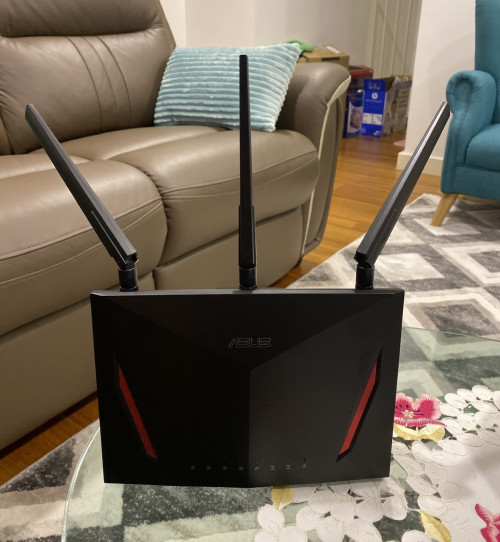 Does antenna orientation matter? Now I’m waiting for the RT-AC66U to arrive. |
|
|
|
|
|
Dec 9 2019, 09:06 PM
Return to original view | Post
#7
|
|
Senior Member
3,435 posts Joined: Oct 2008 From: Kota Bharu
|
QUOTE(Merlinboy @ Dec 9 2019, 06:09 PM) Hello, I am from Europe Romania, and have an older ASUS model (RT-AC55U), which worked more than fine, even on 5GHZ (with its limitations, of course). I’m on 800mbps internet here in Malaysia & I get 820-850mbps on speed test via lan. Weird how you’re on 1gbps & receiving 800 on LAN.The thing is i upgraded (i don't know why to be honest) to the latest firmware version 3.0.0.4.382_51812 and then the LAN speed downgraded from 8-900 Mbps (we have real high speed internet here in Romania, and i have the 1 Gbps connection) to 300-320 Mbps. If I connect the cable directly to the huawei provider's I Have 900 Mbps, but if I connect it back to the Asus router, I can't seem to get more than 320 Mbps. Again, last week everything was working normally. I have looked through the settings, I have tried with the Jumbo Frames and NAT acceleration on AUTO, QOS is off...i don't know that to do anymore, so please if you can help me out with any suggestions ? Thank you in advance! Alex |
|
|
Dec 9 2019, 10:06 PM
Return to original view | Post
#8
|
|
Senior Member
3,435 posts Joined: Oct 2008 From: Kota Bharu
|
QUOTE(Merlinboy @ Dec 9 2019, 09:21 PM) If you are reffering only to 800 - 820 Mbps, i think it is a limitation from the ISP, sometimes 900 Mbps, but never 1 Gbps, anyway if you are talking about this, well then this is not the problem I am complaining about, as I am OK with 800-820Mpbs and not with 300-320-maybe a max of 330 Mbps Maybe it’s the firmware. Have you tried factory resetting the router? |
|
|
Dec 10 2019, 05:17 PM
Return to original view | Post
#9
|
|
Senior Member
3,435 posts Joined: Oct 2008 From: Kota Bharu
|
My RT-AC66U is arriving tomorrow. Planning to use it as an aimesh node but an ethernet backhaul seems possible now.
What do I do? Connect the ethernet cable first and set as aimesh node? Or insert cable later. Do I still have to factory reset a new router? |
|
|
Dec 11 2019, 01:22 PM
Return to original view | Post
#10
|
|
Senior Member
3,435 posts Joined: Oct 2008 From: Kota Bharu
|
QUOTE(ASUSmy @ Dec 11 2019, 10:40 AM) Hi FaezFarhan, So after updating, I’d still have to factory reset it even tho it’s new?Make sure the firmware is the latest and factory reset before adding it wirelessly as a node. After adding the RT-AC66U as a node, you can change the connection type of the node to "Ethernet" when you click the icon node in the router GUI. Thank you |
|
|
Dec 12 2019, 01:32 PM
Return to original view | Post
#11
|
|
Senior Member
3,435 posts Joined: Oct 2008 From: Kota Bharu
|
QUOTE(ASUSmy @ Dec 11 2019, 01:58 PM) Hi FaezFarhan, Alright thanks!When you do the updating of firmware, it mean that you have setup the router to update the firmware. In order for AiMesh router to detect the node, the node must be in non-setup condition. Like new or after factory reset. If the node in setup condition, you won't be able to scan the node. Thank you Finally done with the aimesh setup last night. Everything works well & I finally can get decent internet in the room on the first floor. Btw, woke up to my main router not having internet. Had to restart it & it’s working again. Is it normal or something is wrong with the settings? |
|
|
Nov 19 2024, 05:45 PM
Return to original view | IPv6 | Post
#12
|
|
Senior Member
3,435 posts Joined: Oct 2008 From: Kota Bharu
|
Hi, I just changed from Unifi to Astro fibre today. Can I just login to the router & change PPPOE instead of resetting?
So lazy to reconnect all my smart devices, plugs etc. Actually I tried changing it already, but it’s showing ‘disconnected’ on the router login page. The router is the RT-AX86S connected to the TUF-AX5400 & RT-AC66U B1 via mesh. This post has been edited by FaezFarhan: Nov 19 2024, 05:47 PM |
|
|
Nov 19 2024, 08:29 PM
Return to original view | Post
#13
|
|
Senior Member
3,435 posts Joined: Oct 2008 From: Kota Bharu
|
QUOTE(jusbella @ Nov 19 2024, 07:45 PM) Yes can if you know astro vlan id. Then change accordingly will do. Do I get that from their call centre? |
| Change to: |  0.0402sec 0.0402sec
 0.69 0.69
 7 queries 7 queries
 GZIP Disabled GZIP Disabled
Time is now: 12th December 2025 - 04:54 PM |
 Quote
Quote