Outline ·
[ Standard ] ·
Linear+
Home Networking ASUS Malaysia Networking User & Technical Support, Managed by ASUS Malaysia Representative
|
cHiLdHo0drEaMz
|
 Dec 18 2024, 06:11 PM Dec 18 2024, 06:11 PM
|

|
QUOTE(ASUSmy @ Dec 18 2024, 05:15 PM) Hi cHiLdHo0drEaMz, There is delay on the shipment, the shipment are estimated to arrive next Monday. So by next week you should be able to get it from LAZADA/Shopee/dealer store(If there is no more delay). Thank you Thanks for the update. Just in time for Christmas 😁 |
|
|
|
|
|
HonG8821
|
Dec 19 2024, 03:24 PM
|
Getting Started

|
Hi, I recently purchased a pair of ASUS XT8 ZenWiFi devices from lazada and set them up—one as the router and the other as a mesh node. While most things are working fine, I’ve encountered an issue with the router unit: LAN Port 3 isn’t functioning at all.
Here’s what I’ve tried so far:
Checked the physical connection to ensure the cable is securely plugged in.
Tested the same cable and device on other LAN ports (they work fine).
The other LAN ports on the router work as expected. I’m wondering if anyone else has experienced a similar issue or has suggestions on troubleshooting this further.
|
|
|
|
|
|
Susuwatari
|
Dec 19 2024, 03:59 PM
|
|
|
QUOTE(HonG8821 @ Dec 19 2024, 03:24 PM) Hi, I recently purchased a pair of ASUS XT8 ZenWiFi devices from lazada and set them up—one as the router and the other as a mesh node. While most things are working fine, I’ve encountered an issue with the router unit: LAN Port 3 isn’t functioning at all. Here’s what I’ve tried so far: Checked the physical connection to ensure the cable is securely plugged in. Tested the same cable and device on other LAN ports (they work fine). The other LAN ports on the router work as expected. I’m wondering if anyone else has experienced a similar issue or has suggestions on troubleshooting this further. You mean one of the 1Gbps port is not working? |
|
|
|
|
|
HonG8821
|
Dec 19 2024, 04:46 PM
|
Getting Started
|
QUOTE(Susuwatari @ Dec 19 2024, 03:59 PM) You mean one of the 1Gbps port is not working? Yup, I also tried upgrading the firmware but it's still not working |
|
|
|
|
|
PRSXFENG
|
Dec 19 2024, 04:53 PM
|
|
|
QUOTE(HonG8821 @ Dec 19 2024, 03:24 PM) Hi, I recently purchased a pair of ASUS XT8 ZenWiFi devices from lazada and set them up—one as the router and the other as a mesh node. While most things are working fine, I’ve encountered an issue with the router unit: LAN Port 3 isn’t functioning at all. Here’s what I’ve tried so far: Checked the physical connection to ensure the cable is securely plugged in. Tested the same cable and device on other LAN ports (they work fine). The other LAN ports on the router work as expected. I’m wondering if anyone else has experienced a similar issue or has suggestions on troubleshooting this further. Who's your ISP, did you pick one of the VLAN Profiles like Unifi? Then one of the ports may have been reserved for the old HyppTV/Unifi TV Box go to LAN -> IPTV and change to Unifi-Business if you dont want the port reserved, you may also use "custom" if you're on other ISP |
|
|
|
|
|
Susuwatari
|
Dec 19 2024, 05:03 PM
|
|
|
QUOTE(HonG8821 @ Dec 19 2024, 04:46 PM) Yup, I also tried upgrading the firmware but it's still not working Same for me, mine is ET12. Tried both custom and Unifi business profile but still not working. |
|
|
|
|
|
mwtang
|
Dec 19 2024, 05:13 PM
|
|
|
QUOTE(Susuwatari @ Dec 19 2024, 05:03 PM) Same for me, mine is ET12. Tried both custom and Unifi business profile but still not working. try this . manual setting on the ISP. I did this on my xt8 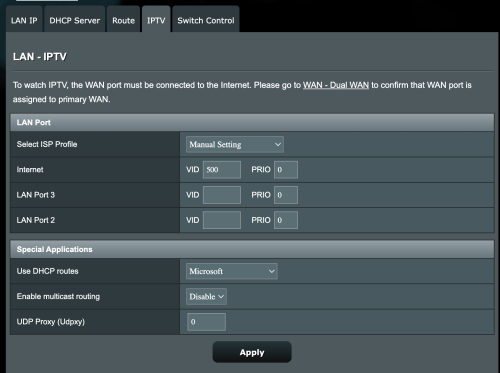 This post has been edited by mwtang: Dec 19 2024, 05:13 PM This post has been edited by mwtang: Dec 19 2024, 05:13 PM |
|
|
|
|
|
pull007
|
Dec 19 2024, 06:11 PM
|
Getting Started
|
Hi,
Recently Unifi technician came and changed my unifi modem to a new one ( this one is both a modem and a router). This has made me unable to use my existing asus mesh WiFi routers. So I decided to change back to the old modem.
What I did was:
Connect the asus xt12 directly to the modem
Reset the asus router
Set up using quick guide - Choose PPOE, fill in usernam and password, setup wifi username and password.
But there's no internet from the modem
Anything that I missed while setting it up?
|
|
|
|
|
|
Susuwatari
|
Dec 19 2024, 06:52 PM
|
|
|
QUOTE(mwtang @ Dec 19 2024, 05:13 PM) try this . manual setting on the ISP. I did this on my xt8 I tried this before but not working as well. |
|
|
|
|
|
HonG8821
|
Dec 19 2024, 09:00 PM
|
Getting Started
|
QUOTE(PRSXFENG @ Dec 19 2024, 04:53 PM) Who's your ISP, did you pick one of the VLAN Profiles like Unifi? Then one of the ports may have been reserved for the old HyppTV/Unifi TV Box go to LAN -> IPTV and change to Unifi-Business if you dont want the port reserved, you may also use "custom" if you're on other ISP QUOTE(mwtang @ Dec 19 2024, 05:13 PM) try this . manual setting on the ISP. I did this on my xt8 thanks for the tips! i'm on unifi home so i changed the isp profile to unifi-business and now my port is functioning like normal again  |
|
|
|
|
|
pull007
|
Dec 20 2024, 10:22 PM
|
Getting Started
|
QUOTE(pull007 @ Dec 19 2024, 06:11 PM) Hi, Recently Unifi technician came and changed my unifi modem to a new one ( this one is both a modem and a router). This has made me unable to use my existing asus mesh WiFi routers. So I decided to change back to the old modem. What I did was: Connect the asus xt12 directly to the modem Reset the asus router Set up using quick guide - Choose PPOE, fill in usernam and password, setup wifi username and password. But there's no internet from the modem Anything that I missed while setting it up? A little update Managed to ask the unifi technician to set the new modem/router as modem only. Then, I successfully use my asus xt12 mesh WiFi. |
|
|
|
|
|
jyu_bonk
|
Dec 21 2024, 11:17 AM
|
|
|
asus ade wifi 7 router with 10G sfp+ port?
|
|
|
|
|
|
blacktubi
|
Dec 21 2024, 11:23 AM
|
-

|
QUOTE(jyu_bonk @ Dec 21 2024, 11:17 AM) asus ade wifi 7 router with 10G sfp+ port? ASUS RT-BE88U, avaialable but limited stock now |
|
|
|
|
|
jyu_bonk
|
Dec 21 2024, 11:29 AM
|
|
|
QUOTE(blacktubi @ Dec 21 2024, 11:23 AM) ASUS RT-BE88U, avaialable but limited stock now any official store ke nk beli? ke shopee? If cucuk sfp+ from my tplink switch - main router can detect this router add as aimesh node? Or need to cucuk ethernet? |
|
|
|
|
|
blacktubi
|
Dec 21 2024, 11:38 AM
|
-
|
QUOTE(jyu_bonk @ Dec 21 2024, 11:29 AM) any official store ke nk beli? ke shopee? If cucuk sfp+ from my tplink switch - main router can detect this router add as aimesh node? Or need to cucuk ethernet? I think it's out of stock / on pre-order now https://shopee.com.my/ASUS-RT-BE88U-WiFi-7-...7751.2173872608I guess for AiMesh you must use Ethernet port, not sure if SFP+ work Maybe ASUSmy can explain this |
|
|
|
|
|
jyu_bonk
|
Dec 21 2024, 03:14 PM
|
|
|
Hi ASUSmy, as per my question above. Currently I use GT-AXE16000 but just finish lay cable to all part of house using LC duplex singlemode optic cable. Currently I'm using sfp+ tranceiver, media converter and switches. On the other end I use another tranceiver and media converter and convert back optic to LAN and connect to my other asus router - I try to add mesh via ethernet and is working well.
If I use BE88U as my main router now replacing GT-AXE16000 - will it able to find my other router to add as mesh if I straight plug sfp+ on this router?
Thanks in advance.
This post has been edited by jyu_bonk: Dec 21 2024, 03:15 PM
|
|
|
|
|
|
Xsence
|
Dec 21 2024, 11:28 PM
|
|
|
I'm using a ax59u and a Ax86u (main) mesh combo
I realize during transition between mesh, it can take some time for my WiFi to have internet (like 30sec-1min)
Is that normal?
Using time fibre
|
|
|
|
|
|
pull007
|
Dec 22 2024, 07:14 AM
|
Getting Started
|
QUOTE(Xsence @ Dec 21 2024, 11:28 PM) I'm using a ax59u and a Ax86u (main) mesh combo I realize during transition between mesh, it can take some time for my WiFi to have internet (like 30sec-1min) Is that normal? Using time fibre Not normal |
|
|
|
|
|
Xsence
|
Dec 22 2024, 08:27 AM
|
|
|
QUOTE(pull007 @ Dec 22 2024, 07:14 AM) Anything that I can check from my side? |
|
|
|
|
|
blacktubi
|
Dec 22 2024, 12:08 PM
|
-
|
QUOTE(Xsence @ Dec 21 2024, 11:28 PM) I'm using a ax59u and a Ax86u (main) mesh combo I realize during transition between mesh, it can take some time for my WiFi to have internet (like 30sec-1min) Is that normal? Using time fibre Is it wireless backhaul and it's happening on what device? What is your firmware version. |
|
|
|
|



 Quote
Quote






 0.0609sec
 0.56
0.56
 6 queries
 GZIP Disabled