Welcome Guest ( Log In | Register )

Outline · [ Standard ] · Linear+

Home Networking ASUS Malaysia Networking User & Technical Support, Managed by ASUS Malaysia Representative

views
     
toi
post Oct 13 2023, 02:32 PM

New Member
*
Newbie
30 posts

Joined: Oct 2006
Hi,

I bought a TUF-AX6000, and facing some problems, hope to get help.

IPTV
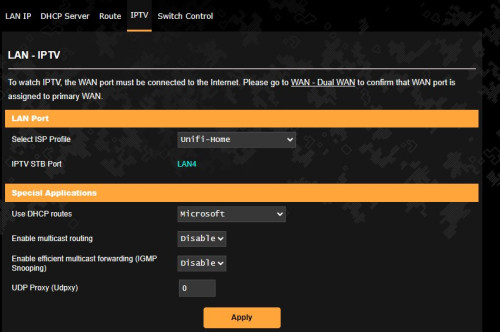
I have setup the WAN for Unifi with the "Special Requirement from ISP" setting and selected Unifi-Home and it has by default bind to LAN4.
I connected my Unifi TV Box (white media box), the date and time can be synced, and I can see the channel information, however there isn't video or audio play.
Is there anything else is not right? My IPTV works well all the time previously with ASUS RT-AC56S.

Also would like to know if this router has the ability to connect the unifi IPTV (white media box) wirelessly? I can't find any info to this router model for this matter.
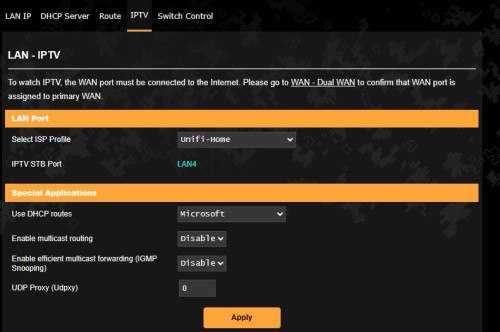
user posted image

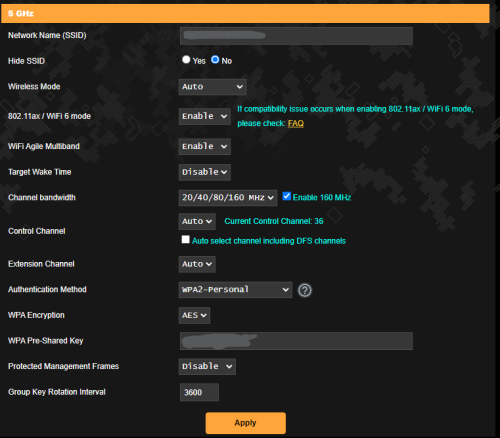
WIFI 5GHZ
Some of my devices can't find 5GHZ WIFI signal, I have to connect it to the 2.4GHZ WIFI first then only the 5GHZ WIFI will be appear in the list. One of the device is my mobile phone Honor 70 with Wi-Fi 6 ready.

Thank you.


toi
post Oct 13 2023, 03:15 PM

New Member
*
Newbie
30 posts

Joined: Oct 2006
QUOTE(jusbella @ Oct 13 2023, 03:08 PM)
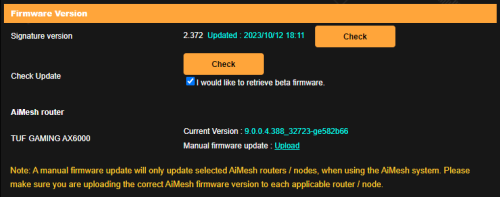
Firmware latest?
*
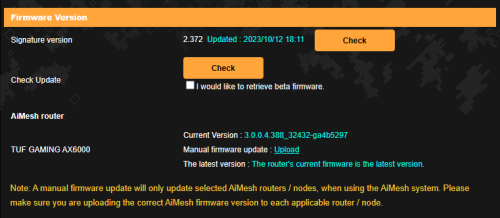
Yes, it is the latest firmware:

user posted image
toi
post Oct 13 2023, 03:27 PM

New Member
*
Newbie
30 posts

Joined: Oct 2006
QUOTE(jusbella @ Oct 13 2023, 03:21 PM)
Try check have these setting and set accordingly

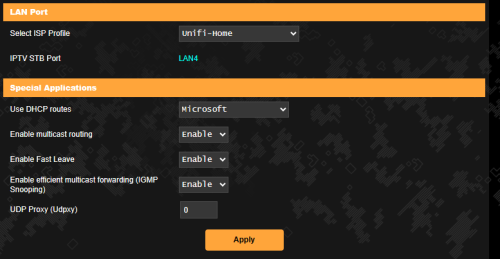
Enable multicast routing: Enable
Enable efficient multicast forwarding (IGMP Snooping): Enable
UDP Proxy (Udpxy): 0
*
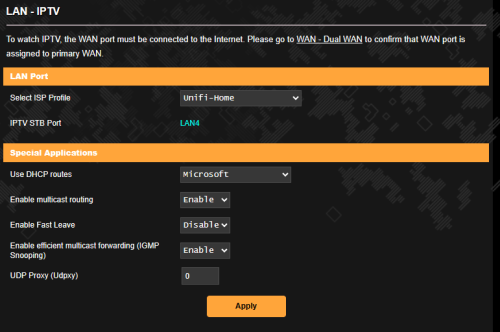
Thanks for the advice.
I have this extra setting, Enable Fast Leave after enable the multicast routing:

user posted image

Should it be enabled as well?
toi
post Oct 13 2023, 03:38 PM

New Member
*
Newbie
30 posts

Joined: Oct 2006
QUOTE(toi @ Oct 13 2023, 03:27 PM)
Thanks for the advice.
I have this extra setting, Enable Fast Leave after enable the multicast routing:

user posted image

Should it be enabled as well?
*
Tested. No luck still the same.
toi
post Oct 13 2023, 04:15 PM

New Member
*
Newbie
30 posts

Joined: Oct 2006
QUOTE(jusbella @ Oct 13 2023, 03:46 PM)
You may try enable or disabled to see both result.

Last resort use back old router to test whether the white stb is ok with old router or not.

If same result need liaise with ASUSmy as they might give you beta firmware to test.
*
Hey, thanks for your help.
Update for the IPTV. At last now it works with below setting:

user posted image
toi
post Oct 13 2023, 04:21 PM

New Member
*
Newbie
30 posts

Joined: Oct 2006
QUOTE(ASUSmy @ Oct 13 2023, 04:05 PM)
Hi toi,

Can you try do a network test in the HyppTV and show us the result?

ASUS router doesn't support HyppTV wirelessly.

Maybe you can try fix the 5GHz channel to 36, 40, 44, 48, 149, 153, 157, 161 or 165 and test again.

Thank you
*
Hi @Asusmy,

With the help of another member, IPTV now working.

Thanks for your advice on the 5GHZ channels fixed. I will try them.
toi
post Oct 13 2023, 09:40 PM

New Member
*
Newbie
30 posts

Joined: Oct 2006
QUOTE(toi @ Oct 13 2023, 04:21 PM)
Hi @Asusmy,

With the help of another member, IPTV now working.

Thanks for your advice on the 5GHZ channels fixed. I will try them.
*
Hi asusmy
Update:
After off the IPTV for some 4-5 hours, unfortuntely it turns back to the same.
I have run Test Network Connection on the IPTV results as below:
1. Network connection - OK
2. Obtaining IP address - OK
3. Gateway connectivity - OK
4. Central connectivity - OK
5. NTP connectivity - OK
6. DNS connection - X
7. Multicast connectivity - X

Restart the IPTV, no luck still the same.

Then with the IPTV remains on, I switch the WAN and LAN from TUF-AX6000 to RT-AC56S, and the IPTV plays the channels normaly.
and I run the Test Network Connection on the IPTV with the connection to RT-AC56S, results as below:
1. Network connection - OK
2. Obtaining IP address - OK
3. Gateway connectivity - OK
4. Central connectivity - OK
5. NTP connectivity - OK
6. DNS connection - X
7. Multicast connectivity - OK

Hope can get a solution to this.


toi
post Oct 14 2023, 04:12 PM

New Member
*
Newbie
30 posts

Joined: Oct 2006
QUOTE(jusbella @ Oct 13 2023, 09:56 PM)
This clearly is the culprit:-

7. Multicast connectivity - X

Maybe in ur TUF try disable multicast and enable back see ok not.
*
I have tried all the possible combinations in TUF on the multicast, but still the same.

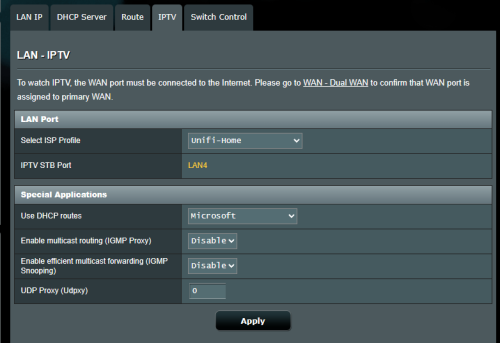
Below is the IPTV configuration on my RT which works:

user posted image
toi
post Oct 14 2023, 04:21 PM

New Member
*
Newbie
30 posts

Joined: Oct 2006
QUOTE(blacktubi @ Oct 14 2023, 11:38 AM)
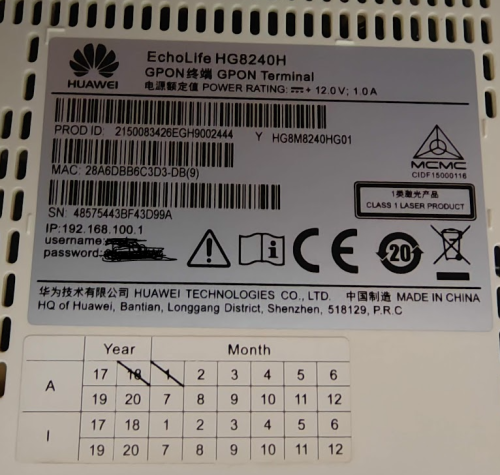
Can you share a picture of your fiber modem and the model number?
*
Hi,

This is the modem EchoLife HG8240H:

user posted image
toi
post Oct 16 2023, 06:42 PM

New Member
*
Newbie
30 posts

Joined: Oct 2006
QUOTE(ASUSmy @ Oct 16 2023, 04:49 PM)
Hi toi,

Can you try on the beta firmware from the link below?

https://drive.google.com/file/d/15NfcDDAp3_...?usp=drive_link

Thank you
*
Hi ASUSmy, Thanks for your firmware.

I have installed it, but unfortunately, the IPTV remains the same.

user posted image

hmm.gif

Another symptom I can provide is, if I leave the IPTV with any channel on, then I manually restart the router the IPTV will connect automatically and play the channel, but once I shift the channel or I off and on the IPTV then the connection will lost again.
toi
post Oct 17 2023, 09:43 AM

New Member
*
Newbie
30 posts

Joined: Oct 2006
QUOTE(ASUSmy @ Oct 17 2023, 09:17 AM)
Hi toi,

May I know is the setting on the IPTV page are on default setting, just like the first image you posted?

If possible can you try to do a factory reset and redo the setup?

Thank you
*
Hi Asusmy,

user posted image

Current stage as per above which is the first image I posted.
Then after install the new firmware yesterday, I did tried both enable and disable the Multicast.
But both also giving the same result.

Just to confirm, factory reset the router correct?

Thanks.
toi
post Oct 17 2023, 09:30 PM

New Member
*
Newbie
30 posts

Joined: Oct 2006
QUOTE(ASUSmy @ Oct 17 2023, 10:11 AM)
Hi toi,

Yes, do a factory reset and test again.

Thank you
*
Hi ASUSmy,

I have done the factory reset twice and reconfiguring referring to the guide in Asus website, (reset with the reset button and Method 2 hard reset with WPS button), but the results remain the same.

Please advise what else can I do.

Thank you.

This post has been edited by toi: Oct 17 2023, 10:27 PM
toi
post Oct 18 2023, 10:43 PM

New Member
*
Newbie
30 posts

Joined: Oct 2006
QUOTE(ASUSmy @ Oct 18 2023, 05:42 PM)
Hi toi,

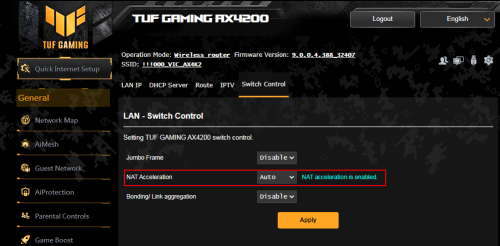
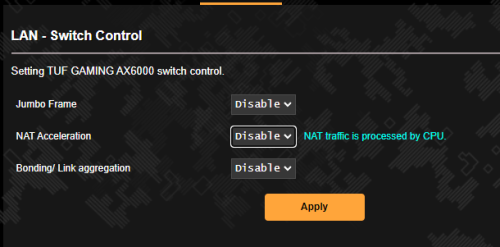
Can you try disable the NAT Acceleration and test again?

user posted image

Thank you
*
Hello ASUSmy,

I have tried, disabling the NAT Acceleration, still the same negative result. sad.gif

user posted image
toi
post Oct 19 2023, 11:03 PM

New Member
*
Newbie
30 posts

Joined: Oct 2006
QUOTE(toi @ Oct 18 2023, 10:43 PM)
Hello ASUSmy,

I have tried, disabling the NAT Acceleration, still the same negative result.  sad.gif

user posted image
*
Hi ASUmy,

May I know what else can I do to get this solved? Is this a defective router that needs a warranty replacement?

Thanks.
toi
post Oct 24 2023, 11:05 AM

New Member
*
Newbie
30 posts

Joined: Oct 2006
QUOTE(ASUSmy @ Oct 20 2023, 10:24 AM)
Hi toi,

RD are still checking what caused the problem will get back to you ASAP.

Thank you
*
Hi ASUSmy,

Is there any update on this?
Sad that the Unifi TV is down so long and my parent can't watch the programs ever since I change to this router grumble.gif .

Hope there is a solution to fix this.

Thank you.
toi
post Dec 5 2023, 02:30 PM

New Member
*
Newbie
30 posts

Joined: Oct 2006
My TUF-AX6000 recently facing wifi signal lost few times.
And checking in the system log, below are the logs at the time when it happens.

WIFI 5GHZ signal lost happened on the below time stamp, with the message :
1. Nov 20 18:04:13 kernel: 7986@C23L3apclix0,WrapDfsRddReportHandle() 3871: [RDM]: Radar detected !!!!!!!!!!!!!!!!!

2. Nov 27 11:31:20 kernel: 7986@C23L3rax0,WrapDfsRddReportHandle() 3871: [RDM]: Radar detected !!!!!!!!!!!!!!!!!

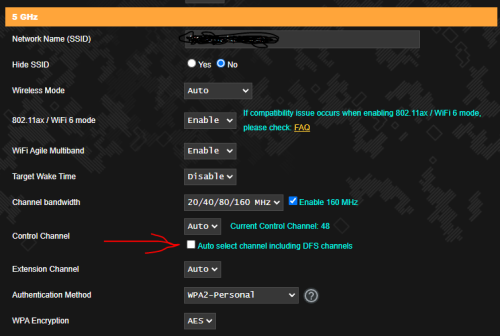
After the above 2 events, I have switch off the DFS, then this yesterday the Wifi 5ghz signal lost, 2.4ghz cannot be connected and need to restart router, on the below time stamp:
Dec 4 08:59:39 kernel: rcu: INFO: rcu_sched self-detected stall on CPU

Anyone encounter the same and any advice to get rid of this?
toi
post Dec 5 2023, 10:08 PM

New Member
*
Newbie
30 posts

Joined: Oct 2006
QUOTE(sitescope @ Dec 5 2023, 09:56 PM)
Switch off dfs meaning changing dfs channel to non dfs channel ?
*
Hi, This is what I mean:

user posted image
toi
post May 10 2024, 03:28 PM

New Member
*
Newbie
30 posts

Joined: Oct 2006
QUOTE(ASUSmy @ May 9 2024, 04:46 PM)
Hi zeronehza,

I have tested the latest firmware version 3.0.0.4.388_33404, it seen like I am unable to turn it on as well. I have feedback to our RD and will get back to you ASAP.

At the meantime, you may downgrade firmware version to 3.0.0.4.388_33147 if you want to use the Traffic Analyzer.

Thank you
*
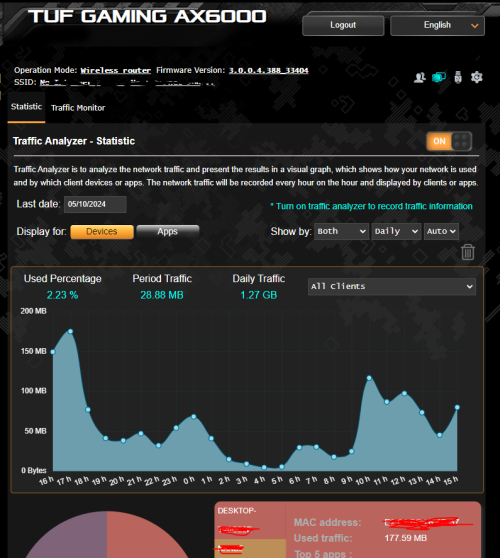
I'm using the same router and with the latest firmware, works fine here:

user posted image

This post has been edited by toi: May 10 2024, 03:31 PM
toi
post May 12 2024, 09:50 PM

New Member
*
Newbie
30 posts

Joined: Oct 2006
QUOTE(zeronehza @ May 12 2024, 05:19 PM)
is your data accurate ? mine still inaccurate, let say my usage over 50GB per day, but the router just record below 10gb  doh.gif
*
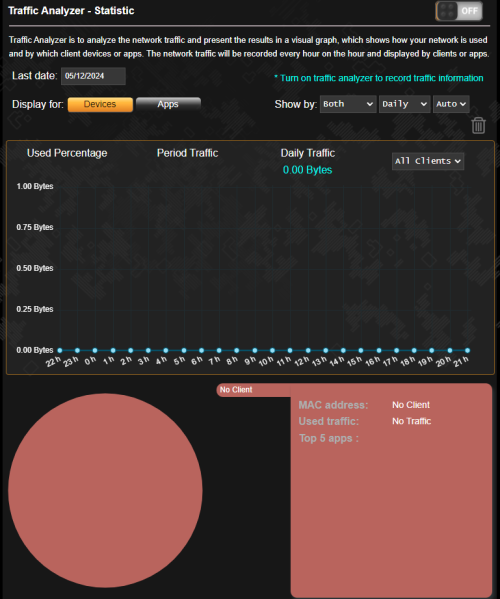
Oh no... unfortunately now the same problem happens to mine. I can't switch it on too...

user posted image
toi
post Jun 11 2024, 06:01 PM

New Member
*
Newbie
30 posts

Joined: Oct 2006
QUOTE(blacktubi @ Jun 10 2024, 01:53 PM)
2.4GHz change to 40Mhz channel 3 will provide the best performance

Enable your WIFi 6 as well
*
Hi,

Just tested the 2.4ghz with your recommended setting, I get from 100Mbps to 200Mbps, looks good to me.
Do you have any advice for 5Ghz setting?
My current setting as below:

user posted image

2 Pages  1 2 >Top
 

Change to:
| Lo-Fi Version
0.0425sec    0.33    7 queries    GZIP Disabled
Time is now: 13th December 2025 - 03:56 PM