Outline ·
[ Standard ] ·
Linear+
Home Networking ASUS Malaysia Networking User & Technical Support, Managed by ASUS Malaysia Representative
|
tng55
|
 Oct 3 2021, 09:52 PM Oct 3 2021, 09:52 PM
|

|
QUOTE(blacktubi @ Oct 3 2021, 11:49 AM) Not until MCMC approved 6Ghz band I guess  I am more interested in the ZenWiFi Pro though Already can get 500Mbps on every corner with XT8. Doubt the ET8 gonna be a lot faster. ET8 is WIFI 6E right i think signal short ranger right if fair ranger will weak signal ? explain 10 meter away wifi 6E will signal weak right ??? |
|
|
|
|
|
tng55
|
Oct 4 2021, 12:43 AM
|
|
|
QUOTE(blacktubi @ Oct 3 2021, 10:12 PM) Technically signal penetration is slightly weaker on 6Ghz but the channel is cleaner so it will provide better speed + better stability. To put it on layman terms, it's like 1 bar of 5Ghz is faster and more stable than 3 bar on 2.4Ghz. We only have 2 non-overlapping 80Mhz channel on 5Ghz if we don't count the DFS channels. Not to mention that 160Mhz on 5Ghz is crippled as it will always involve DFS. If we have access to all channels on 6Ghz, there're actually up to 14 non-overlapping channels for 80Mhz bandwidth, 7 for 160Mhz. ohh so 1 bar of 5Ghz is faster so how much getting Speed and more stable then 3 bar on 2.4Ghz i did try 3 bar 2.4Ghz still can get 50mbps near 90mbps can hit 100mbps full speed i don't know but 1 bar 2.4Ghz getting speed drop using RT-AC68U |
|
|
|
|
|
tng55
|
Oct 6 2021, 12:56 PM
|
|
|
QUOTE(kho51 @ Oct 6 2021, 11:13 AM) Hi, I just change my fibre from maxis to digi fibre and since then I can't connect to my Asus ddns. Its show error invalid IP address, can anyone advice whats the problem ya?  because last time you use was maxis fibre you already request maxis to Public IP that you can connect asus ddns now you changed digi fibre so you got Private IP that why you get error invalid IP Address due Private IP you may try ask digi call request public ip if refuse then unable to do anything someone unable to get public ip for digi fibre mine using unifi i wont change other maxis and digi and celcom lol due maxis very bad so i will stay unifi so always stable unifi |
|
|
|
|
|
tng55
|
Oct 6 2021, 10:17 PM
|
|
|
QUOTE(cablesguy @ Oct 6 2021, 06:02 PM) WaNaWe900Thanks, currently using a notebook cooler for my AC88u, does run abit hot, was wondering how to cool the AX11000. my AC68U without cooling fan noting problem AX11000 this no need cooling fan i saw youtube linus tips he use AX11000 but without cooling fan noting problem |
|
|
|
|
|
tng55
|
Oct 7 2021, 12:59 AM
|
|
|
QUOTE(cablesguy @ Oct 6 2021, 11:00 PM) [tng55] Mine not really a problem too, just prefer to keep it cooler. okey you buy cooler but i also don't need it cooler |
|
|
|
|
|
tng55
|
Oct 10 2021, 02:10 AM
|
|
|
QUOTE(kho51 @ Oct 10 2021, 12:35 AM) Just reveived called from digi today said public IP only applicable to business fibre, so unable to get public IP for home fibre. Is it I can't access the VPN or ddns if I don't get public IP address? Any alternative way, can anyone advice? you can't use ddns so cannot solution why you did change digi see you disappointed you can't bypass due private ip very bad mine unifi home fibre i still have public ip no problem i wont change other isp its waste and trouble and unstable |
|
|
|
|
|
tng55
|
Oct 10 2021, 12:24 PM
|
|
|
QUOTE(kho51 @ Oct 10 2021, 09:05 AM) Digi provide a very good package therefore I switch from maxis to digi, speed and stability wise its OK just no public IP only. lol Digi Provide a very good package look very bad package due no give public IP so you loss access public ip good luck for Private IP for very bad Digi Package very bad |
|
|
|
|
|
tng55
|
Oct 13 2021, 09:58 PM
|
|
|
QUOTE(joeyrm @ Oct 13 2021, 06:21 PM) FYI, Unifi has started migrating those with 100Mbps plan and below to private IPv4. Only those with 300Mbps and above will remain on Public IPv4. yes i know but i am on 100Mbps plan i still on Public IP i checked my router confirm its WAN IP is 175.13x.xx.xx |
|
|
|
|
|
tng55
|
Nov 7 2021, 01:06 AM
|
|
|
QUOTE(blacktubi @ Nov 6 2021, 11:38 AM) Great product although it's expensive. But it's super stable and problem-free. I highly recommend this product for those planning to setup WiFi in a smaller office. Problem free on RT-AX92U. System been up for 10 days. Rock solid and stable. how about GT-AX11000 super stable and problem-free ?????? |
|
|
|
|
|
tng55
|
Mar 28 2022, 01:10 PM
|
|
|
QUOTE(blacktubi @ Mar 28 2022, 11:44 AM) The strongest part of the XT12 is how well ASUS optimized the whole backhaul pipeline. At full load of my TIME 1Gbps, the loaded latency (bufferbloat) is just 36ms. This is extremely good and truly best in class. This will be a huge difference between a smooth or laggy conference call when your network is congested. Many mesh WiFi systems struggled on this particular test shooting all the way to few hundred ms. Bear in mind, this is connected over WiFi to the mesh node on wireless backhaul.  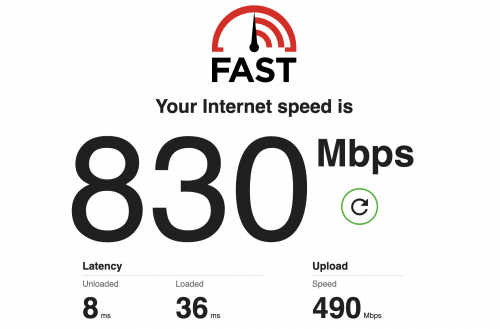 Edit: Also worth mentioning, ASUS make full use of the new Broadcom chip. There's full hardware offload for all WiFi radio unlike the XT8. XT12 inside antenna with Glass if Remove Glass i am sure antenna will be more more strong with Glass block antenna abit hard mean abit loss i think so i know XT12 Can't Remove Glass |
|
|
|
|
|
tng55
|
Aug 21 2022, 01:08 PM
|
|
|
ASUS ceiling WIFI mount WIFI connection don't have ???
like other brand have explain TP-Link also have WIFI ceiling mount for WIFI connection
This post has been edited by tng55: Aug 21 2022, 01:11 PM
|
|
|
|
|
|
tng55
|
Aug 31 2022, 02:07 PM
|
|
|
QUOTE(ASUSmy @ Aug 24 2022, 10:13 AM) ASUS ceiling WIFI mount WIFI connection don't have ??? like other brand have explain TP-Link also have WIFI ceiling mount for WIFI connection |
|
|
|
|
|
tng55
|
Sep 3 2022, 09:41 PM
|
|
|
QUOTE(blacktubi @ Sep 3 2022, 03:09 PM) Most ASUS router models can be ceiling mounted. but not cycle round  |
|
|
|
|
|
tng55
|
Sep 11 2022, 01:32 AM
|
|
|
QUOTE(arslow @ Sep 11 2022, 12:30 AM) Was so tempted to get the ax86u during 9.9 sales, but decided to wait for wifi 7 instead as my ac68u is still going strong after 9 years... Bought on August 2013. Anyone else also still holding out? mine ac68u still going strong since using streamyx 4mbps then may 2019 unifi installed my house once tm technical left i connect ac68u wow stable 100mbps i using over 9year +++ if you are 100mbps batter stay ac68u later upgrade router |
|
|
|
|
|
tng55
|
Oct 15 2022, 01:04 AM
|
|
|
ASUSmy blacktubi What's the difference between GT-AX11000 & GT-AX11000 Pro?
Yes, I know it's not launched in Malaysia yet. Just want to know the difference
This post has been edited by tng55: Oct 15 2022, 01:05 AM
|
|
|
|
|
|
tng55
|
Oct 15 2022, 01:26 PM
|
|
|
QUOTE(blacktubi @ Oct 15 2022, 11:37 AM) 1.8GHz to a faster 2.0GHz 28nm to a modern 16nm DDR3 to DDR4 RAM Added 1x 10G Ethernet WAN/LAN port BIGGER, BRIGHTER RGB  Better Wi-Fi 6 performance due to newer Wi-Fi 6 radio (BCM43684 to BCM6715). The new Wi-Fi 6 radio also introduced RangeBoost Plus technology. how about SoC upgraded from BCM ??? for difference between GT-AX11000 & GT-AX11000 Pro |
|
|
|
|
|
tng55
|
Aug 23 2024, 12:59 PM
|
|
|
QUOTE(dragon528 @ Aug 19 2024, 05:02 PM) Hi everyone, I'm trying to do a port forwarding for my torrent software. I am currently using AC88U, previously it worked, but after moving to a new house and setting up everything again, the port forwarding does not work anymore. I even tried to disable all the firewall from my Windows to router firewall, but it still indicates the port is blocked. I also read something regarded to nat or cgnat stuff but I totally got no idea. Attached image that I have done port forwarding in the router and my wan IP. previously it worked because you got Public IP WAN now you moving to a new house got Private IP WAN you isp is unifi for 100Mbps ??? will be Private IP get 500MBPS to get back Public IP WAN settle mine is UNIFI 500Mbps i still have Public IP no issue port forward and torrents fully speed Max This post has been edited by tng55: Aug 23 2024, 01:06 PM |
|
|
|
|
|
tng55
|
Aug 26 2024, 11:58 AM
|
|
|
QUOTE(dragon528 @ Aug 25 2024, 08:19 PM) Previously is unifi. Just switch to maxis after move. That's why I did.a reset on router. Didn't realize maxis need to pay. Using same 500mbps. why you change maxis that maxis private ip you need pay RM10 to get public ip not worth waste unifi is free public ip must take 500mbps above i know you moved house why not take unifi This post has been edited by tng55: Aug 26 2024, 12:00 PM |
|
|
|
|
|
tng55
|
Nov 25 2024, 01:59 AM
|
|
|
QUOTE(medi88 @ Nov 25 2024, 01:09 AM) Hi, wondering if I can get some assistance. been using my XT8 with Time Internet for the last 4 years or so. Moved to a new location where Time is not available so decided to go with CelcomDigi 1gbps fibre. The fibre modem provided by TM is skyworth GPON ONT. Been trying to connect the XT8 directly to the Skyworth with no success so far, tried to copy the VLAN ID (629) from the the TP Link router provided by CelcomDigi but not working at all. The WebGUI is just showing status of the XT8 as "not connected to the internet". appreciate the assistance I could get on this. edited for grammar & spelling why you don't take UNIFI ???? |
|
|
|
|
|
tng55
|
Nov 26 2024, 01:25 AM
|
|
|
QUOTE(medi88 @ Nov 25 2024, 06:03 PM) just saw an opportunity to reduce the amount of bills to pay since I use celcomdigi mobile.... 😁 ohhh okey mine unifi and before i was use maxis mobile pospaid prefect quality call voice and data super fast now changed celcomdigi mobile pospaid but poor quality call voice and data also abit slow then maxis Maxis mobile = win then celcomdigi mobile i unable change back maxis mobile due contract |
|
|
|
|



 Quote
Quote

 0.0470sec
 0.49
0.49
 7 queries
 GZIP Disabled