Outline ·
[ Standard ] ·
Linear+
Home Networking ASUS Malaysia Networking User & Technical Support, Managed by ASUS Malaysia Representative
|
kk131
|
 Nov 17 2024, 03:14 PM Nov 17 2024, 03:14 PM
|

|
QUOTE(orangubat @ Nov 16 2024, 08:14 PM) Hi, below is the network map. And also the system log. Please note that the system shows the time to be May 5, 2018 instead of Nov 16, 2024. 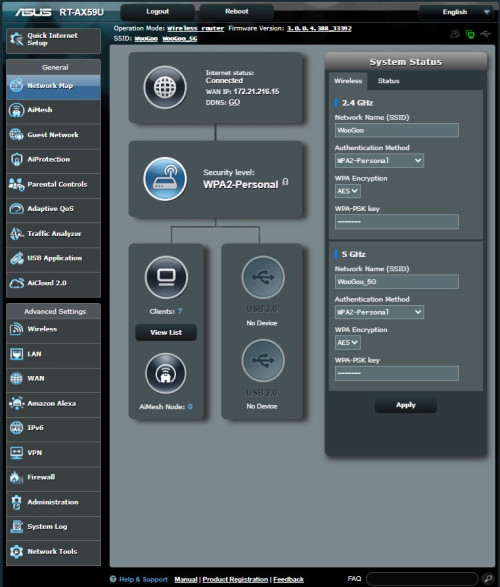 On the WAN tab, have you tried changing the dns servers, for example to cloudflare's - 1.1.1.1? System time is not in sync because it can't find the NTP server. This post has been edited by kk131: Nov 17 2024, 03:18 PM |
|
|
|
|
|
kk131
|
Nov 17 2024, 03:16 PM
|
|
|
deleted
This post has been edited by kk131: Nov 17 2024, 03:17 PM
|
|
|
|
|
|
kk131
|
Nov 22 2024, 05:30 PM
|
|
|
QUOTE(toi @ Nov 22 2024, 02:22 PM) Hi, Thanks for the info. But it is strange, according to the info in year 2023, this is only applicable to the plan 30mbps, 50mpbs and 100mbps. Will try request it.  I wouldn't expose your router interface to the internet; if you need remote access, it's better to setup a VPN. |
|
|
|
|
|
kk131
|
Mar 14 2025, 08:41 PM
|
|
|
QUOTE(thomas1983 @ Mar 13 2025, 10:49 PM) Hi guys , My AX88U suddenly the 5ghz wifi disappear! The 5ghz light on router also off … I am sure its enable ! The current control channel is 0, MAC address also blank I did hard reset and switch to Merlin but still no luck ;( Or its the hardware issue ? Anyone can help with this issue pls … Are you running the latest firmware version? Asus AICloud was hacked. |
|
|
|
|
|
kk131
|
Mar 15 2025, 08:20 AM
|
|
|
QUOTE(thomas1983 @ Mar 14 2025, 10:11 PM) yes latest 3.0.0.4_388_24232 You've tried a factory reset? |
|
|
|
|
|
kk131
|
Mar 15 2025, 07:10 PM
|
|
|
QUOTE(thomas1983 @ Mar 15 2025, 11:41 AM) Yes bro … I did by pressing the reset button at the back Perhaps this thread will help https://www.snbforums.com/threads/rt-ax86u-...try-code.82312/ |
|
|
|
|
|
kk131
|
Jul 10 2025, 02:00 PM
|
|
|
QUOTE(n20nine @ Jul 9 2025, 11:10 PM) Guys, I have a very bizarre issue. I have two Rt-AX59U on a mesh configuration on Time Internet. Been working well for months. Today, the internet stopped working despite showing the usual white light. I restarted both my modem and router and issue still persists. Have done the following: 1. Checked cabling for modem, router and all in good condition 2. Connected via modem to laptop via ethernet - no issues 3. Have hard reset modem, successfully set-up and internet connection detected, only for it to stop working again, white light still showing as normal 4. I have swapped ethernet cables between modem and router and same issue still persists 5. Both hardware firmware are updated to latest version What do I do next? What is the connection status in the router network map page? |
|
|
|
|
|
kk131
|
Aug 9 2025, 11:57 AM
|
|
|
169.254 means you're not receiving an ip address from the dhcpd
|
|
|
|
|
|
kk131
|
Oct 13 2025, 09:19 PM
|
|
|
QUOTE(sam240 @ Oct 13 2025, 04:50 PM) quick question about AiMesh: Can a Asus router (as main) with official Asus firmware pair with another Asus router (as node) which had been flashed with Asuswrt-Merlin firmware? or vice versa? There is no advantage running Asuswrt-Merlin on the nodes, Merlin modifications are related to routing and DNS. You're better installing Asus firmware on the Aimesh nodes. |
|
|
|
|
|
kk131
|
Oct 17 2025, 06:49 PM
|
|
|
QUOTE(sam240 @ Oct 17 2025, 03:15 PM) Asus router required a very challenging password for me to remember, is there a way to make it more simpler or not limit to 10 characters & 1 numberics ? With SSH method, I able to set own format password with it, just wondering is there any other way to do? https://www.reddit.com/r/ASUS/comments/1g6u...ents_on_router/If you're remembering passwords in 2025, it's time to change to a password manager. |
|
|
|
|
|
kk131
|
Oct 30 2025, 01:51 PM
|
|
|
QUOTE(AV_2018 @ Oct 30 2025, 01:25 AM) ASUSmy Why is 3.1.0.4.384_5224-g47f8ce9 firmware being offered on RT-AX56U instead of 3.0.0.4_386_52049-g785e0c7 that is available on website? [attachmentid=11521149] https://www.asus.com/my/networking-iot-serv...l2Name=RT-AX56UIt also appears to auto download then fail and reboot although I have auto update off. CODE
Oct 30 00:00:18 WATCHDOG: [FAUPGRADE][auto_firmware_check:(7790)]periodic_check AM 4:10
Oct 30 00:00:18 WATCHDOG: [FAUPGRADE][auto_firmware_check:(7834)]do webs_update
Oct 30 00:00:38 WATCHDOG: [FAUPGRADE][auto_firmware_check:(7852)]retrieve firmware information
Oct 30 00:00:38 WATCHDOG: [FAUPGRADE][auto_firmware_check:(7867)]fimrware update check first time
Oct 30 00:00:38 rc_service: watchdog 2130:notify_rc stop_upgrade;start_webs_upgrade
Oct 30 00:00:38 usb: USB is ejected
Oct 30 00:00:39 BWDPI: force to flush flowcache entries
Oct 30 00:00:39 BWDPI: rollback fc
Oct 30 00:00:39 WEBDAV Server: daemon is stoped
Oct 30 00:00:39 WEBDAV Server: arpping daemon is stoped
Oct 30 00:00:39 iTunes: daemon is stoped
Oct 30 00:00:39 FTP Server: daemon is stopped
Oct 30 00:00:39 Samba Server: smb daemon is stoped
Oct 30 00:00:39 Timemachine: daemon is stoped
Oct 30 00:00:40 WEBDAV Server: daemon is stoped
Oct 30 00:00:40 iTunes: daemon is stoped
Oct 30 00:00:40 FTP Server: daemon is stopped
Oct 30 00:00:40 Samba Server: smb daemon is stoped
Oct 30 00:00:40 Timemachine: daemon is stoped
Oct 30 00:00:43 ahs: ===Terminate ahs daemon===
Oct 30 00:00:45 disk_monitor: Finish
Oct 30 00:00:45 Mastiff: Got SIGTERM
Oct 30 00:00:47 AUTO_UPGRADE: To download fw/rsa, Start
Oct 30 00:00:47 AUTO_UPGRADE: cfg_trigger=
Oct 30 00:00:47 WATCHDOG: [FAUPGRADE][auto_firmware_check:(7898)]no need to upgrade firmware
Oct 30 00:00:47 rc_service: watchdog 2130:notify_rc stop_aae
Oct 30 00:00:47 rc_service: watchdog 2130:notify_rc start_mastiff
Oct 30 00:00:47 AUTO_UPGRADE: wget fw Real RT-AX56U_3104_384_5224-g47f8ce9_un.zip
Oct 30 00:00:47 AUTO_UPGRADE: exit code: 8
Oct 30 00:00:47 AUTO_UPGRADE: wget fw Real RT-AX56U_3104_384_5224-g47f8ce9_rsa2.zip
Oct 30 00:00:47 AUTO_UPGRADE: exit code: 8
Oct 30 00:00:47 AUTO_UPGRADE: download fw failure, End
Oct 30 00:00:47 rc_service: rc 11804:notify_rc stop_logger
May 5 13:05:01 kernel: klogd started: BusyBox v1.24.1 (2025-03-11 09:09:01 CST)
 Have you tried a manual update? |
|
|
|
|



 Quote
Quote
 0.0364sec
 0.77
0.77
 7 queries
 GZIP Disabled