Outline ·
[ Standard ] ·
Linear+
Home Networking ASUS Malaysia Networking User & Technical Support, Managed by ASUS Malaysia Representative
|
orangubat
|
 Feb 12 2021, 09:12 PM Feb 12 2021, 09:12 PM
|
New Member


|
I use RT-AC66U B1 as my router, set up Aimesh with RP-AC55. Both with latest firmware and the set up is no problem.
However the RP-AC55 regularly turns to red light and then on again. The whole wifi becomes problematic. Turning off the RP-AC55 would solve the wifi problem.
I have tried hard reset the RP-AC55 and reconnected again. But the problem would reappear.
Is this a faulty unit or is there some settings I missed?
|
|
|
|
|
|
orangubat
|
Nov 2 2024, 08:55 AM
|
New Member
|
Asus routers having problem with Unifi
Something strange happened to my Asus routers. I have been using Asus RT-AX59U for the past months without issues. Last week suddenly the internet speed dropped to minimal, can't load webpages or even do a speed test. But the router is functioning well according to the Asus router app. I am on Unifi 500Mbps. I factory reset the router, reinstalled everything, everything goes smoothly but still minimal internet speed (maybe 0.03 Mpbs).
Then I took out my old Asus RT-AC66U B1 router ( the previous router I used before the AX59U), same thing happened, well connected but minimal internet speed. Factory reset and reinstalled, still the same.
Called Unifi, they said nothing wrong on their side. Then I took out the Unifi TP-Link router and tried, Internet speed went back to normal.
So the conclusion is that both my Asus routers can connect but no speed. Unifi router has no issues.
Could someone tell me what has happened?
|
|
|
|
|
|
orangubat
|
Nov 3 2024, 01:44 PM
|
New Member
|
QUOTE(blacktubi @ Nov 2 2024, 11:39 PM) Did you enabled the Guest WiFi function? After the reset, I did not enable the Guest wifi for both the routers. |
|
|
|
|
|
orangubat
|
Nov 12 2024, 09:53 PM
|
New Member
|
QUOTE(ASUSmy @ Nov 5 2024, 04:23 PM) Hi orangubat, May I know is does it happen on both the 2.4GHz and 5GHz? Have you try use LAN cable to do the testing? Have you try to change the LAN cable between the router and the modem? Are you able to ping Google using your PC or laptop or from router? Thank you 1. Yes, it happens to both 2.4GHz and 5GHz. 2. Using LAN cable is the same, super slow connection. 3. I have tried different cables, same results. But no problem with the TP-link unifi router. 4. Cannot ping Google due to low speed. |
|
|
|
|
|
orangubat
|
Nov 16 2024, 08:14 PM
|
New Member
|
QUOTE(ASUSmy @ Nov 13 2024, 09:23 AM) Hi orangubat, Can you show me image of the Network Map when connected to the modem? And download the system log and share it to me for checking. Thank you Hi, below is the network map. And also the system log. Please note that the system shows the time to be May 5, 2018 instead of Nov 16, 2024. 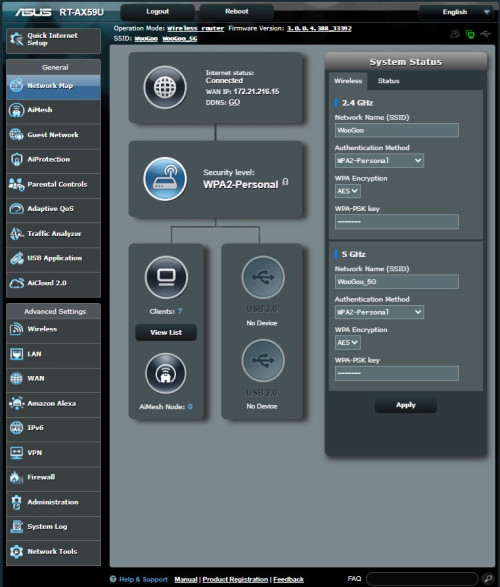 Attached File(s) Attached File(s) RT_AX59U_syslog.txt
 ( 87.1k )
Number of downloads: 7 |
|
|
|
|
|
orangubat
|
Nov 20 2024, 09:31 AM
|
New Member
|
QUOTE(ASUSmy @ Nov 18 2024, 09:47 AM) Hi orangubat, Can you help to double check the user name and password for the UNIFI account is correct. If the user name and password are confirm correct, can you call up TM and request them to refresh your port/connection after you change to ASUS router. Thank you The case is solved. I called up Unifi and requested a new password, and reinstalled the routers with the new password and everything is working fine now. So something must have gone wrong with the old password. Thanks all. |
|
|
|
|



 Quote
Quote

 0.0392sec
 0.36
0.36
 7 queries
 GZIP Disabled