Welcome Guest ( Log In | Register )

826 Pages « < 806 807 808 809 810 > » Bottom

Outline · [ Standard ] · Linear+

Home Networking ASUS Malaysia Networking User & Technical Support, Managed by ASUS Malaysia Representative

views
     
WaNaWe900
post Nov 10 2024, 11:47 PM

చąហ ąచҽ™
******
Senior Member
1,397 posts

Joined: Feb 2012
From: sOuL SoCiETY.. iSKaNDaRPuTeRi.. JB.. JDT


QUOTE(ASUSmy @ Nov 7 2024, 09:56 AM)
Hi WaNaWe900,

After checked with our HQ, they seen to receive similar feedback and they are in the midst of finding the cause and solution for this problem. Will share more information once available.

Thank you
*
QUOTE(mivec1200 @ Nov 10 2024, 11:37 PM)
Is it confirmed that ASUS will release a firmware update to address this issue? Thank you for your kind reply. 🙏
*
Hopefully soon since the case well aware notworthy.gif I still kept the RT-AX86U aside for now hopefully can update sweat.gif
mivec1200
post Nov 11 2024, 02:57 PM

New Member
*
Junior Member
37 posts

Joined: Apr 2009
QUOTE(WaNaWe900 @ Nov 10 2024, 11:47 PM)
Hopefully soon since the case well aware  notworthy.gif  I still kept the RT-AX86U aside for now hopefully can update  sweat.gif
*
Yes, I kept the AX86U even though it's not working currently and am using the AC86U as a fallback while awaiting the firmware release. cry.gif

peguin78
post Nov 11 2024, 11:00 PM

Getting Started
**
Junior Member
162 posts

Joined: Sep 2008


QUOTE(ASUSmy @ Sep 4 2024, 01:49 PM)
Hi iz1011,

Some other models like RT-BE86U and RT-BE58U will be available soon, estimating within this month.

Do follow our social media for more updates.

Thank you
*
Hello. Are these routers available in Malaysia now? What are the MSRP?

Thanks.
TSASUSmy
post Nov 12 2024, 10:53 AM

Look at all my stars!!
*******
Senior Member
2,319 posts

Joined: Mar 2010
QUOTE(peguin78 @ Nov 11 2024, 11:00 PM)
Hello. Are these routers available in Malaysia now? What are the MSRP?

Thanks.
*
Hi peguin78,

There has been delay for the RT-BE86U and it is estimated to be available around mid of December 2024.

The SRP price is RM1788.

Thank you
orangubat
post Nov 12 2024, 09:53 PM

New Member
*
Junior Member
46 posts

Joined: Apr 2009
QUOTE(ASUSmy @ Nov 5 2024, 04:23 PM)
Hi orangubat,

May I know is does it happen on both the 2.4GHz and 5GHz?

Have you try use LAN cable to do the testing?

Have you try to change the LAN cable between the router and the modem?

Are you able to ping Google using your PC or laptop or from router?

Thank you
*
1. Yes, it happens to both 2.4GHz and 5GHz.
2. Using LAN cable is the same, super slow connection.
3. I have tried different cables, same results. But no problem with the TP-link unifi router.
4. Cannot ping Google due to low speed.
TSASUSmy
post Nov 13 2024, 09:23 AM

Look at all my stars!!
*******
Senior Member
2,319 posts

Joined: Mar 2010
QUOTE(orangubat @ Nov 12 2024, 09:53 PM)
1. Yes, it happens to both 2.4GHz and 5GHz.
2. Using LAN cable is the same, super slow connection.
3. I have tried different cables, same results. But no problem with the TP-link unifi router.
4. Cannot ping Google due to low speed.
*
Hi orangubat,

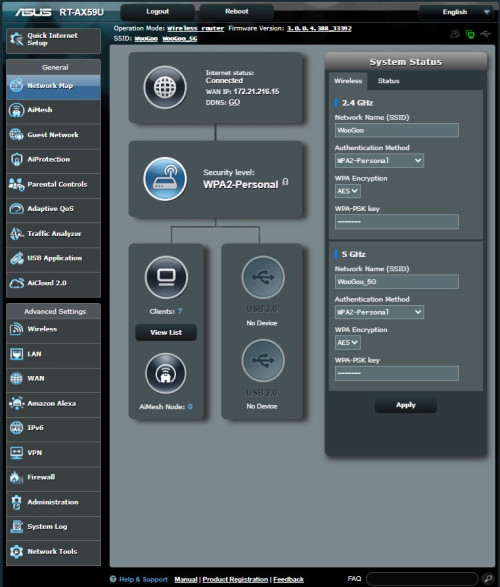
Can you show me image of the Network Map when connected to the modem? And download the system log and share it to me for checking.

Thank you
azmie_83
post Nov 15 2024, 01:55 AM

Getting Started
**
Junior Member
165 posts

Joined: Jan 2003
From: Everywhere....


QUOTE(mivec1200 @ Nov 11 2024, 02:57 PM)
Yes, I kept the AX86U even though it's not working currently and am using the AC86U as a fallback while awaiting the firmware release.  cry.gif
*
Owh gosh

I am hit by the same issue

RT-AX86U
1. Suddenly credentials cannot be used to login to router setting.
2. Reset the router
3. WiFi are not working anymore. No LED and when open WiFi setting being prompt by similar "country code not exist" error.

WaNaWe900
post Nov 15 2024, 09:14 PM

చąហ ąచҽ™
******
Senior Member
1,397 posts

Joined: Feb 2012
From: sOuL SoCiETY.. iSKaNDaRPuTeRi.. JB.. JDT


QUOTE(azmie_83 @ Nov 15 2024, 01:55 AM)
Owh gosh

I am hit by the same issue

RT-AX86U
1. Suddenly credentials cannot be used to login to router setting.
2. Reset the router
3. WiFi are not working anymore. No LED and when open WiFi setting being prompt by similar "country code not exist" error.
*
rclxub.gif rclxub.gif rclxub.gif if no need wifi can Hard-Reset and use LAN cable sweat.gif

If not need new Router w WiFi mega_shok.gif
Dozz
post Nov 16 2024, 11:39 AM

Look at all my stars!!
*******
Senior Member
2,149 posts

Joined: Aug 2005
From: Malaysia


Hi

Just got ASUS RT BE88U router yesterday, successfully setup it up running but i encounter an issue!

Here my setup:

TM modem to Maxis router to do the PPPoE login, from Maxis router to RT BE88U for wireless router. I have been using this setup for years with my previous ASUS router without issue, with RT BE88U
whenever i reboot the router, it wont connect to internet and the internet light is red in BE88U. I have to unplug the Ethernet cable from maxis router (port 1) to another port (port 2) then the light will turn green and connected to internet. I have to do it all over again every time BE88U reboot.

Can anyone here suggest a fix for this annoying issue please?

This post has been edited by Dozz: Nov 16 2024, 11:39 AM
PRSXFENG
post Nov 16 2024, 11:47 AM

Look at all my stars!!
*******
Senior Member
2,608 posts

Joined: Nov 2020


QUOTE(Dozz @ Nov 16 2024, 11:39 AM)
Hi

Just got ASUS RT BE88U router yesterday, successfully setup it up running but i encounter an issue!

Here my setup:

TM modem to Maxis router to do the PPPoE login, from Maxis router to RT BE88U for wireless router. I have been using this setup for years with my previous ASUS router without issue, with RT BE88U
whenever i reboot the router, it wont connect to internet and the internet light is red in BE88U. I have to unplug the Ethernet cable from maxis router (port 1) to another port (port 2) then the light will turn green and connected to internet. I have to do it all over again every time BE88U reboot.

Can anyone here suggest a fix for this annoying issue please?
*
Suggest just dropping the Maxis router and let the Asus handle PPPoE
If you need the phone, connect it after the Asus router
Dozz
post Nov 16 2024, 11:55 AM

Look at all my stars!!
*******
Senior Member
2,149 posts

Joined: Aug 2005
From: Malaysia


QUOTE(PRSXFENG @ Nov 16 2024, 11:47 AM)
Suggest just dropping the Maxis router and let the Asus handle PPPoE
If you need the phone, connect it after the Asus router
*
Hi

I want to use the phone and maxis USB backup dongle.

Possible to use them without maxis router?

you mention connect the phone after asus router? i dont really get it, mind to tell a bit more in detail please?
PRSXFENG
post Nov 16 2024, 03:52 PM

Look at all my stars!!
*******
Senior Member
2,608 posts

Joined: Nov 2020


QUOTE(Dozz @ Nov 16 2024, 11:55 AM)
Hi

I want to use the phone and maxis USB backup dongle.

Possible to use them without maxis router?

you mention connect the phone after asus router?  i dont really get it, mind to tell a bit more in detail please?
*
4g backup will have to be sacrificed, but for the phone, you can connect the maxis router *after* the asus

when you setup PPPoE on the Asus select the Maxis-Fiber profile in VLAN settings, it will mention one of the LAN ports is used for VOIP
connect up the maxis router to the mentioned lan port, and disable it's wifi/internet pppoe interface, and the maxis router will just be a phone adapter

(for 4G Backup, the dongle is checking for "Maxis_Archer_C5v" hostname, you can try setting that as your hostname but some did not have success with that)


orangubat
post Nov 16 2024, 08:14 PM

New Member
*
Junior Member
46 posts

Joined: Apr 2009
QUOTE(ASUSmy @ Nov 13 2024, 09:23 AM)
Hi orangubat,

Can you show me image of the Network Map when connected to the modem? And download the system log and share it to me for checking.

Thank you
*
Hi, below is the network map. And also the system log. Please note that the system shows the time to be May 5, 2018 instead of Nov 16, 2024.


user posted image


Attached File(s)
Attached File  RT_AX59U_syslog.txt ( 87.1k ) Number of downloads: 7
kk131
post Nov 17 2024, 03:14 PM

On my way
****
Junior Member
566 posts

Joined: Jun 2005
From: Somewhere over the rainbow


QUOTE(orangubat @ Nov 16 2024, 08:14 PM)
Hi, below is the network map. And also the system log. Please note that the system shows the time to be May 5, 2018 instead of Nov 16, 2024.
user posted image
*
On the WAN tab, have you tried changing the dns servers, for example to cloudflare's - 1.1.1.1?

System time is not in sync because it can't find the NTP server.

This post has been edited by kk131: Nov 17 2024, 03:18 PM
kk131
post Nov 17 2024, 03:16 PM

On my way
****
Junior Member
566 posts

Joined: Jun 2005
From: Somewhere over the rainbow


deleted

This post has been edited by kk131: Nov 17 2024, 03:17 PM
Dozz
post Nov 17 2024, 03:57 PM

Look at all my stars!!
*******
Senior Member
2,149 posts

Joined: Aug 2005
From: Malaysia


Hi
my main router is BE88U and successfully setup AiMesh with AC88U on second floor. I have two SSID: ABC and ABC_loT

I notice on AC88U only broadcast SSID ABC_loT, but not ABC. I cant find any option in AC88U to enable this SSID-ABC.

What i can think of is BE88U has wifi 7 enable and AC88U is an older router, so maybe there is compatible issue in AiMesh? Can anyone advise me on this please?

thanks
blacktubi
post Nov 17 2024, 11:09 PM

-
Group Icon
Elite
8,415 posts

Joined: Jul 2008

QUOTE(Dozz @ Nov 17 2024, 03:57 PM)
Hi
my main router is BE88U and successfully setup AiMesh with AC88U on second floor. I have two SSID: ABC and ABC_loT

I notice on AC88U only broadcast SSID ABC_loT, but not ABC. I cant find any option in AC88U to enable this SSID-ABC.

What i can think of is BE88U has wifi 7 enable and AC88U is an older router,  so maybe there is compatible issue in AiMesh?  Can anyone advise me on this please?

thanks
*
RT-BE88U is upgraded to Guest Network Pro feature

Go to Guest Network tab, choose that particular network/SSID, then check the AiMesh tab

See if you can enable that network to work on RT-AC88U

If can't it means you need to upgrade your node to something with Guest Network Pro to enjoy that feature

This post has been edited by blacktubi: Nov 17 2024, 11:10 PM


Attached thumbnail(s)
Attached Image
TSASUSmy
post Nov 18 2024, 09:47 AM

Look at all my stars!!
*******
Senior Member
2,319 posts

Joined: Mar 2010
QUOTE(orangubat @ Nov 16 2024, 08:14 PM)
Hi, below is the network map. And also the system log. Please note that the system shows the time to be May 5, 2018 instead of Nov 16, 2024.
user posted image
*
Hi orangubat,

Can you help to double check the user name and password for the UNIFI account is correct. If the user name and password are confirm correct, can you call up TM and request them to refresh your port/connection after you change to ASUS router.

Thank you
FaezFarhan
post Nov 19 2024, 05:45 PM

United till I die!
*******
Senior Member
3,435 posts

Joined: Oct 2008
From: Kota Bharu


Hi, I just changed from Unifi to Astro fibre today. Can I just login to the router & change PPPOE instead of resetting?

So lazy to reconnect all my smart devices, plugs etc.

Actually I tried changing it already, but it’s showing ‘disconnected’ on the router login page.

The router is the RT-AX86S connected to the TUF-AX5400 & RT-AC66U B1 via mesh.

This post has been edited by FaezFarhan: Nov 19 2024, 05:47 PM
jusbella
post Nov 19 2024, 07:45 PM

Look at all my stars!!
*******
Senior Member
3,037 posts

Joined: Dec 2011


QUOTE(FaezFarhan @ Nov 19 2024, 05:45 PM)
Hi, I just changed from Unifi to Astro fibre today. Can I just login to the router & change PPPOE instead of resetting?

So lazy to reconnect all my smart devices, plugs etc.

Actually I tried changing it already, but it’s showing ‘disconnected’ on the router login page.

The router is the RT-AX86S connected to the TUF-AX5400 & RT-AC66U B1 via mesh.
*
Yes can if you know astro vlan id. Then change accordingly will do.

826 Pages « < 806 807 808 809 810 > » Top
 

Change to:
| Lo-Fi Version
0.0281sec    0.58    6 queries    GZIP Disabled
Time is now: 13th December 2025 - 11:22 AM