

Anyone else having trouble accessing their router through ASUSCOMM DDNS?
Home Networking ASUS Malaysia Networking User & Technical Support, Managed by ASUS Malaysia Representative
Home Networking ASUS Malaysia Networking User & Technical Support, Managed by ASUS Malaysia Representative
|
|
 Oct 14 2023, 04:49 PM Oct 14 2023, 04:49 PM
|
 
All Stars
14,909 posts Joined: Jul 2005  
|
Anyone else having trouble accessing their router through ASUSCOMM DDNS?
|
|
|
|
|
|
Oct 14 2023, 05:27 PM
|

All Stars
13,210 posts Joined: Jul 2006
|
old asus router press upgrade firmware n bricked. junk shit
|
|
|
Oct 14 2023, 06:50 PM
Show posts by this member only | IPv6 | Post
#15423
|

All Stars
19,321 posts Joined: Jan 2003 From: Klang 
|
QUOTE(blacktubi @ Oct 14 2023, 03:13 PM) Try a factory reset and test the speed again Alrighty, I will do a factory reset tonight. I bought it at shopee from CGI store.You shouldn’t need to play with settings to get fast speed The factory out of box settings can get 800Mbps easily Worst to worst, send it back to your place of purchase to check Where you buy it from?  |
|
|
Oct 14 2023, 07:01 PM
|

Senior Member
3,892 posts Joined: Jan 2003 From: Back on earth!
|
QUOTE(sHawTY @ Oct 14 2023, 04:49 PM) Anyone else having trouble accessing their router through ASUSCOMM DDNS? Should be okay by now I guess. I had the same problem before. |
|
|
Oct 14 2023, 07:25 PM
|
|
Junior Member
272 posts Joined: Oct 2016
|
QUOTE(shinjite @ Oct 14 2023, 06:50 PM) Alrighty, I will do a factory reset tonight. I bought it at shopee from CGI store. Same place lol I'm wondering if should return it or not since same speed as youbelum press confirm at Lazada app yet This post has been edited by White2000: Oct 14 2023, 07:25 PM |
|
|
Oct 14 2023, 07:56 PM
|
|
All Stars
14,909 posts Joined: Jul 2005
|
QUOTE(wiraone @ Oct 14 2023, 07:01 PM) Should be okay by now I guess. I had the same problem before. Yeah it's fine now but I had to access the router through https://192.168.50.1:8443 firstIt seems the DDNS somehow unregistered by itself. After re-registering, it's fixed |
|
|
|
|
|
Oct 14 2023, 07:58 PM
|
|
Senior Member
4,099 posts Joined: Mar 2006
|
QUOTE(White2000 @ Oct 14 2023, 07:25 PM) Same place lol I'm wondering if should return it or not since same speed as you I also bought from the same place. Since both of you are having the same situation, then I don't think the product got problem. What's the odd of having 2 new routers having problem DOA? Most likely it's the setting, or Unifi itself got issue due to recent free upgrade/SWU/etc.belum press confirm at Lazada app yet I have not yet setup mine because i am lazy to switch over.  This post has been edited by Max2006: Oct 14 2023, 08:00 PM White2000 liked this post
|
|
|
Oct 14 2023, 08:09 PM
|

All Stars
24,467 posts Joined: Nov 2010
|
QUOTE(Max2006 @ Oct 14 2023, 07:58 PM) I also bought from the same place. Since both of you are having the same situation, then I don't think the product got problem. What's the odd of having 2 new routers having problem DOA? Most likely it's the setting, or Unifi itself got issue due to recent free upgrade/SWU/etc. maybe i m not as techy as some of u guys or my needs are simple.I have not yet setup mine because i am lazy to switch over. new TUF ax4200 has been v gud for me. everything's working well now. i do check the test speeds but i care more about whether what i want to work will work. so far, so good. i have packed up the repeater, no need. dun care about mesh. my house is a DSL... not bungalow or 3, 4 storeys condo. netflix 4hdr works very smoothly now at wifi 55ft. Unifitv upbV2 box works gud with Lan4. torrent... i get new max speed 30MB/s, that's 240mbps... i won't expect twice that speed over wifi. now, i just wait for unifi to upgrade me 800->1, 2 gbps. will be ok for next 10 years. This post has been edited by AVFAN: Oct 14 2023, 09:52 PM |
|
|
Oct 14 2023, 08:14 PM
|
 
Elite
8,418 posts Joined: Jul 2008
|
QUOTE(ktek @ Oct 14 2023, 05:27 PM) old asus router press upgrade firmware n bricked. junk shit Which model? RT-AC68U?It's really hard to brick ASUS router, the ASUS firmware restore tool should fix it. |
|
|
Oct 14 2023, 10:01 PM
|

Junior Member
794 posts Joined: Feb 2010
|
Hi guys, mind sharing any good factory-terminated brand cat6/7 cable with a length of around 15m that works well with an Asus Router?
Thank you. |
|
|
Oct 14 2023, 10:05 PM
Show posts by this member only | IPv6 | Post
#15431
|
|
All Stars
19,321 posts Joined: Jan 2003 From: Klang
|
QUOTE(White2000 @ Oct 14 2023, 07:25 PM) Same place lol I'm wondering if should return it or not since same speed as you You also can't get the desired speed on WiFi? 😆belum press confirm at Lazada app yet |
|
|
Oct 14 2023, 10:07 PM
Show posts by this member only | IPv6 | Post
#15432
|
|
All Stars
19,321 posts Joined: Jan 2003 From: Klang
|
QUOTE(Max2006 @ Oct 14 2023, 07:58 PM) I also bought from the same place. Since both of you are having the same situation, then I don't think the product got problem. What's the odd of having 2 new routers having problem DOA? Most likely it's the setting, or Unifi itself got issue due to recent free upgrade/SWU/etc. I will setup back my RT-AX55 later tonight to reconfirm. If my old one can get max speed up close, then it's the new router 😂I have not yet setup mine because i am lazy to switch over. Tried ookla, it goes like 2 patterns most of the time (up close to the router), 1) it bursts to 4xx mbps then it suddenly hits a big drop till 2xx then slowly goes back to 3xxmbps. 2) it bursts till 3xx and just stays there Other than that, wifi is pretty much stable. Unlike those refurbished US sets 🤣 This post has been edited by shinjite: Oct 14 2023, 10:11 PM |
|
|
Oct 14 2023, 10:15 PM
Show posts by this member only | IPv6 | Post
#15433
|

All Stars
31,609 posts Joined: Aug 2010
|
QUOTE(shinjite @ Oct 14 2023, 10:07 PM) I will setup back my RT-AX55 later tonight to reconfirm. If my old one can get max speed up close, then it's the new router 😂 I using TUF-AX3000 since year 2020, since sign up SWU 3.0 offer me 1st year 500mbps, mostly also getting 400+ mbps via Wi-Fi (test in front my router, using my s23 ultra or iphone 12 pro max also same)Tried ookla, it goes like 2 patterns most of the time (up close to the router), 1) it bursts to 4xx mbps then it suddenly hits a big drop till 2xx then slowly goes back to 3xxmbps. 2) it bursts till 3xx and just stays there Other than that, wifi is pretty much stable. Unlike those refurbished US sets 🤣 via LAN no issue, on desktop which using intel ax211 also getting about the same |
|
|
|
|
|
Oct 14 2023, 10:29 PM
Show posts by this member only | IPv6 | Post
#15434
|
|
All Stars
19,321 posts Joined: Jan 2003 From: Klang
|
QUOTE(XeactorZ @ Oct 14 2023, 10:15 PM) I using TUF-AX3000 since year 2020, since sign up SWU 3.0 offer me 1st year 500mbps, mostly also getting 400+ mbps via Wi-Fi (test in front my router, using my s23 ultra or iphone 12 pro max also same) Yup, I tested LAN no issues. Just the WiFi is freaking weird, up close very hardly hit 400, mostly 350 to 38xmbpsvia LAN no issue, on desktop which using intel ax211 also getting about the same |
|
|
Oct 15 2023, 12:57 AM
|
|
All Stars
19,321 posts Joined: Jan 2003 From: Klang
|
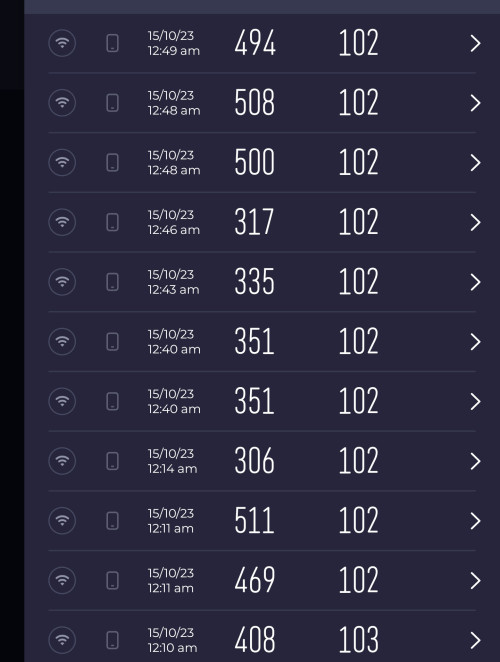 Guys, unfortunately I got to say the culprit is the new TUF AX-4200 router. I have fully hard reset it, just configure the unifi account and leave the rest of the settings intact. Tried with 160mhz and turn it off, still the same thing. 5ghz channel was 52 on auto. On the other hand, I hard reset the RT-AX55, set up my unifi account and with stock settings, 5ghz channel was 44 on auto. Guess what, easily hitting 500mbps. Tested with my phone right in front of both routers side by side. The 5xx, 494,469 and 408 are the RT-AX55. The 351 was the AX4200 with 160mhz checked. 315 and 337 is with 160mhz unchecked. 🤦🏻🤦🏻 This post has been edited by shinjite: Oct 15 2023, 12:58 AM |
 |
Oct 16 2023, 09:39 AM
|

Senior Member
2,319 posts Joined: Mar 2010
|
QUOTE(yfyap69 @ Oct 13 2023, 08:45 PM) Just found out there is a new firmware 3.0.0.6.102_21514-136. Use this one? After i make the change in the software, do i need to switch the cable to 2.5g port on the ax86u? Hi yfyap69, You can try test it with 3.0.0.4.388_23285 first, which is the same with your RT-AX86U. If it is tested no problem then you can try updating to the latest version. Thank you |
|
|
Oct 16 2023, 10:01 AM
|
|
All Stars
24,467 posts Joined: Nov 2010
|
not satisfied with 78xmbps ethernet with new asus TUF AX4200, i changed out this cable.
i thought of this after reading a reminder for this in another thread. i had thought that cable in place was a cat6e which i bought at a shop. but it wasn't labeled; many such cables aren't label... so, be careful! after changing to a cable that came with the new router (also unlabeled!), lan speed is now 82x (previously 78x); wifi speed improved overall too.  |
|
|
Oct 16 2023, 10:02 AM
|
|
Senior Member
2,319 posts Joined: Mar 2010
|
QUOTE(toi @ Oct 14 2023, 04:12 PM) I have tried all the possible combinations in TUF on the multicast, but still the same. Hi toi,Below is the IPTV configuration on my RT which works: 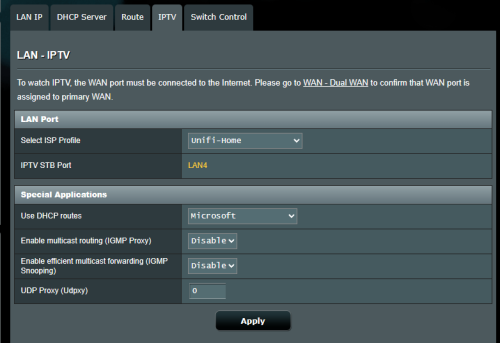 Will check with RD and get back to you ASAP. Thank you |
|
|
Oct 16 2023, 10:04 AM
|
|
Senior Member
2,319 posts Joined: Mar 2010
|
QUOTE(shinjite @ Oct 15 2023, 12:57 AM) Guys, unfortunately I got to say the culprit is the new TUF AX-4200 router. I have fully hard reset it, just configure the unifi account and leave the rest of the settings intact. Tried with 160mhz and turn it off, still the same thing. 5ghz channel was 52 on auto. On the other hand, I hard reset the RT-AX55, set up my unifi account and with stock settings, 5ghz channel was 44 on auto. Guess what, easily hitting 500mbps. Tested with my phone right in front of both routers side by side. The 5xx, 494,469 and 408 are the RT-AX55. The 351 was the AX4200 with 160mhz checked. 315 and 337 is with 160mhz unchecked. 🤦🏻🤦🏻 Can you try fixing the WiFi channel to 44 or others on the TUF-AX4200 to see which will provide better result? Thank you |
|
|
Oct 16 2023, 10:18 AM
|
|
All Stars
24,467 posts Joined: Nov 2010
|
QUOTE(ASUSmy @ Oct 16 2023, 10:04 AM) Hi shinjite, just to share...Can you try fixing the WiFi channel to 44 or others on the TUF-AX4200 to see which will provide better result? Thank you i had earlier changed from channel 52 to 40. it was ok. i then tried channel 36. appears to be a little better, i stay with this. this morning, changed cable modem->router, saw much improved results. v happy now.  White2000 liked this post
|
| Change to: |  0.0278sec 0.0278sec
 0.27 0.27
 6 queries 6 queries
 GZIP Disabled GZIP Disabled
Time is now: 16th December 2025 - 04:53 AM |
 Quote
Quote