Welcome Guest ( Log In | Register )

Outline · [ Standard ] · Linear+

Home Networking ASUS Malaysia Networking User & Technical Support, Managed by ASUS Malaysia Representative

views
     
White2000
post Jun 2 2023, 11:36 PM

Getting Started
**
Junior Member
272 posts

Joined: Oct 2016
How does TUF-AX6000 compare to RT-AX86U?

Lazada official ASUS store prices TUF-AX6000 at ~RM958 and RT-AX86U PRO at ~RM1,488.

On paper both specs gets the important parts down pretty well below, with some parts trading blows here and there but Idk how it explains the RM530 price difference.
QUOTE
Both are 4x4 MIMO on 5GHz band.
TUF-AX6000 better with 4x4 MIMO on 2.4 GHz where RT-AX86U Pro gets 3x3 MIMO. (although most client devices supports 2x2...)
Slight attention towards 6 physical antennas on TUF vs 3 on RT but I assume specs are correct according to specs page.

Both also beam forming. Both supports same channel width. Same 802.11ax. Nothing notable for these parts.

RT better on some internals like RAM with 1 GB compared to 512 MB. Both looks like relatively recent models. Not sure how much effect here.

Physical ports both sufficient so didn't compare but brief glance both seems roughly same.
Originally planned to wait for WiFi 7 but most places online recommended to give the tech more time to mature. So looking at WiFi 6 routers, WiFi 6E also rare sight at the moment with the few routers that get it being out of budget, honorable mention to TP-Link's AXE75 but is 2x2 MIMO so skip. Wouldn't mind waiting for WiFi 7 if it means better pricing older routers.

This post has been edited by White2000: Jun 2 2023, 11:41 PM
White2000
post Jun 4 2023, 10:26 AM

Getting Started
**
Junior Member
272 posts

Joined: Oct 2016
https://www.asus.com/networking-iot-servers...u-pro/techspec/

Hello may I know if this is available in Malaysia or is there an ETA for sale?

How's the internals? New Broadcom chips like the RT-AX86U Pro?

Seems like RT-AX86U Pro/ normal U and S generally gets great reviews.

This post has been edited by White2000: Jun 4 2023, 10:29 AM
White2000
post Jun 7 2023, 02:26 PM

Getting Started
**
Junior Member
272 posts

Joined: Oct 2016
QUOTE(blacktubi @ Jun 7 2023, 02:18 PM)
On tri-band system, mesh backhaul only use the 5GHz-2 band as dedicated backhaul.

Both XT8 and XT9 comes with 4x4 160MHz backhaul up to 4804Mbps

Anyway, to answer your technical question, AiMesh doesn't care. You can mix and match all AiMesh models. You can even mesh XT8 with the cheapest RT-AX53U at a cost of slower speed when connected to the RT-AX53U.
*
Sounds great. Means in future when upgrade to new Asus router can reuse old ones as mesh.
White2000
post Jun 7 2023, 08:42 PM

Getting Started
**
Junior Member
272 posts

Joined: Oct 2016
QUOTE(korbin @ Jun 7 2023, 05:45 PM)
hello asus
any info when XT9 will be release in Malaysia?
*
Also release date (if available) for RT-AX88U Pro too... I'll like to know.
White2000
post Oct 7 2023, 07:44 AM

Getting Started
**
Junior Member
272 posts

Joined: Oct 2016
Can all IT Hypermarket selling Asus Router be trusted? Asus RT-86U Pro around 1.3k

They didn't have LazMall label means Lazada cannot guarantee delivery or genuine product right?


+ Also RT-86U pro is a good Asus router right? No known issues?

This post has been edited by White2000: Oct 7 2023, 07:45 AM
White2000
post Oct 10 2023, 12:41 PM

Getting Started
**
Junior Member
272 posts

Joined: Oct 2016
Eventually went with TUF-AX4200 after reading Blacktubi's review on his website, thank you everyone for the help and answers.
White2000
post Oct 13 2023, 07:06 PM

Getting Started
**
Junior Member
272 posts

Joined: Oct 2016
QUOTE(AVFAN @ Oct 13 2023, 02:52 PM)
hi guys...

rec'd the TUF AX4200, installed, working ok.
was using RT-AC1300UHP.
unifi 800mbps getting ready for 1, 2gbps upgrade.
double storey house, longest distance from router at lower corner is 55ft
no extender, no mesh.
15 devices, mostly wifi, incl Android TV.

new router, set up via phone app as per instruction, updated firmware.
use pc to play around a bit.
first impressions: nice looking, not too difficult to set up, plentiful features.

a few questions, need a little help, pls, comment, thanks:

1. this band steering feature, i.e. auto toggle 2.4 <->5ghz - it seems to always fall back to 2.4, lower speed for any device.
So, i do not set it on.

2. is it correct to set 2.4ghz at 20/40mhz, 5ghz at 20/40/80/160mhz?

3. control channel shud be set to 40, 52 or auto?

4. my devices mostly old, better not tick IPv6, correct?

5. QoS should be NO, right?

6. my PC is 8 yrs old, using Asus UT USB AC55 adaptor for 5ghz, 4-5 yrs now.
PC now cannot detect the 5ghz network, can only detect 2.4.
When i put the AC1300UHP back, it detects again.
What may be the explanation?
Adaptor too old, firmware, driver too old?
Or something to do with the naming of the wifi networks?
I use xxxx and xxxx_5G.
i hope there is a solution as it is a disappointment to get lower speed now for my PC.

the rest of the devices work fine; even at furthest point, 5ghz still works well enough.
no need extender or mesh required.
overall, other than the PC 5ghz adaptor problem, this router is good.

thanks for any comment!
*
Go download WiFi analyzer (open-source) or WiFiman (by Ubiquiti) and check your surrounding WiFi.

2.4 GHz is almost always congested so usually 20 MHz, set it to channel 1, 6, 11 depending on which channel less congestion or less overlap. (Tbh if your neighbour change channel often due to auto-channel it doesn't matter)

Same goes for 5 GHz channel, pick least congested one. Bandwidth depends on you, tho if too wide channel more chance of overlapping with other nearby WiFi networks

This post has been edited by White2000: Oct 13 2023, 07:12 PM
White2000
post Oct 14 2023, 11:29 AM

Getting Started
**
Junior Member
272 posts

Joined: Oct 2016
QUOTE(shinjite @ Oct 14 2023, 11:21 AM)
Hi guys, I am currently running the newly bought ASUS TUF-AX4200 router and for some reason I can't get full Wifi 5Ghz speed (wifi 6) with my hand phone/laptop even though I am right in front of the router itself. Checked phone and laptop, detected max at 1.2Gbps.

I have tried changing channels, already set it to 20/40/80 with 160 unchecked. Disabled QoS, tried disabled and enabling both OFDMA and MU-MIMO to no avail. Ookla speed test is averaging in the 3xxmbps. LAN as usual no issues hitting full speed.

I am running unifi 500mbps. ONU hardware is fiberhome. Any thoughts or advise?
*
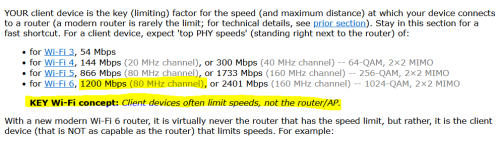
Can you check if your device is actually connecting with the router at 160 MHz or 80 MHz.

Often device is the limiting factor.

user posted image

This post has been edited by White2000: Oct 14 2023, 11:35 AM
White2000
post Oct 14 2023, 11:56 AM

Getting Started
**
Junior Member
272 posts

Joined: Oct 2016
QUOTE(shinjite @ Oct 14 2023, 11:46 AM)
Confirm wifi 6 80mhz at 1200mbps
*
You can try enable 160 MHz (ideally your surrounding WiFi on 5 GHz should be clear/not congested since 160 is pretty wide) to get higher speed but you'll need a device that work with 3x3 antenna (TUF-AX4200 is 3x3 on 5GHz).

Most device is 2x2 I believe (tho some can support 160 MHz), even if manage 160 MHz some like to drop back to 80 MHz.

This post has been edited by White2000: Oct 14 2023, 11:58 AM
White2000
post Oct 14 2023, 12:12 PM

Getting Started
**
Junior Member
272 posts

Joined: Oct 2016
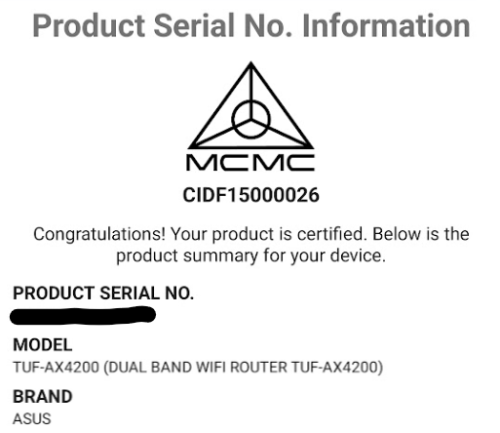
I think it doesn't matter, device is certified

or you mean there's a specific Malaysian model for TUF-AX4200 that have higher performance than non-Malaysian model (ie Aus)?


Mine also from Aus

user posted image

This post has been edited by White2000: Oct 14 2023, 12:13 PM
White2000
post Oct 14 2023, 07:25 PM

Getting Started
**
Junior Member
272 posts

Joined: Oct 2016
QUOTE(shinjite @ Oct 14 2023, 06:50 PM)
Alrighty, I will do a factory reset tonight. I bought it at shopee from CGI store.
*
Same place lol I'm wondering if should return it or not since same speed as you

belum press confirm at Lazada app yet

This post has been edited by White2000: Oct 14 2023, 07:25 PM
White2000
post Oct 16 2023, 10:23 AM

Getting Started
**
Junior Member
272 posts

Joined: Oct 2016
QUOTE(AVFAN @ Oct 16 2023, 10:18 AM)
just to share...

i had earlier changed from channel 52 to 40. it was ok.

i then tried channel 36. appears to be a little better, i stay with this.

this morning, changed cable modem->router, saw much improved results.

v happy now. biggrin.gif
*
So most of the problem is from router to (via cable) modem connection?

Not router to (via WiFi) device connection?

I tested with cable and get better result

Didn't compare since already gave away old ax router. Still got a old d link AC router tho but lazy to test.

Same channel as yours, went with channel 36 80 MHz for 5GHz band since most of the neighbor is on the 100+ channel. Have some on lower channels but very low utilisation when scanned, most activity at 100+

2.4 GHz band all bad so close eye and randomly pick channel 11.

This post has been edited by White2000: Oct 16 2023, 10:26 AM
White2000
post Oct 16 2023, 11:40 AM

Getting Started
**
Junior Member
272 posts

Joined: Oct 2016
QUOTE(AVFAN @ Oct 16 2023, 10:32 AM)
likely a mix of many reasons.... just need to check ev biggrin.gif erything, try everything!

2.4ghz... i forgot to check what i set on my old router... i remember it wasn't in the congested middle.

may hv to trial n error.

...

updated:

checked traffic analyzer...neighbors mostly using 4-12.

so, i use channel 2. smile.gif
*
May I suggest channel 1? biggrin.gif

Ofc final decision is yours.
White2000
post Oct 18 2023, 11:56 AM

Getting Started
**
Junior Member
272 posts

Joined: Oct 2016
Have some issues with TUF AX4200 some websites not loading the first time, need to wait few seconds and refresh.

At first thought browser setting, but repeatable on pc and other phones. Affect also play store and apps like Lazada, image won't load but still can access other stuff. Switch to mobile data instantly no problem.

Then thought I messed up router settings, reset and left everything at default after initial setup. Slightly improved but still happen, but much lesser.

Will continue to monitor for a few days.

Old D-Link TM router don't have this problem.

Edit to add extra info:

1. No pattern on how it occurs, randomly occur regardless of many or no other people using. Doesn't occur at any particular time.

2. If affect that device, others still okay. All devices can randomly kena. Haven't seen 2 device affected at the same time.

3. Got 1 smart watch cannot connect to WiFi. Tried various online solutions including reset device, set to AC/n etc...

This post has been edited by White2000: Oct 18 2023, 12:08 PM
White2000
post Oct 18 2023, 12:15 PM

Getting Started
**
Junior Member
272 posts

Joined: Oct 2016
QUOTE(kingkingyyk @ Oct 18 2023, 12:07 PM)
Open up the 4.8Gbps band for your device to connect, then you will get Gigabit speed if your device has 2.4Gbps AX wifi adapter.

This is what I get with Intel AX210 (XT8 at downstairs)
user posted image
Have you tried to fix your Wifi channels instead of leaving them as auto?
*
Yup I tried adjusting manual set WiFi channels after reset router doesn't work (default is auto), still occurs.

Need to test one by one, it occurs randomly so takes some time to test what's causing the problem.

Edit:

Previous router can work on auto with no problem so I don't think is channel problem or other nearby WiFi problem.

This post has been edited by White2000: Oct 18 2023, 12:17 PM
White2000
post Oct 19 2023, 06:55 AM

Getting Started
**
Junior Member
272 posts

Joined: Oct 2016
QUOTE(ASUSmy @ Oct 18 2023, 04:12 PM)
Hi White2000,

May I ask, have you try to set the DNS server on the router?

https://www.asus.com/support/FAQ/1045253/

Thank you
*
Will do and monitor for a few days, thank you.
White2000
post Oct 23 2023, 10:09 PM

Getting Started
**
Junior Member
272 posts

Joined: Oct 2016
QUOTE(ASUSmy @ Oct 18 2023, 04:12 PM)
Hi White2000,

May I ask, have you try to set the DNS server on the router?

https://www.asus.com/support/FAQ/1045253/

Thank you
*
Update for the TUF AX4200. Mostly... maybe 99% solved.

One interesting thing is that if manual set DNS on phone, sometimes a warning will come out "Private DNS cannot be accessed". Have to change back to original Off.

Ping DNS Google on computer is okay, no packet loss. Cloudflare DNS shows packet loss. (I heard ping DNS is not a reliable measure tho so Idk)

This seems like something wrong at Router-Internet side rather than Router-WiFi. Didn't see this problem before so not sure. Maybe TM side problem? But old router still okay...


Didn't occur frequently now so I can live with it if still cannot fix.

This post has been edited by White2000: Oct 23 2023, 11:15 PM
White2000
post Oct 25 2023, 08:27 PM

Getting Started
**
Junior Member
272 posts

Joined: Oct 2016
Default IPv6 off.

Turn it on or off better?
White2000
post Oct 26 2023, 08:07 AM

Getting Started
**
Junior Member
272 posts

Joined: Oct 2016
Turned IPv6 off because browsing starting to "lag" (IE load Lowyat have to wait long time loading on white page) same for some other websites.

I don't think IPv6 is causing the problem but after turn off no more problems.

Starting to think I got a broken unit.
White2000
post Oct 26 2023, 04:01 PM

Getting Started
**
Junior Member
272 posts

Joined: Oct 2016
QUOTE(renishi @ Oct 26 2023, 03:47 PM)
Im staying on a double story house. I’m using tuf-ax3000 on ground floor and have tuf ax4200 on the way.

I’m planning to set up my mesh as following

A) Ground Floor - tuf-ax3000
Second floor - Tuf-ax4200

Reason being ax4200 has stronger WiFi as everyone is usually upstairs.

Do u think this is ok? Or should I go

B) ground floor - tuf-ax4200
Second floor tuf-ax3000

Is there any new feature in TUFax4200?

There was no mention in blacktubi review haha
*
I think use both A and B for a week each and see how everyone at your place feels about it. Nothing beats actual testing.

2 Pages  1 2 >Top
 

Change to:
| Lo-Fi Version
0.0526sec    0.84    7 queries    GZIP Disabled
Time is now: 12th December 2025 - 12:20 AM