Welcome Guest ( Log In | Register )

3 Pages  1 2 3 >Bottom

Outline · [ Standard ] · Linear+

Home Networking ASUS Malaysia Networking User & Technical Support, Managed by ASUS Malaysia Representative

views
     
shinjite
post Nov 23 2018, 09:25 AM

�ŞħĬΩĵΐŦ��
********
All Stars
19,320 posts

Joined: Jan 2003
From: Klang


QUOTE(blacktubi @ Nov 19 2018, 09:12 PM)
Please update your firmware to the latest one from here/ wink.gif
https://www.asuswebstorage.com/navigate/s/0...CE9F70FD61A392Y
*
I updated my RT-AC1300UHP yesterday as well with the beta firmware. So far so good smile.gif
shinjite
post Nov 8 2020, 10:27 PM

�ŞħĬΩĵΐŦ��
********
All Stars
19,320 posts

Joined: Jan 2003
From: Klang


QUOTE(LawdRetep @ Nov 8 2020, 09:57 PM)
Here you go. Does this mean ethernet port koyak ah?

user posted image
*
It could be the WAN cable is faulty or its rated speed is only 100mbps. Try swapping it with the other LAN cables and see if reads 1gbps. If yes, it's the WAN cable issue.

This post has been edited by shinjite: Nov 8 2020, 10:28 PM
shinjite
post Nov 8 2020, 11:17 PM

�ŞħĬΩĵΐŦ��
********
All Stars
19,320 posts

Joined: Jan 2003
From: Klang


QUOTE(blacktubi @ Nov 8 2020, 11:02 PM)
So it's either the port at your router koyak or the port at the modem koyak.
*
Yup, that sums it all up.
shinjite
post Nov 8 2020, 11:19 PM

�ŞħĬΩĵΐŦ��
********
All Stars
19,320 posts

Joined: Jan 2003
From: Klang


QUOTE(LawdRetep @ Nov 8 2020, 11:16 PM)
user posted image

AN5506-04-BG
hopefully it's the latter  sweat.gif
*
Hey bro, call TM to change your BTU.

This post has been edited by shinjite: Nov 8 2020, 11:20 PM
shinjite
post Nov 9 2020, 08:56 AM

�ŞħĬΩĵΐŦ��
********
All Stars
19,320 posts

Joined: Jan 2003
From: Klang


QUOTE(LawdRetep @ Nov 8 2020, 11:38 PM)
Wah, this BTU super old school or problematic?

Already contacted TM customer service. They said they've opened a report on technical issue.
*
Like what blacktubi said, it could be your BTU WAN port or your Router's WAN port went bonkers. If it is the BTU, TM will come and check and once they get 100Mbps as well from their testing, they will swap to a new BTU for you. Most likely they will just swap the BTU without testing, one shot kao tim and then you test.

This post has been edited by shinjite: Nov 9 2020, 08:57 AM
shinjite
post Nov 10 2020, 04:44 PM

�ŞħĬΩĵΐŦ��
********
All Stars
19,320 posts

Joined: Jan 2003
From: Klang


QUOTE(Flyer @ Nov 10 2020, 04:21 PM)
Hey there, I have an Asus AC87U and has been connected to unifi for the last 2 years everything works fine. When i switched to maxis (unifi suddenly increased their charges to RM209 from 139), I can't get the wireless router to work with Maxis fibre... can anyone please help?

wireless router firmware also updated today...
*
You will need to change the profile to maxis Fibre. Go to LAN > IPTV and change from there.
shinjite
post Nov 10 2020, 10:32 PM

�ŞħĬΩĵΐŦ��
********
All Stars
19,320 posts

Joined: Jan 2003
From: Klang


QUOTE(bernard90 @ Nov 10 2020, 10:26 PM)
hi, which router is better between asus rt ax56u vs ax55 ? any differences between this 2 models?
*
AX55 has no USB and has only 256MB of ram. Proc wise both are the same.
shinjite
post Nov 23 2020, 11:27 PM

�ŞħĬΩĵΐŦ��
********
All Stars
19,320 posts

Joined: Jan 2003
From: Klang


QUOTE(smilealwaysz @ Nov 23 2020, 11:15 PM)
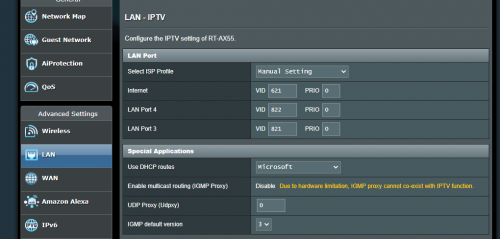
Tried your method, its still not working, both LAN ports 3 or 4 are not working for VoIP, still unable to make calls or receive calls. The phone LED on C5v is not light up.
user posted image
*
Try LAN4 port 823, LAN3 is 822
shinjite
post Nov 24 2020, 08:48 AM

�ŞħĬΩĵΐŦ��
********
All Stars
19,320 posts

Joined: Jan 2003
From: Klang


QUOTE(jusbella @ Nov 24 2020, 03:13 AM)
Yeah 822 is correct one.

Seems it's the firmware bugs. Try see any latest firmware for your router?
*
Most likely no choice but to use the Maxis router just for VOIP by bridging and the ASUS router for the rest.

https://forum.lowyat.net/topic/4798338/all <--- Probably use this as a reference.

This post has been edited by shinjite: Nov 24 2020, 08:50 AM
shinjite
post Dec 7 2020, 10:53 AM

�ŞħĬΩĵΐŦ��
********
All Stars
19,320 posts

Joined: Jan 2003
From: Klang


QUOTE(Cyphereza @ Dec 7 2020, 10:33 AM)
Hi,
I just bought an AX55 and currently having issues with HyppTV (error 108005).
Tried to update the beta firmware RT-AX55_9.0.0.4_384_10227-g7695c22 (downloaded via AsusMY's link), but after uploading, the router restarts, and like nothing has changed? Did I do something wrong?
Currently on 3.0.0.4.384_10212-g8599273 public firmware.
*
I think there is another one which is 10257. Maybe you can try that.
shinjite
post Jun 22 2022, 12:42 PM

�ŞħĬΩĵΐŦ��
********
All Stars
19,320 posts

Joined: Jan 2003
From: Klang


I wonder if there are any planned new firmware updates for RT-AX55
shinjite
post Sep 20 2023, 01:39 PM

�ŞħĬΩĵΐŦ��
********
All Stars
19,320 posts

Joined: Jan 2003
From: Klang


QUOTE(mohd_ikh1 @ Sep 20 2023, 11:20 AM)
Hi again ASUS Msia..my last inquiry was in 2021, now would like to inquire almost the same question again..
Previously using Maxis Fibre, now change tu Unifi.

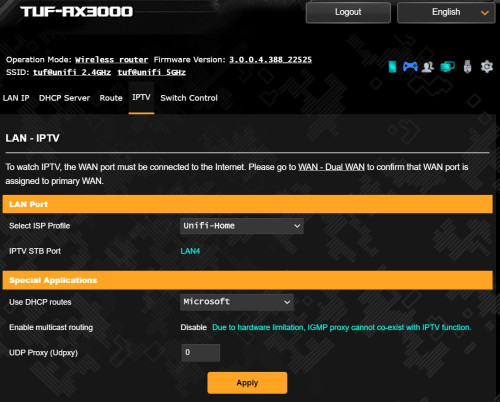
So I just change my Unifi router to ASUS TUF AX3000, already manage to get connected using default Unifi ISP Profile.
But how do i make LAN4 port available since not using any Unifi IPTV STB? Change the ISP Profile to manual then change the VID number/code?
Photo attached is the screenshot of the default settings. Please help, thanks in advance.

user posted image
*
Change it to unifi business
shinjite
post Oct 10 2023, 10:13 AM

�ŞħĬΩĵΐŦ��
********
All Stars
19,320 posts

Joined: Jan 2003
From: Klang


https://shopee.com.my/Asus-TUF-Gaming-TUF-A...3f-758469ac1310

Guys, found this router at a great price!
With the RM25 rebate, seller voucher of RM10 and spend 3000 shopee coins, you can drop it down to RM519 excluding shipping fee. Left 4 to 5 units if I remember correctly

This post has been edited by shinjite: Oct 10 2023, 10:17 AM
shinjite
post Oct 10 2023, 11:06 AM

�ŞħĬΩĵΐŦ��
********
All Stars
19,320 posts

Joined: Jan 2003
From: Klang


QUOTE(dc89 @ Oct 10 2023, 10:42 AM)
I can only get RM553.90 (including shipping) how come cannot get RM519 ?
*
Like what ADVAN stated, you need to earn those shopee coins by playing its games or utilize the cashbacks given vouchers. Per purchase, one can only use 3000 coins maximum for a RM30 extra discount. Yours would have been RM523.90 including shipping if you spent the 3000 coins.

Update: Price updated back to RM625 and next round at RM584 will start at 12pm later.

This post has been edited by shinjite: Oct 10 2023, 11:08 AM
shinjite
post Oct 10 2023, 01:14 PM

�ŞħĬΩĵΐŦ��
********
All Stars
19,320 posts

Joined: Jan 2003
From: Klang


QUOTE(White2000 @ Oct 10 2023, 12:41 PM)
Eventually went with TUF-AX4200 after reading Blacktubi's review on his website, thank you everyone for the help and answers.
*
Same, I pulled a trigger for one too when I found the link. Rm519 just too tempting hahaha
shinjite
post Oct 10 2023, 04:22 PM

�ŞħĬΩĵΐŦ��
********
All Stars
19,320 posts

Joined: Jan 2003
From: Klang


QUOTE(AVFAN @ Oct 10 2023, 02:05 PM)
Just made the order. At price I quoted.
Shopee traffic today v high!
I had considered it months ago!
Finally ordered just now.
*
Thanks to blacktubi for the recommendation in his review page XD
shinjite
post Oct 11 2023, 10:12 AM

�ŞħĬΩĵΐŦ��
********
All Stars
19,320 posts

Joined: Jan 2003
From: Klang


QUOTE(AVFAN @ Oct 11 2023, 07:08 AM)
price also incr a bit... 585->594. biggrin.gif
*
Not surprising with this seller. I got my gaming laptop from him on Feb and it's the same thing, awesome unbelievable price. As usual 5 units, finished those, restocked almost immediately. Compared to the others, it can go up to a few hundreds to RM1k of difference.


shinjite
post Oct 12 2023, 02:51 PM

�ŞħĬΩĵΐŦ��
********
All Stars
19,320 posts

Joined: Jan 2003
From: Klang


My tuf ax4200 arrived.... Huhu, tonight going to play play a bit and see
shinjite
post Oct 13 2023, 03:35 PM

�ŞħĬΩĵΐŦ��
********
All Stars
19,320 posts

Joined: Jan 2003
From: Klang


QUOTE(AVFAN @ Oct 13 2023, 02:52 PM)
hi guys...

rec'd the TUF AX4200, installed, working ok.
was using RT-AC1300UHP.
unifi 800mbps getting ready for 1, 2gbps upgrade.
double storey house, longest distance from router at lower corner is 55ft
no extender, no mesh.
15 devices, mostly wifi, incl Android TV.

new router, set up via phone app as per instruction, updated firmware.
use pc to play around a bit.
first impressions: nice looking, not too difficult to set up, plentiful features.

a few questions, need a little help, pls, comment, thanks:

1. this band steering feature, i.e. auto toggle 2.4 <->5ghz - it seems to always fall back to 2.4, lower speed for any device.
So, i do not set it on.

2. is it correct to set 2.4ghz at 20/40mhz, 5ghz at 20/40/80/160mhz?

3. control channel shud be set to 40, 52 or auto?

4. my devices mostly old, better not tick IPv6, correct?

5. QoS should be NO, right?

6. my PC is 8 yrs old, using Asus UT USB AC55 adaptor for 5ghz, 4-5 yrs now.
PC now cannot detect the 5ghz network, can only detect 2.4.
When i put the AC1300UHP back, it detects again.
What may be the explanation?
Adaptor too old, firmware, driver too old?
Or something to do with the naming of the wifi networks?
I use xxxx and xxxx_5G.
i hope there is a solution as it is a disappointment to get lower speed now for my PC.

the rest of the devices work fine; even at furthest point, 5ghz still works well enough.
no need extender or mesh required.
overall, other than the PC 5ghz adaptor problem, this router is good.

thanks for any comment!
*
I didn't have the time to play much with it too but what I trial and error were the following:-

1) My 2.4Ghz WiFi I straight set to 40Mhz (I don't have very old devices) and I fixed my 5Ghz to 80Mhz with 160Mhz checkbox unchecked. (Going to try to use 20/40/80/160 option tonight to see if there are any differences)

2) As for the channel, I used WiFi Analyzer app to check and set accordingly.

3) QoS turned off completely

4) Under Wireless > Professional, played a bit with the roaming assistant and turning off MU-MIMO and OFDMA

What are your 5Ghz WiFi speeds you got?

Most of the times must be congestion, my WiFi avg more to 330mbps. Very rarely hit 500mbps even when I was very close to the router. Couple of deadzones in the house, I ended up using my previous ASUS RT-AX55 as an Aimesh Node.

This post has been edited by shinjite: Oct 13 2023, 03:36 PM
shinjite
post Oct 14 2023, 11:21 AM

�ŞħĬΩĵΐŦ��
********
All Stars
19,320 posts

Joined: Jan 2003
From: Klang


Hi guys, I am currently running the newly bought ASUS TUF-AX4200 router and for some reason I can't get full Wifi 5Ghz speed (wifi 6) with my hand phone/laptop even though I am right in front of the router itself. Checked phone and laptop, detected max at 1.2Gbps.

I have tried changing channels, already set it to 20/40/80 with 160 unchecked. Disabled QoS, tried disabled and enabling both OFDMA and MU-MIMO to no avail. Ookla speed test is averaging in the 3xxmbps. LAN as usual no issues hitting full speed.

I am running unifi 500mbps. ONU hardware is fiberhome. Any thoughts or advise?

This post has been edited by shinjite: Oct 14 2023, 11:22 AM

3 Pages  1 2 3 >Top
 

Change to:
| Lo-Fi Version
0.0462sec    0.37    7 queries    GZIP Disabled
Time is now: 6th December 2025 - 12:05 PM