Outline ·
[ Standard ] ·
Linear+
Home Networking ASUS Malaysia Networking User & Technical Support, Managed by ASUS Malaysia Representative
|
Jjuggler
|
 Feb 14 2023, 11:58 AM Feb 14 2023, 11:58 AM
|

|
QUOTE(papyrous @ Feb 14 2023, 10:30 AM) they’re fine, for most users it covers a lot of ads. what hardware are you on? personally i’ll just run AdGuardhome. it supports syntax style blocking so you can have much smaller lists, for eg you can set to block *.ads.com and adguardhome will block all 1.ads.com, 2.ads.com.. and so on compared to the basic list where you need to actually list it all out. then beyond that you can set Adguardhome to query any dns servers as well on any protocols. unencrypted, Dns over https/TLS/Quic. I am not sure if this is the right thread to discuss about the hardware or internet gateway I am using. Personally, I am using Mikrotik and I've configured to use quad9 with doh at router level. 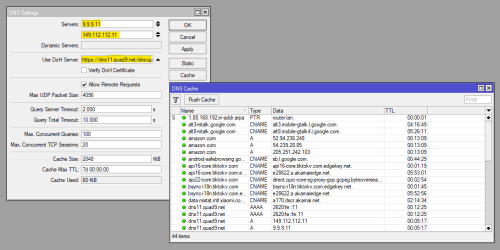 |
|
|
|
|
|
papyrous
|
Feb 14 2023, 03:09 PM
|
Getting Started

|
QUOTE(Jjuggler @ Feb 14 2023, 11:58 AM) I am not sure if this is the right thread to discuss about the hardware or internet gateway I am using. Personally, I am using Mikrotik and I've configured to use quad9 with doh at router level. nice. https://youtu.be/_jCKaHl3XM0check it out and see if it fits what you’re doing |
|
|
|
|
|
Jjuggler
|
Feb 15 2023, 12:21 AM
|
|
|
QUOTE(papyrous @ Feb 14 2023, 03:09 PM) nice. https://youtu.be/_jCKaHl3XM0check it out and see if it fits what you’re doing Unfortunately, I am using non-ARM architecture. But I will keep this in my mind if I invest for higher end Mikrotik router in the future. Container requirement: » Click to show Spoiler - click again to hide... « Container package is compatible with arm arm64 and x86 architectures. Using of remote-image (similar to docker pull) functionality requires a lot of free space in main memory, 16MB SPI flash boards may use pre-build images on USB or other disk media. 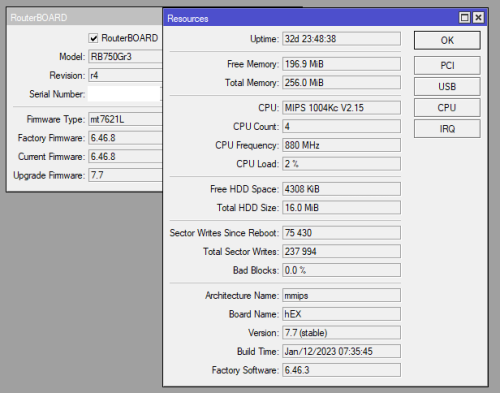 This post has been edited by Jjuggler: Feb 15 2023, 12:22 AM This post has been edited by Jjuggler: Feb 15 2023, 12:22 AM |
|
|
|
|
|
silvaco22
|
Feb 21 2023, 08:23 PM
|
Getting Started
|
Recently upgraded to AX-86U running on 800mbps unifi plan. Set up another mesh node with Ax3000. Here's the speed I'm getting for 2.4GHz and 5GHz respectively. Is this speed expected for 2.4GHz? 2.4GHz speedtest 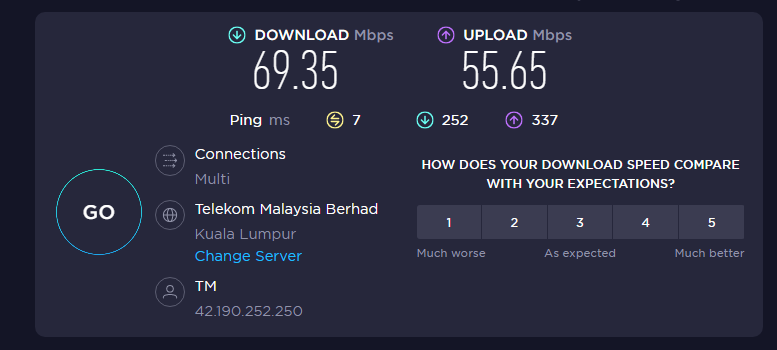 5GHz speedtest 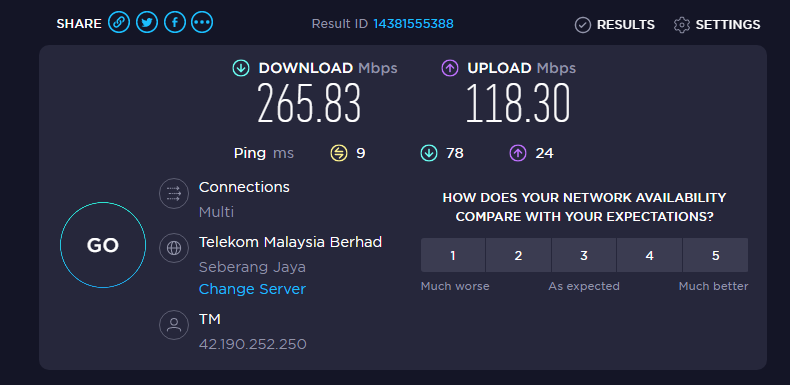 This post has been edited by silvaco22: Feb 21 2023, 08:26 PM This post has been edited by silvaco22: Feb 21 2023, 08:26 PM |
|
|
|
|
|
blacktubi
|
Feb 21 2023, 08:40 PM
|
-

|
QUOTE(silvaco22 @ Feb 21 2023, 08:23 PM) Recently upgraded to AX-86U running on 800mbps unifi plan. Set up another mesh node with Ax3000. Here's the speed I'm getting for 2.4GHz and 5GHz respectively. Is this speed expected for 2.4GHz? 2.4GHz speedtest 5GHz speedtest That's already pretty fast. I am staying in a rather low density condo and it's not even 50Mbps. 2.4GHz is almost unusable these days. |
|
|
|
|
|
silvaco22
|
Feb 21 2023, 08:41 PM
|
Getting Started
|
QUOTE(blacktubi @ Feb 21 2023, 08:40 PM) That's already pretty fast. I am staying in a rather low density condo and it's not even 50Mbps. 2.4GHz is almost unusable these days. What's your internet package? and what do you get for 5GHz? |
|
|
|
|
|
sHawTY
|
Feb 21 2023, 09:05 PM
|
|
|
QUOTE(silvaco22 @ Feb 21 2023, 08:23 PM) SNIP Those speeds you're getting when you're doing the testing, is your device connected to the main router or the node? If it's from the main router, that's quite slow If it's from the mesh node, then it's to be expected. The only way to improve the speed is by connecting the 2 routers using an Ethernet cable |
|
|
|
|
|
blacktubi
|
Feb 21 2023, 09:17 PM
|
-
|
QUOTE(silvaco22 @ Feb 21 2023, 08:41 PM) What's your internet package? and what do you get for 5GHz? I am using the TIME 1Gbps plan.  This is my Wi-Fi speed on my iPhone. Connected to the mesh node of my ZenWiFi XT12. The ZenWiFi XT12 is a monster. Since I paid for 1Gbps, I want to make sure I can use at least 80% of the speed. Edit: Also worth mentioning the congestion management algorithm of XT12 is superb. My loaded latency is =<25ms. This post has been edited by blacktubi: Feb 21 2023, 09:19 PM |
|
|
|
|
|
joeyrm
|
Feb 23 2023, 09:04 AM
|
Getting Started
|
@asusmy,
Any idea on when asus will release the 388 firmware for XD4 and AX1800 routers? Seems most of their Wifi 6 routers have already supported the latest firmware..
|
|
|
|
|
|
pull007
|
Feb 24 2023, 01:04 AM
|
Getting Started
|
QUOTE(blacktubi @ Feb 21 2023, 09:17 PM) I am using the TIME 1Gbps plan. This is my Wi-Fi speed on my iPhone. Connected to the mesh node of my ZenWiFi XT12. The ZenWiFi XT12 is a monster. Since I paid for 1Gbps, I want to make sure I can use at least 80% of the speed. Edit: Also worth mentioning the congestion management algorithm of XT12 is superb. My loaded latency is =<25ms. May I ask do you separate the 2.4GHz and 5GHz wifi and connected to 5GHz to get this speed? Do you enable QoS as well? How about channel bandwidth? Set at 20/40/80MHz This post has been edited by pull007: Feb 24 2023, 01:28 AM |
|
|
|
|
TSASUSmy
|
Feb 24 2023, 02:12 PM
|
|
|
QUOTE(joeyrm @ Feb 23 2023, 09:04 AM) @asusmy, Any idea on when asus will release the 388 firmware for XD4 and AX1800 routers? Seems most of their Wifi 6 routers have already supported the latest firmware.. Hi joeyrm, Just double check with the related person, it seen like there is no plan for AX1800 models at the moment. Certain AX3000 will also don't have 388 firmware. Most of the models that support will have 388 firmware available for download at our website. Thank you |
|
|
|
|
|
pull007
|
Feb 25 2023, 11:27 PM
|
Getting Started
|
Just want to update, after a hard reset of both of my asus xt12 routers, I get full speed now. Didn't know what happen last time. Probably didn't set up properly. Now I'm happy.  . No extra tweak of settings needed 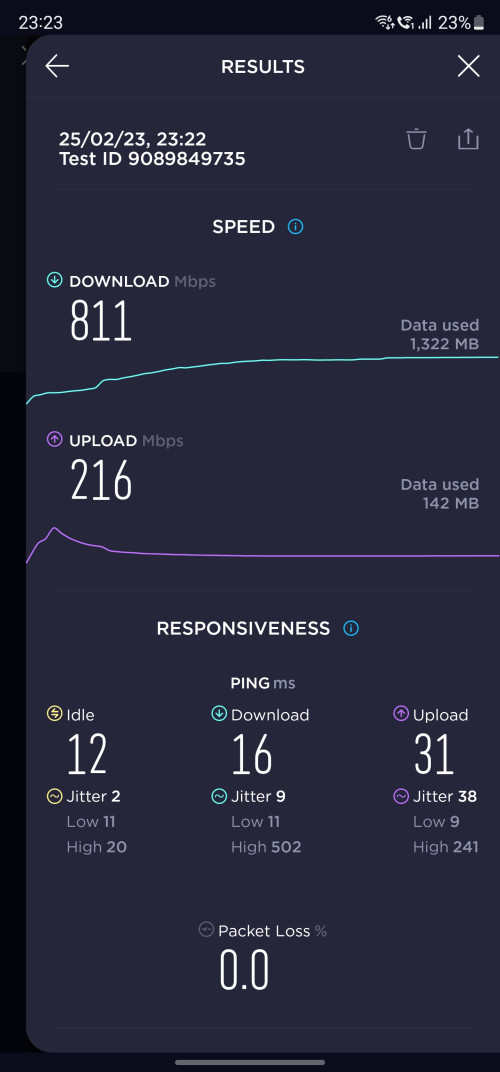 I'm subscribed to unifi 800Mbps This post has been edited by pull007: Feb 25 2023, 11:28 PM |
|
|
|
|
|
darude87
|
Feb 26 2023, 12:26 AM
|
|
|
hi guys, i just purchased an ax55, however I'm facing trouble to set it up for my unifi, I've tried most of the pppoe setting, but nothing seems to work, I've even requested a password reset from unifi and still no avail, any pointers what I've could set wrongly
|
|
|
|
|
|
NovaPrime
|
Feb 26 2023, 02:29 AM
|
New Member
|
QUOTE(darude87 @ Feb 26 2023, 12:26 AM) hi guys, i just purchased an ax55, however I'm facing trouble to set it up for my unifi, I've tried most of the pppoe setting, but nothing seems to work, I've even requested a password reset from unifi and still no avail, any pointers what I've could set wrongly Vlan 500 can refer this > https://www.youtube.com/watch?v=JzvBc-ddeNw |
|
|
|
|
|
darude87
|
Feb 26 2023, 12:43 PM
|
|
|
QUOTE(NovaPrime @ Feb 26 2023, 02:29 AM) thanks bro, got it resolved, fiddle whole night but couldn't figure it out |
|
|
|
|
|
blacktubi
|
Feb 26 2023, 02:07 PM
|
-
|
QUOTE(pull007 @ Feb 25 2023, 11:27 PM) Just want to update, after a hard reset of both of my asus xt12 routers, I get full speed now. Didn't know what happen last time. Probably didn't set up properly. Now I'm happy. . No extra tweak of settings needed I'm subscribed to unifi 800Mbps I’m running my XT12 on full factory default as well apart from my own username and password Figured that it works the best this way |
|
|
|
|
|
myrancid
|
Mar 11 2023, 10:56 AM
|
|
|
I updated firmware to the latest version last night, turn off before went to bed. This morning turn on again and no power at all. AC86U. Coincidence?
|
|
|
|
|
|
blacktubi
|
Mar 11 2023, 11:40 AM
|
-
|
QUOTE(myrancid @ Mar 11 2023, 10:56 AM) I updated firmware to the latest version last night, turn off before went to bed. This morning turn on again and no power at all. AC86U. Coincidence? Probably a power adapter failure if totally no power If you happen to have an ASUS laptop with a similar voltage power adapter, you can try to use it on the router and see whether it can be switched on |
|
|
|
|
|
myrancid
|
Mar 11 2023, 11:57 AM
|
|
|
QUOTE(blacktubi @ Mar 11 2023, 11:40 AM) Probably a power adapter failure if totally no power If you happen to have an ASUS laptop with a similar voltage power adapter, you can try to use it on the router and see whether it can be switched on Yes sir, totally no power. Unfortunately I don’t have similar power adapter to try. |
|
|
|
|
|
Chriss
|
Mar 15 2023, 01:24 AM
|
|
|
Someone from digi telling me asus rog gt ac5300 not supported & i yet to find it out because I'm still using their suck router. Anyone mind to share screenshot of your isp setting for digi fibre home?
Thanks in advance
|
|
|
|
|



 Quote
Quote





 0.0306sec
 0.68
0.68
 6 queries
 GZIP Disabled