Outline ·
[ Standard ] ·
Linear+
Home Networking ASUS Malaysia Networking User & Technical Support, Managed by ASUS Malaysia Representative
|
papyrous
|
 Dec 10 2021, 01:57 PM Dec 10 2021, 01:57 PM
|
Getting Started


|
QUOTE(stormaker @ Dec 10 2021, 01:09 PM) My expectation is to have smooth 4K streaming throughout the house with 3 to 5 devices at the same time. Budget below 2k. Currently subscribed to 100mbps, but potentially upgrade to 300mbps in near future. I tested streaming youtube 4k, takes on average 30mbps. 1080p is less than 10mbps. so if most of the time it’s just 1-2 devices streaming 4k, 100mbps is fine. to me using ac68u in mesh is enough. no future proofing here, but arguably it should last you quite a while before it needs to be upgraded again. |
|
|
|
|
|
papyrous
|
Dec 17 2021, 08:38 AM
|
Getting Started
|
QUOTE(failed.hashcheck @ Dec 16 2021, 10:47 PM) Embrace the Merlin  what's going on with them stuck in August and no more updates? |
|
|
|
|
|
papyrous
|
Jul 14 2022, 01:23 PM
|
Getting Started
|
QUOTE(Sylpheed @ Jul 14 2022, 01:18 PM) hi guys Question, i read that Asus XT12 supports Unifi. When Unifi Profile is loaded, which ethernet port behind is disabled for IPTV? Also, is there a way to disable IPTV as i don't use it. 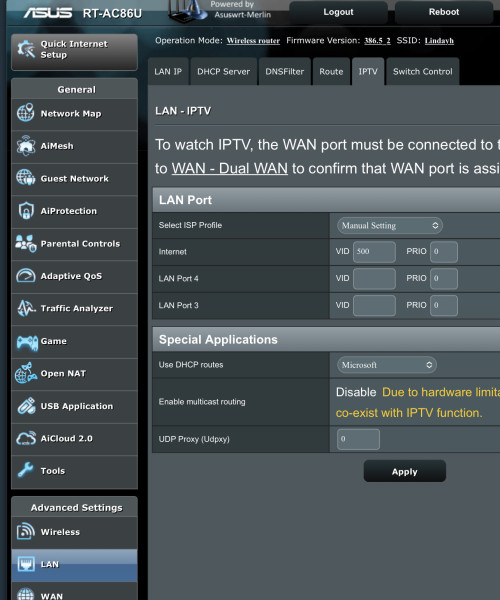 I’m using AC86U, but should be the same. go to LAN > IPTV > ISP set manual Internet VID = 500 and leave the rest blank. |
|
|
|
|
|
papyrous
|
Feb 13 2023, 05:53 PM
|
Getting Started
|
QUOTE(pcdsb @ Feb 9 2023, 12:20 PM) 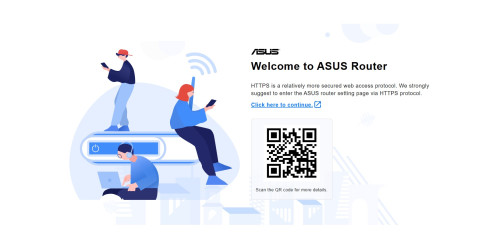 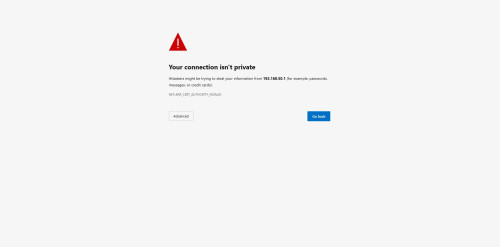 hi guy, i get this everytime when access to router setting page , this happen after i update to latest firmware. do can fix it ? you can switch to using http only. click Advanced and access anyway. once log in to router go to Administration > System > Local access config, set http. or from the app, Settings > System Settings > Access Configuration, set HTTP |
|
|
|
|
|
papyrous
|
Feb 14 2023, 08:28 AM
|
Getting Started
|
QUOTE(Jjuggler @ Feb 13 2023, 09:18 PM) First, I never used WTFast, so I have no comment on that. You may request to those who actually used the feature. Second, the most common plugin addons installed is Diversion (router-level adblock), Skynet (advance-firewall), uiDivStats (UI for diversion), uiScribe (advance logging), and spdMerlin (speedtest & bandwidth monitoring). Trust this helps. actually for most people adblocking is done easier with just using a DNS provider that incorporates adblock(same concept as Diversion) like https://dot.tiar.app/ and https://blahdns.com/ among others. and for AX router's IMO using Adguardhome is much better than diversion. |
|
|
|
|
|
papyrous
|
Feb 14 2023, 10:30 AM
|
Getting Started
|
QUOTE(Jjuggler @ Feb 14 2023, 09:42 AM) I believe Blahdns is a project by a student operating from his dorm. I've heard about this service provider, but never use it personally. I am using Quad9 dns of course with Malware blocking, DNSSEC Validation, ECS feature, enabled. I migrated from cloudlflare to nextdns to quad9. NextDNS was flexible, but prefer Quad9 more. One of the reason why I opt for Quad9 over NextDNS is because my pc always run on vpn enabled. Only my mobile devices access to the internet via wifi. So, I don't wish to waste RM79 for renewing my NextDNS subscription when I am using vpn 24/7. What is your view on the service you have used as highlighted above? Keen to hear your view. Thanks. they’re fine, for most users it covers a lot of ads. what hardware are you on? personally i’ll just run AdGuardhome. it supports syntax style blocking so you can have much smaller lists, for eg you can set to block *.ads.com and adguardhome will block all 1.ads.com, 2.ads.com.. and so on compared to the basic list where you need to actually list it all out. then beyond that you can set Adguardhome to query any dns servers as well on any protocols. unencrypted, Dns over https/TLS/Quic. |
|
|
|
|
|
papyrous
|
Feb 14 2023, 03:09 PM
|
Getting Started
|
QUOTE(Jjuggler @ Feb 14 2023, 11:58 AM) I am not sure if this is the right thread to discuss about the hardware or internet gateway I am using. Personally, I am using Mikrotik and I've configured to use quad9 with doh at router level. 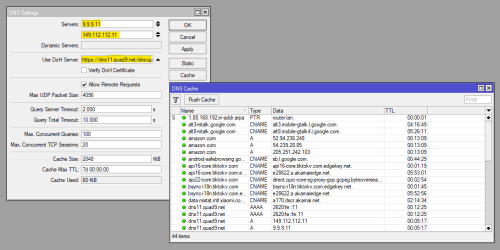 nice. https://youtu.be/_jCKaHl3XM0check it out and see if it fits what you’re doing |
|
|
|
|



 Quote
Quote
 0.0927sec
 0.94
0.94
 7 queries
 GZIP Disabled