Outline ·
[ Standard ] ·
Linear+
Home Networking ASUS Malaysia Networking User & Technical Support, Managed by ASUS Malaysia Representative
|
yongtjunkit
|
 Mar 3 2020, 01:19 PM Mar 3 2020, 01:19 PM
|

|
QUOTE(AV_2018 @ Mar 3 2020, 11:39 AM) He's using astro IPTV... Not just astro with Internet for VOD. So it's a complex set-up with both IPTV VLAN and Internet. Source: https://forum.lowyat.net/index.php?showtopi...post&p=95663659Yup, using Astro IPTV, cascading with lan to wan setup, Vlan tagging already taken care off by the maxis router(it currently does the Vlan tagging, bridging(probably the issue) and dialing PPPOE), I think he’s asking me to convert to lan to lan setup, disable DHCP on maxis router and transfer the PPPOE to the ASUS router |
|
|
|
|
|
AtMostFear
|
Mar 3 2020, 03:20 PM
|
|
|
I'm in the market to buy a router for my parents house. For a budget of RM850, my options are RT-AC86U or RT-AX3000 wifi 6.
House is a double storey bungalow, area about 17k cubic feet per floor. Router location already identified to be at center of the house.
My priority is coverage area & router reliability.
Based on Asus website, RT-AC86U is for Very large homes while RT-AX3000 is for Large homes only.
I've used AC-86U previously and have had overheat issue although I have cooling fans installed since day 1. Already replaced with new unit under warranty.
Other than this issue, RT-AC86U is superb. I'm leaning towards this but I need some feedback on RT-AX3000 for this case.
|
|
|
|
|
|
hongli.11.hongli
|
Mar 3 2020, 05:17 PM
|
Getting Started

|
QUOTE(yongtjunkit @ Feb 27 2020, 07:07 PM) ASUSmy, is there any plan for WPA 3 support on the RT-AC68U( I've already have devices supporting WPA 3)? And also any plan to patch WPA 2 for Kr00K? https://www.eset.com/int/kr00k/ I'm not too sure. But I guess WPA3 also related to router CPU. RT-AC68U is (consider) old. Time to upgrade to AX and use RT-AC68U as a AiMesh Node. |
|
|
|
|
|
firdausbhari
|
Mar 4 2020, 03:35 PM
|
|
|
QUOTE(hongli.11.hongli @ Mar 3 2020, 05:17 PM) I'm not too sure. But I guess WPA3 also related to router CPU. RT-AC68U is (consider) old. Time to upgrade to AX and use RT-AC68U as a AiMesh Node. Old but still powerful |
|
|
|
|
|
Skylinestar
|
Mar 4 2020, 05:29 PM
|
|
|
Do I update router by clicking "update now" (via that link shown in screenshot)? Or better download the firmware separately, then go to flash it? 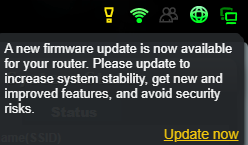 |
|
|
|
|
|
AV_2018
|
Mar 4 2020, 06:47 PM
|
|
|
QUOTE(Skylinestar @ Mar 4 2020, 05:29 PM) Do I update router by clicking "update now" (via that link shown in screenshot)? Or better download the firmware separately, then go to flash it? I've used that link to update. Also ever download from Asus site and upload. Nowadays I just hit update in the Asus router app on phone. All works. |
|
|
|
|
|
Skylinestar
|
Mar 4 2020, 07:13 PM
|
|
|
QUOTE(AV_2018 @ Mar 4 2020, 06:47 PM) I've used that link to update. Also ever download from Asus site and upload. Nowadays I just hit update in the Asus router app on phone. All works. Need to reset default after update? |
|
|
|
|
|
AV_2018
|
Mar 4 2020, 07:31 PM
|
|
|
QUOTE(Skylinestar @ Mar 4 2020, 07:13 PM) Need to reset default after update? These days I only reset when skipping multiple versions or updating major version (380 to 382 or 382 to 384 for example) or when there is an issue after updating or if the changelog asks to reset. Already updated a few minor versions without reset and no problem so far. This post has been edited by AV_2018: Mar 4 2020, 07:31 PM |
|
|
|
|
|
GreenGuy6767
|
Mar 4 2020, 10:02 PM
|
New Member
|
I changed a new Asus RT-AC59U router recently , but now my unifi tv is constantly lagging after changed it from dlink dir 850L . How to solve this problem ?? now i feel like dir 850 L better than asus new router
|
|
|
|
|
TSASUSmy
|
Mar 5 2020, 09:11 AM
|
|
|
QUOTE(GreenGuy6767 @ Mar 4 2020, 10:02 PM) I changed a new Asus RT-AC59U router recently , but now my unifi tv is constantly lagging after changed it from dlink dir 850L . How to solve this problem ?? now i feel like dir 850 L better than asus new router Hi GreenGuy6767, Have you try to update the firmware to the latest and test again? You can download the latest version from the link below. https://www.asus.com/my/Networking/RT-AC59U...pDesk_Download/Thank you |
|
|
|
|
|
ericwidaz
|
Mar 5 2020, 12:30 PM
|
Getting Started
|
Hi there,
I've just recently purchased a Zenwifi set. After setting it up, I was impressed with the performance and have upgraded the firmware to the latest one.
However, now I noticed that almost all my devices are connected to the node/unit which is further from the main hub/unit.
For example, the main unit will be 10 feet from me and the node is like 18 feet away from me. Yet, the device will connect to the node instead of the main unit. Even my TV which is less than 2 feet away from the main unit will connect to the node which is 15 feet away.
Is that normal?
Thank you.
|
|
|
|
|
|
negab71740 P
|
Mar 5 2020, 12:41 PM
|
New Member
|
Thanks for telling this to people. Also those need any sort of help with Arlo login my account, Arlo Netgear Login, they are always take help from us. |
|
|
|
|
|
TSASUSmy
|
Mar 5 2020, 01:48 PM
|
|
|
QUOTE(ericwidaz @ Mar 5 2020, 12:30 PM) Hi there, I've just recently purchased a Zenwifi set. After setting it up, I was impressed with the performance and have upgraded the firmware to the latest one. However, now I noticed that almost all my devices are connected to the node/unit which is further from the main hub/unit. For example, the main unit will be 10 feet from me and the node is like 18 feet away from me. Yet, the device will connect to the node instead of the main unit. Even my TV which is less than 2 feet away from the main unit will connect to the node which is 15 feet away. Is that normal? Thank you. Hi ericwidaz, Between these 2 units of ZenWiFi, which is nearer to the entrance of your house? Thank you |
|
|
|
|
|
ericwidaz
|
Mar 5 2020, 01:57 PM
|
Getting Started
|
QUOTE(ASUSmy @ Mar 5 2020, 01:48 PM) Hi ericwidaz, Between these 2 units of ZenWiFi, which is nearer to the entrance of your house? Thank you The main unit. |
|
|
|
|
|
TSASUSmy
|
Mar 5 2020, 02:12 PM
|
|
|
QUOTE(ericwidaz @ Mar 5 2020, 01:57 PM) Hi ericwidaz, When you move around your house and go to your room, the second unit will be nearer? You can use the ASUS Router APP to check which unit are you connect, and in order for your devices to disconnect and connect to the nearest unit, the signal must drop until certain dBm. The default dBm for the devices to disconnect from the ZenWiFi is -70dBm. If you are using Android phone, you can use app like the WiFi Analyzer to check the WiFi signal strength. When you mention "main unit will be 10 feet from me and the node is like 18 feet away from me", maybe is because the signal strength are still strong from the node. Thank you |
|
|
|
|
|
ericwidaz
|
Mar 5 2020, 03:40 PM
|
Getting Started
|
QUOTE(ASUSmy @ Mar 5 2020, 02:12 PM) Hi ericwidaz, When you move around your house and go to your room, the second unit will be nearer? You can use the ASUS Router APP to check which unit are you connect, and in order for your devices to disconnect and connect to the nearest unit, the signal must drop until certain dBm. The default dBm for the devices to disconnect from the ZenWiFi is -70dBm. If you are using Android phone, you can use app like the WiFi Analyzer to check the WiFi signal strength. When you mention "main unit will be 10 feet from me and the node is like 18 feet away from me", maybe is because the signal strength are still strong from the node. Thank you Thanks for the explanation. Usually, all the devices connected to the node will be about -56dBm. But what's interesting is that a device which is stagnant in place, let's say a TV or a security camera, will connect to the node, rather than the main unit which is relatively closer. As long as it does not congest the node and slow things down, I'm happy with the Zenwifi. |
|
|
|
|
|
blacktubi
|
Mar 5 2020, 11:20 PM
|
-

|
New firmware for ASUS RT-AX3000 with Broadcom security fix. Version 3.0.0.4.384.8563 2020/03/0466.62 MBytes ASUS RT-AX3000 Firmware version 3.0.0.4.384.8563 - Fix bandwidth limiter abnormal. - Fix setup wizard GUI bugs. - Supports 2.4G/5GHz uplink OFDMA and 802.11ax MUMIMO. - Security Fix: CVE-2019-15126 https://dlcdnets.asus.com/pub/ASUS/wireless...30043848563.zip |
|
|
|
|
|
aa123aa
|
Mar 6 2020, 06:50 PM
|
Getting Started
|
Would like to seek for some advice on which to choose. Was looking around for a new router. Ac 86u vs ax3000. Both look the same apart from WiFi 6 only. Notice that ax is slightly cheaper also compare to 86u. TQ.
|
|
|
|
|
|
sHawTY
|
Mar 6 2020, 07:44 PM
|
|
|
QUOTE(aa123aa @ Mar 6 2020, 06:50 PM) Would like to seek for some advice on which to choose. Was looking around for a new router. Ac 86u vs ax3000. Both look the same apart from WiFi 6 only. Notice that ax is slightly cheaper also compare to 86u. TQ. AC86U supports MIMO 3x3 & it uses dual core 1.8GHz AX3000 only supports MIMO 2x2 & it uses tri-core 1.5GHz Not many devices nowadays has 3x3. Even high end gaming laptops only supports 2x2 so you can go ahead with the AX3000 |
|
|
|
|
|
MonsterJ9
|
Mar 6 2020, 08:02 PM
|
Getting Started
|
I’m using unifi 100mbps.
I want a stable router, for PS4 and 3 mobile phones at a time of connection on WiFi.
I’m planning to buy the entry level AX56U, is this router ok or AX3000 much better?
This post has been edited by MonsterJ9: Mar 6 2020, 08:02 PM
|
|
|
|
|



 Quote
Quote


 0.0311sec
 0.74
0.74
 6 queries
 GZIP Disabled