Welcome Guest ( Log In | Register )

826 Pages « < 548 549 550 551 552 > » Bottom

Outline · [ Standard ] · Linear+

Home Networking ASUS Malaysia Networking User & Technical Support, Managed by ASUS Malaysia Representative

views
     
yongtjunkit
post Feb 27 2020, 07:07 PM

Look at all my stars!!
*******
Senior Member
2,516 posts

Joined: Mar 2016
ASUSmy, is there any plan for WPA 3 support on the RT-AC68U( I've already have devices supporting WPA 3)?


And also any plan to patch WPA 2 for Kr00K?

https://www.eset.com/int/kr00k/

This post has been edited by yongtjunkit: Feb 27 2020, 07:19 PM
AV_2018
post Feb 27 2020, 07:31 PM

Casual
***
Junior Member
451 posts

Joined: Apr 2018
QUOTE(yongtjunkit @ Feb 27 2020, 07:07 PM)
ASUSmy, is there any plan for WPA 3 support on the RT-AC68U( I've already have devices supporting WPA 3)?
And also any plan to patch WPA 2 for Kr00K?

https://www.eset.com/int/kr00k/
*
ASUSmy I want to know too. I'm also using RT-AC68U.
blacktubi
post Feb 27 2020, 08:14 PM

-
Group Icon
Elite
8,415 posts

Joined: Jul 2008

QUOTE(AV_2018 @ Feb 27 2020, 07:31 PM)
ASUSmy I want to know too. I'm also using RT-AC68U.
*
WPA3 is it is not backwards compatible. Many devices you own now are not going to get WPA3 update. I am speaking of old Android phones, IoT devices and etc. Running WPA3+WPA2 mixed mode don't give you more security as well.

This new vulnerability is really minor and it only affect Broadcom routers. Knowing ASUS, they will be patched soon.

Details: https://nvd.nist.gov/vuln/detail/CVE-2019-15126

TLDR: Minor vulnerability, attackers won't gain access to your network. Minor packet leakage when disassoctiation is triggered. Impractical to be weaponized for malicious use.
AV_2018
post Feb 27 2020, 09:22 PM

Casual
***
Junior Member
451 posts

Joined: Apr 2018
QUOTE(blacktubi @ Feb 27 2020, 08:14 PM)
WPA3 is it is not backwards compatible. Many devices you own now are not going to get WPA3 update. I am speaking of old Android phones, IoT devices and etc. Running WPA3+WPA2 mixed mode don't give you more security as well.

This new vulnerability is really minor and it only affect Broadcom routers. Knowing ASUS, they will be patched soon.

Details: https://nvd.nist.gov/vuln/detail/CVE-2019-15126

TLDR: Minor vulnerability, attackers won't gain access to your network. Minor packet leakage when disassoctiation is triggered. Impractical to be weaponized for malicious use.
*
All the phones in my house are probably gonna be Android 10 later this year. I'm going to use forced WPA3 if the router is going to support it. No more old Android phones here, other devices are all cabled except a printer which I don't really need to connect to network.

EDIT: But even in transition mode, there's still some benefit for WPA3 devices according to wi-fi.org
QUOTE
In addition, even after this attack is successful and the attacker determines the password, the clients that connect with WPA3-Personal will still benefit from the forward-secrecy that SAE affords—that is, the traffic encryption keys will still remain unknown even if the password is known.


This post has been edited by AV_2018: Feb 27 2020, 09:58 PM

yongtjunkit
post Mar 1 2020, 03:26 PM

Look at all my stars!!
*******
Senior Member
2,516 posts

Joined: Mar 2016
Hi, how do I set up remote connection for my Asus RT-AC 68U?

tried by flipping the switch on the asus router app but still can't remote access, already have public IP, using Asus ddns

This post has been edited by yongtjunkit: Mar 1 2020, 03:27 PM
TSASUSmy
post Mar 2 2020, 09:24 AM

Look at all my stars!!
*******
Senior Member
2,319 posts

Joined: Mar 2010
QUOTE(yongtjunkit @ Mar 1 2020, 03:26 PM)
Hi, how do I set up remote connection for my Asus RT-AC 68U?

tried by flipping the switch on the asus router app but still can't remote access, already have public IP, using Asus ddns
*
Hi yongtjunkit,

Have you enable web access from WAN after you have created the DDNS?

https://www.youtube.com/watch?v=7ECnW86tHCU

Thank you
yongtjunkit
post Mar 2 2020, 09:41 AM

Look at all my stars!!
*******
Senior Member
2,516 posts

Joined: Mar 2016
QUOTE(ASUSmy @ Mar 2 2020, 09:24 AM)
Hi yongtjunkit,

Have you enable web access from WAN after you have created the DDNS?

https://www.youtube.com/watch?v=7ECnW86tHCU

Thank you
*
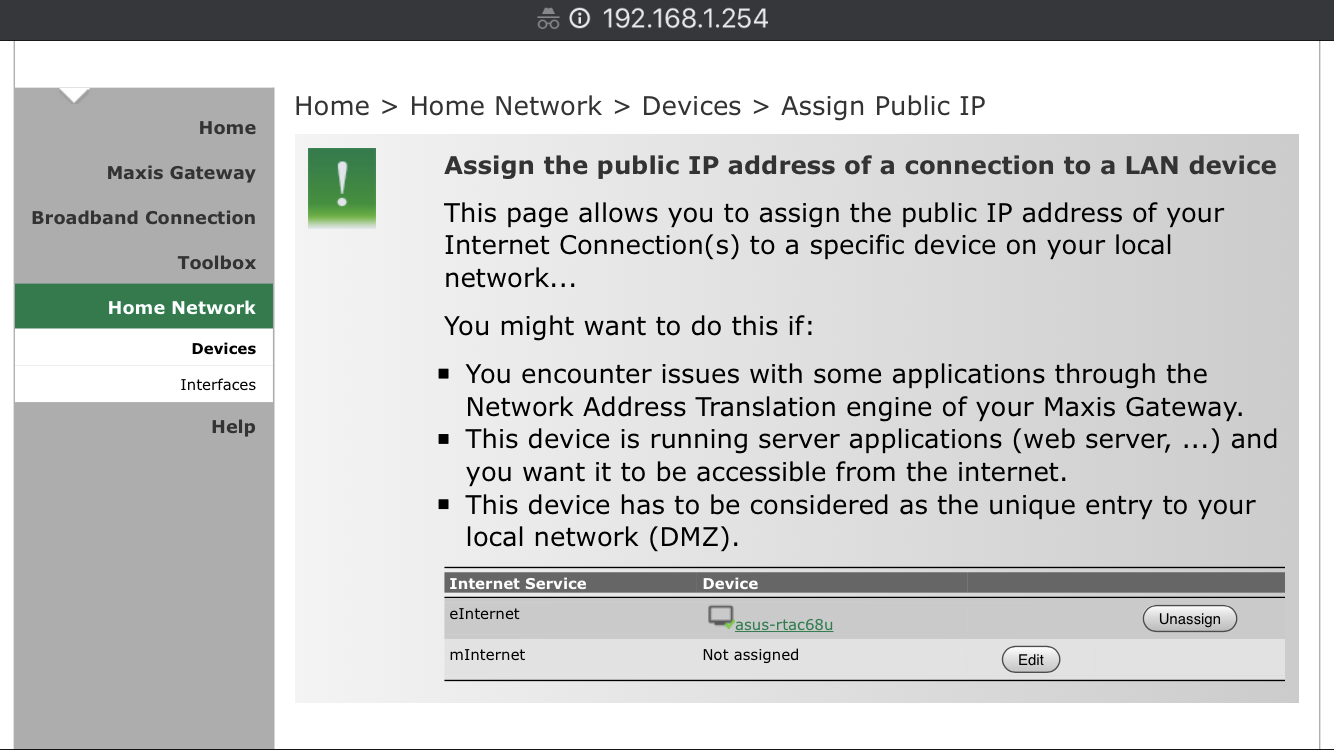
Yup, still doesn't work, I'm cascading router but I've assigned Public IP to it and I think DMZ as well, AIcloud also not working as well

user posted image

This post has been edited by yongtjunkit: Mar 2 2020, 09:47 AM
TSASUSmy
post Mar 2 2020, 09:56 AM

Look at all my stars!!
*******
Senior Member
2,319 posts

Joined: Mar 2010
QUOTE(yongtjunkit @ Mar 2 2020, 09:41 AM)
Yup, still doesn't work, I'm cascading router but I've assigned Public IP to it and I think DMZ as well, AIcloud also not working as well

user posted image
*
Hi yongtjunkit,

From the look of it, the ASUS router is not the main router?

If yes, the DDNS won't be able to work.

Thank you
yongtjunkit
post Mar 2 2020, 10:06 AM

Look at all my stars!!
*******
Senior Member
2,516 posts

Joined: Mar 2016
QUOTE(ASUSmy @ Mar 2 2020, 09:56 AM)
Hi yongtjunkit,

From the look of it, the ASUS router is not the main router?

If yes, the DDNS won't be able to work.

Thank you
*
Nope, basically the maxis router is the one that dials the PPPOE and the Vlans
aa123aa
post Mar 2 2020, 10:08 AM

Getting Started
**
Junior Member
180 posts

Joined: Mar 2015
if set up asus ac 86 mesh using the ethernet cable from the primary router, are we still able to use to remaining lan port as as normal on the "node router" (not the primary router) as there is 4 port for each router? will the speed be affected or it will have the same speed as using lan from the same primary router? thanks.
TSASUSmy
post Mar 2 2020, 10:15 AM

Look at all my stars!!
*******
Senior Member
2,319 posts

Joined: Mar 2010
QUOTE(yongtjunkit @ Mar 2 2020, 10:06 AM)
Nope, basically the maxis router is the one that dials the PPPOE and the Vlans
*
The ASUS DDNS only work only if the ASUS router is the main router.

You can use other DDNS service on the Maxis router and port forward to the ASUS router if you want to access it remotely.

Or change the ASUS router as the main router.

Thank you
TSASUSmy
post Mar 2 2020, 10:19 AM

Look at all my stars!!
*******
Senior Member
2,319 posts

Joined: Mar 2010
QUOTE(aa123aa @ Mar 2 2020, 10:08 AM)
if set up asus ac 86 mesh using the ethernet cable from the primary router, are we still able to use to remaining lan port as as normal on the "node router" (not the primary router) as there is 4 port for each router? will the speed be affected or it will have the same speed as using lan from the same primary router? thanks.
*
Hi aa123aa,

You will still be able to use the 4 LAN ports on the AiMesh node.

As for the speed, I not sure how far and what cable you used, it will always better than using WiFi.

Thank you
junclj
post Mar 2 2020, 10:31 AM

Look at all my stars!!
*******
Senior Member
2,348 posts

Joined: Apr 2008


QUOTE(yongtjunkit @ Mar 2 2020, 09:41 AM)
Yup, still doesn't work, I'm cascading router but I've assigned Public IP to it and I think DMZ as well, AIcloud also not working as well

user posted image
*
Why don't you just move your pppoe user and password from the Maxis stock router to your Asus router? Meaning that, you need to make the Asus router to become as your main router in order to use the Asus DDNS and AiCloud.
yongtjunkit
post Mar 2 2020, 10:39 AM

Look at all my stars!!
*******
Senior Member
2,516 posts

Joined: Mar 2016
QUOTE(ASUSmy @ Mar 2 2020, 10:15 AM)
The ASUS DDNS only work only if the ASUS router is the main router.

You can use other DDNS service on the Maxis router and port forward to the ASUS router if you want to access it remotely.

Or change the ASUS router as the main router.

Thank you
*
The port forwarding should be done on the asus router or the maxis router?
yongtjunkit
post Mar 2 2020, 10:41 AM

Look at all my stars!!
*******
Senior Member
2,516 posts

Joined: Mar 2016
QUOTE(junclj @ Mar 2 2020, 10:31 AM)
Why don't you just move your pppoe user and password from the Maxis stock router to your Asus router? Meaning that, you need to make the Asus router to become as your main router in order to use the Asus DDNS and AiCloud.
*
If that's the case will the Astro decoder see the Asus router to get internet( I'm using Astro IPTV)?

currently, both of them are set as router, 2 different DHCP sever, asus one is 192.168.2.xx, maxis one is 192.168.1.xx

This post has been edited by yongtjunkit: Mar 2 2020, 10:45 AM
sHawTY
post Mar 2 2020, 12:20 PM

Frequent Reporter
********
All Stars
14,909 posts

Joined: Jul 2005

ASUSmy I see a lot of sellers in Lazada & Shopee stating the imported ASUS routers that they are selling comes with "International Warranty" which we all know it isn't true
What can we do about these sellers to avoid confusion for all future buyers?

How do we report it?
TSASUSmy
post Mar 2 2020, 02:04 PM

Look at all my stars!!
*******
Senior Member
2,319 posts

Joined: Mar 2010
QUOTE(sHawTY @ Mar 2 2020, 12:20 PM)
ASUSmy I see a lot of sellers in Lazada & Shopee stating the imported ASUS routers that they are selling comes with "International Warranty" which we all know it isn't true
What can we do about these sellers to avoid confusion for all future buyers?

How do we report it?
*
Hi sHawTY,

You may use the feedback feature if it is from Lazada.

https://www.lazada.com.my/helpcenter/How-do...t-a-Seller.html


For Shopee it is the same.

https://help.shopee.com.my/my/s/article/How...t-1542971630174

Thank you
junclj
post Mar 3 2020, 10:01 AM

Look at all my stars!!
*******
Senior Member
2,348 posts

Joined: Apr 2008


QUOTE(yongtjunkit @ Mar 2 2020, 10:41 AM)
If that's the case will the Astro decoder see the Asus router to get internet( I'm using Astro IPTV)?

currently, both of them are set as router, 2 different DHCP sever, asus one is 192.168.2.xx, maxis one is 192.168.1.xx
*
The astro decoder doesn't care about which router that you are using. If you are worried about this, you can change your asus router to 192.168.1.1 and maxis router change to 192.168.1.2. It's doesn't matter.
yongtjunkit
post Mar 3 2020, 11:29 AM

Look at all my stars!!
*******
Senior Member
2,516 posts

Joined: Mar 2016
QUOTE(junclj @ Mar 3 2020, 10:01 AM)
The astro decoder doesn't care about which router that you are using. If you are worried about this, you can change your asus router to 192.168.1.1 and maxis router change to 192.168.1.2. It's doesn't matter.
*
I'm guessing you mean switching from Lan to Wan cascading router setup to Lan to Lan setup, Asus router dial PPPOE, Disable DHCP on maxis router?

Am I correct?
AV_2018
post Mar 3 2020, 11:39 AM

Casual
***
Junior Member
451 posts

Joined: Apr 2018
QUOTE(junclj @ Mar 3 2020, 10:01 AM)
The astro decoder doesn't care about which router that you are using. If you are worried about this, you can change your asus router to 192.168.1.1 and maxis router change to 192.168.1.2. It's doesn't matter.
*
He's using astro IPTV... Not just astro with Internet for VOD. So it's a complex set-up with both IPTV VLAN and Internet.

Source: https://forum.lowyat.net/index.php?showtopi...post&p=95663659

826 Pages « < 548 549 550 551 552 > » Top
 

Change to:
| Lo-Fi Version
0.0303sec    0.63    6 queries    GZIP Disabled
Time is now: 13th December 2025 - 01:30 PM