

QUOTE(heidarren @ Jan 21 2021, 09:24 PM)
U got the M1 MacBook d? Rich....🤩🤩

I got the Mac Mini, cheap, relatively speaking lah.Enterprise Networking Mikrotik Routers (RouterBoard & RouterOS), User and owner discussion group
|
|
 Jan 21 2021, 10:05 PM Jan 21 2021, 10:05 PM
Show posts by this member only | IPv6 | Post
#2241
|
 
All Stars
11,459 posts Joined: Oct 2007 From: KL  
|
QUOTE(heidarren @ Jan 21 2021, 09:24 PM) U got the M1 MacBook d? Rich....🤩🤩 I got the Mac Mini, cheap, relatively speaking lah. |
|
|
|
|
|
Jan 23 2021, 05:39 PM
|
|
All Stars
11,459 posts Joined: Oct 2007 From: KL
|
Not sure if this will interest anyone but winbox64 is running fine under Windows 10 arm64. Tested on MacOS 11.1 Mac Mini M1.
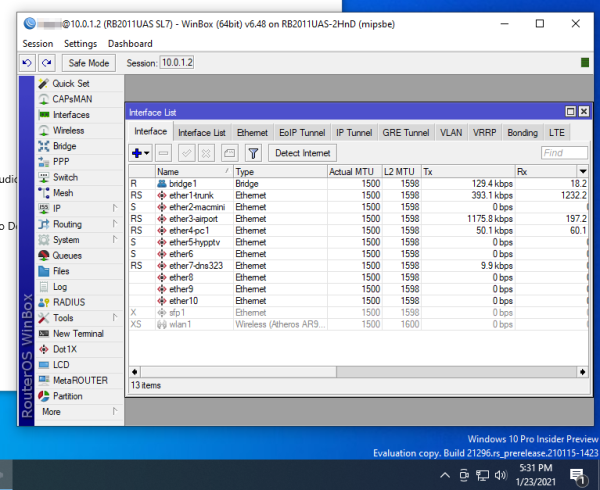 Win10 needs to be updated to latest build for x86-64 emulation. |
|
|
Jan 25 2021, 10:22 PM
Show posts by this member only | IPv6 | Post
#2243
|

Junior Member
612 posts Joined: Apr 2005 From: http://127.0.0.1:80/announce 
|
A friend gave me his usb fan (1200rpm) quite big 12cm
Will put my hAP aC2 on it to cool it down.. shud i use the hAP aC2 usb or separate usb? |
|
|
Jan 26 2021, 03:25 AM
Show posts by this member only | IPv6 | Post
#2244
|

Junior Member
248 posts Joined: Aug 2018
|
QUOTE(ahlong @ Jan 25 2021, 10:22 PM) A friend gave me his usb fan (1200rpm) quite big 12cm Why don’t u try to update to latest stable software and firmware, then set cpu frequency to auto and see if the heat reduce or not, it will drop to 400MHz+ for most of the time, less power consumed and less heat.Will put my hAP aC2 on it to cool it down.. shud i use the hAP aC2 usb or separate usb? IPQ4018 isn’t high performance cpu, I don’t think a fan will get u any benefit but only cause more dust, not a good move I must say. |
|
|
Jan 30 2021, 09:35 AM
|
|
Junior Member
19 posts Joined: Oct 2004 From: Bangi
|
Hi. I'm currently running a hAP AC2 with unifi, and I've noticed that multicast (IPTV) packets are "bleeding" over to all my LAN ports
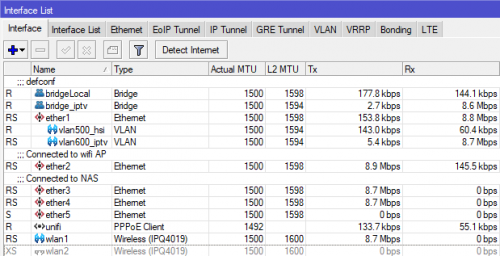 Ether2, 3 & 4 are broadcasting the multicast packets even though they are on a separate bridge 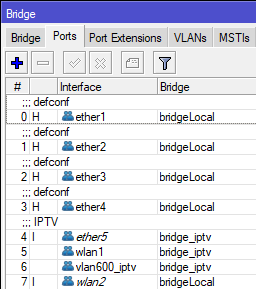 (bridge_iptv connects to ether5 and wlan1, while other ports are on bridgeLocal) Is this a configuration issue? Any way to isolate the packets to only bridge_iptv? Thanks so much if anyone can help! |
|
|
Jan 30 2021, 03:24 PM
Show posts by this member only | IPv6 | Post
#2246
|

Junior Member
148 posts Joined: Apr 2007
|
QUOTE(murks @ Jan 30 2021, 09:35 AM) Hi. I'm currently running a hAP AC2 with unifi, and I've noticed that multicast (IPTV) packets are "bleeding" over to all my LAN ports If you don't mind me asking, why did you put wlan1 in the same bridge as bridge_iptv?Ether2, 3 & 4 are broadcasting the multicast packets even though they are on a separate bridge (bridge_iptv connects to ether5 and wlan1, while other ports are on bridgeLocal) Is this a configuration issue? Any way to isolate the packets to only bridge_iptv? Thanks so much if anyone can help! |
|
|
|
|
|
Jan 30 2021, 03:50 PM
|
|
Junior Member
19 posts Joined: Oct 2004 From: Bangi
|
QUOTE(Deslack @ Jan 30 2021, 03:24 PM) If you don't mind me asking, why did you put wlan1 in the same bridge as bridge_iptv? I'm using wlan1 to wirelessly connect IPTV to my hyypTV set-top box. Works pretty well 😊 |
|
|
Jan 30 2021, 05:13 PM
|
|
All Stars
11,459 posts Joined: Oct 2007 From: KL
|
QUOTE(murks @ Jan 30 2021, 09:35 AM) Hi. I'm currently running a hAP AC2 with unifi, and I've noticed that multicast (IPTV) packets are "bleeding" over to all my LAN ports Do you have IGMP snooping enabled on your iptv bridge? Try disabling it. What version RouterOS are you running? I remember having a similar problem with one particular version of ROS but I forgot which.... This post has been edited by soonwai: Jan 30 2021, 05:15 PM murks liked this post
|
|
|
Jan 30 2021, 08:58 PM
|
|
Junior Member
19 posts Joined: Oct 2004 From: Bangi
|
QUOTE(soonwai @ Jan 30 2021, 05:13 PM) Do you have IGMP snooping enabled on your iptv bridge? Try disabling it. What version RouterOS are you running? I remember having a similar problem with one particular version of ROS but I forgot which. Thanks, soonwai! Managed to fix it  IGMP Snooping was disabled for bridge_iptv, but it was also disabled for bridgeLocal. When I enabled it for bridgeLocal, it stopped the multicast packets from being transmitted 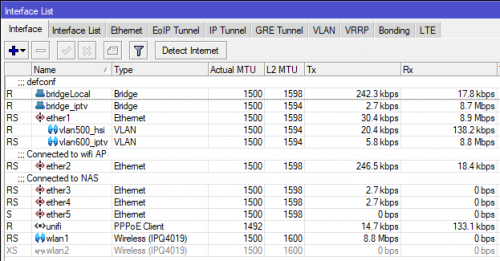 |
|
|
Jan 30 2021, 11:33 PM
|
 
Elite
4,541 posts Joined: Jan 2003 From: BSRPPG51 Access Concentrator
|
Frankly speaking, using a separate bridge for Unifi IPTV is already an obsolete approach since routerOS 6.41.
https://wiki.mikrotik.com/wiki/Manual:Bridge_VLAN_Table |
|
|
Jan 31 2021, 07:35 AM
|
|
Junior Member
19 posts Joined: Oct 2004 From: Bangi
|
QUOTE(asellus @ Jan 30 2021, 11:33 PM) Frankly speaking, using a separate bridge for Unifi IPTV is already an obsolete approach since routerOS 6.41. Thanks for the advice. I read the link, and kinda understand it in theory, but will need to play around to see how it can workhttps://wiki.mikrotik.com/wiki/Manual:Bridge_VLAN_Table |
|
|
Feb 2 2021, 02:17 AM
|
|
All Stars
11,459 posts Joined: Oct 2007 From: KL
|
QUOTE(murks @ Jan 31 2021, 07:35 AM) Thanks for the advice. I read the link, and kinda understand it in theory, but will need to play around to see how it can work Here's a real life example from my hAP AC2. Do note that I'm not 100% sure if this is the correct way to do it but it works. Any comments or corrections highly appreciated.• vlan50 is my LAN. • ether2-trunk is the trunk for both vlan600 (hypptv) and vlan50 (LAN). It goes to another Mikrotik downstairs where the STB is. For education purposes, the router downstairs uses the switch chip to handle the VLANs instead of bridge vlans. CODE /interface bridge port add bridge=bridge1 interface=ether1-wan1 add bridge=bridge1 interface=ether2-trunk1 add bridge=bridge1 interface=ether3 pvid=50 add bridge=bridge1 interface=ether4 pvid=50 add bridge=bridge1 interface=ether5 pvid=50 add bridge=bridge1 interface=wlan1 pvid=50 add bridge=bridge1 interface=wlan2 pvid=50 /interface bridge vlan add bridge=bridge1 tagged=ether2-trunk1,bridge1 untagged=ether3,ether4,ether5 vlan-ids=50 add bridge=bridge1 tagged=ether1-wan1,ether2-trunk1,bridge1 vlan-ids=600 This post has been edited by soonwai: Feb 2 2021, 02:19 AM |
|
|
Feb 3 2021, 01:57 AM
Show posts by this member only | IPv6 | Post
#2253
|
|
All Stars
11,459 posts Joined: Oct 2007 From: KL
|
winbox64 works great with Crossover 20 and Mac mini M1 macOS 11.2. This is probably the easiest way to get winbox running on Apple silicon. However Crossover is not free.
Will test with WINE later. This post has been edited by soonwai: Feb 3 2021, 01:59 AM |
|
|
|
|
|
Feb 4 2021, 06:11 PM
Show posts by this member only | IPv6 | Post
#2254
|
|
All Stars
11,459 posts Joined: Oct 2007 From: KL
|
Synchroweb currently having CNY promo. eg: hAC ac2 RM270. Check their FB.
|
|
|
Feb 4 2021, 06:54 PM
|
|
Senior Member
1,865 posts Joined: Jan 2003 From: XBOX Live
|
my 951G-2HnD seems to be rebooting itself pretty frequently lately... just wondering is it a symptom of "times up" for it ?
 |
|
|
Feb 4 2021, 11:08 PM
|

Senior Member
4,038 posts Joined: Aug 2005 From: Earth 
|
QUOTE(calvin @ Feb 4 2021, 06:54 PM) my 951G-2HnD seems to be rebooting itself pretty frequently lately... just wondering is it a symptom of "times up" for it ? Try update to latest firmware? |
|
|
Feb 5 2021, 01:58 AM
|
|
Senior Member
1,865 posts Joined: Jan 2003 From: XBOX Live
|
QUOTE(MX510 @ Feb 4 2021, 11:08 PM) Try update to latest firmware? already on latest available RouterOS and firmware |
|
|
Feb 5 2021, 11:21 AM
|

Junior Member
612 posts Joined: Mar 2008
|
QUOTE(calvin @ Feb 4 2021, 06:54 PM) my 951G-2HnD seems to be rebooting itself pretty frequently lately... just wondering is it a symptom of "times up" for it ? try replace your power adapter. Or try power it on by using PoE. |
|
|
Feb 5 2021, 11:34 AM
|
|
Junior Member
612 posts Joined: Mar 2008
|
QUOTE(soonwai @ Feb 4 2021, 06:11 PM) Synchroweb currently having CNY promo. eg: hAC ac2 RM270. Check their FB. https://ecommerce.synchroweb.com/mikrotik-m...ence-LTE6%20kitAudience LTE6 also got 60% discount lol. Bought last time rm1.2k first time got out this model.  |
|
|
Feb 5 2021, 11:39 AM
|

Junior Member
477 posts Joined: Jan 2003 From: Seri Kembangan
|
QUOTE(Gaara92 @ Feb 5 2021, 11:34 AM) https://ecommerce.synchroweb.com/mikrotik-m...ence-LTE6%20kit Hey! I didn't realise Hap ac3 (non-LTE) has arrived in Malaysia. I kept checking Shopee but all I found were Indonesian resellers.Audience LTE6 also got 60% discount lol. Bought last time rm1.2k first time got out this model. |
| Change to: |  0.0287sec 0.0287sec
 0.32 0.32
 6 queries 6 queries
 GZIP Disabled GZIP Disabled
Time is now: 22nd December 2025 - 02:20 AM |
 Quote
Quote