Welcome Guest ( Log In | Register )

Outline · [ Standard ] · Linear+

Enterprise Networking Mikrotik Routers (RouterBoard & RouterOS), User and owner discussion group

views
     
heidarren
post Aug 6 2019, 09:07 PM

Getting Started
**
Junior Member
248 posts

Joined: Aug 2018
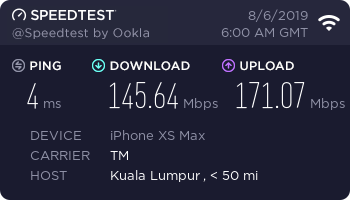
Just got an hAp ac2, updated both RouterOS and Firmware to 6.45.3, the Wi-Fi seems bad for phones out of the box, slow and unstable, finding a hard time to reach 200mbps, and disconnecting my devices every few mins.

user posted image


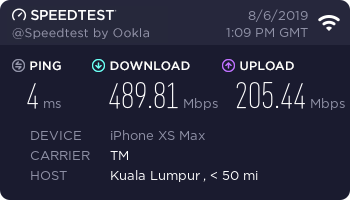
After a day of tuning it, now it become fast and stable for daily use, the coverage is very good, ping is one of the lowest of all the routers I own, no more disconnecting issue, very happy for the result!

Tested with my XS Max, Wi-Fi channel 52, region Malaysia, 30dBm

user posted image

This post has been edited by heidarren: Aug 6 2019, 09:10 PM
heidarren
post Aug 30 2019, 11:56 PM

Getting Started
**
Junior Member
248 posts

Joined: Aug 2018
QUOTE(soonwai @ Aug 30 2019, 09:55 PM)
Apple products, by design, only uses 20Mhz channel width at 2.4Ghz.
*
Yup, many phones only uses 20MHz even if the router is broadcasting 40MHz, due to it's never advised to use 40MHz in 2.4GHz, unless You are living in jungle, or else you are just a bad neighbor.

As for 40MHz, unless every devices in 2.4GHz are using 40MHz, if anyone of them only uses 20MHz, everyone will drop to 20MHz, but still broadcasting 40MHz to create interference to interrupt your neighbor.


heidarren
post Aug 31 2019, 09:49 AM

Getting Started
**
Junior Member
248 posts

Joined: Aug 2018
QUOTE(Garena @ Aug 31 2019, 02:01 AM)
Incorrect, there are smartphones that use 20 MHz channel width on my hAP ac 2.4 GHz band but other laptop and smartphone still able to negotiate 40 MHz channel width and achieve 150 Mbps for 1x1 and 300 Mbps for 2x2. It does not force all wireless clients fall back to 20 MHz channel width.
*
Don't trust the nego speed, try some speedtest to see how those 40MHz perform while some 20MHz clients just doing some simple web surfing.
heidarren
post Aug 31 2019, 10:34 AM

Getting Started
**
Junior Member
248 posts

Joined: Aug 2018
QUOTE(weikee @ Aug 31 2019, 10:26 AM)
Try from Winbox
system -> Packages -> Click "Check For Updates", select "stable" channel and click "Check for Updates" button

user posted image
*
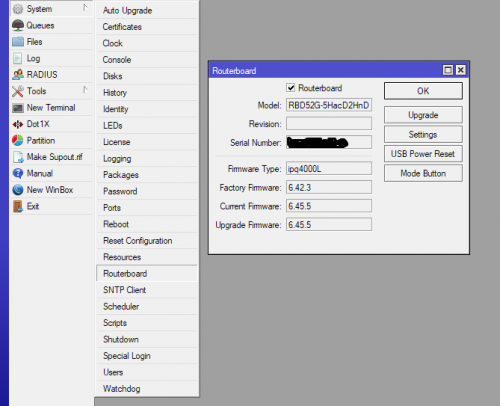
Don't forget to update RouterBoard firmware after

user posted image
heidarren
post Aug 31 2019, 04:40 PM

Getting Started
**
Junior Member
248 posts

Joined: Aug 2018
QUOTE(weikee @ Aug 31 2019, 03:11 PM)
Yup, but i usually wait the package confirm stable after using it few weeks only update the routerboard.
*
True, but I’m just a home user, so I will update both at once, will return to previous version if any instability issues
heidarren
post Aug 31 2019, 07:56 PM

Getting Started
**
Junior Member
248 posts

Joined: Aug 2018
QUOTE(Garena @ Aug 31 2019, 06:23 PM)
Are you saying there's bug in the Wireless Tables -> Registration so do not trust it? I think not. Of course i also done speed test to test it before, on 150 Mbps data rate i get 90 Mbps+, on 300 Mbps data rate i get 180 Mbps+. Obviously the 40 MHz channel width is working. If the shown 300 Mbps negotiated data rate is fake then i wouldn't get more than 90 Mbps+.
*
Bro, calm down. ofcoz we know that the 40MHz is working, and the registration table is showing the correct rate, what I mean is in real world, those 20MHz and 40MHz clients will use the WiFi simultaneously right? So do a speed test WITH both of them connected and do the speed test on the 40MHz client and use the 20MHz client to do some web browsing at the same time, u will see the speed drops significantly.

Also, go YouTube and watch the MUM especially those topic like “wireless” “top ten common mistake in MikroTik”, all of them are saying this. If we can easily get a double of speed by just a single click, why wouldn’t we? Simple enough right? Just a click, double speed. But why most of us r saying the same thing? Must be a reason
heidarren
post Aug 31 2019, 08:07 PM

Getting Started
**
Junior Member
248 posts

Joined: Aug 2018
QUOTE(Garena @ Aug 31 2019, 06:34 PM)
Lol that 4x4 MIMO is for cellular. I can still remember the model number because last year i read some articles about the superiority of Qualcomm modem vs underdog Intel modem. Intel XMM 7560 is the model number for the 2018 iPhones, please do not confuse cellular MIMO with Wi-Fi MIMO laugh.gif

Both iPhone 7 and 7 Plus (2016) and iPhone 8 and 8 Plus (2017) use a mixed of Qualcomm and Intel modem. iPhone Xs, Xs Max, Xr (2018) all use Intel modem. Legal battle between Qualcomm vs Intel.
*
Yup, 4x4 MIMO is cellular modem, Wi-Fi is actually 2x2 MIMO, and no MU-MIMO supported.

And many people think that Wi-Fi is bad on current iPhones like XS/Max/XR is due to Intel chipset, but actually Intel has nothing to do with Wi-Fi in iPhones, they used Murata Wi-Fi module, Apple is using Wi-Fi module from them since iphone 4 or even earlier.
heidarren
post Sep 1 2019, 02:49 AM

Getting Started
**
Junior Member
248 posts

Joined: Aug 2018
QUOTE(Garena @ Aug 31 2019, 11:07 PM)
But what you said earlier "everyone will drop to 20 MHz" is not true. I've done the speed test with devices connected to the wireless router at the same time, not one at a time. Clearly the 40 MHz is working and laptop that support 40 MHz does see increase in speed compared to 20 MHz.
*
👍

heidarren
post Sep 1 2019, 10:00 AM

Getting Started
**
Junior Member
248 posts

Joined: Aug 2018
QUOTE(Garena @ Aug 31 2019, 11:15 PM)
Incorrect, iPhone Xs, Xs Max, Xr all does support 2x2 MU-MIMO. In fact since year 2016 flagship smartphones like Galaxy S7, Galaxy Note 7 (boom), Galaxy S8, S8 Plus, iPhone 8, 8 Plus, X to name a few all support MU-MIMO (802.11ac Wave 2 standard) already.

Yes, Intel had nothing to do with Wi-Fi in iPhone but Murata is just the manufacturer for the Wi-Fi module. The Broadcom Wi-Fi chip is that laid underneath the silicon module is the brain and it powers the Wi-Fi. Apple has a long relationship with Broadcom already. For Samsung on the other hand, they have been jumping from Broadcom and Qualcomm Wi-Fi chip (refer image below) but in recent years they prefer to stick with Broadcom. In fact their flagship S series and Note series mostly all powered by Broadcom chip.

Samsung has their own manufacturing arm for Wi-Fi module called Samsung Electro-Mechanics, so of course they won't be using Murata Manufacturing.

Broadcom has been the hegemon of Wi-Fi chip and currently dominating the wireless market but Qualcomm has been stepping up to disrupt the market ever since they acquired Atheros in 2011.

user posted image
*
I hope you really know what you are saying, give you a key word, "hardware supported doesn't mean software supported"

heidarren
post Sep 6 2019, 09:41 PM

Getting Started
**
Junior Member
248 posts

Joined: Aug 2018
ROS v7 Beta for ARM has just released

http://mt.lv/v7

Linux kernel has upgraded from 3.3.5 to 4.14.131

Mainly for ARM devices like hAP AC2, try it at your own risk

This post has been edited by heidarren: Sep 6 2019, 09:44 PM
heidarren
post Oct 9 2019, 09:34 PM

Getting Started
**
Junior Member
248 posts

Joined: Aug 2018
QUOTE(chuahhooi @ Oct 9 2019, 07:16 PM)
where can buy mikrotik Audience
*
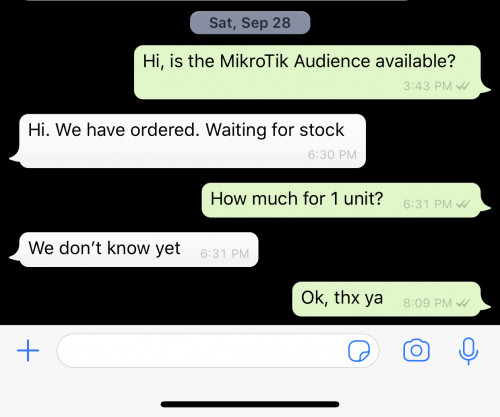
Asked SUBTel, arriving soon.

user posted image
heidarren
post Oct 10 2019, 07:41 PM

Getting Started
**
Junior Member
248 posts

Joined: Aug 2018
QUOTE(amirsubhi @ Oct 10 2019, 06:45 PM)
how much the audience price?
*
Taobao is selling RM710, I expect Malaysia sells about RM750~830
heidarren
post Oct 11 2019, 12:00 PM

Getting Started
**
Junior Member
248 posts

Joined: Aug 2018
First "draft" review for Audience posted in mt forum

"I have 2 days of (limited) Audience testing experience now:
Audience looks nice, actually smaller than on the pictures, a device you can actually keep outside, close to TV or sideboard
it has 3 color LED that shine nicely through little slot on lower front side (including Mtik preferred blue led! but no more that bright biggrin.gif )
No idea yet what they mean in terms of device status, but looks good!
In terms of HW it has 3 Wifi master interfaces:
2x2 2.4GHz Wifi (IPQ4019)
2x2 5Ghz Wifi (IPQ4019) (can only use channel 36 to 52(?))
4x4 5GHz Wifi (QCA9984) (can only be used on channel 100 and above (I have European model))
There seems to be no additional SW/functions for MESH such as steering, improved access lists etc.
But maybe within Capsman there could be some additional functions (I don’t use Capsman …)[/list]

I did some quick setup and test as a dual band AP (2x2 2.4G + 4x4 5Ghz) to compare to RB4011.
To use all three bands as AP I need a bit more thinking how to organise my network…
2.4GHz Wifi coveres slightly less distance than that of RB4011 (but RB4011 does have a great range)
I have some far away IOT devices which have sometimes some disconnects, but they are really far off...
5GHz 4x4 Audience has huge improvement over 4x4 5Ghz of RB4011. I get 5G conection for many clients now where before
they stayed on 2.4Ghz.
Now I can not tell if this is due to the Wifi channel difference as Audience only uses channel 100 and above!
For the experts to tell (and more testing to be done).
I see no issue with DFS/radar on 4x4 so far (those 100+ channels are DFS channels).

Based on this, to cover huge homes or areas using two or more Audience seems to be a good way to provide
Wifi coverage.

A bit more tricky is going to be the setup / config, specially if you will use 3 AP Wifi interfaces (and not as MESH).
Which 5Ghz network will a client select if you have 2 with same SSID at two different channels? Or create 2 or 3 different SSID?
Creating the right access rules with signal level will be more complex, maybe not practical at all.

And seeing 3 master Wifi i/f with all (for me 18!) the virtual Wifi i/f means you quickly get lost in what is what…
But hey this is why you have such a device… laugh.gif
Will definitely keep it as my main Wifi router... !"

heidarren
post Oct 11 2019, 08:36 PM

Getting Started
**
Junior Member
248 posts

Joined: Aug 2018
QUOTE(chuahhooi @ Oct 11 2019, 08:05 PM)
user posted image

bruce.gif  bruce.gif  bruce.gif
*
Can’t wait to see the actual result
heidarren
post Oct 20 2019, 02:12 AM

Getting Started
**
Junior Member
248 posts

Joined: Aug 2018
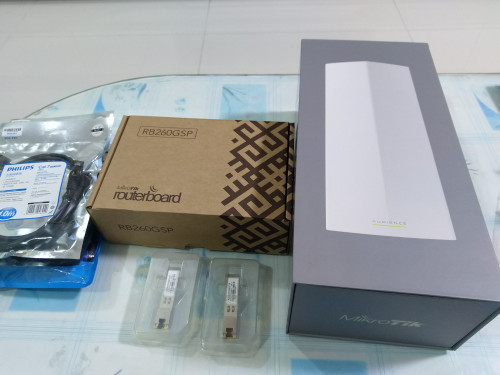
Finally here, MikroTik Audience, from SUBTel
https://s.lazada.com.my/s.ZPDVr
RM760, reasonable price

This post has been edited by heidarren: Oct 20 2019, 02:12 AM
heidarren
post Dec 22 2019, 04:11 PM

Getting Started
**
Junior Member
248 posts

Joined: Aug 2018
QUOTE(boxsystem @ Dec 22 2019, 03:36 PM)
Guys HAP AC2 good enough to cover for a double storey terrace?
*
If u place it in the middle of the house, 2G can but 5G is slightly challenging
heidarren
post Dec 26 2019, 04:02 PM

Getting Started
**
Junior Member
248 posts

Joined: Aug 2018
QUOTE(soonwai @ Dec 26 2019, 02:09 PM)
I'm not too confident about the Audience. Does it have anything that helps clients roam? I asked in the Mikrotik forums about 802.11 KVR and no-one answered. As far as I can tell, it only has an extra 5Ghz radio.

Dual WAN with Mikrotik is no problem. It's up to your imagination how to configure the dual WANs and balancing. Dual PPPoE, no problem, or weirder setups like what I did previously - My UniFi's PPPoE and a wifi bridge to my neighbours UniFi.
*
I got an Audience in hand, it has nothing special than any other MikroTik APs, no k/v/r. 2.4G/5G1 has been configured in CAPsMAN by default.

However it does has much bigger coverage, especially 5G2. One of the best I found is it has much better receiving capability, it makes the high tx power usable in real life since now the AP can hear the client better. I tried to put at the middle of my 2 storey house and it does cover it up easily for all 3 bands from it, I can even reach nearly 200mbps at outside of my house, totally different experience from my hAP AC2/cAP AC.
heidarren
post Dec 26 2019, 06:01 PM

Getting Started
**
Junior Member
248 posts

Joined: Aug 2018
QUOTE(boxsystem @ Dec 26 2019, 05:41 PM)
Double storey house?

You put the Audience in the middle of the house and is there an anothet router? Or hardwired?
*
My BTU is located at the middle of my house, beside staircase, so I just plug in the Audience and set it up as router.
heidarren
post Dec 30 2019, 11:46 PM

Getting Started
**
Junior Member
248 posts

Joined: Aug 2018
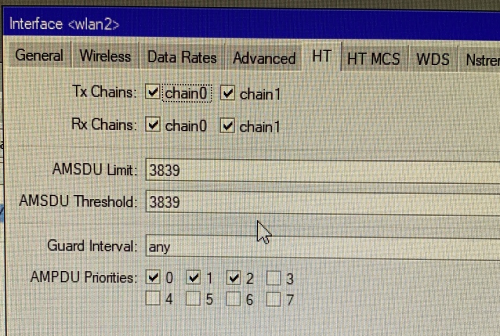
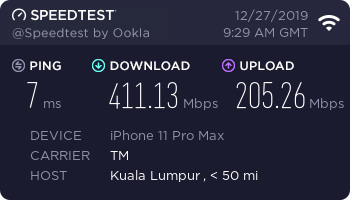
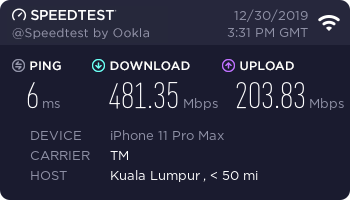
Today I try to fine tune my Audience Wi-Fi speed, set the AMSDU limit/threshold to 3839 (according to my Aruba AP's default) and AMPDU Priorities to 0,1,2, my speed went up from 410mbps+ to 480mbps+, you may try it out and see if it works for u.

Setting

user posted image

Previously

user posted image


After

user posted image

This post has been edited by heidarren: Dec 30 2019, 11:47 PM
heidarren
post Jan 6 2020, 02:27 PM

Getting Started
**
Junior Member
248 posts

Joined: Aug 2018
QUOTE(limmengsi @ Jan 6 2020, 01:43 PM)
hi,

i want to ask i currently using hAP AC, i plan to extend the range with the Mikrotik Audience. How to set it up?
*
Plug the LAN cable to LAN2 (LAN1 is used for WAN by default) on Audience, log in then reset configuration with CAPS MODE and DO NOT BACKUP selected, it will auto join your current CAPsMAN after reboot. If you r not planning to use CAPsMAN, you need to add those radios in bridge, then set the IP by using DHCP client or manually, then enable all 3 radios and do the basic wireless setting, that's it.

2 Pages  1 2 >Top
 

Change to:
| Lo-Fi Version
0.0982sec    0.92    7 queries    GZIP Disabled
Time is now: 21st December 2025 - 03:00 PM