Outline ·
[ Standard ] ·
Linear+
Enterprise Networking Mikrotik Routers (RouterBoard & RouterOS), User and owner discussion group
|
piju
|
 Jan 1 2021, 03:21 PM Jan 1 2021, 03:21 PM
|
Getting Started


|
QUOTE(soonwai @ Jan 1 2021, 03:13 PM) Can you post your /export ? Are your devices getting an IPv6 address? CODE /ipv6 address
add from-pool=myPool interface=bridge
/ipv6 dhcp-client
add add-default-route=yes interface="maxis pppoe" pool-name=myPool request=\
prefix use-peer-dns=no
/ipv6 firewall filter
add action=accept chain=input dst-port=546 in-interface="maxis pppoe" protocol=\
udp src-address=fe80::/16
add action=accept chain=input dst-port=546 in-interface="maxis pppoe" protocol=\
udp src-address=fe80::/16
/ipv6 nd
set [ find default=yes ] interface=bridge mtu=1480
/ipv6 nd prefix default
set preferred-lifetime=1h valid-lifetime=2h
https://ibb.co/r4yFpppThis post has been edited by piju: Jan 1 2021, 03:42 PM |
|
|
|
|
|
soonwai
|
Jan 1 2021, 03:56 PM
|
|
|
QUOTE(piju @ Jan 1 2021, 03:21 PM) CODE /ipv6 address
add from-pool=myPool interface=bridge
/ipv6 dhcp-client
add add-default-route=yes interface="maxis pppoe" pool-name=myPool request=\
prefix use-peer-dns=no
/ipv6 firewall filter
add action=accept chain=input dst-port=546 in-interface="maxis pppoe" protocol=\
udp src-address=fe80::/16
add action=accept chain=input dst-port=546 in-interface="maxis pppoe" protocol=\
udp src-address=fe80::/16
/ipv6 nd
set [ find default=yes ] interface=bridge mtu=1480
/ipv6 nd prefix default
set preferred-lifetime=1h valid-lifetime=2h
https://ibb.co/r4yFpppLooks OK, is your Mikrotik router getting an IPv6 address from the pool? If it is, RADVD is already working. |
|
|
|
|
|
piju
|
Jan 1 2021, 04:16 PM
|
Getting Started
|
QUOTE(soonwai @ Jan 1 2021, 03:56 PM) Looks OK, is your Mikrotik router getting an IPv6 address from the pool? If it is, RADVD is already working. clients has ipv6 address and mikrotik too. but still cant pass ipv6 test |
|
|
|
|
|
piju
|
Jan 1 2021, 04:21 PM
|
Getting Started
|
QUOTE(soonwai @ Jan 1 2021, 03:56 PM) Looks OK, is your Mikrotik router getting an IPv6 address from the pool? If it is, RADVD is already working. done. manually add ipv6 dns on clients resolve this issue. thank you very much for your help. |
|
|
|
|
|
soonwai
|
Jan 1 2021, 04:26 PM
|
|
|
QUOTE(piju @ Jan 1 2021, 04:21 PM) done. manually add ipv6 dns on clients resolve this issue. thank you very much for your help. Ahh, ok, sorry my bad, I assumed you were using the router as DNS server. |
|
|
|
|
|
piju
|
Jan 1 2021, 04:37 PM
|
Getting Started
|
QUOTE(soonwai @ Jan 1 2021, 04:26 PM) Ahh, ok, sorry my bad, I assumed you were using the router as DNS server. it should, but i dont know why. maybe dns cache. thanks again. |
|
|
|
|
|
amirsubhi
|
Jan 13 2021, 12:33 PM
|
|
|
I just notice that Mikrotik add wireguard in 7.1 beta  Have anyone try it?  This post has been edited by amirsubhi: Jan 13 2021, 12:36 PM
 |
|
|
|
|
|
shahie
|
Jan 13 2021, 03:00 PM
|
|
|
QUOTE(amirsubhi @ Jan 13 2021, 12:33 PM) I just notice that Mikrotik add wireguard in 7.1 beta Have anyone try it?
any idea what is that for? |
|
|
|
|
|
amirsubhi
|
Jan 13 2021, 03:06 PM
|
|
|
QUOTE(shahie @ Jan 13 2021, 03:00 PM) any idea what is that for? its VPN like OpenVPN, its faster than openvpn and using latest encryption https://www.wireguard.com/ |
|
|
|
|
|
shahie
|
Jan 14 2021, 06:14 AM
|
|
|
Hi... suddenly received the notification from my mikrotik at home, someone tried to login on mine. 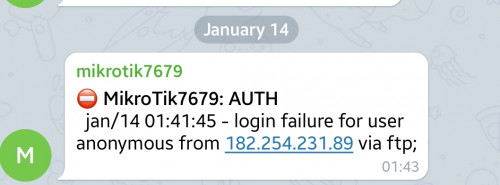 is this normal or risk when enabling remote login features? or just strengthen the password la? |
|
|
|
|
|
Vigilant
|
Jan 14 2021, 06:24 AM
|
|
|
I've been using RB951Ui-2HnD for years now. I config the QoS just to limit bandwidth. The issue is, with a 300mbps connection, I limit device 1 to 150mbps, and device 2 is playing a game, it's suffering from a high ping when device 1 is downloading at max speed.
So I've been thinking, instead of setting bandwidth limit, how do I go around with packet prioritization instead and which Mikrotik router is suitable for this task? Is this possible and how?
This post has been edited by Vigilant: Jan 14 2021, 06:26 AM
|
|
|
|
|
|
amirsubhi
|
Jan 14 2021, 09:25 AM
|
|
|
QUOTE(shahie @ Jan 14 2021, 06:14 AM) Hi... suddenly received the notification from my mikrotik at home, someone tried to login on mine. is this normal or risk when enabling remote login features? or just strengthen the password la? close down unnecessary port eg FTP at your mikrotik, maybe leave only winbox, or use uncommon port |
|
|
|
|
|
amirsubhi
|
Jan 14 2021, 09:29 AM
|
|
|
QUOTE(Vigilant @ Jan 14 2021, 06:24 AM) I've been using RB951Ui-2HnD for years now. I config the QoS just to limit bandwidth. The issue is, with a 300mbps connection, I limit device 1 to 150mbps, and device 2 is playing a game, it's suffering from a high ping when device 1 is downloading at max speed. So I've been thinking, instead of setting bandwidth limit, how do I go around with packet prioritization instead and which Mikrotik router is suitable for this task? Is this possible and how? you can use layer7 function(in firewall) and queue tree(in queues) to do packet prioritization |
|
|
|
|
|
soonwai
|
Jan 14 2021, 01:29 PM
|
|
|
QUOTE(shahie @ Jan 14 2021, 06:14 AM) Hi... suddenly received the notification from my mikrotik at home, someone tried to login on mine. is this normal or risk when enabling remote login features? or just strengthen the password la? That's normal. There're tons of bots scanning all the time. Can use good username/password, port knocking or totally turn off services or use VPN. Of course last option will still expose one service. Then pray no vulnerabilities discovered. |
|
|
|
|
|
shahie
|
Jan 14 2021, 02:07 PM
|
|
|
QUOTE(soonwai @ Jan 14 2021, 01:29 PM) That's normal. There're tons of bots scanning all the time. Can use good username/password, port knocking or totally turn off services or use VPN. Of course last option will still expose one service. Then pray no vulnerabilities discovered. hahaha... tq sir. noted on that. |
|
|
|
|
|
soonwai
|
Jan 20 2021, 12:26 PM
|
|
|
Finally we have native Mikrotik client for Mac. Well, kind of. 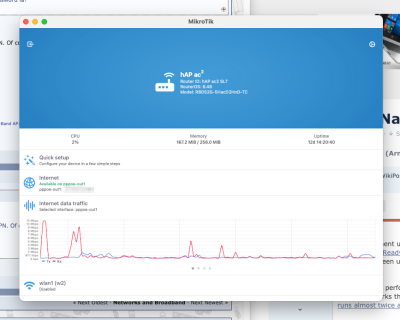 |
|
|
|
|
|
heidarren
|
Jan 20 2021, 03:25 PM
|
Getting Started
|
QUOTE(shahie @ Jan 14 2021, 06:14 AM) Hi... suddenly received the notification from my mikrotik at home, someone tried to login on mine. is this normal or risk when enabling remote login features? or just strengthen the password la? Some anti-virus has network scanning test, it's normal |
|
|
|
|
|
maxiscool
|
Jan 21 2021, 08:52 PM
|
|
|
QUOTE(soonwai @ Jan 20 2021, 12:26 PM) Finally we have native Mikrotik client for Mac. Well, kind of. How to get this? |
|
|
|
|
|
soonwai
|
Jan 21 2021, 09:09 PM
|
|
|
QUOTE(maxiscool @ Jan 21 2021, 08:52 PM) From the Apple App Store. It's just the iPad version which the new M1 Macs can install. |
|
|
|
|
|
heidarren
|
Jan 21 2021, 09:24 PM
|
Getting Started
|
QUOTE(soonwai @ Jan 21 2021, 09:09 PM) From the Apple App Store. It's just the iPad version which the new M1 Macs can install. U got the M1 MacBook d? Rich....🤩🤩 |
|
|
|
|



 Quote
Quote






 0.0241sec
 0.59
0.59
 6 queries
 GZIP Disabled