Outline ·
[ Standard ] ·
Linear+
Enterprise Networking Mikrotik Routers (RouterBoard & RouterOS), User and owner discussion group
|
cwtien
|
 Dec 24 2020, 11:41 AM Dec 24 2020, 11:41 AM
|

|
Hi, I am wondering if anyone else has encountered this issue with Unifi.
I recently got a Mikrotik Hex S. Using this guide (https://www.mikrotik.com.my/setup-for-unifi/), I connected my Unifi cable to port 1. Unfortunately, I keep getting Unifi drops every 30 mins -> 2 hrs (message says "PPPOE: terminating... - failed to authenticate ourselves to peer").
I subsequently switched to port 4, did some reconfiguration, and this issue never happened again. Thinking I have a faulty port 1, I plugged in my switch LAN port to port 1, but have not been able to detect any CRC or packet drop issues in the history.
My question is - has anyone else ever gotten issues with Hex S port 1 connecting to internet, and have resolved it (other than moving to another port)?
|
|
|
|
|
|
cwtien
|
Dec 24 2020, 03:39 PM
|
|
|
QUOTE(shahie @ Dec 24 2020, 12:42 PM) have you tried 'reset' and 'no default configuration' check? means you begin from the stretch? Yes, I did. I accidentally 'bricked' the router one time configuring VLAN, so I had to reset and redo from scratch. |
|
|
|
|
|
cwtien
|
Feb 5 2021, 11:39 AM
|
|
|
QUOTE(Gaara92 @ Feb 5 2021, 11:34 AM) https://ecommerce.synchroweb.com/mikrotik-m...ence-LTE6%20kitAudience LTE6 also got 60% discount lol. Bought last time rm1.2k first time got out this model.  Hey! I didn't realise Hap ac3 (non-LTE) has arrived in Malaysia. I kept checking Shopee but all I found were Indonesian resellers. |
|
|
|
|
|
cwtien
|
Feb 15 2021, 10:39 AM
|
|
|
Hi,
I have a question about VLAN. I know what a VLAN is, but I am not sure what purpose Mikrotik's implementation of 'Interface -> VLAN' is for.
For instance, if you put in a bridge and turn on VLAN filtering, you will filter VLAN. If you go to "Switch->Ports" and perform VLAN configuration, you can manipulate packets. This is filtering behaviour on ports. You can also tag VLANs on per port basis.
What I don't understand is the purpose of 'Interface -> VLAN'. To get Unifi working, you have to create VLAN 500 and assign it to the WAN port. For HyppTV, create another 'Interface->VLAN' 600 and assign it to the same WAN port. What purpose does this VLAN interface achieve? Is it to tag outgoing traffic to PPPoE?
P.S. It seems I may have answered my own question, I just need to confirmation. Looks like the technique or recommendation on VLAN configuration changed with 6.41 firmware in December 2017? Can someone confirm? Technically, I don't need to assign VLAN 500 and 600 on the ethernet port anymore? Instead, I can have 1 bridge with VLAN filtering, passing VLAN500 and 600.
This post has been edited by cwtien: Feb 15 2021, 10:53 AM
|
|
|
|
|
|
cwtien
|
Aug 19 2021, 08:14 PM
|
|
|
Hi all, I've been doing some speedtest on my Mikrotik Hex S. It seems that I can only go up to ~ 160 Mbps download speed on the router. At the router side, 1x CPU core is running at 100%. Also, when I tried using 2 different computers to run speedtest (speedtest.tm.com.my), it is still one stream.
It seems like:
1- network packets to/fomr a website only uses 1 core.
2- 1 core limit is ~ 160 Mbps.
Has anyone successfully pushed the Hex S to beyond 160 Mbps in a single core with speedtest?
|
|
|
|
|
|
cwtien
|
Aug 19 2021, 09:56 PM
|
|
|
QUOTE(go626201 @ Aug 19 2021, 08:34 PM) Did you enable fasttrack? i think without fasttrack run about 200+mbps is normal. (To be clear i am using hEX) Yes, I'm using Fasttrack. One suspicion is I have VLAN filtering turned on at the bridge. I'll disable it tonight and try again. |
|
|
|
|
|
cwtien
|
Aug 23 2021, 09:31 AM
|
|
|
QUOTE(cwtien @ Aug 19 2021, 09:56 PM) Yes, I'm using Fasttrack. One suspicion is I have VLAN filtering turned on at the bridge. I'll disable it tonight and try again. I still hit a speedtest speed limit at 160-170 Mbps. I believe it's the Unifi VLAN translation (VLAN500 interface) in Miktrotik; one core hits 100% usage at 170 Mbps. I did a LAN-to-LAN speedtest (webfig, HAP ac3 to HEX S) and I got 450 Mbps one way. My assumption is the VLAN500 interface program is not multi-threaded. Rather than doing more daisy chaining (HEX S -> Router/bridge -> modem), I may get an RB5009 instead  . Unless someone has a great idea  . |
|
|
|
|
|
cwtien
|
Nov 15 2021, 02:48 PM
|
|
|
Anybody know where I can get RB5009 rackmounting kit (K-79). I asked Subtel but they were showing me the wall mount plugs that came in the box....
I also don't see any in Synchroweb.
|
|
|
|
|
|
cwtien
|
Nov 15 2021, 04:48 PM
|
|
|
QUOTE(go626201 @ Nov 15 2021, 03:08 PM) I think Subtel misunderstood the item u ask,the box only come with K-55 screw kit,does not come with RB5009 rackmount kit K-79. Maybe u can ask subtel again? I know they misunderstood me (I was chatting via lazada chat app). I explained a few times but the other side didn't get it.... I'll probably email to their official site or something. |
|
|
|
|
|
cwtien
|
Nov 16 2021, 04:46 PM
|
|
|
QUOTE(Gaara92 @ Nov 16 2021, 07:45 AM) I already asked them. They have not ordered it yet. I managed to order 1 set from Shopee, shop name is mikrotik.my (from China). I buzzed their shop and they said they have stock, then only listed them in Shopee. It was better than ordering from Australia, New Zealand, or Europe (all the other places that has stock) |
|
|
|
|
|
cwtien
|
Nov 20 2021, 04:31 PM
|
|
|
QUOTE(Gaara92 @ Nov 16 2021, 07:37 PM) OMG can share the link? I cannot find any rackmount in the shop. I found another one in Shopee -> https://shopee.com.my/Microtik-RB5009-rackm...14-5e20f4cffeddQUOTE(megablur @ Nov 19 2021, 12:03 PM) Got my rack mount kit from Synchroweb. They have stock.  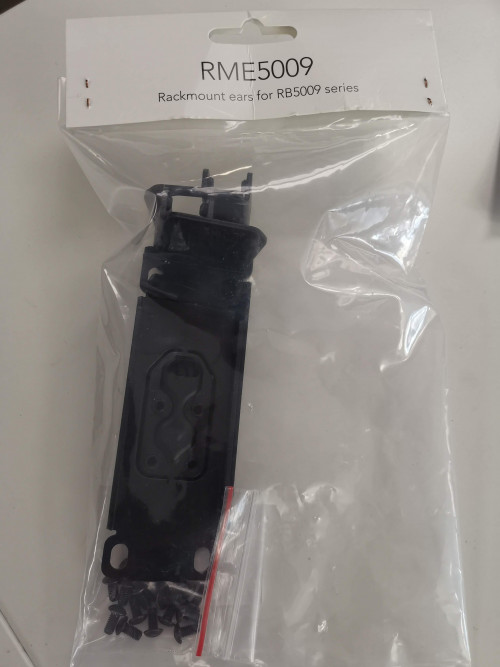 I hate it when they don't list it in their website  . |
|
|
|
|
|
cwtien
|
Dec 10 2021, 02:58 PM
|
|
|
QUOTE(Gaara92 @ Dec 10 2021, 12:13 AM) oh wait i am misunderstanding here. The problem only resist in model RB5009, other model is working fine. My mistake. Doh! And there I thought I could finally get ipv6 working on RB5009 . Nevermind, IPv6 is only 'good-to-have', not a 'must-have'. This post has been edited by cwtien: Dec 10 2021, 03:08 PM |
|
|
|
|
|
cwtien
|
Mar 24 2022, 09:27 AM
|
|
|
QUOTE(go626201 @ Mar 23 2022, 10:15 PM) What's new in 7.2rc5 (2022-Mar-23 12:04): *) ipv6 - fixed VLAN tagged PPPoE packet receiving on RB5009; Finally fix? I haven't install the new beta,going to try it later tonight.  Edit: Fix confirmed. Unifi ipv6 prefix working now. Oh yeah! Am waiting for this! I hope it gets pushed to next month's stable release. I'm running on 7.1.5 right now. |
|
|
|
|
|
cwtien
|
Jun 29 2022, 04:03 PM
|
|
|
QUOTE(MC_Amig0 @ Jun 26 2022, 11:05 PM) hi all sifus, I finished setup my hAP ac router to connect to TM Unifi by following guide from website. now, i want to setup multiple VLAN, such as my kids connect to vlan01, my IoT to connect to vlan02, and myself connect to vlan03. i am afraid to mess around with the router.. any good guide i can follow? thanks If you're planning to setup VLAN, I only have 3 advices to give - 1- export your configuration regularly. 2- make sure you know how to reset your router. 3- Leave yourself a backdoor (designate a network port for emergency use). I made a mistake earlier changing some VLAN settings and locked myself out of the router, as my PC does not support VLAN tagging. I had to do a hard reset. |
|
|
|
|
|
cwtien
|
Jun 17 2025, 08:50 PM
|
|
|
Disable keepalive setting and it should get MTU 1492 (hopefully!). It should be this: "ppp - do not send initial echo request if keepalive-timeout=disabled;" I'm not upgrading yet. And this is the history of why we're getting MTU 1480 (spoiler, Huawei): https://forum.mikrotik.com/t/pppoe-compatib...bras-nfv/182546P.S. Hi @Anime4000, same username and picture here and Mikrotik forum. This post has been edited by cwtien: Jun 17 2025, 08:55 PM |
|
|
|
|



 Quote
Quote

 0.0310sec
 0.52
0.52
 7 queries
 GZIP Disabled