

QUOTE(MX510 @ Jun 26 2019, 09:36 AM)
hap AC or hap AC2 :-)

Any other alternatives? As I don’t need the WiFi. Or such a WiFi-less version doesn’t exist in this day and age.Enterprise Networking Mikrotik Routers (RouterBoard & RouterOS), User and owner discussion group
|
|
 Jun 26 2019, 10:05 PM Jun 26 2019, 10:05 PM
|
 
Senior Member
6,356 posts Joined: Jan 2003 
|
QUOTE(MX510 @ Jun 26 2019, 09:36 AM) hap AC or hap AC2 :-) Any other alternatives? As I don’t need the WiFi. Or such a WiFi-less version doesn’t exist in this day and age. |
|
|
|
|
|
Jul 3 2019, 05:02 PM
|

Newbie
4 posts Joined: Jul 2005 From: Kuching, Sarawak  
|
Hi all,
I have many used RB2011iL-IN units. Selling at RM250 each. Do Whatsapp me at 0198764400 (Awang) for info 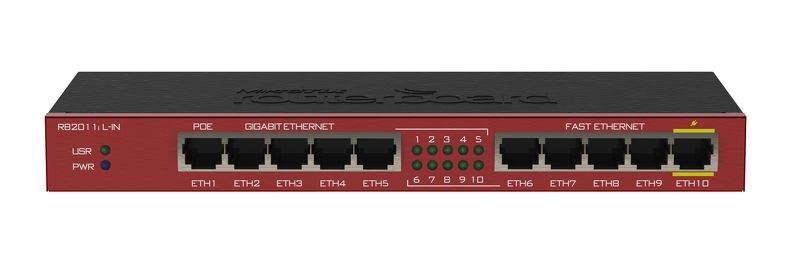 RB2011iL-IN The RB2011 is a low cost multi port device series which designed for indoor use, and available in many different cases, with a multitude of options. RB2011iL-IN is the most basic model, with 5 Gigabit ethernet ports, 5 Fast ethernet ports, power jack and PoE support. Powered by the new Atheros next generation 600MHz 74K MIPS network processor and has 64MB of RAM and a Level4 RouterOS license. This post has been edited by tihie: Jul 3 2019, 05:27 PM |
|
|
Jul 3 2019, 06:21 PM
|

All Stars
12,019 posts Joined: Jan 2003
|
QUOTE(tihie @ Jul 3 2019, 05:02 PM) Hi all, You do cod in KL/PJ?I have many used RB2011iL-IN units. Selling at RM250 each. Do Whatsapp me at 0198764400 (Awang) for info RB2011iL-IN The RB2011 is a low cost multi port device series which designed for indoor use, and available in many different cases, with a multitude of options. RB2011iL-IN is the most basic model, with 5 Gigabit ethernet ports, 5 Fast ethernet ports, power jack and PoE support. Powered by the new Atheros next generation 600MHz 74K MIPS network processor and has 64MB of RAM and a Level4 RouterOS license. |
|
|
Jul 16 2019, 12:47 AM
|
|
Newbie
4 posts Joined: Jul 2005 From: Kuching, Sarawak
|
QUOTE(weikee @ Jul 3 2019, 06:21 PM) You do cod in KL/PJ? Sorry cannot do COD in West Malaysia as Im based in Kuching. Will arrange for delivery if you want. |
|
|
Jul 17 2019, 02:54 PM
|

Junior Member
612 posts Joined: Mar 2008
|
QUOTE(Jason @ Jun 26 2019, 10:05 PM) Any other alternatives? As I don’t need the WiFi. Or such a WiFi-less version doesn’t exist in this day and age. get a hEX or hEX s. |
|
|
Jul 18 2019, 03:24 PM
|

Junior Member
54 posts Joined: Oct 2007 From: へび
|
Hi guys. Anyone here use your mikrotik to replace maxis with working IPTV setup?
I need to replace the horrible techinicolor router once and for all and failing that, I'll probably just cancel their service. Trying to get any support from Astro/Maxis is just just impossible. They just keep pointing fingers at each other with no resolution from either side. |
|
|
|
|
|
Jul 19 2019, 08:49 AM
|

All Stars
11,459 posts Joined: Oct 2007 From: KL
|
QUOTE(tro11 @ Jul 18 2019, 03:24 PM) Hi guys. Anyone here use your mikrotik to replace maxis with working IPTV setup? It should be possible. Any ideas about the vlans involved? I vaguely remember that there is a thread here about this very subject. I need to replace the horrible techinicolor router once and for all and failing that, I'll probably just cancel their service. Trying to get any support from Astro/Maxis is just just impossible. They just keep pointing fingers at each other with no resolution from either side. My uncle uses Maxis/Astro IPTV with 2 decoders. Also have an RB2011 but just as an AP. I haven’t have the opportunity yet to look at the config of the Maxis router. |
|
|
Jul 19 2019, 09:48 AM
|
|
Junior Member
54 posts Joined: Oct 2007 From: へび
|
QUOTE(soonwai @ Jul 19 2019, 08:49 AM) It should be possible. Any ideas about the vlans involved? I vaguely remember that there is a thread here about this very subject. I think it should. But just no idea on how to do the implementation. Based on different information from scattered sources, 621 for Internet, 823 for IPTV. I've only found 2 old blogs claiming to have it working via openwrt. I had the internet working before using this guide, but the IPTV portion completely confuses me. I understand they use multicast so it's not the same as just putting it on a single port like hypptv. My uncle uses Maxis/Astro IPTV with 2 decoders. Also have an RB2011 but just as an AP. I haven’t have the opportunity yet to look at the config of the Maxis router. I feel like a lot of people have just given up with replacing their router or with Astro IPTV at this point. I myself have tried just bypassing it with a secondary router on DMZ, but the issue I have still persists through this. After talking to a support person on the phone the other day, she was saying that their 100mbit rollout has been delayed for months because she heard there are issues with their IPTV implementation on the new routers. This post has been edited by tro11: Jul 19 2019, 11:32 AM |
|
|
Jul 20 2019, 01:22 AM
|

Junior Member
103 posts Joined: Jun 2008
|
Any router recommendation for TIme - 500Mbps or 1 Gbps over 802.11ac? Can it connect to TIME's ONO device?
|
|
|
Jul 21 2019, 09:49 AM
|
|
Newbie
4 posts Joined: Jul 2005 From: Kuching, Sarawak
|
QUOTE(davidw89 @ Jul 20 2019, 01:22 AM) Any router recommendation for TIme - 500Mbps or 1 Gbps over 802.11ac? Can it connect to TIME's ONO device? Get a dual core processor router. Should be able to handle flawlessly. hEX S a.k.a RB760iGS should be great for this.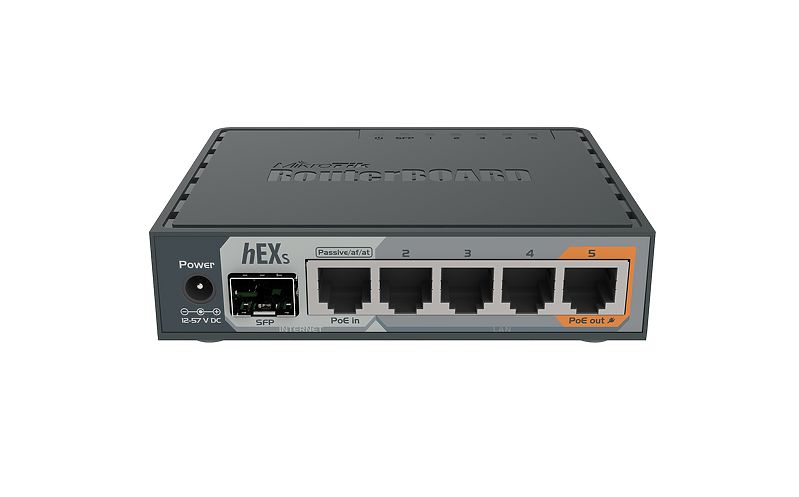 |
|
|
Jul 28 2019, 08:20 PM
|

Junior Member
104 posts Joined: Jun 2016
|
Hi, I've just setup Hap Ac² for maxis fiber.
Any idea on how to setup the ipv6? |
|
|
Jul 30 2019, 01:52 PM
Show posts by this member only | IPv6 | Post
#2032
|

Junior Member
612 posts Joined: Apr 2005 From: http://127.0.0.1:80/announce
|
a question,
does 20% - 30% (sometimes reached 33% - 35%) normal for cpu load usage? thanks! after monitoring, its the wifi (android phones - 6) connected playing online games (roblox/minecraft/etc)  This post has been edited by ahlong: Jul 31 2019, 09:12 AM |
|
|
Aug 6 2019, 09:07 PM
|
|
Junior Member
248 posts Joined: Aug 2018
|
Just got an hAp ac2, updated both RouterOS and Firmware to 6.45.3, the Wi-Fi seems bad for phones out of the box, slow and unstable, finding a hard time to reach 200mbps, and disconnecting my devices every few mins.
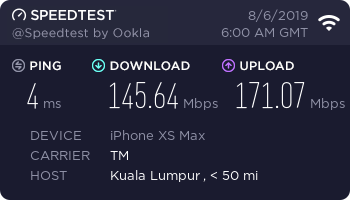 After a day of tuning it, now it become fast and stable for daily use, the coverage is very good, ping is one of the lowest of all the routers I own, no more disconnecting issue, very happy for the result! Tested with my XS Max, Wi-Fi channel 52, region Malaysia, 30dBm 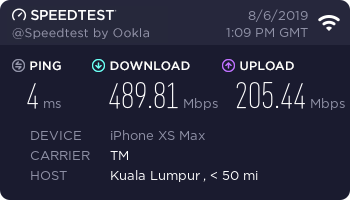 This post has been edited by heidarren: Aug 6 2019, 09:10 PM |
|
|
|
|
|
Aug 8 2019, 12:44 AM
|

Junior Member
21 posts Joined: Aug 2006
|
will be out a new reply, forget about it.
This post has been edited by ssplayboy: Aug 9 2019, 08:38 AM |
|
|
Aug 9 2019, 12:42 PM
|

All Stars
13,216 posts Joined: Jul 2006
|
routerOs have the function to block, reduce pishing & spam email from mail server?
|
|
|
Aug 18 2019, 10:00 PM
Show posts by this member only | IPv6 | Post
#2036
|

Elite
2,559 posts Joined: Jan 2003
|
QUOTE(weikee @ Jan 6 2019, 06:00 PM) I use below console command, "Unifi PPPoE" is my pppoe dialer interface, you need to replace it with your interface name. Thanks for the tips. - interface=bridge-local (bridge-local is my data vlan bridge, replace with your data vlan bridge name) I have problem with some site like lowyat, therefore i temporary disable it. Didn't really spend extra time checking it. ____________________ /ipv6 nd set [ find default=yes ] disabled=yes /ipv6 dhcp-client add add-default-route=yes interface="Unifi PPPoE" pool-name=general-pool6 request=prefix :delay 10s /ipv6 address add address=::1 from-pool=general-pool6 interface=bridge-local advertise=yes :delay 10s /ipv6 nd add interface=bridge-local ra-interval=20s-60s /ipv6 firewall filter add chain=input action=drop connection-state=invalid comment="Drop (invalid)" add chain=input action=accept connection-state=established,related comment="Accept (established, related)" add chain=input action=accept in-interface="Unifi PPPoE" protocol=udp src-port=547 limit=10,20:packet comment="Accept DHCP (10/sec)" add chain=input action=drop in-interface="Unifi PPPoE" protocol=udp src-port=547 comment="Drop DHCP (>10/sec)" add chain=input action=accept in-interface="Unifi PPPoE" protocol=icmpv6 limit=10,20:packet comment="Accept external ICMP (10/sec)" add chain=input action=drop in-interface="Unifi PPPoE" protocol=icmpv6 comment="Drop external ICMP (>10/sec)" add chain=input action=accept in-interface=!"Unifi PPPoE" protocol=icmpv6 comment="Accept internal ICMP" add chain=input action=drop in-interface="Unifi PPPoE" comment="Drop external" add chain=input action=reject comment="Reject everything else" add chain=output action=accept comment="Accept all" add chain=forward action=drop connection-state=invalid comment="Drop (invalid)" add chain=forward action=accept connection-state=established,related comment="Accept (established, related)" add chain=forward action=accept in-interface="Unifi PPPoE" protocol=icmpv6 limit=20,50:packet comment="Accept external ICMP (20/sec)" add chain=forward action=drop in-interface="Unifi PPPoE" protocol=icmpv6 comment="Drop external ICMP (>20/sec)" add chain=forward action=accept in-interface=!"Unifi PPPoE" comment="Accept internal" add chain=forward action=accept out-interface="Unifi PPPoE" comment="Accept outgoing" add chain=forward action=drop in-interface="Unifi PPPoE" comment="Drop external" add chain=forward action=reject comment="Reject everything else"  It work superb It work superb Got myself Mikrotik hEX RB750Gr3 and Deco M4 mesh WiFi. Replacing my ageing DIR-850L v1. This post has been edited by haturaya: Aug 18 2019, 10:09 PM |
|
|
Aug 29 2019, 10:51 PM
Show posts by this member only | IPv6 | Post
#2037
|
|
Junior Member
265 posts Joined: Jun 2005 From: Penang
|
Hi soonwai,
I want to update my hAP AC to latest 6.45.5 by manually uploading packages as per https://blog.pessoft.com/2019/03/02/mikroti...ll-disk-device/. However, i noticed that the system-6.45.5-mipsbe.npk package alone has a 7.2MB file size while the hAP AC has only 4.6MB left. Is it still possible to upload? May i know how do you normally update your unit please? Via Netinstall? This post has been edited by soohoe84: Aug 29 2019, 11:21 PM |
|
|
Aug 30 2019, 01:30 PM
|

Senior Member
1,924 posts Joined: May 2009 From: Yokohama, JP
|
QUOTE(tro11 @ Jul 18 2019, 03:24 PM) Hi guys. Anyone here use your mikrotik to replace maxis with working IPTV setup? I need to replace the horrible techinicolor router once and for all and failing that, I'll probably just cancel their service. Trying to get any support from Astro/Maxis is just just impossible. They just keep pointing fingers at each other with no resolution from either side. QUOTE(soonwai @ Jul 19 2019, 08:49 AM) It should be possible. Any ideas about the vlans involved? I vaguely remember that there is a thread here about this very subject. any update on this? planning to change my parent Technicolor router to Mikrotik, can live without VOIP but IPTV is important for them My uncle uses Maxis/Astro IPTV with 2 decoders. Also have an RB2011 but just as an AP. I haven’t have the opportunity yet to look at the config of the Maxis router.  few "ancient" links I came across http://zonelance.blogspot.com/2015/02/astr...on-openwrt.html http://mybhat.blogspot.com/2014/10/asus-rt...er-and.html?m=1 http://www.msblog.org/2015/02/07/configure...router-openwrt/ Maxis IPTV vlan setting (without VOD) https://forum.lowyat.net/topic/4790552 TP-Link has support for Maxis IPTV? https://www.tp-link.com/my/support/faq/1538/ This post has been edited by quadcube: Aug 30 2019, 02:53 PM |
|
|
Aug 30 2019, 08:30 PM
|

Junior Member
446 posts Joined: Dec 2009
|
Just sharing my findings here. Anyone notice some smartphones like iPhone and Google Nexus can't utilise the 2.4 GHz band 40 MHz channel width? Only able to establish 144.4 Mbps on 20 MHz channel width. Channel bonding fail? Not sure it's the smartphone Wi-Fi chip or RouterOS problem. Currently running the latest RouterOS stable version 6.45.5. The smartphones all have the current 802.11ac Wi-Fi chip from Broadcom. But i use a Huawei Nova 3i to test it can establish 40 MHz and obtain a theoretical data rate of 150 Mbps too bad it's 1x1, as seen in Wireless Tables -> Registration. And i use a laptop with Killer Wireless also able to establish 300 Mbps for 2x2. Seems like not RouterOS Wi-Fi issue. Now don't say something like why 2.4 GHz when you can 5 GHz, that's out of discussion.
This post has been edited by Garena: Aug 30 2019, 08:52 PM |
|
|
Aug 30 2019, 09:55 PM
|
|
All Stars
11,459 posts Joined: Oct 2007 From: KL
|
QUOTE(Garena @ Aug 30 2019, 08:30 PM) Just sharing my findings here. Anyone notice some smartphones like iPhone and Google Nexus can't utilise the 2.4 GHz band 40 MHz channel width? Only able to establish 144.4 Mbps on 20 MHz channel width. Channel bonding fail? Not sure it's the smartphone Wi-Fi chip or RouterOS problem. Currently running the latest RouterOS stable version 6.45.5. The smartphones all have the current 802.11ac Wi-Fi chip from Broadcom. But i use a Huawei Nova 3i to test it can establish 40 MHz and obtain a theoretical data rate of 150 Mbps too bad it's 1x1, as seen in Wireless Tables -> Registration. And i use a laptop with Killer Wireless also able to establish 300 Mbps for 2x2. Seems like not RouterOS Wi-Fi issue. Now don't say something like why 2.4 GHz when you can 5 GHz, that's out of discussion. Apple products, by design, only uses 20Mhz channel width at 2.4Ghz. |
| Change to: |  0.0181sec 0.0181sec
 1.01 1.01
 6 queries 6 queries
 GZIP Disabled GZIP Disabled
Time is now: 21st December 2025 - 11:38 AM |
 Quote
Quote