Welcome Guest ( Log In | Register )

Outline · [ Standard ] · Linear+

Enterprise Networking Mikrotik Routers (RouterBoard & RouterOS), User and owner discussion group

views
     
quadcube
post Mar 17 2018, 02:50 PM

Regular
******
Senior Member
1,924 posts

Joined: May 2009
From: Yokohama, JP


QUOTE(squall0833 @ Mar 16 2018, 04:44 AM)
hello all mikrotik users
just wondering

hows the wifi coverage for mikrotik? decent like usual routers out there? or better?

mostly no comes with athenna, so just curious

and will there be hap ac2 model coming to malaysia?  tongue.gif
*
using the HAP AC at the moment. no complains about the wifi coverage as it's only for my room but I do noticed my Macs would usually connects to the 2.4Ghz SSID rather than the 5Ghz one.
and of course, looking at the logs, 2.4Ghz interface only experienced 24 link down while the 5Ghz experienced 2196 link downs laugh.gif not sure what's the cause, anyone has any ideas?
quadcube
post Mar 17 2018, 06:38 PM

Regular
******
Senior Member
1,924 posts

Joined: May 2009
From: Yokohama, JP


QUOTE(XPS @ Mar 17 2018, 06:06 PM)
That is not normal.  Macs are very stable on the wifi side and will stay connected to 5Ghz unless your network had dropped.  Could be your wifi is not stable or your Mac is too far away (anything more than 15m) probably, easy to check hold onto the option key and click on the wifi icon to look at the signal strength etc.
*
just updated the router firmware to the latest. would monitor it for a few days.

unstable due to long distance would be out of the question as both my MacBook are on the same table as the HAP AC (stationary most of the time/"desktop", distance less than 1m).

I just re-configured the TX power too as previously the RSSI for both machines are around -23dBm (Total TX should be around 28dBm). Current RSSI range is around -50~-40dBm (Total RX 5dBm), I guess is pretty fine? laugh.gif
quadcube
post Mar 17 2018, 09:00 PM

Regular
******
Senior Member
1,924 posts

Joined: May 2009
From: Yokohama, JP


QUOTE(XPS @ Mar 17 2018, 06:52 PM)
The new RSSI looks more normal numbers, its a false belief that over-powered Tx power is helpful unless the Rx gain can match.  Macs stay connected for days if you leave it in the power source.  Check your wifi log to see connect time as you monitor.
*
Yeap,you are right. I purposely dial down the TX power because I’m sleeping directly above the router. The last thing I wanna get is some weird sickness from that.

Hmm, I’ll take note of it, although Ethernet is the primary network interface for both devices. Been uploading/downloading from Google Drive at around 700~800Mbps on average, only Ethernet can sustain near gigabit speed
quadcube
post Aug 30 2019, 01:30 PM

Regular
******
Senior Member
1,924 posts

Joined: May 2009
From: Yokohama, JP


QUOTE(tro11 @ Jul 18 2019, 03:24 PM)
Hi guys. Anyone here use your mikrotik to replace maxis with working IPTV setup?

I need to replace the horrible techinicolor router once and for all and failing that, I'll probably just cancel their service. Trying to get any support from Astro/Maxis is just just impossible. They just keep pointing fingers at each other with no resolution from either side.
*
QUOTE(soonwai @ Jul 19 2019, 08:49 AM)
It should be possible. Any ideas about the vlans involved? I vaguely remember that there is a thread here about this very subject.

My uncle uses Maxis/Astro IPTV with 2 decoders. Also have an RB2011 but just as an AP. I haven’t have the opportunity yet to look at the config of the Maxis router.
*
any update on this? planning to change my parent Technicolor router to Mikrotik, can live without VOIP but IPTV is important for them laugh.gif

few "ancient" links I came across
http://zonelance.blogspot.com/2015/02/astr...on-openwrt.html
http://mybhat.blogspot.com/2014/10/asus-rt...er-and.html?m=1
http://www.msblog.org/2015/02/07/configure...router-openwrt/

Maxis IPTV vlan setting (without VOD)
https://forum.lowyat.net/topic/4790552

TP-Link has support for Maxis IPTV?
https://www.tp-link.com/my/support/faq/1538/

This post has been edited by quadcube: Aug 30 2019, 02:53 PM
quadcube
post Sep 17 2019, 08:00 AM

Regular
******
Senior Member
1,924 posts

Joined: May 2009
From: Yokohama, JP


QUOTE(quadcube @ Aug 30 2019, 01:30 PM)
any update on this? planning to change my parent Technicolor router to Mikrotik, can live without VOIP but IPTV is important for them laugh.gif

few "ancient" links I came across
http://zonelance.blogspot.com/2015/02/astr...on-openwrt.html
http://mybhat.blogspot.com/2014/10/asus-rt...er-and.html?m=1
http://www.msblog.org/2015/02/07/configure...router-openwrt/

Maxis IPTV vlan setting (without VOD)
https://forum.lowyat.net/topic/4790552

TP-Link has support for Maxis IPTV?
https://www.tp-link.com/my/support/faq/1538/
*
update

managed to switch the Technicolor router to Mikrotik for Astro IPTV (VOD working). no IGMP proxy, no additional settings to default firewall needed biggrin.gif

at default bridge enable both IGMP and DHCP snooping (to prevent flooding of IPTV stream to other interfaces and the latter to prevent Maxis DHCP traffic from giving out IP to private network clients)

add vlan 823 interface to bridge and reboot Astro decoder.
quadcube
post May 13 2020, 12:22 PM

Regular
******
Senior Member
1,924 posts

Joined: May 2009
From: Yokohama, JP


QUOTE(cybercrew @ May 13 2020, 01:36 AM)
Anyone using USB LAN Adapter on Mikrotik RB750gr3 here?

If yes please share the model of your USB Lan Adapter.

It seems only ASIX AX88772 chipset will work but many are areporting even that doesnt work in mikrotik forum.
*
just tested mine USB LAN adapter on my HAP AC.

HAP AC detects the USB LAN adapter and list it as an ethernet interface (Auto nego: incomplete, rate: unknown)
on the other end, device could not get any IP
added the new interface to bridge, DHCP now serves an IP to the device

The USB LAN adapter that I tested
https://www.planex.co.jp/products/usb-lan1000r/spec.shtml
quadcube
post May 13 2020, 08:46 PM

Regular
******
Senior Member
1,924 posts

Joined: May 2009
From: Yokohama, JP


QUOTE(cybercrew @ May 13 2020, 08:30 PM)
Thanks..but where did you got this from..I couldn't find this model in lazada or shopee..

Any other model.apart.from.this?
*
bought a bunch of them from JP, it's one of the popular driverless USB LAN adapter in JP. not sure if there's any in MY

don't have any other USB LAN adapter to test
quadcube
post May 13 2020, 10:49 PM

Regular
******
Senior Member
1,924 posts

Joined: May 2009
From: Yokohama, JP


QUOTE(cybercrew @ May 13 2020, 09:04 PM)
no wonder.. when i google .. it is mostly redirecting to JP stores.. anyway thanks for the info.
*
try to find the adapter that supports CDC-ECM or CDC-NCM (linux driver) out of the box. not sure what is the exact problem that u faced but my assumption would be something related to drivers?
quadcube
post Jun 8 2020, 09:44 PM

Regular
******
Senior Member
1,924 posts

Joined: May 2009
From: Yokohama, JP


anyone managed to maintain IKEv2 connection for more than 8 minutes?

setup an IKEv2 VPN server on the HAP AC^2, certificate authenticated. client used is a Mac.
quadcube
post Nov 17 2020, 04:55 PM

Regular
******
Senior Member
1,924 posts

Joined: May 2009
From: Yokohama, JP


QUOTE(shahie @ Nov 9 2020, 09:29 PM)
Hi

i'm very new to this Mikrotik. Currently using RB750gr3 for my unifi 500mbps with fasttrack enable. Now waiting my RB4011igs+rm probably reach me in this few days. just want to ask, do we still need fasttrack to be enable on this 1.4Ghz Quad core router? so far i have 2 unit Dlink 882 and 1 unit Dlink 3060 as an AP connected to my main wired router via utp CAT5e cable. system workload, user 3 ppl, unifi tv, iptv & my kid using for his online learning too. no torrent as well. thank you.
*
most likely no? my HAP ac^2 running fine, around 20-30% utilisation when running full 300Mbps without fast track + ~30 mangle rules laugh.gif using it with wifi disabled, just routing. wifi all handled by Aruba APs

QUOTE(skywardsword @ Nov 14 2020, 10:24 PM)
Wowee, manage to set up the Ambience that I gifted to a family. Almost did not get it set up. The quick set up did not work. Luckily managed to find the password for the maxis router via some router view software.

Had to manually set up vlan to 621 and use port two of the BTU.... So exciting. The range is super good. Wireless ac from the 2nd floor...thru a concrete floor.
*
single ambience or multiple?

wanted to go for Mikrotik AP (cAP AC) but their wireless implementation really lacking sweat.gif plus I had a lot of problem with mDNS (HomeKit devices no response) with my previous mikrotik AP + apple time capsule, need to periodically switch on/off the wifi to get HomeKit devices to sync back
quadcube
post Nov 17 2020, 06:02 PM

Regular
******
Senior Member
1,924 posts

Joined: May 2009
From: Yokohama, JP


QUOTE(skywardsword @ Nov 17 2020, 05:05 PM)
oh dear you serious? their wireless implementation is bad? argh. I was having trouble with the quick setup. but after I got it going using manual setup. so far no complain from the family I gifted it.

I went with just one ambience as it is only a double storey semi-D. I think it is over kill, but since it as mesh, I figured maybe it might be upgradable eventually. Furthermore, the internet connection for the family is at 30mbps... so it is definitely over kill. <I suggested to upgrade to 100mbps if TM or Maxis give good offer >

I got it at rm 599 - for the ambience. so I think ok lah. <<I have no idea why it is so cheap... seem like cheaper then RRP>>> competition from Xiaomi and others??
*
yea, lots of wave2 features missing (some are available on beta firmware, have't tried them though). I used to do quick setup when I first got into Mikrotik but its better to wipe clean and do it manually smile.gif

how big is the semi-D? could you share the layout and some wifi analysis data? I could only barely cover mine with 2x Aruba AP11 APs on each floor (more details here https://forum.lowyat.net/topic/5055919), probably the brick walls too thick laugh.gif

I guess you bought it from sublime telecom? laugh.gif I got all my Mikrotik fix from them, usually the cheapest + pretty near to my place, easy to COD at their office
today just got my hands on Aruba WiFi6 AP, haven't plan out the new AP layout. hopefully after testing the potential layouts, I don't have to resort into putting an AP in every room sweat.gif
» Click to show Spoiler - click again to hide... «


quadcube
post Nov 17 2020, 10:04 PM

Regular
******
Senior Member
1,924 posts

Joined: May 2009
From: Yokohama, JP


QUOTE(skywardsword @ Nov 17 2020, 08:51 PM)
yeah from subtel. I think the house is about 5k sq ft, ground and 1st floor. so not exactly super big. most rooms get coverage and signals pass thru 1 concrete floor and 1 brick wall. and the router is right in the middle of the house.

I did not run any test other then the simple speed test... and got 30mbps up and down. that is the max for the maxis fiber connection at that place. *** to be honest, it is not even taxing 10% of what this is capable right?

(the general feel, upgrading from the maxis tplink router is, that it feels snappy. )

Sometimes WIFI also affected by an old TV set(that your neighbour have) or other interference, or an old refrigerator ect ect. so not necessary your Aruba is not good enough. hahaha.

From what I can tell, just one ambience is more then enough at this location. (but in future if go up to 800mbps or 1gbps. maybe a 2nd mesh is needed)

@ heidarren

... any particular reason it is being cleared out?
*
eh? isn't 5k sq ft like huge? laugh.gif mine idk how big but already hard to cover with only 3 AP running at max TX, all ceiling mounted.
hopefully can get my hands on one to test out its capability in my house laugh.gif
quadcube
post Dec 10 2020, 09:57 AM

Regular
******
Senior Member
1,924 posts

Joined: May 2009
From: Yokohama, JP


QUOTE(soonwai @ Dec 10 2020, 01:56 AM)
Anyone here with a hAP AC2 that has 128MB of RAM?

Can you post the output of "/system resource irq print"? I'm wondering if your CPU is IPQ4018 or IPQ4019 or whether it's just cosmetic.

This is the output from mine which has 256MB RAM.
*

mine with 128MB RAM
CODE

[quadcube@hAP ac^2] /system resource irq> print
Flags: ro - read-only
#    IRQ USERS                                                                                             CPU ACTIVE-CPU         COUNT
0 ro  97 edma_eth_tx0                                                                                     auto               63 506 022
1 ro  98 edma_eth_tx1                                                                                     auto               88 746 988
2 ro  99 edma_eth_tx2                                                                                     auto               71 609 956
3 ro 100 edma_eth_tx3                                                                                     auto              110 169 882
4    127 78b5000.spi                                                                                      auto          0             1
5    164 usb1                                                                                             auto          1             0
6    200 ipq4019_ahb                                                                                      auto          2           771
7    201 ipq4019_ahb                                                                                      auto          3           771
8 ro 239 qca_crypto                                                                                       auto                        0
9 ro 272 edma_eth_rx0                                                                                     auto               62 474 643
10 ro 273 edma_eth_rx1                                                                                     auto               91 625 816
11 ro 274 edma_eth_rx2                                                                                     auto               72 049 313
12 ro 275 edma_eth_rx3                                                                                     auto              109 430 104
13    351 gpiolib                                                                                          auto          0             1


This post has been edited by quadcube: Dec 10 2020, 09:58 AM
quadcube
post Feb 10 2022, 09:42 AM

Regular
******
Senior Member
1,924 posts

Joined: May 2009
From: Yokohama, JP


QUOTE(haturaya @ Feb 3 2022, 10:09 AM)
Better to get one. During blackout, still have network / internet  thumbsup.gif  and it may provide some protection  thumbsup.gif
*
and I thought I was crazy to hook up all my core network to the UPS...even the TM ONU runs on PoE power laugh.gif

QUOTE(Gaara92 @ Feb 3 2022, 06:51 PM)
I think maybe someone can create a homelab thread here in LYN. I will share my homelab rack setup for you guys, in case anyone is thinking to build one.

user posted image
user posted image
*
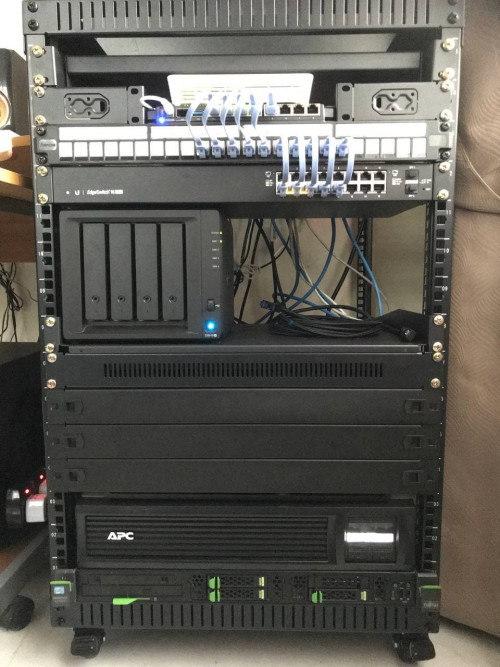
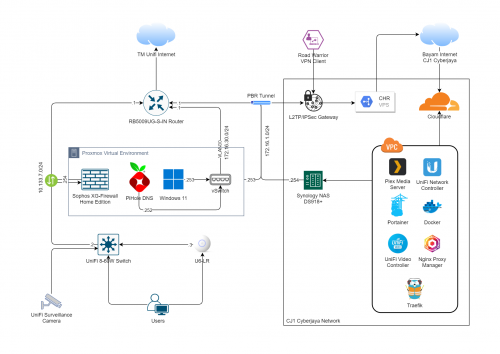
thumbup.gif nice to see another homelabber. my setup in MY house is just a 4U rack with 1U SuperMicro server, UPS, HPE 24p switch, TP-link PoE+ switch, MikroTik hapac2 as router and 3 Aruba APs for WiFi.
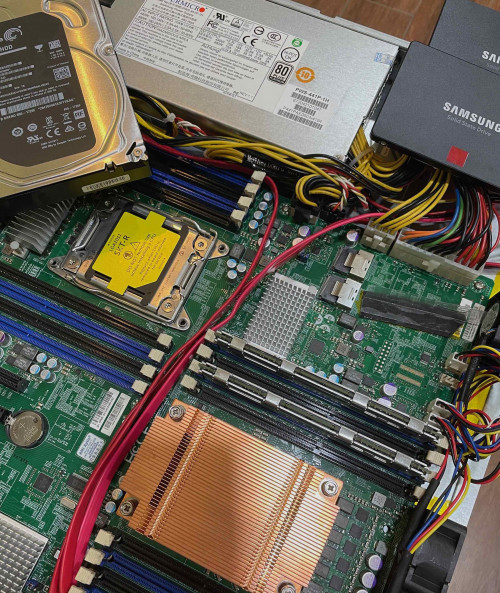
mainly running plex, AdGuard home, hosting my website and some other stuffs on proxmox.

in JP, I run a 1U SuperMicro below my work desk to host a nextcloud instance and Mac mini at home to lower my home electric bill laugh.gif
quadcube
post Feb 20 2022, 11:06 AM

Regular
******
Senior Member
1,924 posts

Joined: May 2009
From: Yokohama, JP


QUOTE(Anime4000 @ Feb 20 2022, 03:16 AM)
you know where to find server case that fit in that rack? I want transform gaming case
*
short server case quite hard to find, especially when my wall mounted server enclosure is less than 550mm
I settled for a 1U short depth supermicro case (recycled) (https://item.taobao.com/item.htm?spm=a1z09.2.0.0.cf992e8dQYVnSh&id=572750465193&_u=k2v7300vd415)

also got a 480W platinum plus rated PSU for short depth supermicro case (PWS-441P-1H), basically building a Frankenstein supermicro laugh.gif (https://store.supermicro.com/480w-1u-pws-441p-1h.html) (https://item.taobao.com/item.htm?spm=a1z09.2.0.0.cf992e8dQYVnSh&id=636335216874&_u=k2v7300va6c0)

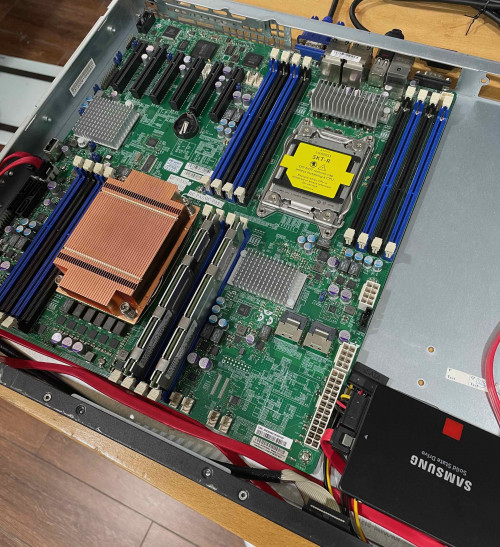
this is just enough to the "mm" to fit a dual socket supermicro mobo that I bought, combined with 1U low profile copper heatsink and short depth high rpm 1U fans with two SATA SSD (3.5" HDD cannot fit into the case)

user posted image

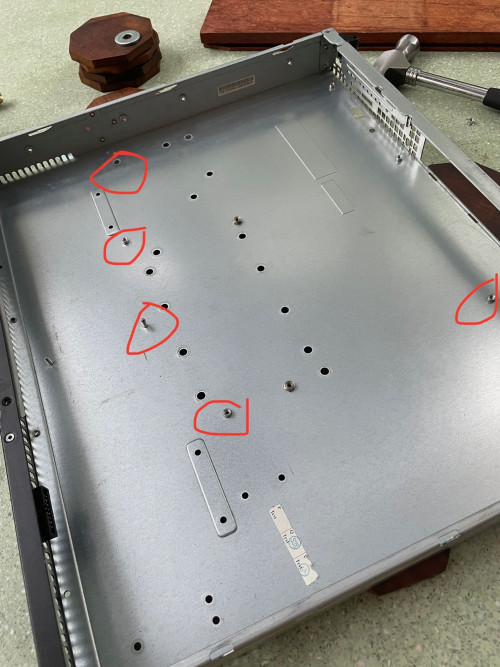
those mobo mounting are for certain single CPU mobo size. had to remove and reconfigure some of them to mount the dual socket mobo
user posted image

user posted image

keyword on Taobao is 短机箱

but I would recommend not doing 1U, basically the fans are too damn noisy

This post has been edited by quadcube: Feb 20 2022, 11:11 AM
quadcube
post Feb 20 2022, 05:13 PM

Regular
******
Senior Member
1,924 posts

Joined: May 2009
From: Yokohama, JP


QUOTE(Anime4000 @ Feb 20 2022, 04:18 PM)
quadcube
Look nice!

too bad my server is full height:

I have 4 × 1TB SSD in RAIDz2 (TrueNAS + PCIe SATA Passthrough)

and 1 × 10TB HDD

[attachmentid=11097597]

at least need 4U server rack with ATX screw.

If I managed to get proper server case then I use proper server rack instead of metal rack

sorry interject here, since my RB3011 died because of port flop, plan to buy RB5009 but out of stock, so I bought ER-12 while waiting RB5009 become available
*
a proper rack would be great, but if you are still stuck with short ones, there are also 2U/4U ones (for e.g.: https://detail.tmall.com/item.htm?spm=a230r...=4708406741179)


on the side note, I think I remember seeing somewhere where you mentioned your friend helps you to host something in JP?
was wondering how he/she deals with the IPv6 setup there, specifically to the issue where stupid Japanese ISP only gives out /64 addresses (at least MY ISP didn't screw up this part laugh.gif )

I can't even properly firewall the IPv6 side since they are connected L2 bridge mode laugh.gif

seems like one way to do it is via ND proxy but Mikrotik doesn't have ND proxy, I think Ubiquiti also doesn't have them either

quadcube
post Feb 20 2022, 05:18 PM

Regular
******
Senior Member
1,924 posts

Joined: May 2009
From: Yokohama, JP


QUOTE(go626201 @ Feb 20 2022, 05:13 PM)
You need so many SFP Port?

For me i prefer CCR2004-16G-2S+,maybe because i dont need so many SFP port,(And also I though S+RJ10 or similar adapter quite hot?)
*
yes, S+RJ10 runs ungodly hot even in winter sweat.gif can't run them without active cooling
quadcube
post Feb 20 2022, 05:53 PM

Regular
******
Senior Member
1,924 posts

Joined: May 2009
From: Yokohama, JP


QUOTE(Anime4000 @ Feb 20 2022, 05:36 PM)
That case very blank~ I guess put case in horizontal

yes, JP give IPv6 /64 only, but my friend disable IPv6

Malaysia also same, give only /64, which is very bad.

Currently I use ND proxy, Android hate DHCPv6, both Mikrotik and Ubiquiti do have ND
here, I use ND Proxy on my RB3011: https://www.hitoha.moe/mikrotik-ipv6-over-pppoe/

added haxxor word, I do like this with IPv6:
[attachmentid=11097606]
not really, but doing 10GbE networking is nice tho, 1GbE hardly over-saturated SSD NAS.

Indeed SFP run hot even SFP XPON ONU can reach 61°C, Realtek SoC + Laser is very hot, pumping ~3dB back to TM OLT,
[attachmentid=11097607]
*
ah, but damn..without ipv6, the congestion is really bad at peak period sweat.gif mine is an IPv6 only IPOE connection (dual stack via ds-lite), can't avoid it sweat.gif

eh? I thought MY gives out prefix? because my DHCP client gets the prefix from TM/Maxis and mikrotik side assigns the v6DHCP addresses from the prefix pool to the rest of the LAN devices (if I understands it correctly) sweat.gif

will try setting it again after going through your guide


my S+RJ10 runs at 88 celsius at low load, even with small heat sinks pasted to it laugh.gif
quadcube
post Sep 7 2024, 01:34 PM

Regular
******
Senior Member
1,924 posts

Joined: May 2009
From: Yokohama, JP


QUOTE(soonwai @ Aug 29 2024, 04:39 PM)
ah finally, no longer need to use nrlquaker's winbox-mac laugh.gif


Change to:
| Lo-Fi Version
0.0909sec    0.42    7 queries    GZIP Disabled
Time is now: 22nd December 2025 - 01:53 AM