Outline ·
[ Standard ] ·
Linear+
Enterprise Networking Mikrotik Routers (RouterBoard & RouterOS), User and owner discussion group
|
heidarren
|
 Aug 30 2019, 11:56 PM Aug 30 2019, 11:56 PM
|
Getting Started


|
QUOTE(soonwai @ Aug 30 2019, 09:55 PM) Apple products, by design, only uses 20Mhz channel width at 2.4Ghz. Yup, many phones only uses 20MHz even if the router is broadcasting 40MHz, due to it's never advised to use 40MHz in 2.4GHz, unless You are living in jungle, or else you are just a bad neighbor. As for 40MHz, unless every devices in 2.4GHz are using 40MHz, if anyone of them only uses 20MHz, everyone will drop to 20MHz, but still broadcasting 40MHz to create interference to interrupt your neighbor. |
|
|
|
|
|
Garena
|
Aug 31 2019, 01:23 AM
|
|
|
QUOTE(soonwai @ Aug 30 2019, 09:55 PM) Apple products, by design, only uses 20Mhz channel width at 2.4Ghz. Since the beginning? Well that explains why. But the Broadcom chip inside the iPhones supposed can support 40 MHz channel width right? Since iPhone 6 Apple use 802.11ac chip. I've read the chips' datasheets. Actually iPhone is not alone, even Nexus phones and Galaxy S7 also the same only support 20 MHz channel width on 802.11n 2.4 GHz with a 144.4 Mbps theoretical data rate. It's very nice to test out different brand of smartphones to find out their Wi-Fi capabilities using RouterOS. This post has been edited by Garena: Sep 12 2019, 09:48 AM |
|
|
|
|
|
soohoe84
|
Aug 31 2019, 01:51 AM
|
Getting Started
|
QUOTE(soohoe84 @ Aug 29 2019, 10:51 PM) Hi soonwai, I want to update my hAP AC to latest 6.45.5 by manually uploading packages as per https://blog.pessoft.com/2019/03/02/mikroti...ll-disk-device/. However, i noticed that the system-6.45.5-mipsbe.npk package alone has a 7.2MB file size while the hAP AC has only 4.6MB left. Is it still possible to upload? May i know how do you normally update your unit please? Via Netinstall? Can any sifu please shed some light? |
|
|
|
|
|
Garena
|
Aug 31 2019, 02:01 AM
|
|
|
QUOTE(heidarren @ Aug 30 2019, 11:56 PM) Yup, many phones only uses 20MHz even if the router is broadcasting 40MHz, due to it's never advised to use 40MHz in 2.4GHz, unless You are living in jungle, or else you are just a bad neighbor. As for 40MHz, unless every devices in 2.4GHz are using 40MHz, if anyone of them only uses 20MHz, everyone will drop to 20MHz, but still broadcasting 40MHz to create interference to interrupt your neighbor. Incorrect, there are smartphones that use 20 MHz channel width on my hAP ac 2.4 GHz band but other laptop and smartphone still able to negotiate 40 MHz channel width and achieve 150 Mbps for 1x1 and 300 Mbps for 2x2. It does not force all wireless clients fall back to 20 MHz channel width. This post has been edited by Garena: Aug 31 2019, 02:28 AM |
|
|
|
|
|
Garena
|
Aug 31 2019, 02:03 AM
|
|
|
QUOTE(soohoe84 @ Aug 31 2019, 01:51 AM) Can any sifu please shed some light? I update via Quick Set -> Check For Updates. This post has been edited by Garena: Aug 31 2019, 03:17 AM |
|
|
|
|
|
heidarren
|
Aug 31 2019, 09:49 AM
|
Getting Started
|
QUOTE(Garena @ Aug 31 2019, 02:01 AM) Incorrect, there are smartphones that use 20 MHz channel width on my hAP ac 2.4 GHz band but other laptop and smartphone still able to negotiate 40 MHz channel width and achieve 150 Mbps for 1x1 and 300 Mbps for 2x2. It does not force all wireless clients fall back to 20 MHz channel width. Don't trust the nego speed, try some speedtest to see how those 40MHz perform while some 20MHz clients just doing some simple web surfing. |
|
|
|
|
|
MX510
|
Aug 31 2019, 10:18 AM
|
|
|
Get xsMax and ipad pro support mimo 4x4 :-)
|
|
|
|
|
|
weikee
|
Aug 31 2019, 10:26 AM
|
|
|
QUOTE(soohoe84 @ Aug 31 2019, 01:51 AM) Can any sifu please shed some light? Try from Winbox system -> Packages -> Click "Check For Updates", select "stable" channel and click "Check for Updates" button  |
|
|
|
|
|
heidarren
|
Aug 31 2019, 10:34 AM
|
Getting Started
|
QUOTE(weikee @ Aug 31 2019, 10:26 AM) Try from Winbox system -> Packages -> Click "Check For Updates", select "stable" channel and click "Check for Updates" button Don't forget to update RouterBoard firmware after 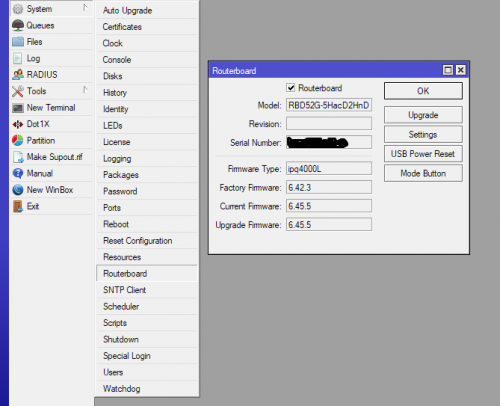 |
|
|
|
|
|
MX510
|
Aug 31 2019, 10:47 AM
|
|
|
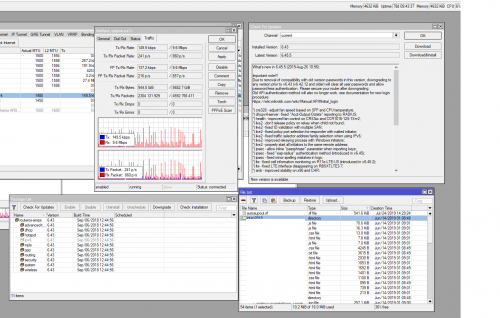 Please clear file list to perform update usually it will take a lot of space then you can perform update I will do update later hehehe |
|
|
|
|
|
soohoe84
|
Aug 31 2019, 11:48 AM
|
Getting Started
|
Garena, weikee, heidarren, MX510, thank you so much for your help.  Read that many users mentioning insufficient disk space error while using the check for updates function, and hence my question. Managed to update my units successfully and effortlessly. No issues so far.  My file list is always empty except the default flash, /pub, /skins. However, i do notice that the login speed via winbox is different. Was on 6.41.1 with winbox 3.11 and the login was instantaneous. But with winbox 3.19 login to 6.41.1, there was a few seconds delay. Now with winbox 3.19 to 6.45.5, the login speed is back to instantaneous. This post has been edited by soohoe84: Aug 31 2019, 12:43 PM
|
|
|
|
|
|
weikee
|
Aug 31 2019, 03:11 PM
|
|
|
QUOTE(heidarren @ Aug 31 2019, 10:34 AM) Don't forget to update RouterBoard firmware after Yup, but i usually wait the package confirm stable after using it few weeks only update the routerboard. |
|
|
|
|
|
soohoe84
|
Aug 31 2019, 03:16 PM
|
Getting Started
|
QUOTE(weikee @ Aug 31 2019, 03:11 PM) Yup, but i usually wait the package confirm stable after using it few weeks only update the routerboard. Meaning there is no way to revert if the new firmware is unstable? |
|
|
|
|
|
heidarren
|
Aug 31 2019, 04:40 PM
|
Getting Started
|
QUOTE(weikee @ Aug 31 2019, 03:11 PM) Yup, but i usually wait the package confirm stable after using it few weeks only update the routerboard. True, but I’m just a home user, so I will update both at once, will return to previous version if any instability issues |
|
|
|
|
|
soonwai
|
Aug 31 2019, 04:45 PM
|
|
|
QUOTE(soohoe84 @ Aug 31 2019, 03:16 PM) Meaning there is no way to revert if the new firmware is unstable? Can revert RouterOS anytime, just upload old npk and click Downgrade in Winbox. Firmware not sure. |
|
|
|
|
|
soonwai
|
Aug 31 2019, 04:48 PM
|
|
|
QUOTE(MX510 @ Aug 31 2019, 10:18 AM) Get xsMax and ipad pro support mimo 4x4 :-) Eh? Sure or not. iPad Pro, I dunno but iPhone only 2x2 for Wifi. |
|
|
|
|
|
Garena
|
Aug 31 2019, 06:23 PM
|
|
|
QUOTE(heidarren @ Aug 31 2019, 09:49 AM) Don't trust the nego speed, try some speedtest to see how those 40MHz perform while some 20MHz clients just doing some simple web surfing. Are you saying there's bug in the Wireless Tables -> Registration so do not trust it? I think not. Of course i also done speed test to test it before, on 150 Mbps data rate i get 90 Mbps+, on 300 Mbps data rate i get 180 Mbps+. Obviously the 40 MHz channel width is working. If the shown 300 Mbps negotiated data rate is fake then i wouldn't get more than 90 Mbps+. This post has been edited by Garena: Aug 31 2019, 06:36 PM |
|
|
|
|
|
Garena
|
Aug 31 2019, 06:34 PM
|
|
|
QUOTE(MX510 @ Aug 31 2019, 10:18 AM) Get xsMax and ipad pro support mimo 4x4 :-) Lol that 4x4 MIMO is for cellular. I can still remember the model number because last year i read some articles about the superiority of Qualcomm modem vs underdog Intel modem. Intel XMM 7560 is the model number for the 2018 iPhones, please do not confuse cellular MIMO with Wi-Fi MIMO  Both iPhone 7 and 7 Plus (2016) and iPhone 8 and 8 Plus (2017) use a mixed of Qualcomm and Intel modem. iPhone Xs, Xs Max, Xr (2018) all use Intel modem. Legal battle between Qualcomm vs Intel. This post has been edited by Garena: Aug 31 2019, 06:54 PM |
|
|
|
|
|
Garena
|
Aug 31 2019, 07:01 PM
|
|
|
QUOTE(soonwai @ Aug 31 2019, 04:48 PM) Eh? Sure or not. iPad Pro, I dunno but iPhone only 2x2 for Wifi. Yes, so far no smartphone support 3x3 yet, but laptop have a few like the MacBook 2018. Maybe the engineers think that 600 Mbps real world speed on Wi-Fi is good enough for smartphone? Laptop support 3x3 is not new, many years ago Apple equipped a 802.11n 3x3 Wi-Fi before in their MacBook 2012, it supports up to 450 Mbps theoretical data rate. 802.11ac 3x3 is very rare to be found in laptop space. Maybe we can just forget about it, just straight away jump to 802.11ax 2x2 with greater theoretical data rate of 1201 Mbps.  And then the engineers will think that 802.11ax 2x2 is good enough no need 3x3 again This post has been edited by Garena: Sep 12 2019, 09:40 AM |
|
|
|
|
|
heidarren
|
Aug 31 2019, 07:56 PM
|
Getting Started
|
QUOTE(Garena @ Aug 31 2019, 06:23 PM) Are you saying there's bug in the Wireless Tables -> Registration so do not trust it? I think not. Of course i also done speed test to test it before, on 150 Mbps data rate i get 90 Mbps+, on 300 Mbps data rate i get 180 Mbps+. Obviously the 40 MHz channel width is working. If the shown 300 Mbps negotiated data rate is fake then i wouldn't get more than 90 Mbps+. Bro, calm down. ofcoz we know that the 40MHz is working, and the registration table is showing the correct rate, what I mean is in real world, those 20MHz and 40MHz clients will use the WiFi simultaneously right? So do a speed test WITH both of them connected and do the speed test on the 40MHz client and use the 20MHz client to do some web browsing at the same time, u will see the speed drops significantly. Also, go YouTube and watch the MUM especially those topic like “wireless” “top ten common mistake in MikroTik”, all of them are saying this. If we can easily get a double of speed by just a single click, why wouldn’t we? Simple enough right? Just a click, double speed. But why most of us r saying the same thing? Must be a reason |
|
|
|
|



 Quote
Quote




 0.0224sec
 0.41
0.41
 6 queries
 GZIP Disabled