This post has been edited by MaKaNg: Oct 9 2010, 11:52 AM
Attached thumbnail(s)

Intel® Core™2 Duo/Quad Overhauled Rev. 4, The journey continues...
|
|
 Oct 9 2010, 09:51 AM Oct 9 2010, 09:51 AM
|
 
Junior Member
151 posts Joined: Jun 2009 
|
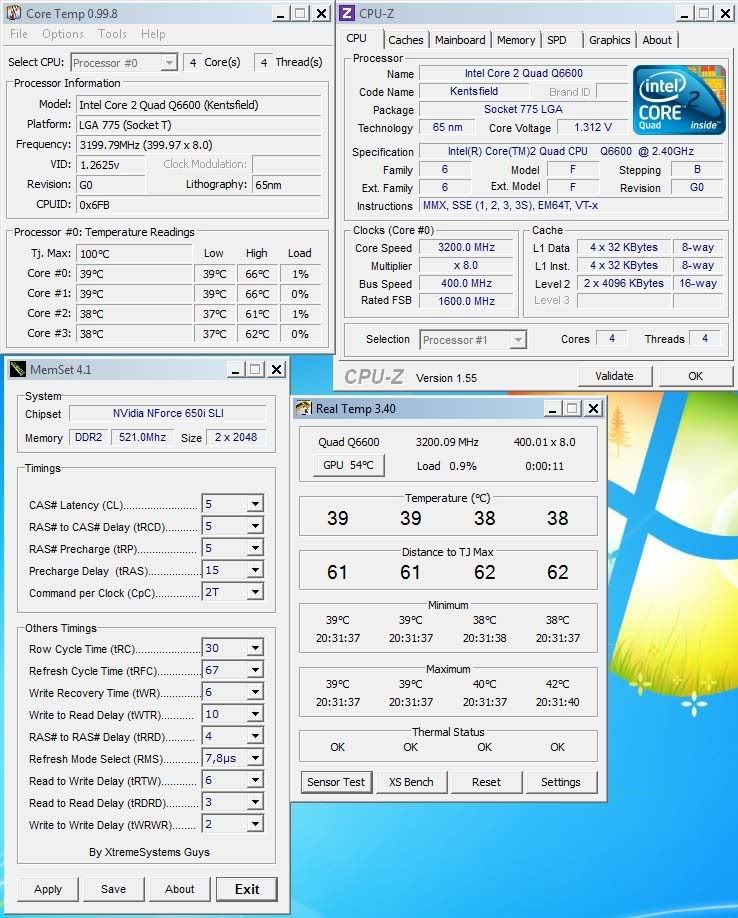
And this is when im running at 3.0Ghz.. im using core temp and real temp to check the temp.. but they seem to be different results.. which 1 is more accurate??
This post has been edited by MaKaNg: Oct 9 2010, 11:52 AM Attached thumbnail(s)
|
|
|
|
|
|
Oct 16 2010, 08:58 AM
|

Junior Member
422 posts Joined: Feb 2008 From: Johor Bahru  
|
Hello guys...i'm very new with oc thingy....hope sifu oc help me...don't wat to push so hard for my proc..just 24/7 setup...ok..let start with my setting....
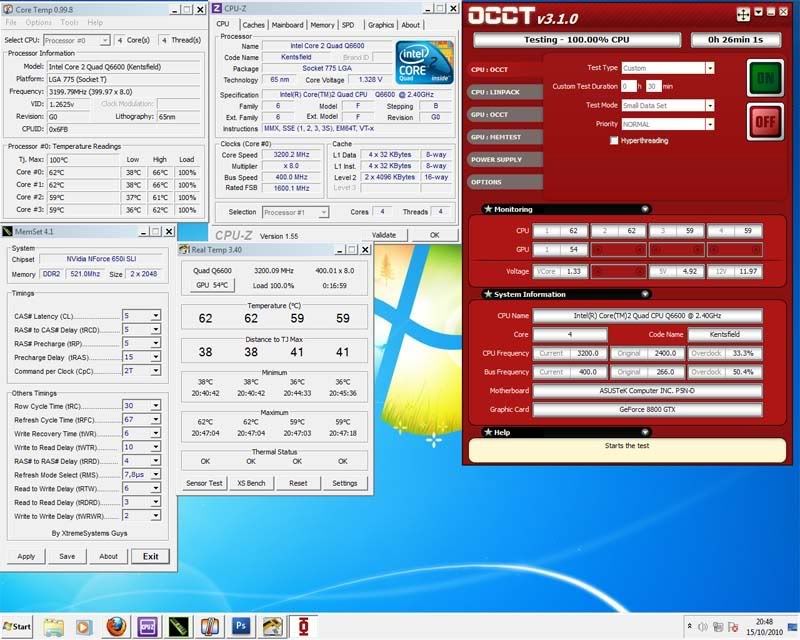
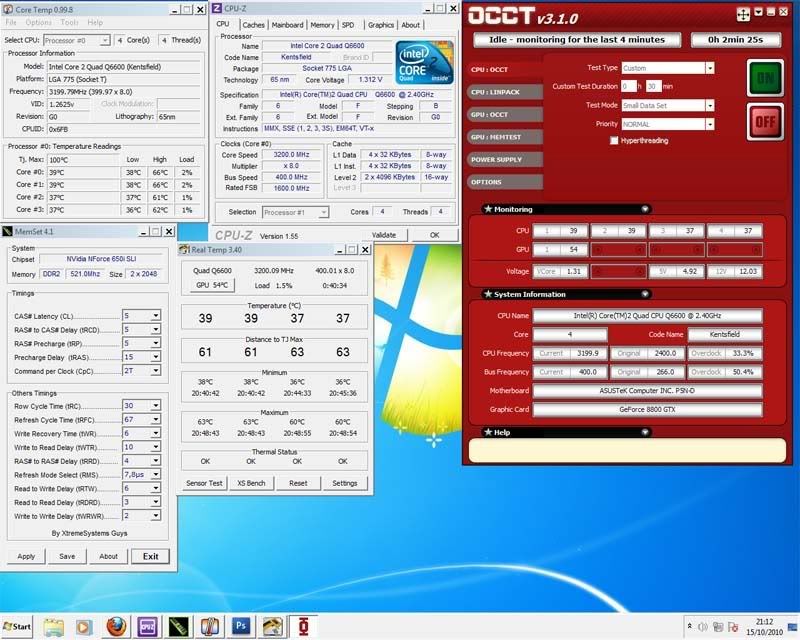
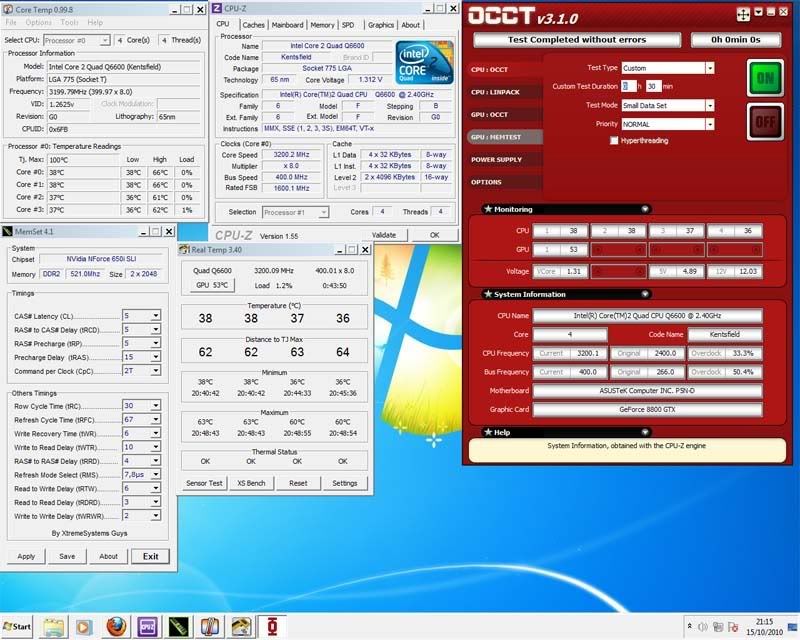
 asus p5n-d Q6600 @3.2Ghz Vcore : 1.32 (scare to up more) some forum suggest up until 1.5v  NB : 1.42 HT : 1.42 SB : auto FSB : 1600 Multiplier 8x Vram : 2.1 (5 5 5 15 2t) Hyper-x Dram : 1040 testing 30 min occt, small data set with no error.. 100% load » Click to show Spoiler - click again to hide... « idle » Click to show Spoiler - click again to hide... « Finish.. » Click to show Spoiler - click again to hide... « how to check stability..? if using prime95, if there any setting that i must set..? how long to test... if using occt, how much min time to test to check stability...thanks... This post has been edited by jungle_boy: Oct 16 2010, 08:59 AM |
|
|
Oct 16 2010, 10:50 AM
|

Senior Member
1,632 posts Joined: Oct 2007 From: Sea 
|
hi jungle_boy, u system merely same as mine
 ... btw nice oc u tweak there.. ... btw nice oc u tweak there.. basically for stability test, some ppl torture test taking 24hr or 12hr.... 30minutes test, u cant see any error yet, some error will pop out in 5 hrs for example...  at least set to medium data sheet or large data sheet test... u will see how's your temperature goes...  this medium data sheet or large data sheet test will faster to lead u whether u oc is stable or not.. because if not stable it will BSOD faster within minutes |
|
|
Oct 17 2010, 01:29 AM
|

Senior Member
4,947 posts Joined: Nov 2007
|
Anyone here invited to the Kingston power user gathering?
|
|
|
Oct 22 2010, 06:08 PM
|

Senior Member
4,522 posts Joined: Jan 2003 From: Mordor, Middle Earth.
|
Hi guys whats the average OC result for Qx9650 can get on a decent cooler such as Hyper 212 Plus with condition like these below.
1. Adjust multiplier only. (no changing FSB) 2. Default factory Voltage. |
|
|
Oct 22 2010, 06:09 PM
|

All Stars
10,688 posts Joined: Jan 2005
|
QUOTE(Silverfire @ Oct 17 2010, 01:29 AM) Anyone here invited to the Kingston power user gathering? Me..   |
|
|
|
|
|
Oct 22 2010, 11:49 PM
|

Senior Member
3,812 posts Joined: Dec 2008 From: Eden 
|
QUOTE(gengstapo @ Oct 22 2010, 06:09 PM) Me.. me oso~  |
|
|
Nov 1 2010, 11:01 AM
|

Senior Member
1,127 posts Joined: Feb 2008
|
Hi, tried to Overclock the E2180 but am stuck at 2.20. It works fine at this speed.
however, immediately after increase to 223 or 226 and exit BIOS, it will go silent for a while then automatically resets back to default 2.00 before POST. Hope any sifus can give some opinion:help: My Specs and config in BIOS are below. Intel E2180@2.20ghz Gigabyte mobo: GA945-GCM-S2L Revision 1.00 F4 2Gb 667 -PC 5200 Kingston value ram 4-4-4-12 sapphire 4670 512 mb 1 TV card Windows XP sp2 1 DVD drive LG 1 USB wireless TP-Link 1 AVF 450W PSU (Cap ayam) 1 PCI fan memory frequency multifplier = 2.00 FSB = 220 CPU Multiplier = (cannot change in bios) PCI Clock speed = 100 vDimm = auto FSB overvoltage = auto Vcore = 1.325 EIST = Disable CE1 = Disable Temp = 48 - 65 c Thanks for all advice. smile.gif This post has been edited by alvinfks78: Nov 1 2010, 05:02 PM |
|
|
Nov 1 2010, 08:47 PM
|

Senior Member
8,686 posts Joined: Mar 2009
|
QUOTE(alvinfks78 @ Nov 1 2010, 11:01 AM) Hi, tried to Overclock the E2180 but am stuck at 2.20. It works fine at this speed. try lower down the dram multiplier.however, immediately after increase to 223 or 226 and exit BIOS, it will go silent for a while then automatically resets back to default 2.00 before POST. Hope any sifus can give some opinion:help: My Specs and config in BIOS are below. Intel E2180@2.20ghz Gigabyte mobo: GA945-GCM-S2L Revision 1.00 F4 2Gb 667 -PC 5200 Kingston value ram 4-4-4-12 sapphire 4670 512 mb 1 TV card Windows XP sp2 1 DVD drive LG 1 USB wireless TP-Link 1 AVF 450W PSU (Cap ayam) 1 PCI fan memory frequency multifplier = 2.00 FSB = 220 CPU Multiplier = (cannot change in bios) PCI Clock speed = 100 vDimm = auto FSB overvoltage = auto Vcore = 1.325 EIST = Disable CE1 = Disable Temp = 48 - 65 c Thanks for all advice. smile.gif since you are using DDR2 667 ram, default dram muliplier should be 1.67. try lower it donw to 1.33.  |
|
|
Nov 3 2010, 01:25 AM
|

Senior Member
1,058 posts Joined: Apr 2006 From: Penang , Malaysia
|
QUOTE(billytong @ Oct 22 2010, 07:08 PM) Hi guys whats the average OC result for Qx9650 can get on a decent cooler such as Hyper 212 Plus with condition like these below. by only adjusting multi won't yield you much. 1. Adjust multiplier only. (no changing FSB) 2. Default factory Voltage. instead, combine multi + fsb +ram ratio +volt tweek is the magic here. QX9 series isn't that powerfull thou! |
|
|
Nov 3 2010, 12:08 PM
|
|
Senior Member
1,127 posts Joined: Feb 2008
|
QUOTE(saturn85 @ Nov 1 2010, 09:47 PM) try lower down the dram multiplier. Thanks for reply since you are using DDR2 667 ram, default dram muliplier should be 1.67. try lower it donw to 1.33.   Tried to lower the multiplier for DRAM but lowest can go is 2.00. Memory Frequency 400mhz. But its still below 667mh right? Tried to lower the multiplier for DRAM but lowest can go is 2.00. Memory Frequency 400mhz. But its still below 667mh right?If set to auto.......would not even start. shoot up to 7++ mhz. Maybe I can increase the timings? probably my Mobo limitations? ..........Googled..........other people's best bet was 1:2. I remember being successfully going to 2.23 or 2.26 once but can't replicate it again. This post has been edited by alvinfks78: Nov 3 2010, 04:16 PM |
|
|
Nov 4 2010, 03:19 AM
|
|
Senior Member
8,686 posts Joined: Mar 2009
|
QUOTE(alvinfks78 @ Nov 3 2010, 12:08 PM) Thanks for reply oh, you are referring to the ddr clock. Tried to lower the multiplier for DRAM but lowest can go is 2.00. Memory Frequency 400mhz. But its still below 667mh right?If set to auto.......would not even start. shoot up to 7++ mhz. Maybe I can increase the timings? probably my Mobo limitations? ..........Googled..........other people's best bet was 1:2. I remember being successfully going to 2.23 or 2.26 once but can't replicate it again. if you are referring to this standard, then the lowest dram multiplier should be 2.00. so you can use dram multiplier of 2.66. but for your information, the real clock of ddr2 667 = 333mhz. when play overclock, normally people will use manual, won't set it auto. |
|
|
Nov 8 2010, 09:51 AM
|

Senior Member
15,022 posts Joined: Jan 2003 From: Damansara Jaya/Bandar Utama
|
i need some help guys, here's my specs:
Gigabyte EP45-UD3P E5400 2.7Ghz 2 x 2GB KVR RAM GTX 460 1GB CM RealPower 550W CM V6-GT FSB=333Mhz RAM=800Mhz (No OC). Initially i o/c-ed it to 4Ghz and it was running fine for a few months..., but recently, when it boots up, sometimes it'll lose the OC settings and goes back to default. I'm not sure how to set those settings in the voltage, so i just default it in the BIOS (which was working previously). The core voltage goes to 1.4v. Whenever it lose the setting, and i return to the BIOS, a red warning message will pop up regarding some failed OC settings on previous run. Could it be a mobo problem? The LAN port (2 ports!) just kong out recently...i think around the same time the problem appears...not really sure though....can OC too much knock out LAN ports??? Pls help!! This post has been edited by Matrix: Nov 8 2010, 09:52 AM |
|
|
|
|
|
Nov 8 2010, 02:44 PM
|

Junior Member
7 posts Joined: Sep 2010
|
i have an e4600..i tried overclocking but somehow i'm reli noob at it so just gona stick with the normal freq..i just want to know is 200*12 is better than 240*10?
and do anyone know what is the best overclock i can get with my rig?do tell how to reach it.. my rig's specs: intel e4600 2.4ghz mobo asus p5kpl-vm 2*1gb ddr2 800mhz |
|
|
Nov 8 2010, 06:38 PM
|
|
Senior Member
3,812 posts Joined: Dec 2008 From: Eden
|
QUOTE(Matrix @ Nov 8 2010, 09:51 AM) i need some help guys, here's my specs: try switch off your power switch for a minute (not ur pc only). your wall socket switch. then reboot ur pc. heard this kind of cases happening, but dunno if it's caused by OC. Gigabyte EP45-UD3P E5400 2.7Ghz 2 x 2GB KVR RAM GTX 460 1GB CM RealPower 550W CM V6-GT FSB=333Mhz RAM=800Mhz (No OC). Initially i o/c-ed it to 4Ghz and it was running fine for a few months..., but recently, when it boots up, sometimes it'll lose the OC settings and goes back to default. I'm not sure how to set those settings in the voltage, so i just default it in the BIOS (which was working previously). The core voltage goes to 1.4v. Whenever it lose the setting, and i return to the BIOS, a red warning message will pop up regarding some failed OC settings on previous run. Could it be a mobo problem? The LAN port (2 ports!) just kong out recently...i think around the same time the problem appears...not really sure though....can OC too much knock out LAN ports??? Pls help!!  QUOTE(fallend90 @ Nov 8 2010, 02:44 PM) i have an e4600..i tried overclocking but somehow i'm reli noob at it so just gona stick with the normal freq..i just want to know is 200*12 is better than 240*10? there is no different between 200*12 vs 240*10. not that u can tell the different oso~ and do anyone know what is the best overclock i can get with my rig?do tell how to reach it.. my rig's specs: intel e4600 2.4ghz mobo asus p5kpl-vm 2*1gb ddr2 800mhz flash to latest bios, go to AI overcloking and choose manual (manually set ur OC parameters). put ur multiplier to the highest, then start upping ur fsb bit by bit~ 3.0ghz is doable~ (someone run this chip on 3ghz with 1.375v Vcore (250*12)) |
|
|
Nov 8 2010, 10:37 PM
|
|
Senior Member
8,686 posts Joined: Mar 2009
|
QUOTE(Matrix @ Nov 8 2010, 09:51 AM) i need some help guys, here's my specs: maybe the silicon chips have degrade.Gigabyte EP45-UD3P E5400 2.7Ghz 2 x 2GB KVR RAM GTX 460 1GB CM RealPower 550W CM V6-GT FSB=333Mhz RAM=800Mhz (No OC). Initially i o/c-ed it to 4Ghz and it was running fine for a few months..., but recently, when it boots up, sometimes it'll lose the OC settings and goes back to default. I'm not sure how to set those settings in the voltage, so i just default it in the BIOS (which was working previously). The core voltage goes to 1.4v. Whenever it lose the setting, and i return to the BIOS, a red warning message will pop up regarding some failed OC settings on previous run. Could it be a mobo problem? The LAN port (2 ports!) just kong out recently...i think around the same time the problem appears...not really sure though....can OC too much knock out LAN ports??? Pls help!! it needs higher voltage to stable it at 4ghz. i found some clock and voltage that related with ethernet controller. not sure whether applicable on your case or not. http://www.tomshardware.com/reviews/xeon-e...-ep,2767-2.html QUOTE After bumping up the PCIe frequency and IOH/ICH PCIe voltages, I fried the onboard Intel gigabit Ethernet controller. It simply wouldn't show up in Windows afterward. |
|
|
Dec 8 2010, 09:27 AM
|

Junior Member
492 posts Joined: Nov 2008 From: Boleh-Land
|
Hi, im trying to OC my PC abit..
This is my comp spec: Intel C2D E7400 2.80 Gigabyte EP41-UD3L(Intel G41 Chipset) 2GB DDR2 800MHz RAM Gigabyte 9800GT 1GB GC CM 550 Real Power PSU(19A on +12V rail) This is how I did. -Change FSB to 286(originally at 266MHz) -Multiplier is 10.5, so my target CPU speed is 286*10.5=3003Mhz -VCore is 1.2875(stock) -Lowering SPD to 2.0 From my understanding, this FSB increase is very little and doesnt need any VCore increase.. To my concern, after I save settings and restart, my PC unable to boot at all..it just show POST half way then pufft..it turns off itself Then restart automatically(this on-off process happens 2-3 times) until suddenly, it can boot properly but, this time FSB is back to normal(266MHz).. What happened actually?Before this im using 450W psu with 230W real power also same thing happened. So i upgraded to CM psu. PS: I tried increase VCore 5-10% but, same thing happen.. |
|
|
Dec 11 2010, 12:59 PM
|
|
Senior Member
2,751 posts Joined: Jan 2003 From: Taiping
|
pump some at vmch to 1.2v
hit vcore to 1.3125v v.dimm hit to 1.9v now hit 300mhz at fsb SPD get as low as possible disable intel thermal monitor, eist, c1, and spread spectrum |
|
|
Dec 11 2010, 01:17 PM
|

Junior Member
612 posts Joined: Mar 2008
|
Hi, I need someone teach me how to OC the E5200. I really noob when playing at volt thingy. Here is my PC spec
Intel Pentium Dual Core E5200 2.5Ghz Asus Maximus II Formula 2 x 2GB HyperX 1066Mhz CL5 ATI HD 4870 Gigabyte Odin GT 550watt So, what is the setting I need to put? Very noob here.. Thinking to get 3.5Ghz using Corsair H50 watercooled |
|
|
Dec 22 2010, 12:38 AM
|
|
Senior Member
1,058 posts Joined: Apr 2006 From: Penang , Malaysia
|
try reset your mobo BIOS and OC again.
P45 + Q6600 combination is very easy to OC. u can easily go over 3ghz without much hassle........... |
| Change to: |  0.0388sec 0.0388sec
 0.71 0.71
 6 queries 6 queries
 GZIP Disabled GZIP Disabled
Time is now: 18th December 2025 - 09:55 AM |
 Quote
Quote