Welcome Guest ( Log In | Register )

113 Pages « < 100 101 102 103 104 > » Bottom

Outline · [ Standard ] · Linear+

 Intel® Core™2 Duo/Quad Overhauled Rev. 4, The journey continues...

views
     
OC4/3
post Feb 14 2011, 07:13 PM

.
Group Icon
Elite
4,746 posts

Joined: Dec 2007
From: Speed rule


QUOTE(JayChoww @ Feb 14 2011, 05:18 PM)
Hi guys, i just got this new Cpu Q8300 @ 2.5Ghz ( I know it's not good as Q6600 or Q9x50 series OC), i think it's bottleneck my gpu so i decide to OC this one (not sure though.. 3D Vantage GPU score 16k stock, 18k OC lol)
I manage to get stable to 3.5Ghz. The problem is my temp, 73-75c after 2 hour prime test.
Tcase for this cpu is 71.4c and Tj.Max 100c. Im a noob at this so..is this ok? for 24/7 use?
If i play games, max temp only reach 64-65c only.

here pic after 5 min prime and it's already reach 69c max  tongue.gif
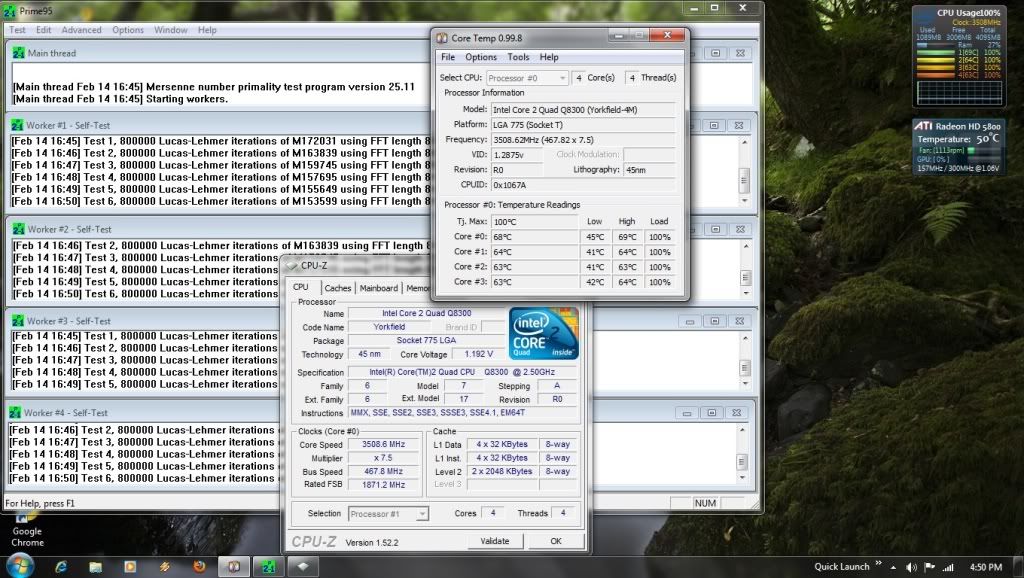
user posted image

My setting :

Vcore : 1.21v
Memory : 1.908v @ 934Mhz (auto at 5-6-6-18)
Mch : 1.304v
Vtt : 1.21v
Ich : 1.52v (set to default manual, auto set it to 1.6)
(Spread spectrum, C1E,Speedstep etc. all disable)
The rest is auto

Check my Sig for other part.. Thx
*
The temp is ok and there are nothing to worry about smile.gif
amadzack
post Feb 14 2011, 11:24 PM

Getting Started
**
Junior Member
61 posts

Joined: Oct 2010


how about this is it i have push it too far?

user posted image

vcore=1.35v in bios
memory=1.645v ddr3
memory clock=1000mhz
VTT=1.25v
MCH=1.47v
other set on default.
ne0cz
post Feb 14 2011, 11:49 PM

Zoom Zoom
*******
Senior Member
5,372 posts

Joined: May 2008
From: Nokia HQ


the temps look OK. Keep cool..
Your RAM is 1000mhz in CPU-Z = 2000mhz? Nice RAMs.
amadzack
post Feb 15 2011, 01:32 AM

Getting Started
**
Junior Member
61 posts

Joined: Oct 2010


no la
my memory 1600mhz
now work at 529x2=1058mhz
happy.gif
thx for reply

This post has been edited by amadzack: Feb 15 2011, 01:36 AM
Kva
post Jun 4 2011, 03:05 PM

Getting Started
**
Junior Member
96 posts

Joined: Jan 2003
From: Kota Kinabalu
I've been using my E6300 overclocked to 3.010 Ghz for 4 years now at 430x7 (5.5.5.15)
4 slots of ram (KVR 512MB rated DDR2 666mhz at 1.8v CL5 hynix chips) 4x512MB= 2 GB in total.
RAM need to overvolt to 2.1v and CPU 1.425v to stabilize the system.

Then I figured i need more RAM and I bought another piece of 2GB KVR (rated DDR2 800 at 1.8v CL6)
I replace 1 piece of 512MB with the 2GB. Everything is good. Computer works perfectly at 3.010 Ghz prime stable 430x7 (5.5.5.15) at 2.1 volt same as before.
Total RAM is 3.5 GB.

FYI my GPU has a 512MB hence works perfectly for my 32bit windows.

Later on I upgraded to 8 GB of KVR DDR2 800 ( bought 3 more 2GBs) . Same chipset (kingston chip) as my first 2GB piece. Same 1.8v 800Mhz CL6.

After I installed. system is able to boot with stock speed (default) 1.86Ghz(266x7) Ratio is 3:2 (auto mode) So RAM is indeed running at 800 Mhz at 6.6.6.18 (default)

But I am unable to boot it at 400x7=2.8Ghz (Ratio 1:1) no matter How high I overvolt the MCH FSB (+0.3 max) , CPU (1.5v still can go up some more but I know CPU is not to blame), RAM( 2.5v max)

I continue to test n retest: System able to boot and prime stable at 333x7Ratio 1:1 all ok
also prime stable 366x7= (all stock volt, ram timing auto) Ratio 4:5 RAM speed is 915Mhz (AUTO timing CPU-Z shows 6-8-8-18)

And I still cannot do 400x7 (1:1 ratio) despite overvolt. Why ah?


Further Details of my Rig
Mobo: Gigabyte P965-DS3 rev 3.3 Bios F14(newest)
Cooler: TRUE with 120mm Fan

Anyone experience similar problems?

Even 266x7 at 1:1 also cannot boot. Auto or 2.5 /3.0 ratio np can boot


Added on June 5, 2011, 8:40 amBoard is dead when I tried

to flash from f14 to f12. Sigh

This post has been edited by Kva: Jun 5 2011, 08:40 AM
billytong
post Jun 18 2011, 08:26 PM

Lord Sauron
*******
Senior Member
4,522 posts

Joined: Jan 2003
From: Mordor, Middle Earth.


Hey guys, this thing has been puzzling me for a while

Does your gigabtye mobo boot twice when it is overclocked? *means on a few sec then off again only then to boot window.

System
Pentium Dual core E5800 (3.2GHz)
Cooler Master Hyper Tx-3 with Artic silver 3.
4GB RAM DDR2 800
Gigabyte GA-EP41-UD3L motherboard (F5 BIOS)
Gigabyte Geforce 9800GT
1TB Samsung HDD, 80GB Seagate HDD
LG DVD-RW
510w Acbel ipower PSU
uzer85
post Jun 18 2011, 10:12 PM

love............love......
*******
Senior Member
3,812 posts

Joined: Dec 2008
From: Eden


QUOTE(billytong @ Jun 18 2011, 08:26 PM)
Hey guys, this thing has been puzzling me for a while

Does your gigabtye mobo boot twice when it is overclocked? *means on a few sec then off again only then to boot window.

System
Pentium Dual core E5800 (3.2GHz)
Cooler Master Hyper Tx-3 with Artic silver 3.
4GB RAM DDR2 800
Gigabyte GA-EP41-UD3L motherboard (F5 BIOS)
Gigabyte Geforce 9800GT
1TB Samsung HDD, 80GB Seagate HDD
LG DVD-RW
510w Acbel ipower PSU
*
up ur vcore or mch core abit. smile.gif
PC WORM
post Jun 18 2011, 11:44 PM

New Member
*
Junior Member
29 posts

Joined: Aug 2010
QUOTE(JayChoww @ Feb 14 2011, 05:18 PM)
Hi guys, i just got this new Cpu Q8300 @ 2.5Ghz ( I know it's not good as Q6600 or Q9x50 series OC), i think it's bottleneck my gpu so i decide to OC this one (not sure though.. 3D Vantage GPU score 16k stock, 18k OC lol)
I manage to get stable to 3.5Ghz. The problem is my temp, 73-75c after 2 hour prime test.
Tcase for this cpu is 71.4c and Tj.Max 100c. Im a noob at this so..is this ok? for 24/7 use?
If i play games, max temp only reach 64-65c only.

here pic after 5 min prime and it's already reach 69c max  tongue.gif

user posted image

My setting :

Vcore : 1.21v
Memory : 1.908v @ 934Mhz (auto at 5-6-6-18)
Mch : 1.304v
Vtt : 1.21v
Ich : 1.52v (set to default manual, auto set it to 1.6)
(Spread spectrum, C1E,Speedstep etc. all disable)
The rest is auto

Check my Sig for other part.. Thx
*
Wow! i also using Core 2 Quad Q8300, i also can OC to 3.5 even 3.6, but at 3.6GHz not so stable and scare it BOOM! haha! tongue.gif But when i prime at 3.5GHz full load Temperature only 60 something, i using a modified V8 with CM Excalibur it so Cold! can try it! thumbup.gif
billytong
post Jun 19 2011, 09:45 AM

Lord Sauron
*******
Senior Member
4,522 posts

Joined: Jan 2003
From: Mordor, Middle Earth.


QUOTE(uzer85 @ Jun 18 2011, 10:12 PM)
up ur vcore or mch core abit. smile.gif
*

it has nothing to do with vcore it even boot twice when I OC only 100Mhz. I even up by to 1.3v for just 3.3 GHz. it even pass prime95 <--well obvious.... for 3.3 lol

E5800 is known to work a lot higher without problems. The real problem is as long as I am overclock even by little I get to boot twice b4 I enter into window.

Can someone that have better knowledge answer me this please?

OC4/3
post Jun 19 2011, 12:51 PM

.
Group Icon
Elite
4,746 posts

Joined: Dec 2007
From: Speed rule


QUOTE(billytong @ Jun 19 2011, 09:45 AM)
it has nothing to do with vcore it even boot twice when I OC only 100Mhz. I even up by to 1.3v for just 3.3 GHz. it even pass prime95 <--well obvious.... for 3.3 lol

E5800 is known to work a lot higher without problems.  The real problem is as long as I am overclock even by little I get to boot twice b4 I enter into window.

Can someone that have better knowledge answer me this please?
*
Ram??
That might be ram issue

uzer85
post Jun 19 2011, 11:24 PM

love............love......
*******
Senior Member
3,812 posts

Joined: Dec 2008
From: Eden


QUOTE(billytong @ Jun 19 2011, 09:45 AM)
it has nothing to do with vcore it even boot twice when I OC only 100Mhz. I even up by to 1.3v for just 3.3 GHz. it even pass prime95 <--well obvious.... for 3.3 lol

E5800 is known to work a lot higher without problems.  The real problem is as long as I am overclock even by little I get to boot twice b4 I enter into window.

Can someone that have better knowledge answer me this please?
*
well, ur cases is different than mine and hilmiangah although the situation is exactly the same. mine fixed after increasing MCH core while hilmiangah prob fixed while increasing Vcore. (yours are different since any oc attempt resulting double post) sweat.gif

try manually adjust ur ram setting~
PC WORM
post Jun 20 2011, 01:59 AM

New Member
*
Junior Member
29 posts

Joined: Aug 2010
Anyone have try OC your Q8300 to 500fsb x 7.5 = 3.75GHz? I scare to add core voltage over 1.35v tongue.gif i only can go to 3.6GHz with MSI Mobo P45 chips.
5p3ak
post Jun 20 2011, 06:22 PM

CPE, FIG Certified Gymnastics Coach
*******
Senior Member
5,648 posts

Joined: Mar 2011
From: Jalan Tijani
Hi Sifus,

I'm new to OCing and I want to ask how to set RAM ratio to CPU ? Like 2:1 etc Which part of my BIOS ? BTW I'm using low end asus mobo with 6500.
fathir
post Jun 29 2011, 12:05 PM

New Member
*
Junior Member
39 posts

Joined: Aug 2008
From: ampang


how do u all play with clock skew

saturn85
post Jun 30 2011, 04:12 AM

Folding@home
*******
Senior Member
8,686 posts

Joined: Mar 2009


QUOTE(5p3ak @ Jun 20 2011, 06:22 PM)
I'm new to OCing and I want to ask how to set RAM ratio to CPU ? Like 2:1 etc Which part of my BIOS ? BTW I'm using low end asus mobo with 6500.
*
can refer to the mainboard manual.
find something like dram ratio. unsure.gif
QUOTE(fathir @ Jun 29 2011, 12:05 PM)
how do u all play with clock skew
*
clock skew? unsure.gif
5p3ak
post Jul 1 2011, 05:52 PM

CPE, FIG Certified Gymnastics Coach
*******
Senior Member
5,648 posts

Joined: Mar 2011
From: Jalan Tijani
OK then which ratio is best ? 1:1 ?
saturn85
post Jul 1 2011, 07:34 PM

Folding@home
*******
Senior Member
8,686 posts

Joined: Mar 2009


QUOTE(5p3ak @ Jul 1 2011, 05:52 PM)
OK then which ratio is best ? 1:1 ?
*
i think depends on what clock you want. brows.gif
5p3ak
post Jul 2 2011, 01:02 PM

CPE, FIG Certified Gymnastics Coach
*******
Senior Member
5,648 posts

Joined: Mar 2011
From: Jalan Tijani
Huh ? Got a guide mou ? I very confuse le...
saturn85
post Jul 2 2011, 04:56 PM

Folding@home
*******
Senior Member
8,686 posts

Joined: Mar 2009


QUOTE(5p3ak @ Jul 2 2011, 01:02 PM)
Huh ? Got a guide mou ? I very confuse le...
*
use this formula: biggrin.gif
dram clock = base clock x dram ratio

example: biggrin.gif
base clock = 200mhz
dram ratio = 1:2

dram clock = 200 x 2/1 = 400mhz
amadzack
post Jul 14 2011, 06:06 AM

Getting Started
**
Junior Member
61 posts

Joined: Oct 2010


QUOTE(PC WORM @ Jun 20 2011, 01:59 AM)
Anyone have try OC your Q8300 to 500fsb x 7.5 = 3.75GHz? I scare to add core voltage over 1.35v tongue.gif  i only can go to 3.6GHz with MSI Mobo P45 chips.
*
q8200 519x7 at 1.35v stable
why not??
but p45 chips over 500 fsb need a ton of voltage about 1.35v-1.4+v to make it solid stable
so you will need proper cooling for it..

This post has been edited by amadzack: Jul 14 2011, 06:08 AM

113 Pages « < 100 101 102 103 104 > » Top
 

Change to:
| Lo-Fi Version
0.0343sec    0.40    6 queries    GZIP Disabled
Time is now: 17th December 2025 - 11:39 PM