Welcome Guest ( Log In | Register )

113 Pages « < 99 100 101 102 103 > » Bottom

Outline · [ Standard ] · Linear+

 Intel® Core™2 Duo/Quad Overhauled Rev. 4, The journey continues...

views
     
alvinfks78
post Dec 22 2010, 09:13 AM

Regular
******
Senior Member
1,127 posts

Joined: Feb 2008
Hey for OC. Does the age of the CPU affect Overclocking capabilty.

Tried to OC my 3 yr old E2180 but can't go above 2.2

This post has been edited by alvinfks78: Dec 22 2010, 10:58 AM
saturn85
post Dec 22 2010, 12:22 PM

Folding@home
*******
Senior Member
8,686 posts

Joined: Mar 2009


silicon maybe will degrade. unsure.gif
but check other clock that maybe will prevent the core clock go higher.
saturn85
post Dec 22 2010, 03:53 PM

Folding@home
*******
Senior Member
8,686 posts

Joined: Mar 2009


post cpuz screen shoot see see. unsure.gif
saturn85
post Dec 22 2010, 04:27 PM

Folding@home
*******
Senior Member
8,686 posts

Joined: Mar 2009


maybe the ram prevent you clock higher, since it is already reach lowest dram ratio. unsure.gif
if want core speed beyond 3ghz, you have to overclock the ram as well.
alvinfks78
post Dec 22 2010, 05:10 PM

Regular
******
Senior Member
1,127 posts

Joined: Feb 2008
QUOTE(teoh123 @ Dec 22 2010, 05:03 PM)
I'm not a good overclocker but I need some help to OC my q6600 above 3.2ghz

I'm using GA-EP45-UD3R , 2GB 667 DDR2 1 stick RAM , others shouldn't be a problem

Need help with my BIOS settings

Here's the image

http://img440.imageshack.us/f/asdbu.png/


Added on December 22, 2010, 4:05 pmMy settings,I need some help to tweak them

» Click to show Spoiler - click again to hide... «

*
Newbie myself but shouldn't the PCI-e clock be 100 not AUTO
saturn85
post Dec 23 2010, 12:14 AM

Folding@home
*******
Senior Member
8,686 posts

Joined: Mar 2009


previously you are using DDR2 800 ram? unsure.gif
m0rph
post Dec 26 2010, 11:53 AM

Getting Started
**
Junior Member
227 posts

Joined: Feb 2010


Wanna ask if my gears are good for overclocking.

Q9550 + GA-EP45-UD3L + DDR2 3gb

Which casing u guys recommend?
overclockalbert
post Dec 26 2010, 12:11 PM

Regular
******
Senior Member
1,058 posts

Joined: Apr 2006
From: Penang , Malaysia


casing not affect OC......consider a more powerfull psu, since Q9550 is a power hungry beast.
m0rph
post Dec 26 2010, 01:17 PM

Getting Started
**
Junior Member
227 posts

Joined: Feb 2010


I cuak panas la bro. Later capacitor burn. But my gpu only 5670.
saturn85
post Dec 26 2010, 03:39 PM

Folding@home
*******
Senior Member
8,686 posts

Joined: Mar 2009


lian li aluminium case? brows.gif
user posted image
flybuster20
post Dec 26 2010, 11:28 PM

New Member
*
Newbie
3 posts

Joined: Dec 2010


QUOTE(OC4/3 @ Mar 15 2008, 11:17 PM)
Time for some CL4 pass,stay tune thumbup.gif
*
i wanna overclock my system but i dunno how,im noob with this stuffs.somebody can help me on how to adjust the voltage n stuff?im using asus p5g41c-m lx.here is what in the jumperfree config menu:

CPU frequency 200
DRAM frequency auto
PCiE express frequency auto
memory voltage Auto
NB Voltage Auto
VTT voltage Auto
SB 1.5v voltage - 1.5v
Auto PSI Enabled.

how to adjust the setting?
saturn85
post Dec 26 2010, 11:43 PM

Folding@home
*******
Senior Member
8,686 posts

Joined: Mar 2009


normally adjust voltage things in bios.
the first post of this thread got some overclocking guide. wink.gif
flybuster20
post Dec 27 2010, 01:17 AM

New Member
*
Newbie
3 posts

Joined: Dec 2010


QUOTE(OC4/3 @ Mar 15 2008, 11:17 PM)
Time for some CL4 pass,stay tune thumbup.gif
*
please teach me how i can OC my pc.using asus p5g41c-m lx mobo,pentium core2duo™,1.8ghz 2gb kingston RAM,cooler master v6gt.


Added on December 27, 2010, 7:07 pm
QUOTE(IcEMoCHa @ Mar 14 2008, 07:13 PM)
woah... new thread... later i post mine...
*
bro help me pls i wanna overclock my pc but i dunno how to setup the voltage.


Added on December 27, 2010, 7:22 pmno one wanna help me too sad.gif(

This post has been edited by flybuster20: Dec 27 2010, 07:22 PM
uzer85
post Dec 29 2010, 11:14 AM

love............love......
*******
Senior Member
3,812 posts

Joined: Dec 2008
From: Eden


QUOTE(flybuster20 @ Dec 27 2010, 01:17 AM)
please teach me how i can OC my pc.using asus p5g41c-m lx mobo,pentium core2duo™,1.8ghz 2gb kingston RAM,cooler master v6gt.


Added on December 27, 2010, 7:07 pm

bro help me pls i wanna overclock my pc but i dunno how to setup the voltage.


Added on December 27, 2010, 7:22 pmno one wanna help me too sad.gif(
*
read the guide and start experimenting using ur pc~ nod.gif

u can jump straight by asking for the setting but will u understand a shiat bout it? biggrin.gif
leoboa6
post Dec 29 2010, 02:59 PM

Casual
***
Junior Member
334 posts

Joined: Jun 2007
From: K.L (city of life and entertainment)
Hi guys. I have a laptop HP Pavillion DV7-2170us.
It's running on dual core processor p7550.
I was wondering if the processor can be overclock. Currently I used a software called cpu Genie to make the clock speed run at 2266 constantly.
Was wondering if can overclock to higher speed? I'm a total noob in overclocking. Hope you guys can help. Or can help me over clock to a faster speed?
Huntsman
post Dec 31 2010, 10:55 AM

New Member
*
Junior Member
38 posts

Joined: Dec 2010
From: Penang


hi, im new to this forum.

i got myself a Asus P5Q SE PLUS mainboard. i am not new to overclocking but this problem is new to me. in the BIOS setting, there was a FSB clock speed setting. whenever i changed that to "Manual" instead of the default "Auto", i get a "overclocking failure" error message when it reboots. note that the message would appear even if i did not change the frequency. just changing the setting from "Auto" to "Manual" will result in failure and the error message.

i've tried changing everything to RAMs to graphics card. nothing works. i've tried cleaning the contacts but the board still fails. i've tried flashing the BIOS to newest version yet it failed to solve the problem. Asus forums recommended using a higher power PSU but i change from 350W to 850W yet it failed.

some background of the board. the board has a problem of it own without overclocking. whenever i want to power it up, i need to discharge the whole system before i power it up. as in unplugging the power from the wall socket, then hit the power button to discharge it. this wasn't a big problem so i ignored it. a few weeks ago, i installed a second hard disk and another problem arises. now, i dont need to discharge before i power it up. but i need to power it up twice to get it up n running. the 1st power up wouldn't do anything. the fans would spin but no POST check beep. i would have to power down by pressing the power button for a few seconds. then power it back up. this time it would power up, but after a few seconds it would shut down and restart by itself. after the auto restart, there would be the POST check beep n everything went on normal.

i couldn't warranty the board because the warranty period is over. and i can't buy another mainboard cause im still just a student. the following is the list of hardware on my rig.

Intel Core 2 Duo E7400
Asus P5Q SE PLUS
2x Kingston DDR2 800 2Gb
Western Digital Caviar Black 320GB SATA HDD @7200rpm
Western Digital Caviar Green 500GB SATA HDD @7200rpm (this is the 2nd HDD)
Asus Silent Series ATI HD4350 512MB
Cooler Master Real Power Pro 850W PSU
Liteon DVD-ROM

i know it wasn't an impressive setup but it's enough for me... hope you guys can help me out, thx in advance!
commanderz
post Dec 31 2010, 10:46 PM

On my way
****
Senior Member
676 posts

Joined: Jul 2007
From: Soviet Union
hi..i`m new to overclock....can any1 pls guide me how to OC my q6600 to 3.0-3.2 ghz step by step? thx...btw i`m using a Gigabyte EP43T-UD3L mobo and Cooler master v6 GT air cooler... blush.gif

This post has been edited by commanderz: Dec 31 2010, 10:47 PM
uzer85
post Jan 1 2011, 03:04 AM

love............love......
*******
Senior Member
3,812 posts

Joined: Dec 2008
From: Eden


QUOTE(leoboa6 @ Dec 29 2010, 02:59 PM)
Hi guys. I have a laptop HP Pavillion DV7-2170us.
It's running on dual core processor p7550.
I was wondering if the processor can be overclock. Currently I used a software called cpu Genie to make the clock speed run at 2266 constantly.
Was wondering if can overclock to higher speed? I'm a total noob in overclocking. Hope you guys can help. Or can help me over clock to a faster speed?
*
i wouldnt recommend overclocking a lappy. the heat generated is not to be taken lightly~ wink.gif
QUOTE(Huntsman @ Dec 31 2010, 10:55 AM)
hi, im new to this forum.

i got myself a Asus P5Q SE PLUS mainboard. i am not new to overclocking but this problem is new to me. in the BIOS setting, there was a FSB clock speed setting. whenever i changed that to "Manual" instead of the default "Auto", i get a "overclocking failure" error message when it reboots. note that the message would appear even if i did not change the frequency. just changing the setting from "Auto" to "Manual" will result in failure and the error message.

i've tried changing everything to RAMs to graphics card. nothing works. i've tried cleaning the contacts but the board still fails. i've tried flashing the BIOS to newest version yet it failed to solve the problem. Asus forums recommended using a higher power PSU but i change from 350W to 850W yet it failed.

some background of the board. the board has a problem of it own without overclocking. whenever i want to power it up, i need to discharge the whole system before i power it up. as in unplugging the power from the wall socket, then hit the power button to discharge it. this wasn't a big problem so i ignored it. a few weeks ago, i installed a second hard disk and another problem arises. now, i dont need to discharge before i power it up. but i need to power it up twice to get it up n running. the 1st power up wouldn't do anything. the fans would spin but no POST check beep. i would have to power down by pressing the power button for a few seconds. then power it back up. this time it would power up, but after a few seconds it would shut down and restart by itself. after the auto restart, there would be the POST check beep n everything went on normal.

i couldn't warranty the board because the warranty period is over. and i can't buy another mainboard cause im still just a student. the following is the list of hardware on my rig.

Intel Core 2 Duo E7400
Asus P5Q SE PLUS
2x Kingston DDR2 800 2Gb
Western Digital Caviar Black 320GB SATA HDD @7200rpm
Western Digital Caviar Green 500GB SATA HDD @7200rpm (this is the 2nd HDD)
Asus Silent Series ATI HD4350 512MB
Cooler Master Real Power Pro 850W PSU
Liteon DVD-ROM

i know it wasn't an impressive setup but it's enough for me... hope you guys can help me out, thx in advance!
*
reset CMOS or/and take out ur battery for 1-2minute. then put back and powerup ur rig. if that doesnt do it, nothing much u can do if all component is working perfectly well~

this things usually happen when not enough Vcore or mobo need a lil bit moar MCH core~

mobo might be faulty already~ wink.gif

QUOTE(commanderz @ Dec 31 2010, 10:46 PM)
hi..i`m new to overclock....can any1 pls guide me how to OC my q6600 to 3.0-3.2 ghz step by step? thx...btw i`m using a Gigabyte EP43T-UD3L mobo and Cooler master v6 GT air cooler... blush.gif
*
read this and start experimenting using ur rig~ thumbup.gif

http://www.overclockers.com/forums/showthread.php?t=263753

http://www.broadbandreports.com/faq/overclocking (got everything in it)

Overclocking is not a skills, it's an art!! thumbup.gif

Huntsman
post Jan 2 2011, 05:14 PM

New Member
*
Junior Member
38 posts

Joined: Dec 2010
From: Penang


QUOTE

reset CMOS or/and take out ur battery for 1-2minute. then put back and powerup ur rig. if that doesnt do it, nothing much u can do if all component is working perfectly well~

this things usually happen when not enough Vcore or mobo need a lil bit moar MCH core~

mobo might be faulty already~  wink.gif
read this and start experimenting using ur rig~ thumbup.gif

thx... resetting the cmos did the trick of eliminating the double boot problem. i later found out tat this is due to a BIOS setting. setting the performance level to anything but AUTO causes the double boot problem. still havent tried to OC since i didnt have time.. will try and post results later.


Added on January 2, 2011, 7:30 pmok.. i tried OCing the board. i get 3.57GHz without increasing the Vcore. FSB 420MHz and multiplier is 8.5... will try to clock it further..

This post has been edited by Huntsman: Jan 2 2011, 07:30 PM
JayChoww
post Feb 14 2011, 05:18 PM

New Member
*
Junior Member
49 posts

Joined: Aug 2007


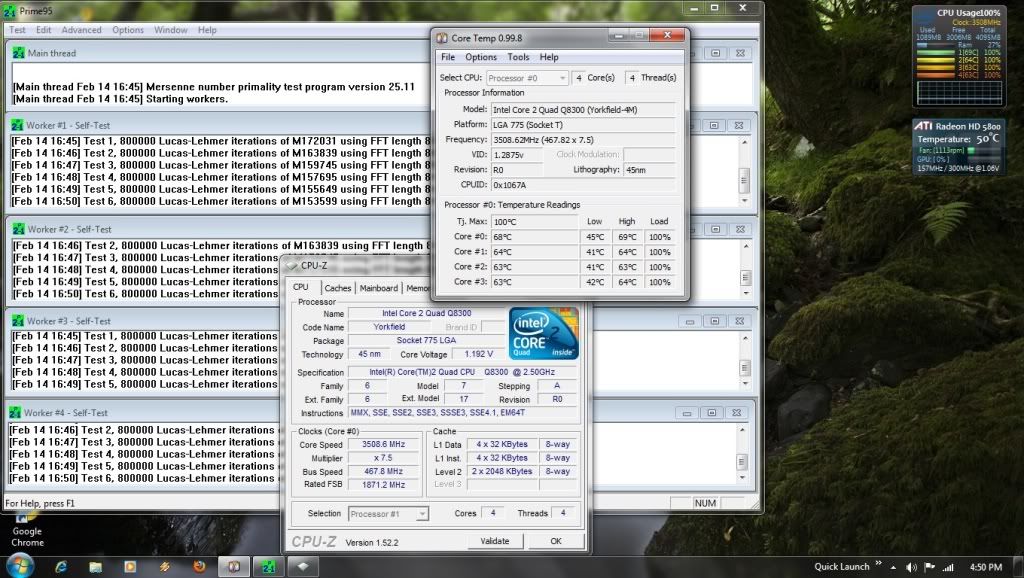
Hi guys, i just got this new Cpu Q8300 @ 2.5Ghz ( I know it's not good as Q6600 or Q9x50 series OC), i think it's bottleneck my gpu so i decide to OC this one (not sure though.. 3D Vantage GPU score 16k stock, 18k OC lol)
I manage to get stable to 3.5Ghz. The problem is my temp, 73-75c after 2 hour prime test.
Tcase for this cpu is 71.4c and Tj.Max 100c. Im a noob at this so..is this ok? for 24/7 use?
If i play games, max temp only reach 64-65c only.

here pic after 5 min prime and it's already reach 69c max tongue.gif

user posted image

My setting :

Vcore : 1.21v
Memory : 1.908v @ 934Mhz (auto at 5-6-6-18)
Mch : 1.304v
Vtt : 1.21v
Ich : 1.52v (set to default manual, auto set it to 1.6)
(Spread spectrum, C1E,Speedstep etc. all disable)
The rest is auto

Check my Sig for other part.. Thx

This post has been edited by JayChoww: Feb 14 2011, 05:22 PM

113 Pages « < 99 100 101 102 103 > » Top
 

Change to:
| Lo-Fi Version
0.0215sec    0.65    6 queries    GZIP Disabled
Time is now: 22nd December 2025 - 06:56 PM