

87mbps ?= = kaspersky on while running test?
Unifi Official TM UniFi High Speed Broadbrand Thread V6, News: RM200 for installation after Sept
Unifi Official TM UniFi High Speed Broadbrand Thread V6, News: RM200 for installation after Sept
|
|
 Aug 18 2010, 02:32 AM Aug 18 2010, 02:32 AM
|
 
Junior Member
186 posts Joined: Aug 2006 From: Magic Dimensions  
|
87mbps ?= = kaspersky on while running test?
|
|
|
|
|
|
Aug 18 2010, 04:23 AM
|

Junior Member
147 posts Joined: Jan 2010 From: Selangor 
|
QUOTE(samsoong @ Aug 18 2010, 12:48 AM) Check this out! I'm on VIP5! LOL Restart your PC and router and BTU then off you anti virus firewall and update then re run the speedtest then you 'll get yr actual speed  another after 2mins..  last but not least    BTW: abnormal speedtest is due to packet loss. Here Are Other Speedtest sites to check your actual speed:  Jaring Data Center SpeedTest Unifi Speedtest If your speed still the same then it means they never cap you le  |
|
|
Aug 18 2010, 07:52 AM
|

Senior Member
686 posts Joined: Mar 2005
|
I'm connected via cable also get upload speed 1/2 of the download speed. How do I fix the router? I changed wifi to 20mhz already. lol
|
|
|
Aug 18 2010, 08:12 AM
|

Senior Member
875 posts Joined: Oct 2004 From: Selayang, Selangor
|
Just wonder FTP download within download speed limitation?
|
|
|
Aug 18 2010, 08:16 AM
|

Senior Member
1,488 posts Joined: Oct 2004
|
QUOTE(r47z @ Aug 18 2010, 07:52 AM) I'm connected via cable also get upload speed 1/2 of the download speed. How do I fix the router? I changed wifi to 20mhz already. lol I'm on wireless, and it seems since yesterday my upload speed is about half of download only. Maybe tm have done something, it was full speed for the last 3 weeks.Added on August 18, 2010, 8:21 am QUOTE(klgoh99 @ Aug 17 2010, 05:36 PM) Now when you call the Unifi Centre's 1-300 number from your Unifi's Voice line, you have to pay for it !!! Huh, that is really bad. Anyhow, so confirm nationwide tm line free then? How's the rate for mobile?This post has been edited by vergas: Aug 18 2010, 08:21 AM |
|
|
Aug 18 2010, 08:25 AM
|
|
Senior Member
686 posts Joined: Mar 2005
|
QUOTE(vergas @ Aug 18 2010, 08:16 AM) I'm on wireless, and it seems since yesterday my upload speed is about half of download only. Maybe tm have done something, it was full speed for the last 3 weeks. really? is this a known problem now? *cross fingers*Added on August 18, 2010, 8:21 am Huh, that is really bad. Anyhow, so confirm nationwide tm line free then? How's the rate for mobile? |
|
|
|
|
|
Aug 18 2010, 08:42 AM
|

Senior Member
1,495 posts Joined: Sep 2005 From: Damansara Perdana - KL
|
QUOTE(r47z @ Aug 18 2010, 07:52 AM) I'm connected via cable also get upload speed 1/2 of the download speed. How do I fix the router? I changed wifi to 20mhz already. lol I think at 50% of the download speed they're still within their so called "best effort" speed. I get about 4.x Mbps on wireless, although speedtest to Japan always shows 6-9Mbps LOLQUOTE(ahsiah @ Aug 18 2010, 08:12 AM) Just wonder FTP download within download speed limitation? Based on my FTP usage to Jeens Torrentflux, I'm getting average of 38x to 43x kBps, which i think is about right.QUOTE(r47z @ Aug 18 2010, 08:25 AM) really? is this a known problem now? *cross fingers* Yup, basically just remember calling their support line is gonna be expensive.... |
|
|
Aug 18 2010, 08:44 AM
|
 
Elite
195 posts Joined: Sep 2006
|
QUOTE(Lord_Ashe @ Aug 18 2010, 08:42 AM) Based on my FTP usage to Jeens Torrentflux, I'm getting average of 38x to 43x kBps, which i think is about right. Jeen has torrentflux now? =xThis post has been edited by rizvanrp: Aug 18 2010, 08:46 AM |
|
|
Aug 18 2010, 08:57 AM
|

Junior Member
130 posts Joined: Mar 2008
|
Why my VIP5 package constantly getting around 5mb download/upload since day1:
       whereas I can see some of you are getting more than what you subscribe for, is there any "secret" or some kind of tweaking here? Mind to share? Appreciate PM, tqvm!!  Added on August 18, 2010, 9:20 amNow on IPTV, it said "Upgrading, do not disturb...." Hmmmmm, something new?!  Added on August 18, 2010, 9:49 amWah, channel 144 LUXE TV HD was introducing our Pangkor Laut at 9:30am for about 15min, very nice scenery lah!! This post has been edited by klseet: Aug 18 2010, 09:49 AM |
|
|
Aug 18 2010, 11:48 AM
|
|
Senior Member
1,495 posts Joined: Sep 2005 From: Damansara Perdana - KL
|
QUOTE(rizvanrp @ Aug 18 2010, 08:44 AM) Jeen has torrentflux now? =x Heheh sorry my mistake, it's not actually torrentflux : but I'm getting good speeds from him on Unifi. Now I'm wondering if I should terminate...http://forum.lowyat.net/index.php?showtopic=669967 |
|
|
Aug 18 2010, 11:56 AM
|

Junior Member
499 posts Joined: Jan 2008
|
QUOTE(Jeremy_John @ Aug 18 2010, 04:23 AM) Restart your PC and router and BTU then off you anti virus firewall and update then re run the speedtest then you 'll get yr actual speed whats a cap?BTW: abnormal speedtest is due to packet loss. Here Are Other Speedtest sites to check your actual speed: Jaring Data Center SpeedTest Unifi Speedtest If your speed still the same then it means they never cap you le |
|
|
Aug 18 2010, 12:23 PM
|

Junior Member
326 posts Joined: Jun 2007 From: Denai Alam 
|
check out mine at sig, maintain one..
|
|
|
Aug 18 2010, 12:57 PM
|

Junior Member
363 posts Joined: Aug 2009
|
Rizvanrp,
I was reading your site about the D-LINK router security and compared to my router and the options you mention in your site does not exist in the WEB ui of my router. I got UniFi installed less than 7 days ago. Strangely, I manage to telnet into the router with the operator password but the option to chg password in the Web UI does not exist. Same goes for the TR069 protocol. Perhaps you may want to add this into your well documented HowTo for others to keep up to date. Thanks. |
|
|
|
|
|
Aug 18 2010, 01:04 PM
|
|
Senior Member
1,495 posts Joined: Sep 2005 From: Damansara Perdana - KL
|
QUOTE(joeaggas @ Aug 18 2010, 12:57 PM) Rizvanrp, can you give more details like router model, or even screenshots after you log into your operator account?I was reading your site about the D-LINK router security and compared to my router and the options you mention in your site does not exist in the WEB ui of my router. I got UniFi installed less than 7 days ago. Strangely, I manage to telnet into the router with the operator password but the option to chg password in the Web UI does not exist. Same goes for the TR069 protocol. Perhaps you may want to add this into your well documented HowTo for others to keep up to date. Thanks. |
|
|
Aug 18 2010, 01:04 PM
|
 
Trade Dispute
3,379 posts Joined: Apr 2006 From: KL 
|
by the time TM launch unifi at my area, ill have to pay for the installation chargers already which is hefty rm300....
|
|
|
Aug 18 2010, 01:10 PM
|
|
Senior Member
686 posts Joined: Mar 2005
|
QUOTE(rattan @ Aug 18 2010, 01:04 PM) by the time TM launch unifi at my area, ill have to pay for the installation chargers already which is hefty rm300.... and if you're going to pull the cable.. it may cost additional too. |
|
|
Aug 18 2010, 01:15 PM
|

Senior Member
4,808 posts Joined: Sep 2006
|
 |
|
|
Aug 18 2010, 01:40 PM
|
|
Junior Member
363 posts Joined: Aug 2009
|
QUOTE(Lord_Ashe @ Aug 18 2010, 01:04 PM) can you give more details like router model, or even screenshots after you log into your operator account? Hi Lord Ashe,Here are the screenshots from the D-Link DIR615 router. See the Web UI for the D-Link Router. The firmware version is the same as the instructions in rizvanrp site. 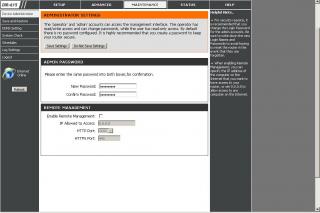
Problem #1 The option to change the Operator Password is missing. 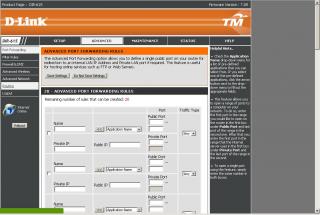
Problem #2 The menu item in Advanced-> TR069 not there. Workaround - Problem #2 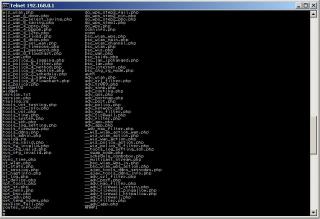
When I telnet into the router under the /www directory, the PHP files exist. Therefore to solve Problem#2, in the WebUI address bar, manually key in the PHP file and voila! 
Can disable the TR069 protocol option. However, I'm still unable to solve Problem#1. I hope this gives a better explanation. Thanks. J |
|
|
Aug 18 2010, 01:53 PM
|
|
Elite
195 posts Joined: Sep 2006
|
QUOTE(joeaggas @ Aug 18 2010, 01:40 PM) Hi Lord Ashe, It looks like you logged into the web UI using the 'admin' username. Did you use the 'operator' username to log into the thing? If you did, you're somehow being given the 'admin' level access to the web UI and not operator.Here are the screenshots from the D-Link DIR615 router. See the Web UI for the D-Link Router. The firmware version is the same as the instructions in rizvanrp site.
Problem #1 The option to change the Operator Password is missing.
Problem #2 The menu item in Advanced-> TR069 not there. Workaround - Problem #2
When I telnet into the router under the /www directory, the PHP files exist. Therefore to solve Problem#2, in the WebUI address bar, manually key in the PHP file and voila!
Can disable the TR069 protocol option. However, I'm still unable to solve Problem#1. I hope this gives a better explanation. Thanks. J |
|
|
Aug 18 2010, 01:56 PM
|
|
Junior Member
363 posts Joined: Aug 2009
|
QUOTE(rizvanrp @ Aug 18 2010, 01:53 PM) It looks like you logged into the web UI using the 'admin' username. Did you use the 'operator' username to log into the thing? If you did, you're somehow being given the 'admin' level access to the web UI and not operator. LoL! Yes you are correcto! Thank you Thank you. So no news yet from Mikrotik?J |
|
Topic ClosedOptions
|
| Change to: |  0.0473sec 0.0473sec
 0.47 0.47
 7 queries 7 queries
 GZIP Disabled GZIP Disabled
Time is now: 3rd December 2025 - 04:33 PM |
 Quote
Quote