QUOTE(selferino @ Jul 28 2010, 09:50 PM)
yes.. see a lot of positive response in guru3d forum about this driver..little bit tricky to install it..
i stick with 10.8b driver..
AMD Radeon™ Discussion V3, Prepare Red! Green has attacked!
|
|
Jul 28 2010, 09:58 PM
|
![]() ![]() ![]() ![]() ![]() ![]()
Senior Member
1,384 posts Joined: Mar 2010 From: Ampang,Selangor |
|
|
|
|
|
|
Jul 28 2010, 10:17 PM
|
![]() ![]()
Junior Member
244 posts Joined: Oct 2005 |
i already update my ccc to 10.7...
but my screen resolution still max at 1600x1200... any other suggestion for me to try out? or mayb i really have to get a hdmi cable? |
|
|
Jul 28 2010, 10:24 PM
|
![]() ![]() ![]() ![]() ![]() ![]()
Senior Member
1,384 posts Joined: Mar 2010 From: Ampang,Selangor |
|
|
|
Jul 28 2010, 11:02 PM
|
![]() ![]()
Junior Member
244 posts Joined: Oct 2005 |
|
|
|
Jul 28 2010, 11:12 PM
|
![]() ![]() ![]() ![]() ![]() ![]()
Senior Member
1,384 posts Joined: Mar 2010 From: Ampang,Selangor |
|
|
|
Jul 29 2010, 12:16 AM
|
![]() ![]() ![]() ![]() ![]()
Senior Member
969 posts Joined: Jul 2009 From: ɹndɯnן ɐןɐnʞ |
QUOTE(hasyir @ Jul 28 2010, 01:51 PM) im using LG 32LF20FR lcd... To monitor your CPU temp, you need to download: http://www.techpowerup.com/downloads/1691/..._Temp_3.40.htmli checked at their website d lcd should be able to use 1920x1080 resolution.. so now i have to get a hdmi cable n update my ccc? btw, how do u guys monitor your cpu temp?what software are u guys using? thx for all d helps! Once you installed the software, do drag the '.exe' file to : Start > Open Programs > Startup (folder) so you can start monitoring your cpu temp every time you started your PC. Anyways, back the LCD issue, I've check your LG, and it's a pretty great LCD for it's price. Now you need to initiated the 1920 X 1080 reso, before buying/getting an HDMI cable: ~do fiddle around with the LCD's Setting if there is an option to change resolution ~usually you change resolution from Windows & Catalyst, so open up Catalyst Control Center or right click on the Desktop an click 'Screen Resolution' to change it via OS. In Catalyst, go to: Graphics > Desktop Properties to select your reso. I think you don't need to get HDMI cable considering you haven't change the resolution settings yet, probably by default the reso is 1600 x 1200, so you need to set it to 1920 X 1080. QUOTE(CrossFirE @ Jul 28 2010, 04:45 PM) thanks bro.. i heard that some of the lowyat shop offer rm 299 only for this card? is this card hot and noisy? Nah, not noisy or too hot like the 9800GT, but for it's price, it's has good performance...so value for money.Yeah, Low Yat Plaza want to clear stock so it's selling pretty cheap these days. |

|
|
|
|
|
Jul 29 2010, 12:18 AM
|
![]() ![]() ![]() ![]() ![]() ![]()
Senior Member
1,222 posts Joined: Jan 2003 From: Melaka |
bought a new machine with amd system.
amd x2 245 Tforce TA770+ mainboard Powercolor HD 5770 PCS+ 2gb kingston ddr2 800mhz WD Green 500gb LG dvdrw Coolermaster Extreme 460watt. gonna build up tomorrow.but can this psu enough to load Powercolor HD 5770 PCS+? |
|
|
Jul 29 2010, 12:19 AM
|
![]() ![]() ![]()
Junior Member
308 posts Joined: Dec 2004 |
|
|
|
Jul 29 2010, 12:44 AM
|
![]() ![]()
Junior Member
244 posts Joined: Oct 2005 |
QUOTE(JoBigShow @ Jul 29 2010, 12:16 AM) To monitor your CPU temp, you need to download: http://www.techpowerup.com/downloads/1691/..._Temp_3.40.html mind telling me what is d correct temp tht im looking for?Once you installed the software, do drag the '.exe' file to : Start > Open Programs > Startup (folder) so you can start monitoring your cpu temp every time you started your PC. Anyways, back the LCD issue, I've check your LG, and it's a pretty great LCD for it's price. Now you need to initiated the 1920 X 1080 reso, before buying/getting an HDMI cable: ~do fiddle around with the LCD's Setting if there is an option to change resolution ~usually you change resolution from Windows & Catalyst, so open up Catalyst Control Center or right click on the Desktop an click 'Screen Resolution' to change it via OS. In Catalyst, go to: Graphics > Desktop Properties to select your reso. I think you don't need to get HDMI cable considering you haven't change the resolution settings yet, probably by default the reso is 1600 x 1200, so you need to set it to 1920 X 1080. regarding d resolution prob, i already try ur method..both using d ccc n via OS.. but still d max resolution it can go is 1600x1200.. what else can i do bro?if u or anyone tht think can help me out here n happen to have msn id or ym id...do pm me k.. im really |
|
|
Jul 29 2010, 12:53 AM
|
![]() ![]() ![]() ![]() ![]()
Senior Member
969 posts Joined: Jul 2009 From: ɹndɯnן ɐןɐnʞ |
QUOTE(hasyir @ Jul 29 2010, 12:44 AM) mind telling me what is d correct temp tht im looking for? CPU temps depends on the cooler itself, stock cooler have high LOAD temps and mediocre IDLE temp.regarding d resolution prob, i already try ur method..both using d ccc n via OS.. but still d max resolution it can go is 1600x1200.. what else can i do bro?if u or anyone tht think can help me out here n happen to have msn id or ym id...do pm me k.. im really Since you have a quad ( i5) there will be up to 3 proc you need to monitor. For better cooling, you need to get aftermarket coolers. Alright, have you found this on Catalyst yet? Added on July 29, 2010, 1:04 am QUOTE(^KamilskaZ^ @ Jul 29 2010, 12:18 AM) bought a new machine with amd system. I've checked the CM 460 Ex specs, the rails are rated @ 18A with 312W. Not too bad for a '460W' PSU.amd x2 245 Tforce TA770+ mainboard Powercolor HD 5770 PCS+ 2gb kingston ddr2 800mhz WD Green 500gb LG dvdrw Coolermaster Extreme 460watt. gonna build up tomorrow.but can this psu enough to load Powercolor HD 5770 PCS+? QUOTE ATI rates the Radeon HD 5770 for 18W of power consumption at idle and 108W maximum board power at load From that statement, you'll have decent headroom...meaning can overclock big~time, BUT only recommended for SINGLE card, Cross-Firing is way too tight on the headroom hence needs higher wattage PSU if you plan to do so. (like 600W for safe and decent headroom) This post has been edited by JoBigShow: Jul 29 2010, 01:04 AM |
|
|
Jul 29 2010, 01:05 AM
|
![]() ![]()
Junior Member
244 posts Joined: Oct 2005 |
QUOTE(JoBigShow @ Jul 29 2010, 12:53 AM) CPU temps depends on the cooler itself, stock cooler have high LOAD temps and mediocre IDLE temp. what kind of aftermarket cooler?Since you have a quad ( i5) there will be up to 3 proc you need to monitor. For better cooling, you need to get aftermarket coolers. Alright, have you found this on Catalyst yet? so how do i know my current temp reading is acceptable or not? where do u get tht option on ccc? i dont have it on my ccc... |
|
|
Jul 29 2010, 01:12 AM
|
![]() ![]() ![]() ![]() ![]()
Senior Member
969 posts Joined: Jul 2009 From: ɹndɯnן ɐןɐnʞ |
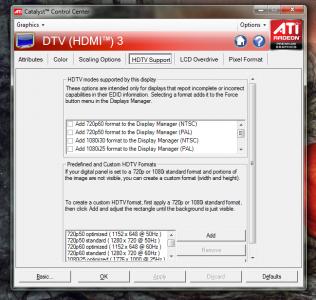
QUOTE(hasyir @ Jul 29 2010, 01:05 AM) what kind of aftermarket cooler? Open CCC > Go to Graphics, choose Desktops & Displays, then right click the bottom small monitor icon and click Configure> HDTV Supportso how do i know my current temp reading is acceptable or not? where do u get tht option on ccc? i dont have it on my ccc... But I think you need the HDMI cable to get this Just try anyways to see if there's similar settings for the VGA/DVI... (I forgot since I stop using D-sub VGA & DVI since I got my 5850 end of last year..) Anyways there's quite a number of settings in Configure for you to fiddle around with, see if you can manage to set it to the right reso... |
|
|
Jul 29 2010, 01:32 AM
|
![]() ![]()
Junior Member
244 posts Joined: Oct 2005 |
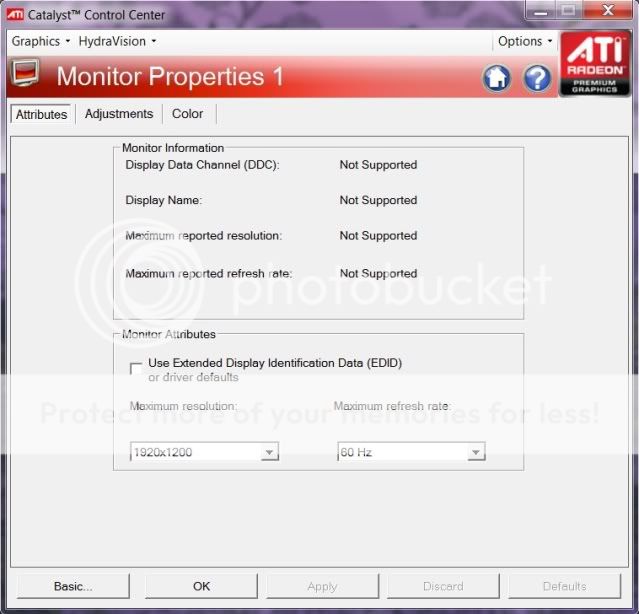
QUOTE(JoBigShow @ Jul 29 2010, 01:12 AM) Open CCC > Go to Graphics, choose Desktops & Displays, then right click the bottom small monitor icon and click Configure> HDTV Support even after i go to configure...theres no 'HDTV Support" option..But I think you need the HDMI cable to get this Just try anyways to see if there's similar settings for the VGA/DVI... (I forgot since I stop using D-sub VGA & DVI since I got my 5850 end of last year..) Anyways there's quite a number of settings in Configure for you to fiddle around with, see if you can manage to set it to the right reso... i think maybe bcoz my lcd is detected as crt monitor? do i need a driver for my lcd?but it doest comes wif any driver when i bought it... here's d screenshot: » Click to show Spoiler - click again to hide... « |
|
|
|
|
|
Jul 29 2010, 01:55 AM
|
![]() ![]() ![]() ![]() ![]()
Senior Member
969 posts Joined: Jul 2009 From: ɹndɯnן ɐןɐnʞ |
QUOTE(hasyir @ Jul 29 2010, 01:32 AM) even after i go to configure...theres no 'HDTV Support" option.. Great, it detects the proper reso for this monitor is 1920 X 1200, but now to get it to set it to that? i think maybe bcoz my lcd is detected as crt monitor? do i need a driver for my lcd?but it doest comes wif any driver when i bought it... here's d screenshot: » Click to show Spoiler - click again to hide... « The HDMI cable will give you more options in Configure though, like 'Attributes', 'GPU Scaling', 'Scaling Options', 'HDTV Support', 'LCD Overdrive' and 'Pixel Format'. With your screenshot, the only option is to tick and untick the EDID. Indeed there's a miscommunication between your card and the LCD monitor, Catalyst is limited to rectify this, so what's left is your LCD Settings itself. There's has to be an option in that LG to choose between inputs. I know my 32" Sharp LCD in the living room has this setting. (to choose from the analogue Astro input, or DVD digital input, etc.) Still if you can't find the options, the last resort is to get a HDMI cable. (P.S.: No need to buy those expensive 1m Monster HDMI cable, save money and get an alright cable below RM40) |
|
|
Jul 29 2010, 06:28 AM
|
![]() ![]() ![]()
Junior Member
492 posts Joined: Jun 2008 From: KEDAH (Raja Bolasepak Malaysia) |
http://www.techspot.com/review/283-geforce...radeon-hd-5800/
This is the latest benchmark (June 2010) done using all 4 top GCs in market today. I'm sorry if somebody posted this before, but just to highlight that this is one of the most conclusive review for time being. I'm not a fanboy and I'm not saying ATI is winning currently, but only GTX460 (a tweaked G92 chip iinm) impressed me in the current GTX400 series cards. |
|
|
Jul 29 2010, 07:00 AM
|
![]() ![]() ![]() ![]() ![]() ![]()
Senior Member
1,337 posts Joined: Apr 2010 |
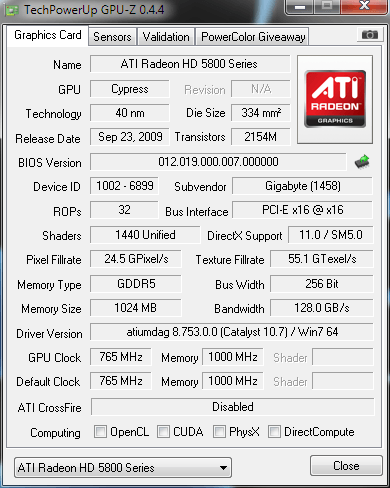
QUOTE(Nosferatu @ Jul 28 2010, 05:20 PM) @ronaldlee007, moshpit21 My result same as urs. Driver version with Win7 64 and the DirectCompute 5.0 is checked.nope wor, I am running w7 ulti x64. I downloaded the driver for w7 x64.. » Click to show Spoiler - click again to hide... « update - I once again went through the whole process of doing a clean install of the driver and this time, Gpuz shows Win7 at Driver Version, but DirectCompute is still unchecked. What I noticed in all these screenshots is that, all the DirectX Support shows that it supports directx 11. Can anyone help varify if DirectCompute is really working? |
|
|
Jul 29 2010, 07:23 AM
|
![]() ![]() ![]() ![]() ![]()
Senior Member
969 posts Joined: Jul 2009 From: ɹndɯnן ɐןɐnʞ |
QUOTE(gto87 @ Jul 29 2010, 06:28 AM) http://www.techspot.com/review/283-geforce...radeon-hd-5800/ Marketing~wise, the GTX460 scores points with the consumers because of it's price, value~per~performance.This is the latest benchmark (June 2010) done using all 4 top GCs in market today. I'm sorry if somebody posted this before, but just to highlight that this is one of the most conclusive review for time being. I'm not a fanboy and I'm not saying ATI is winning currently, but only GTX460 (a tweaked G92 chip iinm) impressed me in the current GTX400 series cards. I would have gotten the GTX460 over the 5850 if they were to be launched at the same time because the 5850 falls a bit high up the price range for most consumers (noted that majority of GC consumers aren't working/career folk with two to three iPhones) But again, if you take every graphic cards and stack them up from low, mid to high end, the 5850 is still bang~for~the~bucks overall, it's balanced performance (pwned all mid~end cards and considered high-end) and price tag (lowest price of the high end cards...excluding 5970 because that card is considered above high~end) Having said, it would be a big mistake if I were to choose the GTX460 over the 5850, because the fact of the matter is, the 5850 dwells in the High-End card category and the GTX460 only dreams to be there.. (that's why there has the OC and SOC Version) So if you want a piece of a premium card and lowest of it's price, the 5850 still the choice...AT THE MOMENT that is... Anyways the review, I like the new method of testing the cards, it's more practical then just running those "auto-pilot" benchmarks... So they are suggesting the HD5870 wins the round? This post has been edited by JoBigShow: Jul 29 2010, 07:25 AM |
|
|
Jul 29 2010, 09:03 AM
|
![]() ![]()
Junior Member
246 posts Joined: Jun 2008 From: Darul Takzim |
QUOTE(Nosferatu @ Jul 29 2010, 12:19 AM) Back after trying out bad company 2 for awhile. Forced set the directx to 11 via setting.ini. So far, the gameplay is smooth, no hiccups or any sort. if u can play directx 11 game, no need to worry.i assume ur windows got some issue for u to check it out.So am I safe to assume that directx 11 is running as it should be? Some screens. If dx11 is really running... ![]() ![]() ![]() ![]() |
|
|
Jul 29 2010, 02:25 PM
|
![]() ![]() ![]()
Junior Member
492 posts Joined: Jun 2008 From: KEDAH (Raja Bolasepak Malaysia) |
QUOTE(JoBigShow @ Jul 29 2010, 07:23 AM) Marketing~wise, the GTX460 scores points with the consumers because of it's price, value~per~performance. 1) ATI made it possible for normal people to have High end card, while Nvidia quite frankly made the card for "watercoolers". Why? For the same money you buy a GTX480, you can actually purchase a HD5870+3rd party cooler. Better yet, if you got a good deal with your HD5870, you might end up having extra moolah for a 2nd hand physx card. Less heat, less power even after OCed, and less noise (with an option to add physx card).I would have gotten the GTX460 over the 5850 if they were to be launched at the same time because the 5850 falls a bit high up the price range for most consumers (noted that majority of GC consumers aren't working/career folk with two to three iPhones) But again, if you take every graphic cards and stack them up from low, mid to high end, the 5850 is still bang~for~the~bucks overall, it's balanced performance (pwned all mid~end cards and considered high-end) and price tag (lowest price of the high end cards...excluding 5970 because that card is considered above high~end) Having said, it would be a big mistake if I were to choose the GTX460 over the 5850, because the fact of the matter is, the 5850 dwells in the High-End card category and the GTX460 only dreams to be there.. (that's why there has the OC and SOC Version) So if you want a piece of a premium card and lowest of it's price, the 5850 still the choice...AT THE MOMENT that is... Anyways the review, I like the new method of testing the cards, it's more practical then just running those "auto-pilot" benchmarks... So they are suggesting the HD5870 wins the round? Less heat and less noise with GTX480 equals to watercooling. NVIDIA knew they did a terrible card for normal users by producing GTX470, GTX480 and GTX465(utter failure). Then GTX460 introduced...... GTX460 impressed me since Nvidia used the same chip as the 470/480, redefined it and found a more balanced solution in terms of performcance and business standing. It's an old chip tweaked to be a new chip iinm. It's not power hunger and we can't use it to fry eggs. Better yet, it has better temperature compare to HD5850 and the price is cheaper. GF104 is the best answer for all that and if it can be the next "G92" for NVIDIA, (than I'll be more than happy to wait for the next Nvidia release.) The GC market will be as interesting as before. Just my 2 cents 2)I love the review as well and loving the fact that HD5870 can close the gap with GTX480. But current crop of HD5k series card showed less to no improvement in their latest few CCC releases. That's disappointing. adeh~ |
|
|
Jul 29 2010, 02:44 PM
|
![]() ![]() ![]() ![]() ![]() ![]() ![]()
Senior Member
5,221 posts Joined: Aug 2007 From: Deneb star |
We shall wait for 6 series and prepare for price cuts..thats all what i think - -..
Not much improvement in driver segment.. Last choice is drop price |
|
Topic ClosedOptions
|
| Change to: | 0.0172sec
0.54
6 queries
GZIP Disabled
Time is now: 5th December 2025 - 07:21 AM |