Welcome Guest ( Log In | Register )

Bump Topic Topic Closed RSS Feed

Outline · [ Standard ] · Linear+

 AMD Radeon™ Discussion V3, Prepare Red! Green has attacked!

views
     
hasyir
post Jul 18 2010, 04:17 PM

Getting Started
**
Junior Member
244 posts

Joined: Oct 2005


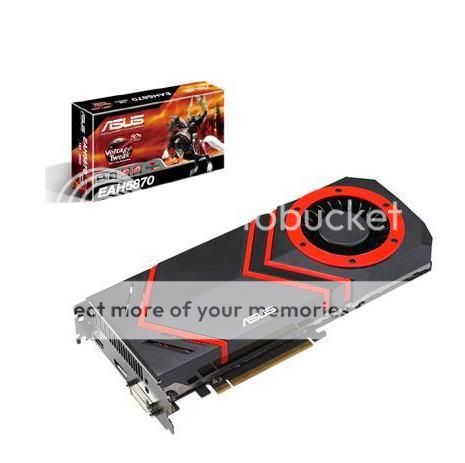
better buy hd5850 1gb or hd5870 1gb??i can get it at a price more or less d same..

d hd5870 spec:

Graphics Engine ATI Radeon HD 5870

Bus Standard PCI Express 2.1

Video Memory DDR5 1GB

Engine Clock 850 MHz

Memory Clock 4.8 GHz ( 1.2 GHz DDR5 )

Memory Interface 256-bit

CRT Max Resolution 2048 x 1536

DVI Max Resolution 2560 x 1600

VGA Output Yes x 1 (via DVI to D-Sub adaptor x 1 )

DVI Output Yes x2

HDMI Output Yes x1

DisplayPort Yes x1

HDCP Support Yes

Adaptor/Cable bundled


1 x HDMI to DVI adaptor
1 x DVI to D-Sub adaptor
1 x CrossFire cable
2 x Power cable

Software Bundled


ASUS Utilities & Driver


the Card Size is 11 inches x 5 inches.
Native Display Port
Native HDMI
Native Dual-link DVI-I
Single-link DVI (via HDMI to DVI Adapter)
D-Sub (via DVI to D-Sub Adaptor)
user posted image

This post has been edited by hasyir: Jul 18 2010, 04:24 PM
hasyir
post Jul 18 2010, 07:54 PM

Getting Started
**
Junior Member
244 posts

Joined: Oct 2005


yerps...im using a 32" fhd monitor..
so d 5870 is a better choice??
that makes life much more easier...hehehe
hasyir
post Jul 27 2010, 06:13 PM

Getting Started
**
Junior Member
244 posts

Joined: Oct 2005


why i can only use screen resolution up to 1600x1200 only on my 32" fhd lcd?im using hd5850...

plus d picture quality is quite blurry...not tht sharp...
is it bcoz of my cable?
im using vga cable n dvi converter...
hasyir
post Jul 28 2010, 01:18 AM

Getting Started
**
Junior Member
244 posts

Joined: Oct 2005


QUOTE(JoBigShow @ Jul 27 2010, 08:25 PM)
Haha, I thought you gonna go for the 5870?  laugh.gif

Blurriness: What's the native res for your monitor? 720p or 1080p or 1080i?
Not an expert in monitors:
1) but I think you need to use the HDMI cable to hook onto your LCD to your card, see what does this do first,

2)Alternately you should set the 'HDTV support' on the Catalyst Control Center.
Ok, Open CCC > Go to Graphics, choose Desktops & Displays, then right click the bottom small monitor icon and click Configure> HDTV Support
At this point, try adding the desired format, fiddle around until you can remedy this problem.
i found a better deal for hd5850...hehehe
my lcd is fhd 1080p..
where to find d catalyst control centre?sory noob question...hehe
ill try out ur suggestion n will let u know d result later..thx bro!


QUOTE(ronaldlee007 @ Jul 27 2010, 09:08 PM)
Not sharp is caused by the resolution problem. In your case, not sure why it don't support 1920 x 1080. What catalyst version of driver u use? I used V10.4, 10.5, 10.6 and now 10.7.
I am also using hd5850 (with VGA cable + DVI Converter) and hook up to 32" at 1920 x 1080, the screen look very sharp.  rclxms.gif
Try to play around with the resolution and try again. Update ur driver may help.  sweat.gif
*
d highest resolution provided is 1600x1200...no option for 1920x1080
i tried to update my driver but its stated tht my driver is already up to date...
any other suggestion bro?
hasyir
post Jul 28 2010, 01:51 PM

Getting Started
**
Junior Member
244 posts

Joined: Oct 2005


QUOTE(JoBigShow @ Jul 28 2010, 02:01 AM)
Just 'Right Click' anywhere on your Desktop and select 'Catalyst ™ Control Center' OR it's that red 'ATi' icon in your Tasksbar.
Remember to try both of my troubleshoots ( 1. try use HDMI cable and 2. fiddle with the Catalyst HDTV settings)

Some LCD reso are maxed @1600x1200, but DO PROVIDE details of this LCD monitor of yours, what exact brand, series, etc....probably I can look around about your monitor.. nod.gif
*
QUOTE(ronaldlee007 @ Jul 28 2010, 08:57 AM)
Agreed with JoBigShow. We need the LCD spec and type. I have tried on Toshiba 32" LCD, the resolution supported is so limited. As for my Philips 32" LCD, on default already in nice and sharp resolution.
*
im using LG 32LF20FR lcd...
i checked at their website d lcd should be able to use 1920x1080 resolution..

so now i have to get a hdmi cable n update my ccc?
rclxub.gif

btw, how do u guys monitor your cpu temp?what software are u guys using?
thx for all d helps! rclxm9.gif

This post has been edited by hasyir: Jul 28 2010, 02:09 PM
hasyir
post Jul 28 2010, 10:17 PM

Getting Started
**
Junior Member
244 posts

Joined: Oct 2005


i already update my ccc to 10.7...
but my screen resolution still max at 1600x1200...
any other suggestion for me to try out?
or mayb i really have to get a hdmi cable?
hasyir
post Jul 28 2010, 11:02 PM

Getting Started
**
Junior Member
244 posts

Joined: Oct 2005


QUOTE(faiz2036 @ Jul 28 2010, 10:24 PM)
get the hdmi cable..
*
any other suggestion bro?
is it have something to do with windows 7 32bit or intel i5 tht im using??
or mayb anything at all?any idea why?
hasyir
post Jul 29 2010, 12:44 AM

Getting Started
**
Junior Member
244 posts

Joined: Oct 2005


QUOTE(JoBigShow @ Jul 29 2010, 12:16 AM)
To monitor your CPU temp, you need to download: http://www.techpowerup.com/downloads/1691/..._Temp_3.40.html
Once you installed the software, do drag the '.exe' file to : Start > Open Programs > Startup (folder) so you can start monitoring your cpu temp every time you started your PC.

Anyways, back the LCD issue, I've check your LG, and it's a pretty great LCD for it's price.

Now you need to initiated the 1920 X 1080 reso, before buying/getting an HDMI cable:
~do fiddle around with the LCD's Setting if there is an option to change resolution
~usually you change resolution from Windows & Catalyst, so open up Catalyst Control Center or right click on the Desktop an click 'Screen Resolution' to change it via OS.
In Catalyst, go to: Graphics > Desktop Properties to select your reso.

I think you don't need to get HDMI cable considering you haven't change the resolution settings yet, probably by default the reso is 1600 x 1200, so you need to set it to 1920 X 1080.
mind telling me what is d correct temp tht im looking for?

regarding d resolution prob, i already try ur method..both using d ccc n via OS..
but still d max resolution it can go is 1600x1200..

what else can i do bro?if u or anyone tht think can help me out here n happen to have msn id or ym id...do pm me k..
im really rclxub.gif now...huhuhu
hasyir
post Jul 29 2010, 01:05 AM

Getting Started
**
Junior Member
244 posts

Joined: Oct 2005


QUOTE(JoBigShow @ Jul 29 2010, 12:53 AM)
CPU temps depends on the cooler itself, stock cooler have high LOAD temps and mediocre IDLE temp.
Since you have a quad ( i5) there will be up to 3 proc you need to monitor.

For better cooling, you need to get aftermarket coolers.  rclxms.gif

Alright, have you found this on Catalyst yet?
[attachmentid=1698740]
*
what kind of aftermarket cooler?
so how do i know my current temp reading is acceptable or not?

where do u get tht option on ccc?
i dont have it on my ccc...
hasyir
post Jul 29 2010, 01:32 AM

Getting Started
**
Junior Member
244 posts

Joined: Oct 2005


QUOTE(JoBigShow @ Jul 29 2010, 01:12 AM)
Open CCC > Go to Graphics, choose Desktops & Displays, then right click the bottom small monitor icon and click Configure> HDTV Support

But I think you need the HDMI cable to get this  sweat.gif
Just try anyways to see if there's similar settings for the VGA/DVI... (I forgot since I stop using D-sub VGA & DVI since I got my 5850 end of last year..)

Anyways there's quite a number of settings in Configure for you to fiddle around with, see if you can manage to set it to the right reso...
*
even after i go to configure...theres no 'HDTV Support" option..
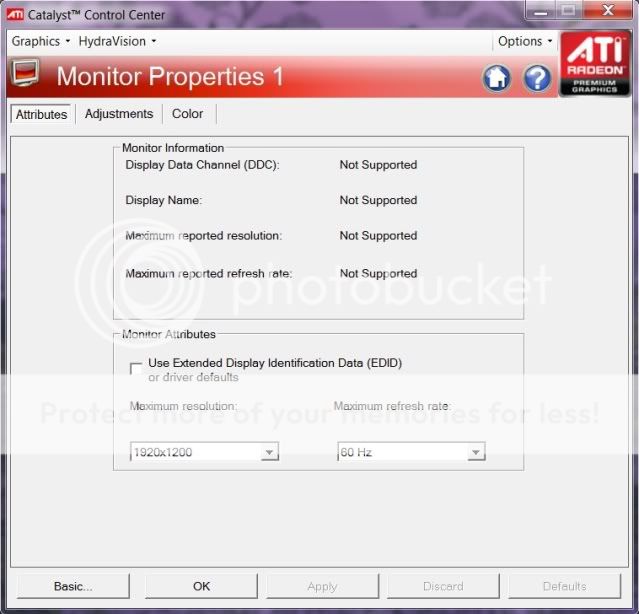
i think maybe bcoz my lcd is detected as crt monitor?
do i need a driver for my lcd?but it doest comes wif any driver when i bought it...

here's d screenshot:
» Click to show Spoiler - click again to hide... «

hasyir
post Aug 9 2010, 11:20 AM

Getting Started
**
Junior Member
244 posts

Joined: Oct 2005


guys, is it ok if i let my pc runs more thn 24hours none stop?
i usually left my pc overnight on for downloading purposes..
i afraid it might affect my hd5850...
hasyir
post Aug 10 2010, 04:24 PM

Getting Started
**
Junior Member
244 posts

Joined: Oct 2005


yeah!finally i manage to change my screen resolution to 1920x1080!!
yeep yeep hooray!!
hasyir
post Aug 10 2010, 06:03 PM

Getting Started
**
Junior Member
244 posts

Joined: Oct 2005


QUOTE(JoBigShow @ Aug 10 2010, 05:03 PM)
Haha. how did you do it?!!! laugh.gif
I remembered couple of posts ago you were stuck at a lower res...
*
i changed my cable from dvi>>quite expensive hdmi gold-plated cable(from my ps3)...but still wont work..
but thn i changed to a much more cheaper hdmi cable(rm30) and to my surprise it works!!
thats so weird...but it works...so im more thn happy now..hahaha rclxm9.gif rclxm9.gif

Topic ClosedOptions
 

Change to:
| Lo-Fi Version
0.0195sec    0.62    7 queries    GZIP Disabled
Time is now: 4th December 2025 - 02:05 PM