

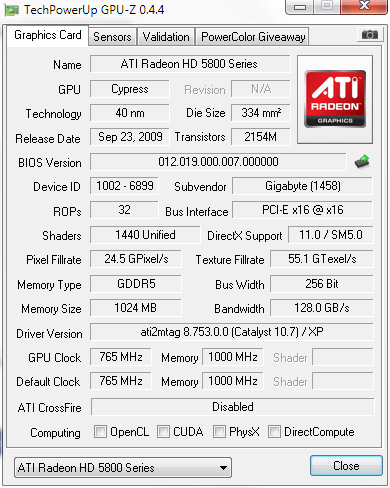
Now using 10.7 and it seems like DirectCompute is absent.

AMD Radeon™ Discussion V3, Prepare Red! Green has attacked!
|
|
 Jul 27 2010, 03:44 PM Jul 27 2010, 03:44 PM
|
 
Junior Member
308 posts Joined: Dec 2004  
|
Is this normal? When using 10.6, I saw a check at DirectCompute.
Now using 10.7 and it seems like DirectCompute is absent. |
|
|
|
|
|
Jul 27 2010, 05:33 PM
|

Senior Member
1,969 posts Joined: Oct 2007 From: CheRaS, KL
|
hey guys, my budget to buy a GC is rm 250 to rm 300. which series should i get and which one is good? should i buy the one with second hand or new one and which series le?
|
|
|
Jul 27 2010, 06:13 PM
|

Junior Member
244 posts Joined: Oct 2005
|
why i can only use screen resolution up to 1600x1200 only on my 32" fhd lcd?im using hd5850...
plus d picture quality is quite blurry...not tht sharp... is it bcoz of my cable? im using vga cable n dvi converter... |
|
|
Jul 27 2010, 06:33 PM
|

Junior Member
116 posts Joined: Dec 2006
|
Well, 10.7 didnt fix my 2nd monitor flickering issue.
|
|
|
Jul 27 2010, 06:50 PM
|

Senior Member
1,343 posts Joined: Jun 2006 From: Wangsa Maju/TTDI/Ampang
|
guys, who selling the cheapest 5850 now? feels like it's time to crossfire
 |
|
|
Jul 27 2010, 07:26 PM
|
|
Senior Member
6,109 posts Joined: Dec 2008 From: Mike India Romeo India
|
CCC 10.7 increased my 5770 score in 3dmarkvantage by 3XX for gpu
 Still got that stutter in bfbc2 when game starts.. I guess its sumthing to do with ATi Power Play? |
|
|
|
|
|
Jul 27 2010, 08:19 PM
|

Senior Member
1,205 posts Joined: Jul 2008
|
QUOTE(Nosferatu @ Jul 27 2010, 03:44 PM) Is this normal? When using 10.6, I saw a check at DirectCompute. mine checked: direct compute 5.0Now using 10.7 and it seems like DirectCompute is absent.  what happen with yours? 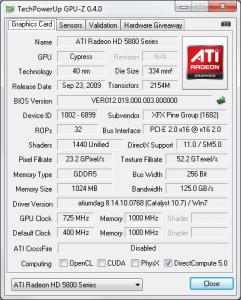
|
|
|
Jul 27 2010, 08:25 PM
|

Senior Member
969 posts Joined: Jul 2009 From: ɹndɯnן ɐןɐnʞ
|
QUOTE(faiz2036 @ Jul 27 2010, 03:37 PM) my rig show the beta 10.7 perform better than 10.7 whql int 3dmark vantage. Official drivers (WHQL) have to follow a certain protocol and regulation which prioritize stability & safety first before performance. That's why 'unofficial' drivers always edge on the performance part, but the stability at your own discretion. Unless the modded driver (the outmost unofficial driver out there  ) which are multiply tested to perform at highest peak with stability. ) which are multiply tested to perform at highest peak with stability.Just like a Nissan Skyline with it's RB engine, official gotta capped at 180km/h due to regulations, but when unofficially modded can reach easily to 300km/h  QUOTE(CrossFirE @ Jul 27 2010, 05:33 PM) hey guys, my budget to buy a GC is rm 250 to rm 300. which series should i get and which one is good? should i buy the one with second hand or new one and which series le? For that budget, you might want to think about the Radeon HD4850, I think for 2nd hand you can nego below RM300. But better get a new one with full length warranty, only below RM330 but you'll be satisfied with it for the next 2 years..  Any low-end 5 Series isn't worth that budget, plus you don't really need DirectX11 at the moment.  QUOTE(hasyir @ Jul 27 2010, 06:13 PM) why i can only use screen resolution up to 1600x1200 only on my 32" fhd lcd?im using hd5850... Haha, I thought you gonna go for the 5870? plus d picture quality is quite blurry...not tht sharp... is it bcoz of my cable? im using vga cable n dvi converter...  Blurriness: What's the native res for your monitor? 720p or 1080p or 1080i? Not an expert in monitors: 1) but I think you need to use the HDMI cable to hook onto your LCD to your card, see what does this do first, 2)Alternately you should set the 'HDTV support' on the Catalyst Control Center. Ok, Open CCC > Go to Graphics, choose Desktops & Displays, then right click the bottom small monitor icon and click Configure> HDTV Support At this point, try adding the desired format, fiddle around until you can remedy this problem. QUOTE(supernothing @ Jul 27 2010, 06:50 PM) guys, who selling the cheapest 5850 now? feels like it's time to crossfire I see you have an Nvidia card in your sig for Phsyx, I wonder if can do CF while using Phsyx... Added on July 27, 2010, 8:30 pm QUOTE(Nosferatu @ Jul 27 2010, 03:44 PM) Is this normal? When using 10.6, I saw a check at DirectCompute. Without DirectCompute, your card will find it erroneous to compute DIrectX 11 or can't properly process the shaders bro, I think you should clean re~install the drivers in Safe Mode...Now using 10.7 and it seems like DirectCompute is absent. Or probably just a major bug on the GPU-Z, regardless, do try to reinstall the driver... This post has been edited by JoBigShow: Jul 27 2010, 08:30 PM |
|
|
Jul 27 2010, 08:58 PM
|

Senior Member
1,219 posts Joined: Jul 2009
|
link for TMD any1? modded b4 10.7 CCC oso i dun min
|
|
|
Jul 27 2010, 09:08 PM
|

Senior Member
1,337 posts Joined: Apr 2010
|
QUOTE(Nosferatu @ Jul 27 2010, 03:44 PM) Is this normal? When using 10.6, I saw a check at DirectCompute. I am using V10.7 now. Using HD5850.Now using 10.7 and it seems like DirectCompute is absent. I have the DirectCompute 5.0 Checked on TechPowerUp GPU-Z 0.4.4. Reinstall ur driver may help. Use driver sweeper in safe mode to make a proper clean. Added on July 27, 2010, 9:24 pm QUOTE(hasyir @ Jul 27 2010, 06:13 PM) why i can only use screen resolution up to 1600x1200 only on my 32" fhd lcd?im using hd5850... Not sharp is caused by the resolution problem. In your case, not sure why it don't support 1920 x 1080. What catalyst version of driver u use? I used V10.4, 10.5, 10.6 and now 10.7.plus d picture quality is quite blurry...not tht sharp... is it bcoz of my cable? im using vga cable n dvi converter... I am also using hd5850 (with VGA cable + DVI Converter) and hook up to 32" at 1920 x 1080, the screen look very sharp.  Try to play around with the resolution and try again. Update ur driver may help.  This post has been edited by ronaldlee007: Jul 27 2010, 09:24 PM |
|
|
Jul 27 2010, 10:52 PM
|

Senior Member
4,494 posts Joined: Feb 2009 
|
so as the conclusion can upgrade to 10.7?
|
|
|
Jul 27 2010, 10:59 PM
|
|
Junior Member
308 posts Joined: Dec 2004
|
@ronaldlee007 JoBigShow
yeah i guess i'll have to reinstall and see how it goes...maybe later at night.. no mood to do it now. Thanks. |
|
|
Jul 27 2010, 11:16 PM
|

Senior Member
1,384 posts Joined: Mar 2010 From: Ampang,Selangor
|
planning to go back to 10.7 beta..
|
|
|
|
|
|
Jul 28 2010, 01:18 AM
|
|
Junior Member
244 posts Joined: Oct 2005
|
QUOTE(JoBigShow @ Jul 27 2010, 08:25 PM) Haha, I thought you gonna go for the 5870? i found a better deal for hd5850...hehehe Blurriness: What's the native res for your monitor? 720p or 1080p or 1080i? Not an expert in monitors: 1) but I think you need to use the HDMI cable to hook onto your LCD to your card, see what does this do first, 2)Alternately you should set the 'HDTV support' on the Catalyst Control Center. Ok, Open CCC > Go to Graphics, choose Desktops & Displays, then right click the bottom small monitor icon and click Configure> HDTV Support At this point, try adding the desired format, fiddle around until you can remedy this problem. my lcd is fhd 1080p.. where to find d catalyst control centre?sory noob question...hehe ill try out ur suggestion n will let u know d result later..thx bro! QUOTE(ronaldlee007 @ Jul 27 2010, 09:08 PM) Not sharp is caused by the resolution problem. In your case, not sure why it don't support 1920 x 1080. What catalyst version of driver u use? I used V10.4, 10.5, 10.6 and now 10.7. d highest resolution provided is 1600x1200...no option for 1920x1080I am also using hd5850 (with VGA cable + DVI Converter) and hook up to 32" at 1920 x 1080, the screen look very sharp. Try to play around with the resolution and try again. Update ur driver may help. i tried to update my driver but its stated tht my driver is already up to date... any other suggestion bro? |
|
|
Jul 28 2010, 01:26 AM
|
|
Junior Member
308 posts Joined: Dec 2004
|
Back after reinstalling the new driver. Direct Compute still does not show up on gpuz.
What am I doing wrong? As I have stated before, I have been using driver sweeper and ccleaner all these years. |
|
|
Jul 28 2010, 02:01 AM
|
|
Senior Member
969 posts Joined: Jul 2009 From: ɹndɯnן ɐןɐnʞ
|
QUOTE(hasyir @ Jul 28 2010, 01:18 AM) i found a better deal for hd5850...hehehe Just 'Right Click' anywhere on your Desktop and select 'Catalyst ™ Control Center' OR it's that red 'ATi' icon in your Tasksbar.my lcd is fhd 1080p.. where to find d catalyst control centre?sory noob question...hehe ill try out ur suggestion n will let u know d result later..thx bro! Remember to try both of my troubleshoots ( 1. try use HDMI cable and 2. fiddle with the Catalyst HDTV settings) Some LCD reso are maxed @1600x1200, but DO PROVIDE details of this LCD monitor of yours, what exact brand, series, etc....probably I can look around about your monitor..  |
|
|
Jul 28 2010, 08:57 AM
|
|
Senior Member
1,337 posts Joined: Apr 2010
|
Nosferatu, have u try to revert to V10.6? Just to make sure that it is ok.
Regarding your V10.7 installer, where did u download? From http://www.amd.com/us/Pages/AMDHomePage.aspx ? Agreed with JoBigShow. We need the LCD spec and type. I have tried on Toshiba 32" LCD, the resolution supported is so limited. As for my Philips 32" LCD, on default already in nice and sharp resolution. |
|
|
Jul 28 2010, 09:54 AM
|
|
Senior Member
1,343 posts Joined: Jun 2006 From: Wangsa Maju/TTDI/Ampang
|
QUOTE(JoBigShow @ Jul 27 2010, 08:25 PM) I see you have an Nvidia card in your sig for Phsyx, I wonder if can do CF while using Phsyx... i've seen it done before, need 3 pcie of course. but my gtx260 sold already, siggy not updated yet. 5850 below rm900 yet? |
|
|
Jul 28 2010, 10:48 AM
|
|
Senior Member
1,205 posts Joined: Jul 2008
|
ok so I OC'ed my 5850 to 865/1155 (stock voltage, what to do, can't modify) and the Vantage result is identical between 10.6 and 10.7 which is P174XX.
just wanna share. lol |
|
|
Jul 28 2010, 12:05 PM
|
|
Senior Member
1,384 posts Joined: Mar 2010 From: Ampang,Selangor
|
QUOTE(moshpit21 @ Jul 28 2010, 10:48 AM) ok so I OC'ed my 5850 to 865/1155 (stock voltage, what to do, can't modify) and the Vantage result is identical between 10.6 and 10.7 which is P174XX. woh? stock voltage.. already had a stable test? just wanna share. lol |
|
Topic ClosedOptions
|
| Change to: |  0.0195sec 0.0195sec
 0.52 0.52
 6 queries 6 queries
 GZIP Disabled GZIP Disabled
Time is now: 7th December 2025 - 11:30 PM |
 Quote
Quote