Welcome Guest ( Log In | Register )

Bump Topic Topic Closed RSS Feed

Outline · [ Standard ] · Linear+

 AMD Radeon™ Discussion V3, Prepare Red! Green has attacked!

views
     
Nosferatu
post Jul 27 2010, 06:26 AM

Casual
***
Junior Member
308 posts

Joined: Dec 2004


Downloaded 10.7 and its CCC is still as broke as 10.6
Whatever I do, CCC will refuse to load. Ever. Mom.exe will just pop up for 1sec or so and then disappears.

And my uninstalling of drivers has been the same as ever, uninstall > safe mode > driver sweeper + driver cleaner + cc cleaner > reboot > install new driver. It used to work for older versions back then unless there's a new uninstall method which I didn't get the memo for.

How do you guys get your CCC to work?
/desperate
Nosferatu
post Jul 27 2010, 02:58 PM

Casual
***
Junior Member
308 posts

Joined: Dec 2004


I tried reinstalling after the 4th time even downloading without using any download accelerators but still fails. On the fifth time, I just installed 10.7 driver only and used 10.4 CCC only and CCC finally launched.

It seems like 10.4's CCC is stable enough.
Nosferatu
post Jul 27 2010, 03:05 PM

Casual
***
Junior Member
308 posts

Joined: Dec 2004


QUOTE(FoxAss @ Jul 27 2010, 02:13 PM)
does your ccc works fine with 10.7 whql??
*
I guess that your CCC failed to launch?
You can just try to install 10.7 driver only and then install 10.4's CCC.
At least this works on mine smile.gif

This post has been edited by Nosferatu: Jul 27 2010, 03:06 PM
Nosferatu
post Jul 27 2010, 03:44 PM

Casual
***
Junior Member
308 posts

Joined: Dec 2004


Is this normal? When using 10.6, I saw a check at DirectCompute.
Now using 10.7 and it seems like DirectCompute is absent. rclxub.gif
user posted image
Nosferatu
post Jul 27 2010, 10:59 PM

Casual
***
Junior Member
308 posts

Joined: Dec 2004


@ronaldlee007 JoBigShow
yeah i guess i'll have to reinstall and see how it goes...maybe later at night..
no mood to do it now.

Thanks.
Nosferatu
post Jul 28 2010, 01:26 AM

Casual
***
Junior Member
308 posts

Joined: Dec 2004


Back after reinstalling the new driver. Direct Compute still does not show up on gpuz.

What am I doing wrong? As I have stated before, I have been using driver sweeper and ccleaner all these years.
Nosferatu
post Jul 28 2010, 03:25 PM

Casual
***
Junior Member
308 posts

Joined: Dec 2004


hey guys regarding my DirectCompute problem..I saw something weird..
user posted image user posted image
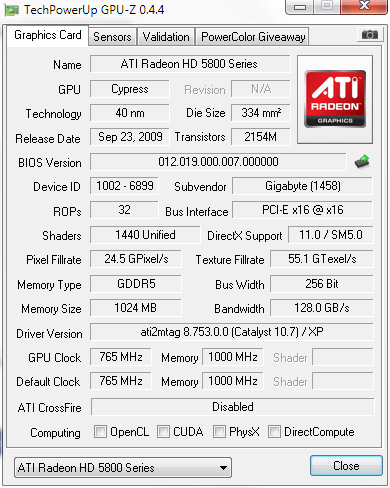
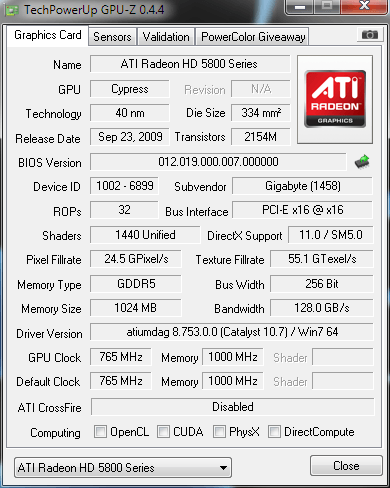
picture on the right is mine, while picture on the left is moshpit21's. At Driver Version, mine shows XP although I am running Win7 while his shows Win7.
I've uninstalled the driver again and using the OS standard vga driver, Gpuz shows Vista/Win7, but after installing the driver, Gpuz shows XP.

What seems to be the problem here?
my mind's blown rclxub.gif
Nosferatu
post Jul 28 2010, 05:20 PM

Casual
***
Junior Member
308 posts

Joined: Dec 2004


@ronaldlee007, moshpit21
nope wor, I am running w7 ulti x64.
I downloaded the driver for w7 x64..


Added on July 28, 2010, 6:33 pmuser posted image

update - I once again went through the whole process of doing a clean install of the driver and this time, Gpuz shows Win7 at Driver Version, but DirectCompute is still unchecked. What I noticed in all these screenshots is that, all the DirectX Support shows that it supports directx 11.

Can anyone help varify if DirectCompute is really working?

This post has been edited by Nosferatu: Jul 28 2010, 06:33 PM
Nosferatu
post Jul 28 2010, 07:55 PM

Casual
***
Junior Member
308 posts

Joined: Dec 2004


Yeah, I am reinstalling Bad Company 2 now. See how it goes. Planning to force set dx11 from its settings.ini.
Also found out something new while waiting for BC2 to be installed. The 4600series that you see is..desktop right click > resolution > advanced settings. But when I click on the Properties, it shows 5800series.. rclxub.gif
user posted image
Nosferatu
post Jul 29 2010, 12:19 AM

Casual
***
Junior Member
308 posts

Joined: Dec 2004


Back after trying out bad company 2 for awhile. Forced set the directx to 11 via setting.ini. So far, the gameplay is smooth, no hiccups or any sort.
So am I safe to assume that directx 11 is running as it should be?

Some screens. If dx11 is really running...
user posted imageuser posted image

Nosferatu
post Aug 3 2010, 10:05 PM

Casual
***
Junior Member
308 posts

Joined: Dec 2004


QUOTE(Evirober @ Aug 3 2010, 05:15 PM)
Guys,
I installed 10.7 yesterday and I get this weird problem. When playinh SC2 the mouse icon will change. When you exit back to windows it will show small duplicates of mouse cursor ? When I move the cursor from Monitor A to Monitor B the cursor looks ok on Monitor B. Am wondering if anyone else i facing this problem. Might revert back to 10.6
*
I believe that cursor bug is sc2 not the driver. I got the problem too.
Nosferatu
post Aug 5 2010, 09:59 PM

Casual
***
Junior Member
308 posts

Joined: Dec 2004


QUOTE(tuonn @ Aug 5 2010, 02:16 PM)
i think sapphire n gigabyte have lowest temp...
my gigabyte gc temp max at 63 celcius when playing game... tongue.gif
*
hm from your sig, i think your gigabyte card is the same as mine.
This right?
user posted image

I didnt overclock this card (leaving it factory overclocked @ 765/1000) and at room temperature, idling sits at 46c mostly. Gaming, it hits 71c max.
how did you bring it down to 63c while gaming ? lol

Casing I use is Lancool K58. 2 front intakes, 1rear exhaust, 1top exhaust.

Unless...you are using aftermarket graphic card cooler, then nvm tongue.gif

This post has been edited by Nosferatu: Aug 5 2010, 10:01 PM
Nosferatu
post Aug 6 2010, 12:21 AM

Casual
***
Junior Member
308 posts

Joined: Dec 2004


@speedhunter
I didnt manual set my graphic card fan speed. Just let it auto rev up/down depending on the card's temperature. Cant have it on high spin all the time. Sounds like a mini vacuum cleaner inside lol.

@tuonn
lol ok I think I get it. You got soo many intakes haha..i mean shieet 4 side intakes lol
Nosferatu
post Aug 6 2010, 12:45 AM

Casual
***
Junior Member
308 posts

Joined: Dec 2004


wow lol thats pretty cool. Are you using aftermarket coolers ?
Nosferatu
post Aug 6 2010, 12:57 AM

Casual
***
Junior Member
308 posts

Joined: Dec 2004


according to catalyst, my idle sits at 45c @ 46% fan speed lol (765/1000 default factory oc)
Room temperature not sure, but its summer now and night time outside now is 30c. No air con lol

lol your cards got good cooling!


This post has been edited by Nosferatu: Aug 6 2010, 12:58 AM
Nosferatu
post Aug 6 2010, 04:05 PM

Casual
***
Junior Member
308 posts

Joined: Dec 2004


QUOTE(JoBigShow @ Aug 6 2010, 08:20 AM)
ATi cards always flickers when startup, even the first time i used 4870 last year it flickers upon startup...having said, I think all the ATI cards I used within 3 years ago does flickers upon startup...
I think it's how CCC is commenced in the processing...
Probably the airflow of the casing, because mine idles around 40c~42c @157/300 either day time of night time (and early wee morning), the room got no aircond., and it's freakin' hot in the daytime.. sweat.gif
Using ref. cooled PowerColor 5850. (replaced the thermal pasted with Tuniq TX-3thumbup.gif

BTW, I'm using Lancool PC-K62 with 2 14cm fans in the front (intake), 2 14cm fans for top exhaust and2 12cm fans for rear exhaust.
Only drawback with much airflow in the casing is that you have to vacuum cleaned the casing once a month, too much dust...  wacko.gif

Anyways, idle temps below 50c (@157/300) should be standard, above that is considered a bit warm..
*
hm how did you get 2 fans for the rear exhaust ? I am using Lancool PC-K58 which isnt that much different from the K62. I use 2 14cm front intakes (default lancool's and thermaltake's), 1 14cm thermaltake top exhaust, and 1rear exhaust which is lancool's default.

The only thing I didnt change is the thermal paste lol and like the other forummer said, flashing the card's bios, which i am not so confident ;p

Nosferatu
post Aug 6 2010, 06:23 PM

Casual
***
Junior Member
308 posts

Joined: Dec 2004


QUOTE(JoBigShow @ Aug 6 2010, 05:35 PM)
I attached a 12cm fan at the PCI slots just under the VGA slot.
I can do that since my PCI'd aren't occupy for such things as soundcards, etc.

Yeah, the thermal paste actually did major improvement for my idle and load temps, esp. good paste like TX-3  notworthy.gif

Anyways, your HDD cage, is it facing towards the side panels or parallel along length~wise of the case?
If the first one, the airflow to the GC isn't that good... so I did rotate my HHD cage 90 degrees so that the GC can get much airflow directed by the bottom front 14cn fan.
*
icic, I'd forgotten about the expansions slots as possible exhaust. I've got a soundcard on one of the pci slots so I never really gave it much thought lol.
My hdd cage is parallel along the case length and the hdd placed on the bottom of the cage.

I am not sure where I can buy quality thermal grease in taiwan but at the moment I am using the grease from Titan Cooler which I am not sure if I can apply it to my graphic card and/or if this grease is even good or not haha
Nosferatu
post Aug 6 2010, 09:07 PM

Casual
***
Junior Member
308 posts

Joined: Dec 2004


@ronaldlee007
i guess i'll keep looking for other shops here when i have time.

@JoBigShow
haha its the only one that is a tad more expensive than the others, so i guessed that it's gonna have better effect tongue.gif
but yeah i guess i'll mail gigabyte and see if replacing thermal grease will void warranty or not
Nosferatu
post Aug 11 2010, 12:45 AM

Casual
***
Junior Member
308 posts

Joined: Dec 2004


not sure what you meant by 3D, the games I play are all 3D games not 2D side scrolling lol

If by 3D you mean playing on triple monitors with 3D glasses, then that is totally up to you.

Personally tho, I think the price on nvidia's 3d triple monitor feature thing would be way expensive
Nosferatu
post Aug 15 2010, 05:24 PM

Casual
***
Junior Member
308 posts

Joined: Dec 2004


QUOTE(Jet23sky @ Aug 14 2010, 11:03 PM)
Does it mean the HD5000 can crossfire with HD6000 series since both of them are using the same 40nm? If it is true then I can wait the 6000 series to crossfire my 5870.  brows.gif
*
i wouldnt bet on it.
Even tho using still 40nm, HD5000 series cant even crossfire between all their families.
They can only crossfire between 58XX, 57XX
» Click to show Spoiler - click again to hide... «


2 Pages  1 2 >Top
Topic ClosedOptions
 

Change to:
| Lo-Fi Version
0.0461sec    0.61    8 queries    GZIP Disabled
Time is now: 5th December 2025 - 05:08 PM