Welcome Guest ( Log In | Register )

Bump Topic Topic Closed RSS Feed

Outline · [ Standard ] · Linear+

 AMD Radeon™ Discussion V3, Prepare Red! Green has attacked!

views
     
ronaldlee007
post Jul 19 2010, 08:50 AM

LYN SGN Flasher
******
Senior Member
1,337 posts

Joined: Apr 2010


who u buy from?? pm him for details.. smile.gif


Added on July 19, 2010, 8:59 am
QUOTE(JoBigShow @ Jul 18 2010, 03:56 PM)
I can OC my Powrcolor 5850 to:
900mhz/1200 @ 1.15v to score similar points in 3DMark Vantage as my friend's Asus 5870.

Then later he OC'd his 5870 to 1ghz to ejek me  mad.gif
But these days I stop OC'ing the card since it can easily handle most of the games out there...last time OC'ed when Metro 2033 was released couple of months ago.... sweat.gif
*
Hi, i saw that u mention about the 900mhz for ur HD5850. But on my ati catalyst, the max is 875 only. Are u using MSI burner to do that?
Thank you.. I need to learn more about my new PW PCS+ HD5850..

This post has been edited by ronaldlee007: Jul 19 2010, 08:59 AM
ronaldlee007
post Jul 19 2010, 08:16 PM

LYN SGN Flasher
******
Senior Member
1,337 posts

Joined: Apr 2010


I just got my PW PCS+ 5850 at $950 with Dirt2 bundle early July.. If it really drop to RM600.. so sad.. sad.gif
ronaldlee007
post Jul 27 2010, 09:08 PM

LYN SGN Flasher
******
Senior Member
1,337 posts

Joined: Apr 2010


QUOTE(Nosferatu @ Jul 27 2010, 03:44 PM)
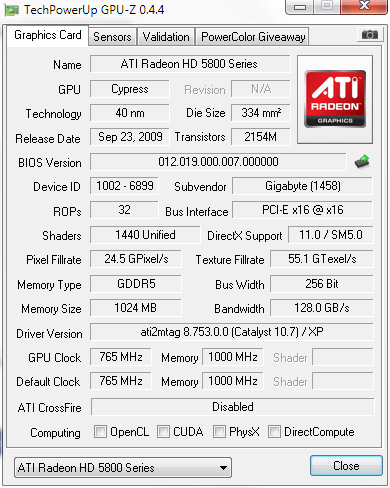
Is this normal? When using 10.6, I saw a check at DirectCompute.
Now using 10.7 and it seems like DirectCompute is absent. rclxub.gif
user posted image
*
I am using V10.7 now. Using HD5850.
I have the DirectCompute 5.0 Checked on TechPowerUp GPU-Z 0.4.4.

Reinstall ur driver may help. Use driver sweeper in safe mode to make a proper clean.


Added on July 27, 2010, 9:24 pm
QUOTE(hasyir @ Jul 27 2010, 06:13 PM)
why i can only use screen resolution up to 1600x1200 only on my 32" fhd lcd?im using hd5850...

plus d picture quality is quite blurry...not tht sharp...
is it bcoz of my cable?
im using vga cable n dvi converter...
*
Not sharp is caused by the resolution problem. In your case, not sure why it don't support 1920 x 1080. What catalyst version of driver u use? I used V10.4, 10.5, 10.6 and now 10.7.
I am also using hd5850 (with VGA cable + DVI Converter) and hook up to 32" at 1920 x 1080, the screen look very sharp. rclxms.gif
Try to play around with the resolution and try again. Update ur driver may help. sweat.gif

This post has been edited by ronaldlee007: Jul 27 2010, 09:24 PM
ronaldlee007
post Jul 28 2010, 08:57 AM

LYN SGN Flasher
******
Senior Member
1,337 posts

Joined: Apr 2010


Nosferatu, have u try to revert to V10.6? Just to make sure that it is ok.
Regarding your V10.7 installer, where did u download? From http://www.amd.com/us/Pages/AMDHomePage.aspx ?

Agreed with JoBigShow. We need the LCD spec and type. I have tried on Toshiba 32" LCD, the resolution supported is so limited. As for my Philips 32" LCD, on default already in nice and sharp resolution.
ronaldlee007
post Jul 28 2010, 02:59 PM

LYN SGN Flasher
******
Senior Member
1,337 posts

Joined: Apr 2010


I think before u buy the HDMI cable, pls update ur ccc first.

Check CPU temp by CoreTemp. smile.gif
ronaldlee007
post Jul 28 2010, 04:18 PM

LYN SGN Flasher
******
Senior Member
1,337 posts

Joined: Apr 2010


Could it be that you download the catalyst V10.7 for XP version?
Not sure if it's possible to install at all.

I will double checked mine tonight.
ronaldlee007
post Jul 29 2010, 07:00 AM

LYN SGN Flasher
******
Senior Member
1,337 posts

Joined: Apr 2010


QUOTE(Nosferatu @ Jul 28 2010, 05:20 PM)
@ronaldlee007, moshpit21
nope wor, I am running w7 ulti x64.
I downloaded the driver for w7 x64..

» Click to show Spoiler - click again to hide... «


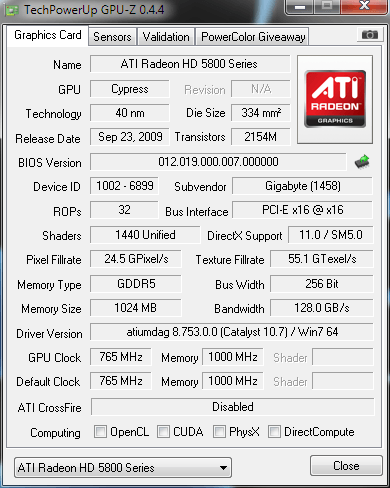
update - I once again went through the whole process of doing a clean install of the driver and this time, Gpuz shows Win7 at Driver Version, but DirectCompute is still unchecked. What I noticed in all these screenshots is that, all the DirectX Support shows that it supports directx 11.

Can anyone help varify if DirectCompute is really working?
*
My result same as urs. Driver version with Win7 64 and the DirectCompute 5.0 is checked.
ronaldlee007
post Aug 4 2010, 10:21 PM

LYN SGN Flasher
******
Senior Member
1,337 posts

Joined: Apr 2010


QUOTE(Onion-KiD @ Aug 4 2010, 06:46 PM)
It is normal. my 5850 also around that. (54'c)
*
My HD5850 idle at 40C but mine is Powercolor PCS+.
54C is a bit too high for idle to me. What case u using? how is the airflow? hmm.gif
ronaldlee007
post Aug 5 2010, 10:07 AM

LYN SGN Flasher
******
Senior Member
1,337 posts

Joined: Apr 2010


QUOTE(Onion-KiD @ Aug 4 2010, 10:38 PM)
my room temp already 36~39 temp. 50c is normal for my system ler
Overall system temp: 71'c after Dota
[attachmentid=1709668]
*
i see. Not sure what is my room temperature. My room must be in nice room temp. rclxms.gif
Usually gaming will maxed <60C. icon_rolleyes.gif
ronaldlee007
post Aug 5 2010, 01:57 PM

LYN SGN Flasher
******
Senior Member
1,337 posts

Joined: Apr 2010


QUOTE(law1777 @ Aug 5 2010, 12:22 PM)
they said they r using driver 10.4 and how bout yours?

im still using 9.12hotfix my reference 5870 stock also 40c
*
I am using the 10.7 official driver. But no oc. My card comes with factory over clock. The powercolor heatsink look really nice and it cool down nicely too. rclxms.gif
ronaldlee007
post Aug 6 2010, 07:29 PM

LYN SGN Flasher
******
Senior Member
1,337 posts

Joined: Apr 2010


Nosferatu, u stay at taiwan? u can order from our lyn seller if u don't mind the courier charges. But i am sure, taiwan will have it too. Try to look at taiwan online store.
ronaldlee007
post Aug 7 2010, 06:16 AM

LYN SGN Flasher
******
Senior Member
1,337 posts

Joined: Apr 2010


If i were to change the thermal paste of my PowerColor, is it necessary to email them for a prove of green light? hmm.gif
ronaldlee007
post Aug 7 2010, 10:49 AM

LYN SGN Flasher
******
Senior Member
1,337 posts

Joined: Apr 2010


Thanks JoBigShow.
I have ordered and used the TX2 for my processor from Lingloong. Just wonder how much different btw TX2 and TX3? smile.gif

I will email powercolor for proof if i were to change the thermal paste.
ronaldlee007
post Aug 7 2010, 12:07 PM

LYN SGN Flasher
******
Senior Member
1,337 posts

Joined: Apr 2010


If only +/- 1c-2c (Tx2 & Tx3), doesn't really matter. It's hardly noticeable. yawn.gif
I will use Tx2 if i were to try it later. But from the stock paste to Tx2 or Tx3, it is really worth since +/- 6c-8c. drool.gif

This post has been edited by ronaldlee007: Aug 7 2010, 12:09 PM
ronaldlee007
post Aug 17 2010, 11:16 AM

LYN SGN Flasher
******
Senior Member
1,337 posts

Joined: Apr 2010


» Click to show Spoiler - click again to hide... «


Hi Bro, I am using 5850. please share with me the oc'ed ability for stock voltage.
Thank you.
ronaldlee007
post Aug 17 2010, 01:32 PM

LYN SGN Flasher
******
Senior Member
1,337 posts

Joined: Apr 2010


For 3 LCD set up, one of your LCD must have display port.
ronaldlee007
post Aug 18 2010, 02:20 PM

LYN SGN Flasher
******
Senior Member
1,337 posts

Joined: Apr 2010


V10.7 still stay at higher idle clock when u oc'ed the card. But it will stay at lower idle when it is not oc'ed.
I read a lot that the higher idle clock is not bug but to solve the flicker issue.
ronaldlee007
post Aug 18 2010, 03:32 PM

LYN SGN Flasher
******
Senior Member
1,337 posts

Joined: Apr 2010


Indeed, ATI team need to work harder to get rid of the high idle clock after Oc'ed.

Since i am using PowerColor card, is it better to use their website driver? Just wanna know what is the different btw manufacturer and official ATI. PowerColor site only have V10.6 instead of the latest V10.7. I notice also, Powercolor have different link for the HD5800, HD5700 etc series while ATI official have only 1 universal driver for HD5XXX, HD4XXX etc series.
ronaldlee007
post Aug 19 2010, 09:54 AM

LYN SGN Flasher
******
Senior Member
1,337 posts

Joined: Apr 2010


QUOTE(Clem1982 @ Aug 18 2010, 03:58 PM)
lol I thought only can find in Official driver site? never bothered to look at Sapphire's site for drivers dunno if they have one specially for 5770 vapor  tongue.gif
*
That's why i am wondering if there is different btw manufacturer and official ATI? Who knows, the manufacturer twist the driver a bit and work great for their card? smile.gif
ronaldlee007
post Aug 20 2010, 09:04 AM

LYN SGN Flasher
******
Senior Member
1,337 posts

Joined: Apr 2010


In Chinese, "Every Family have 1 difficult book to read". tongue.gif
Jump here and there but at the end still the same. Not only in driver, same as job etc, right?

2 Pages  1 2 >Top
Topic ClosedOptions
 

Change to:
| Lo-Fi Version
0.0212sec    0.65    7 queries    GZIP Disabled
Time is now: 4th December 2025 - 07:03 PM