Welcome Guest ( Log In | Register )

248 Pages « < 175 176 177 178 179 > » Bottom

Outline · [ Standard ] · Linear+

 Official TM UniFi High Speed Broadband Thread V43, READ 1ST PAGE FOR RELEVANT WIFI INFO!

views
     
go626201
post Sep 21 2025, 12:59 AM

Regular
******
Senior Member
1,882 posts

Joined: Sep 2017
QUOTE(tng55 @ Sep 21 2025, 12:33 AM)
yah i know Ecoflow hardware failure i saw many people complaint and unstable and some problem error and voltage issue and ground issue etc crazy

i know not allow buy oversea

what you think brand bluetti ???? still hardware failure right for bluetti ??
how about brand anker still hardware failure right for anker ??
*
Not sure for other brand,i only check on Ecoflow.
So far most power station brand does not support proper UPS mode. (alot of those only can use as EPS mode-20ms or higher)
tng55
post Sep 21 2025, 02:47 AM

Regular
******
Senior Member
1,440 posts

Joined: Sep 2021


QUOTE(go626201 @ Sep 21 2025, 12:59 AM)
Not sure for other brand,i only check on Ecoflow.
So far most power station brand does not support proper UPS mode. (alot of those only can use as EPS mode-20ms or higher)
*
i always prefer brand Ecoflow then bluetti why i don't know hehehe
delta 3 Pro amazing setup Delta 3 pro + x2 extra battery wow daam expensive but can run BTU+ROUTER+PC DESKTOP+MONITOR like that
i think possible can last 12hours backup or 24hhours backup depend load power
so no need APC

have you try you own Ecoflow river 3 UPS Mode if you switch off Power wall socket switch battery 0MS real ???
have you check you BTU + ROUTER stay on ??? because need 0MS
how about PC Desktop ?? if delay 20MS will PC off and Router + btu off look like reboot due power loss during switch battery
go626201
post Sep 21 2025, 03:08 AM

Regular
******
Senior Member
1,882 posts

Joined: Sep 2017
QUOTE(tng55 @ Sep 21 2025, 02:47 AM)
have you try you own Ecoflow river 3 UPS Mode if you switch off Power wall socket switch battery 0MS real ???
have you check you BTU + ROUTER stay on ??? because need 0MS
how about PC Desktop ?? if delay 20MS will PC off and Router + btu off look like reboot due power loss during switch battery
*
UPS mode is default. River 3 and Delta 3 is released mainly for UPS usage with upgrade.
0ms can only be achieved with On-Line UPS. My perspective: Current Power Station should not have enough capacity or performance to do 0ms switching.
River 3 or Delta 3 can only do around or within 10ms switching time.
Low power device can sustain the switching time even 15-20ms. (PC might or might not depends on PSU)
Normal PC can also sustain the switching time,I tested around 150W on load switching no issue.
High wattage PC like using more than 300W not sure,i didn't try,but i think Any PC lower than 300W on load not an issue.
PC Running Full load 300W+ not sure,i guess this might power off. (Or maybe also depends on PSU,some high-end PSU might have bigger enough Capacitor to hold the switching time)
go626201
post Sep 21 2025, 03:08 AM

Regular
******
Senior Member
1,882 posts

Joined: Sep 2017
Repeated Replies.

This post has been edited by go626201: Sep 21 2025, 03:09 AM
Moogle Stiltzkin
post Sep 21 2025, 05:30 AM

Look at all my stars!!
*******
Senior Member
4,458 posts

Joined: Jan 2003
QUOTE(tng55 @ Sep 21 2025, 02:47 AM)
i always prefer brand Ecoflow then bluetti  why i don't know hehehe
delta 3 Pro amazing setup Delta 3 pro + x2 extra battery wow daam expensive but can run BTU+ROUTER+PC DESKTOP+MONITOR like that
i think possible can last 12hours backup or 24hhours backup depend load power
so no need APC

have you try you own Ecoflow river 3 UPS Mode if you switch off Power wall socket switch battery 0MS real ???
have you check you BTU + ROUTER stay on ??? because need 0MS
how about PC Desktop ?? if delay 20MS will PC off and Router + btu off look like reboot due power loss during switch battery
*
for your setup, would that work for solar from balcony?

and how much for that setup?

how do you setup the MCB to add this to your power grid to hook up the BTU router etc?

Is that enough power for truenas server and a gaming desktop pc? 24/7 ?

If the power in the battery run out, can it seamlessly switch back to using the main power?


More interested to use for powering off solar, rather than as a backup. Maybe when i was in Sabah may have needed many years ago (lots of power cuts). But more interested in directly powering devices direct off solar hmm.gif


This post has been edited by Moogle Stiltzkin: Sep 21 2025, 05:36 AM
go626201
post Sep 21 2025, 11:46 AM

Regular
******
Senior Member
1,882 posts

Joined: Sep 2017
QUOTE(Moogle Stiltzkin @ Sep 21 2025, 05:30 AM)
If the power in the battery run out, can it seamlessly switch back to using the main power?
More interested to use for powering off solar, rather than as a backup. Maybe when i was in Sabah may have needed many years ago (lots of power cuts). But more interested in directly powering devices direct off solar  hmm.gif

*
If i not wrong,Below is my research,not actual experience
prefer battery 1st will use the battery until the battery limit,and the grid power will take over and continue to provide power.
The app can set the discharge level or full charge level.
And when solar power in,it will use solar 1st to charge battery and dc to ac convert for providing power to device.

For your usage, better just find solar company to install solar panel,high capacity battery and UPS based/grade inverter(for low switching time).
for safety purpose, you may install multiple 200ah deep cycle "lead acid type" battery (got other material this i dont really know the details) for backup power.
If you prefer longer backup time,Lifepo4 battery is also usable and also longlife(1000+ full cycle before reach 80% battery life),but more expensive and abit dangerous than "lead acid type" battery.

The reason why i dont suggest to use Ecoflow product for solar power is because i saw alot of people using solar power to Ecoflow,and either the device auto turn off or something else got different weird issue or breakdown.
And the price like around RM4k for Delta3 and 1.8kw output power. (And it might breakdown randomly or once...)
Just install a fully function solar system will be better for home backup usage. (20k+ if i am not wrong for this kind of usage)

Edited:
Maybe add another PC use grade UPS would be safer with solar system.

This post has been edited by go626201: Sep 21 2025, 11:56 AM

RallyNight
post Sep 21 2025, 12:27 PM

Regular
******
Senior Member
1,125 posts

Joined: Nov 2015
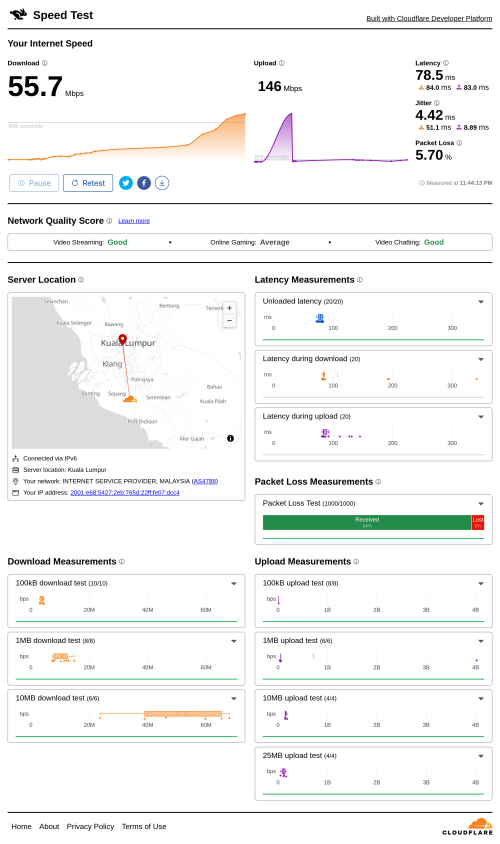
QUOTE(kwss @ Sep 20 2025, 01:03 AM)
I think TM made a configuration mistake with Cloudflare as well.
They should advertise all their prefix towards their Cloudflare PNI but from the traceroute, I suspect they didn't.
They also didn't perform RPKI check on the router that peer with Cloudflare.

Terrible performance with packet loss:
user posted image

IPv4:
CODE

traceroute -4 speed.cloudflare.com
traceroute to speed.cloudflare.com (172.66.0.218), 30 hops max, 60 byte packets
1  _gateway (192.168.88.1)  0.470 ms  0.383 ms  0.349 ms
2  115.134.191.254 (115.134.191.254)  5.799 ms  5.797 ms  5.810 ms
3  * * *
4  * * *
5  162.158.24.253 (162.158.24.253)  37.928 ms  12.501 ms  37.832 ms
6  172.66.0.218 (172.66.0.218)  105.306 ms  103.720 ms  103.631 ms


IPv6:
CODE

traceroute speed.cloudflare.com
traceroute to speed.cloudflare.com (2606:4700:7::da), 30 hops max, 80 byte packets
1  2001:e68:5427:2eb::f (2001:e68:5427:2eb::f)  0.327 ms  0.530 ms  0.508 ms
2  2001:e68:402c:8001::6c (2001:e68:402c:8001::6c)  5.513 ms  5.506 ms  5.478 ms
3  2001:e68::b:4c (2001:e68::b:4c)  6.609 ms  4.381 ms  5.289 ms
4  2400:cb00:56:3::a29e:18fd (2400:cb00:56:3::a29e:18fd)  13.923 ms  12.030 ms  13.507 ms
5  2400:cb00:56:1024::a29e:1978 (2400:cb00:56:1024::a29e:1978)  76.715 ms 2400:cb00:56:1024::a29e:1911 (2400:cb00:56:1024::a29e:1911)  96.602 ms 2400:cb00:56:1024::a29e:195c (2400:cb00:56:1024::a29e:195c)  98.807 ms


You can clearly see a huge asymmetric which should not happen in a PNI
CODE

tracepath -p 443 -6 speed.cloudflare.com
1?: [LOCALHOST]                        0.007ms pmtu 1500
1:  2001:e68:5427:2eb::f                                  0.556ms
1:  2001:e68:5427:2eb::f                                  0.269ms
2:  2001:e68:5427:2eb::f                                  0.272ms pmtu 1492
2:  2001:e68:402c:8001::6c                                3.334ms
3:  2001:e68::b:4c                                        2.871ms asymm  2
4:  2400:cb00:56:3::a29e:18fd                            62.151ms asymm  6
5:  no reply
<snip>


Same example using AWS and you can see the asymmetric is less than TM
CODE

tracepath -p 443 -6 speed.cloudflare.com
1?: [LOCALHOST]                        0.006ms pmtu 9001
1:  _gateway                                              0.099ms pmtu 1500
1:  no reply
2:  no reply
3:  no reply
4:  no reply
5:  2620:107:4000:cfff::f3ff:671                          0.549ms
6:  2620:107:4000:d1d0::f003:3c01                         0.432ms
7:  2620:107:4000:cfff::f207:fc85                        18.054ms asymm 10
8:  2620:107:4000:b310::f001:a80b                         1.312ms
9:  2400:6500::58                                         1.968ms asymm 10
10:  2620:107:4008:f9b::2                                 11.706ms asymm  9
11:  2400:cb00:632:3::                                     2.368ms asymm 12
12:  no reply

*
This make me feels like 100 300 500 no different on peak time
go626201
post Sep 21 2025, 01:29 PM

Regular
******
Senior Member
1,882 posts

Joined: Sep 2017
QUOTE(RallyNight @ Sep 21 2025, 12:27 PM)
This make me feels like 100 300 500 no different on peak time
*
TM already fix IPv4 Cloudflare issue yesterday.
So IPv4 should be okay now.
emilyngsc
post Sep 21 2025, 02:47 PM

Regular
******
Senior Member
1,644 posts

Joined: Dec 2017


Anyone using NextDNS on iPhone? Now blocking Touch ‘n Go check in app on A+ rewards and totally blank out that particular section.

This post has been edited by emilyngsc: Sep 21 2025, 02:50 PM


Attached thumbnail(s)
Attached Image
tng55
post Sep 21 2025, 02:51 PM

Regular
******
Senior Member
1,440 posts

Joined: Sep 2021


QUOTE(go626201 @ Sep 21 2025, 03:08 AM)
UPS mode is default. River 3 and Delta 3 is released mainly for UPS usage with upgrade.
0ms can only be achieved with On-Line UPS. My perspective: Current Power Station should not have enough capacity or performance to do 0ms switching.
River 3 or Delta 3 can only do around or within 10ms switching time.
Low power device can sustain the switching time even 15-20ms. (PC might or might not depends on PSU)
Normal PC can also sustain the switching time,I tested around 150W on load switching no issue.
High wattage PC like using more than 300W not sure,i didn't try,but i think Any PC lower than 300W on load not an issue.
PC Running Full load 300W+ not sure,i guess this might power off. (Or maybe also depends on PSU,some high-end PSU might have bigger enough Capacitor to hold the switching time)
*
i think need On-Line UPS APC safety
PC+BTU+ROUTER On-Line UPS APC Connect Ecoflow i think so

because you not yet tested PC High End
explain PC PSU Corsair AX1600 = 1600Watts
if you friend have PC Gaming High End like PSU Corsair AX1600 = 1600Watts try for you own River 3 UPS Mode for testing
if works mean no need On-Line UPS APC

where you did buy Ecoflow with 5 Year warranty if problem send back then he test if found fully broken he will replace new one set with 1weeks or 2weeks to easy can you pm me details

i don't want risk bad seller or dealer

PM ME
ppfoong
post Sep 21 2025, 03:03 PM

On my way
****
Junior Member
556 posts

Joined: Jun 2008
Hmm... Something strange with B Infinite app today.

I daily check-in to collect BPoints for Caltex petrol.

Today, when connected to WiFi (using Unifi), B Infinite app stuck at splash screen; When phone disabled WiFi and connected using Hotlink Postpaid, B Infinite app works normal. Enable back WiFi, stuck at splash screen again.


ppfoong
post Sep 21 2025, 03:03 PM

On my way
****
Junior Member
556 posts

Joined: Jun 2008
[Repeated reply]


This post has been edited by ppfoong: Sep 21 2025, 03:08 PM
kwss
post Sep 21 2025, 04:14 PM

Regular
******
Senior Member
1,207 posts

Joined: Aug 2018
QUOTE(go626201 @ Sep 21 2025, 01:29 PM)
TM already fix IPv4 Cloudflare issue yesterday.
So IPv4 should be okay now.
*
They didn't fix anything. If you get JHB address then it is okay.

Using cloudflare speedtest server as example:
CODE

$ resolvectl query speed.cloudflare.com
speed.cloudflare.com: 2a06:98c1:58::da         -- link: enp1s0f0
                     2606:4700:7::da          -- link: enp1s0f0
                     172.66.0.218             -- link: enp1s0f0
                     162.159.140.220          -- link: enp1s0f0


KUL:
CODE

traceroute to speed.cloudflare.com (172.66.0.218), 30 hops max, 60 byte packets
1  _gateway (192.168.88.1)  0.431 ms  0.391 ms  0.654 ms
2  115.134.191.254 (115.134.191.254)  4.446 ms  4.336 ms  4.436 ms
3  * * *
4  * * *
5  162.158.24.253 (162.158.24.253)  51.017 ms  34.946 ms  50.983 ms
6  172.66.0.218 (172.66.0.218)  81.154 ms  79.330 ms  80.448 ms


CODE

$ curl http://172.66.0.218/cdn-cgi/trace
fl=56f182
h=172.66.0.218
ip=115.134.187.54
ts=1758442025.271
visit_scheme=http
uag=curl/8.11.1
colo=KUL
sliver=010-tier3
http=http/1.1
loc=MY
tls=off
sni=off
warp=off
gateway=off
rbi=off
kex=none


JHB:
CODE

traceroute to speed.cloudflare.com (162.159.140.220), 30 hops max, 60 byte packets
1  _gateway (192.168.88.1)  0.372 ms  0.867 ms  0.314 ms
2  115.134.191.254 (115.134.191.254)  3.936 ms  3.822 ms  3.869 ms
3  * * *
4  * * *
5  * * *
6  172.69.19.16 (172.69.19.16)  10.180 ms  8.877 ms  7.575 ms
7  162.159.140.220 (162.159.140.220)  8.760 ms  8.721 ms  9.788 ms


CODE

$ curl http://162.159.140.220/cdn-cgi/trace
fl=242f27
h=162.159.140.220
ip=115.134.187.54
ts=1758442011.339
visit_scheme=http
uag=curl/8.11.1
colo=JHB
sliver=none
http=http/1.1
loc=MY
tls=off
sni=off
warp=off
gateway=off
rbi=off
kex=none


At this stage I really cannot tell salah siapa. I don't have a Cloudflare Enterprise account to use their colo traceroute API.
To be fair Cloudflare has been shitty lately. They always need to re-route KUL for reason only they themselves know.

Not saying TM is not shitty with their congestion.
RallyNight
post Sep 21 2025, 04:53 PM

Regular
******
Senior Member
1,125 posts

Joined: Nov 2015
Want to ask 100 300 500 has any different?
Since they having same upload as same public ip for 3 person use only
PJng
post Sep 21 2025, 07:04 PM

10k Club
********
All Stars
12,039 posts

Joined: Oct 2017


QUOTE(RallyNight @ Sep 21 2025, 04:53 PM)
Want to ask 100 300 500 has any different?
Since they having same upload as same public ip for 3 person use only
*
What mean same? And 3 person use? If light user 10 person with 100 also enough
300, 100 upload is 50, private IP
500 upload is 100, public IP
RallyNight
post Sep 21 2025, 07:19 PM

Regular
******
Senior Member
1,125 posts

Joined: Nov 2015
QUOTE(PJng @ Sep 21 2025, 08:04 PM)
What mean same? And 3 person use? If light user 10 person with 100 also enough
300, 100 upload is 50, private IP
500 upload is 100, public IP
*
Private ip what i mean, now feels like my 300 selow betol during 7pm to 11pm everyday.
Even on vpn also need to pray
Yeah 3 people use only.

This post has been edited by RallyNight: Sep 21 2025, 07:20 PM
PJng
post Sep 21 2025, 07:23 PM

10k Club
********
All Stars
12,039 posts

Joined: Oct 2017


QUOTE(RallyNight @ Sep 21 2025, 07:19 PM)
Private ip what i mean, now feels like my 300 selow betol during 7pm to 11pm everyday.
Even on vpn also need to pray
Yeah 3 people use only.
*
Read above slow is TM issue, now i swu 5.0 also sometine slow on night time
After 12am is normal back

Add on
If not heavy user, speed is not important even got 20 person
Higher speed just shorten download large file

Example 5 device stream 1080p video at the sametime, 100mbps still more that enough

This post has been edited by PJng: Sep 21 2025, 07:40 PM
kmed
post Sep 21 2025, 07:36 PM

Getting Started
**
Junior Member
107 posts

Joined: Apr 2008


Noob here. How to subscribe to SWU 5.0? My unifi contract has already ended 5 years ago but the unifi tv contract is only ending 02/05 next year even though i have not watched before.
YoungMan
post Sep 21 2025, 07:48 PM

Look at all my stars!!
*******
Senior Member
6,798 posts

Joined: Oct 2008
From: Kuala Lumpur


QUOTE(RallyNight @ Sep 21 2025, 07:19 PM)
Private ip what i mean, now feels like my 300 selow betol during 7pm to 11pm everyday.
Even on vpn also need to pray
Yeah 3 people use only.
*
If 3 people light use, 100mbps also enough. Private or public IP not related to slowness, TM Unifi sucks at night.
You can try use hotspot from phone, it is also private IP.
QUOTE(kmed @ Sep 21 2025, 07:36 PM)
Noob here. How to subscribe to SWU 5.0? My unifi contract has already ended 5 years ago but the unifi tv contract is only ending 02/05 next year even though i have not watched before.
*
Search for SWU 5.0 in this topic, you will find plenty of information.
RallyNight
post Sep 21 2025, 08:30 PM

Regular
******
Senior Member
1,125 posts

Joined: Nov 2015
QUOTE(PJng @ Sep 21 2025, 08:23 PM)
Read above slow is TM issue, now i swu 5.0 also sometine slow on night time
After 12am is normal back

Add on
If not heavy user, speed is not important even got 20 person
Higher speed just shorten download large file

Example 5 device stream 1080p video at the sametime, 100mbps still more that enough
*
Ah, cnah only 2 watch youtube, me for wfh, doesnt need much internet.
Yeah gotta see what offer they give saw other post swu kinda suck.

248 Pages « < 175 176 177 178 179 > » Top
 

Change to:
| Lo-Fi Version
0.0167sec    0.40    6 queries    GZIP Disabled
Time is now: 5th December 2025 - 11:19 AM