Welcome Guest ( Log In | Register )

249 Pages « < 176 177 178 179 180 > » Bottom

Outline · [ Standard ] · Linear+

 Official TM UniFi High Speed Broadband Thread V43, READ 1ST PAGE FOR RELEVANT WIFI INFO!

views
     
go626201
post Sep 21 2025, 09:09 PM

Regular
******
Senior Member
1,882 posts

Joined: Sep 2017
QUOTE(tng55 @ Sep 21 2025, 02:51 PM)
i think need On-Line UPS APC safety
PC+BTU+ROUTER On-Line UPS APC Connect Ecoflow i think so

because you not yet tested PC High End
explain PC PSU Corsair AX1600 = 1600Watts
if you friend have PC Gaming High End like PSU Corsair AX1600 = 1600Watts try for you own River 3 UPS Mode for testing
if works mean no need On-Line UPS APC

where you did buy Ecoflow with 5 Year warranty if problem send back then he test if found fully broken he will replace new one set with 1weeks or 2weeks to easy can you pm me details

i don't want risk bad seller or dealer

PM ME
*
For that kind of high wattage device,u need 1800W/3600W(Surge) Delta3(RM3-4k and 1-2hours backup time) or 1.5-2kA lead-acid battery UPS(RM1k+ and 5-20min backup time) to hold the power.
Ecoflow Official Store.

QUOTE(kwss @ Sep 21 2025, 04:14 PM)
They didn't fix anything. If you get JHB address then it is okay.

At this stage I really cannot tell salah siapa. I don't have a Cloudflare Enterprise account to use their colo traceroute API.
To be fair Cloudflare has been shitty lately. They always need to re-route KUL for reason only they themselves know.

Not saying TM is not shitty with their congestion.
*
I dont know oh...i just check my smokeping,and see all CF ipv4 just back to 20ms again.
I not sure how the experience with unifi route,because i just enable Netwatch on Cloudflare IPv6 if high latency or packet lost and redirect the CF traffic to my JHB VPS,which will send the CF traffic to SIN.
Don't know why it didn't use JHB PoP,but i haven't problem with it,so i didn't care whether JHB or SIN.

Edited:
Just remembered- Equinix JHB mainly exchange traffic with SG Equinix,that's why reroute to SIN.
Most JHB DC just straight connected to SIN for traffic exchange.

This post has been edited by go626201: Sep 21 2025, 09:34 PM
jiaen0509
post Sep 21 2025, 09:47 PM

Look at all my stars!!
*******
Senior Member
3,305 posts

Joined: Dec 2012
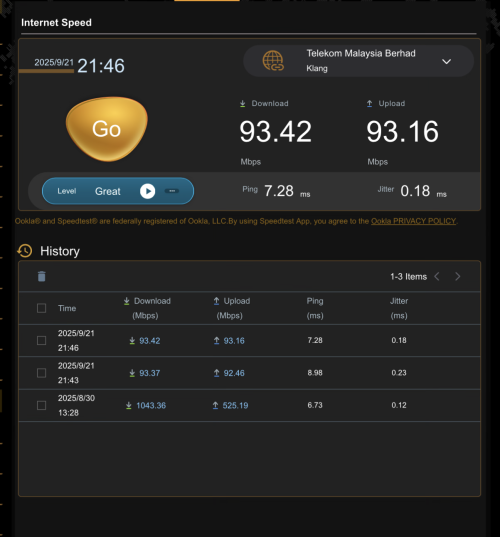
Strange that both my down and uoload speed capped at 90mbps.

user posted image
blacktubi
post Sep 21 2025, 09:52 PM

-
Group Icon
Elite
8,409 posts

Joined: Jul 2008

QUOTE(jiaen0509 @ Sep 21 2025, 09:47 PM)
Strange that both my down and uoload speed capped at 90mbps.

user posted image
*
Confirm plus chop Ethernet link speed issue

Check modem to router LAN cable
PJng
post Sep 21 2025, 10:56 PM

10k Club
********
All Stars
12,039 posts

Joined: Oct 2017


QUOTE(jiaen0509 @ Sep 21 2025, 09:47 PM)
Strange that both my down and uoload speed capped at 90mbps.

user posted image
*
Sometime mine also like that, i just unplug, replug LAN cable
jiaen0509
post Sep 21 2025, 11:03 PM

Look at all my stars!!
*******
Senior Member
3,305 posts

Joined: Dec 2012
QUOTE(blacktubi @ Sep 21 2025, 09:52 PM)
Confirm plus chop Ethernet link speed issue

Check modem to router LAN cable
*
QUOTE(PJng @ Sep 21 2025, 10:56 PM)
Sometime mine also like that, i just unplug, replug LAN cable
*
OMG! I unplug and plug again LAN cable. The speed back to normal!!!! Thank you!!!!
blacktubi
post Sep 21 2025, 11:34 PM

-
Group Icon
Elite
8,409 posts

Joined: Jul 2008

QUOTE(jiaen0509 @ Sep 21 2025, 11:03 PM)
OMG! I unplug and plug again LAN cable. The speed back to normal!!!! Thank you!!!!
*
Time to buy a new LAN cable tongue.gif
kwss
post Sep 21 2025, 11:55 PM

Regular
******
Senior Member
1,207 posts

Joined: Aug 2018
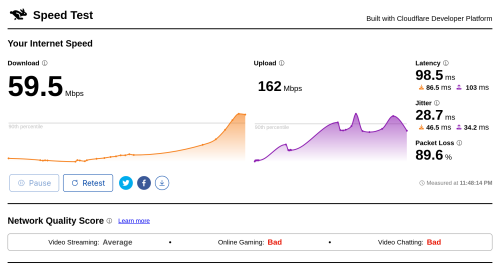
Today's Internut

On TM Unifi, 89.6% packet loss!!!:
user posted image

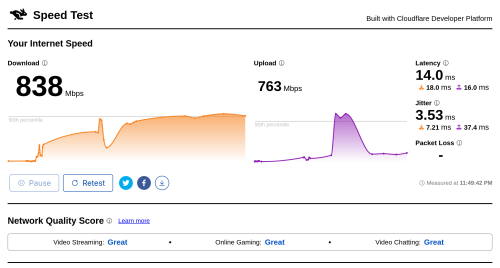
On my very own "VPN":
user posted image

Try to login to this forum using my own "VPN":
user posted image

Why LYN want to block AWS?
fruitie Can fix?
tng55
post Sep 21 2025, 11:58 PM

Regular
******
Senior Member
1,440 posts

Joined: Sep 2021


QUOTE(go626201 @ Sep 21 2025, 09:09 PM)
For that kind of high wattage device,u need 1800W/3600W(Surge) Delta3(RM3-4k and 1-2hours backup time) or 1.5-2kA lead-acid battery UPS(RM1k+ and 5-20min backup time) to hold the power.
Ecoflow Official Store.
I dont know oh...i just check my smokeping,and see all CF ipv4 just back to 20ms again.
I not sure how the experience with unifi route,because i just enable Netwatch on Cloudflare IPv6 if high latency or packet lost and redirect the CF traffic to my JHB VPS,which will send the CF traffic to SIN.
Don't know why it didn't use JHB PoP,but i haven't problem with it,so i didn't care whether JHB or SIN.

Edited:
Just remembered- Equinix JHB mainly exchange traffic with SG Equinix,that's why reroute to SIN.
Most JHB DC just straight connected to SIN for traffic exchange.
*
yah i know about watts
Ecoflow Official Store Malaysia can get link

can you try you friend about PC HIGH END testing River 3 switch battery how was
adz83
post Sep 22 2025, 12:07 AM

Casual
***
Junior Member
424 posts

Joined: May 2009
From: Petaling Jaya


Hi. need some advise on my situation.
I'm using Unifi 300mb with combo box Skyworth GN630V.

I'm using a company laptop (the only pc at home) and i face a weird issue.
it will connect for a while, and everything is good. but suddenly my PCU will hangs, my wireless tab in windows will disappear and after a while my connection will be lost.
subsequently, my restart will be long and usually fails to fix the issue.

Issue was not noticed on other devices like phones, android tv.

Please note that tthis issue only happens when i'm connected to the home Wifi. When i'm connected to my office wifi, i didn't have this issue at all.

I'm workng a 12 hours shift helpdesk job and i will need to be constantly connected to phone app and a remote desktop. i usually works in the office but sometime i will have to work from home to look after my kids if my wife work time clashes with my schedule.

any advise on the source of the issue?

This post has been edited by adz83: Sep 22 2025, 12:09 AM
blacktubi
post Sep 22 2025, 12:12 AM

-
Group Icon
Elite
8,409 posts

Joined: Jul 2008

QUOTE(kwss @ Sep 21 2025, 11:55 PM)
Today's Internut

On TM Unifi, 89.6% packet loss!!!:
user posted image

On my very own "VPN":
user posted image

Try to login to this forum using my own "VPN":
user posted image

Why LYN want to block AWS?
fruitie Can fix?
*
I don't think LYN is blocking you explicitly but they probably use a stricter security setup. LYN is using Cloudflare and I guess your AWS public IP is flagged by Cloudflare.

Most AWS public IPs are flagged on pretty much every single list.

You can also try blacktubi.com , if you can't access then it's 100% blocked by CF.

This post has been edited by blacktubi: Sep 22 2025, 12:13 AM
fruitie
post Sep 22 2025, 12:15 AM

Rise and Shine
Group Icon
Staff
72,808 posts

Joined: Sep 2005
From: KUL

QUOTE(kwss @ Sep 21 2025, 11:55 PM)
Why LYN want to block AWS?
fruitie Can fix?
*
This one you need to tag se7en. laugh.gif
If you noticed any abnormalities or anything that requires se7en’s attention, you can post it here: https://forum.lowyat.net/FeedbackandHelpdesk

This post has been edited by fruitie: Sep 22 2025, 12:17 AM
tng55
post Sep 22 2025, 01:15 AM

Regular
******
Senior Member
1,440 posts

Joined: Sep 2021


QUOTE(adz83 @ Sep 22 2025, 12:07 AM)
Hi. need some advise on my situation.
I'm using Unifi 300mb with combo box Skyworth GN630V.

I'm using a company laptop (the only pc at home) and i face a weird issue.
it will connect for a while, and everything is good. but suddenly my PCU will hangs, my wireless tab in windows will disappear and after a while my connection will be lost.
subsequently, my restart will be long and usually fails to fix the issue.

Issue was not noticed on other devices like phones, android tv.

Please note that tthis issue only happens when i'm connected to the home Wifi. When i'm connected to my office wifi, i didn't have this issue at all.

I'm workng a 12 hours shift helpdesk job and i will need to be constantly connected to phone app and a remote desktop. i usually works in the office but sometime i will have to work from home to look after my kids if my wife work time clashes with my schedule.

any advise on the source of the issue?
*
because not issue unifi its crappy combo box Skyworth GN630V. crappy router problem and unstable
not you PC problem and not you laptop problem

ok i may ask you office what router they are using
i think you office using own router not use FREE TM ROUTER

get you own buy new Router like tp link or ASUS
if you office router what brand and model you can buy same model like office using router settle
adz83
post Sep 22 2025, 06:45 AM

Casual
***
Junior Member
424 posts

Joined: May 2009
From: Petaling Jaya


QUOTE(tng55 @ Sep 22 2025, 01:15 AM)
because not issue unifi its crappy combo box Skyworth GN630V. crappy router problem and unstable
not you PC problem and not you laptop problem

ok i may ask you office what router they are using
i think you office using own router not use FREE TM ROUTER

get you own buy new Router like tp link or ASUS
if you office router what brand and model you can buy same model like office using router settle
*
Thanks for the advice.
I have a previous time/huawei hg8145x6 (moved to unifi as new house is not covered by time). Is it possible to use it instead? If anyone has done it, as u haven't found the guide to do so.
kwss
post Sep 22 2025, 08:09 AM

Regular
******
Senior Member
1,207 posts

Joined: Aug 2018
QUOTE(adz83 @ Sep 22 2025, 12:07 AM)
Hi. need some advise on my situation.
I'm using Unifi 300mb with combo box Skyworth GN630V.

I'm using a company laptop (the only pc at home) and i face a weird issue.
it will connect for a while, and everything is good. but suddenly my PCU will hangs, my wireless tab in windows will disappear and after a while my connection will be lost.
subsequently, my restart will be long and usually fails to fix the issue.

Issue was not noticed on other devices like phones, android tv.

Please note that tthis issue only happens when i'm connected to the home Wifi. When i'm connected to my office wifi, i didn't have this issue at all.

I'm workng a 12 hours shift helpdesk job and i will need to be constantly connected to phone app and a remote desktop. i usually works in the office but sometime i will have to work from home to look after my kids if my wife work time clashes with my schedule.

any advise on the source of the issue?
*
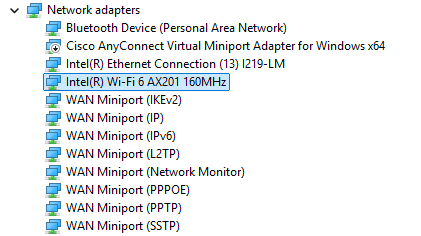
It sounds more like a WiFi driver issue than router.
Reason:
You mention laptop will hang.
Restart will be slower than usual.

None of the above can be due to the router. Maybe try updating the WiFi driver.
Can try the one from Windows update first. Just update the WiFi driver, don't update any other hardware.

What WiFi module are you using?
adz83
post Sep 22 2025, 09:35 AM

Casual
***
Junior Member
424 posts

Joined: May 2009
From: Petaling Jaya


QUOTE(kwss @ Sep 22 2025, 08:09 AM)
It sounds more like a WiFi driver issue than router.
Reason:
You mention laptop will hang.
Restart will be slower than usual.

None of the above can be due to the router. Maybe try updating the WiFi driver.
Can try the one from Windows update first. Just update the WiFi driver, don't update any other hardware.

What WiFi module are you using?
*
Hello,
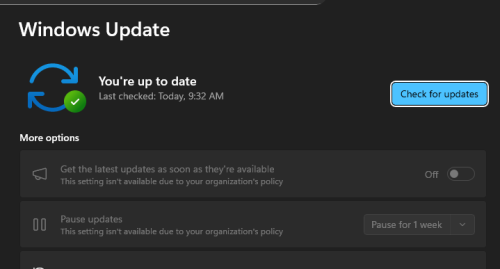
tried checking update but none showing.
user posted image
my office provided me with Dell latitude 5520, so not sure the module unsure.gif
i guess, this..

user posted image
blacktubi
post Sep 22 2025, 09:47 AM

-
Group Icon
Elite
8,409 posts

Joined: Jul 2008

QUOTE(adz83 @ Sep 22 2025, 09:35 AM)
Hello,
tried checking update but none showing.
user posted image
my office provided me with Dell latitude 5520, so not sure the module  unsure.gif
i guess, this..

user posted image
*
I suspect it's due to buggy endpoint security software from your corporate security, it's quite common actually laugh.gif

Try to check if it's still happening if you use other WiFi network like your phone hotspot or etc

adz83
post Sep 22 2025, 09:56 AM

Casual
***
Junior Member
424 posts

Joined: May 2009
From: Petaling Jaya


QUOTE(blacktubi @ Sep 22 2025, 09:47 AM)
I suspect it's due to buggy endpoint security software from your corporate security, it's quite common actually laugh.gif

Try to check if it's still happening if you use other WiFi network like your phone hotspot or etc
*
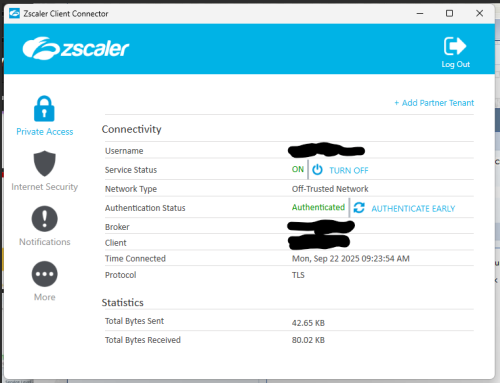
u meant the Zscaler?

user posted image
kwss
post Sep 22 2025, 10:04 AM

Regular
******
Senior Member
1,207 posts

Joined: Aug 2018
QUOTE(adz83 @ Sep 22 2025, 09:35 AM)
Hello,
tried checking update but none showing.
user posted image
my office provided me with Dell latitude 5520, so not sure the module  unsure.gif
i guess, this..

user posted image
*
Does your user account has permission to install driver manually?

Can try the Dell official version:
https://www.dell.com/support/home/en-my/dri...-15-5520-laptop

Or Intel official version:
https://www.intel.com/content/www/us/en/dow...windows-11.html

Do you use ZScaler while you are in office? Or only when at home? Since you said works fine in office.
You are using WiFi in office right?
TSSilentVampire
post Sep 22 2025, 10:07 AM

Networking Enthusiast
*******
Senior Member
5,714 posts

Joined: Mar 2007


QUOTE(adz83 @ Sep 22 2025, 09:56 AM)
u meant the Zscaler?

user posted image
*
Yes, it is possible. From your screenshot, you’re using Zscaler ZPA and ZIA. It could be caused by the WiFi driver + Zscaler conflict, more specifically the Zscaler filter driver, which inspect and redirect all traffic through Zscaler. You can try asking your IT to troubleshoot.
adz83
post Sep 22 2025, 10:15 AM

Casual
***
Junior Member
424 posts

Joined: May 2009
From: Petaling Jaya


QUOTE(kwss @ Sep 22 2025, 10:04 AM)
Does your user account has permission to install driver manually?

Can try the Dell official version:
https://www.dell.com/support/home/en-my/dri...-15-5520-laptop

Or Intel official version:
https://www.intel.com/content/www/us/en/dow...windows-11.html

Do you use ZScaler while you are in office? Or only when at home? Since you said works fine in office.
You are using WiFi in office right?
*
Unfortunately my account doesn't allow me to install driver manually. /
and yes, using Zscaler in both office and at home.

249 Pages « < 176 177 178 179 180 > » Top
 

Change to:
| Lo-Fi Version
0.0195sec    0.19    6 queries    GZIP Disabled
Time is now: 8th December 2025 - 02:13 AM