Welcome Guest ( Log In | Register )

Bump Topic Topic Closed RSS Feed
495 Pages « < 474 475 476 477 478 > » Bottom

Outline · [ Standard ] · Linear+

Unifi Official TM UniFi High Speed Broadband Thread V42, READ 1ST PAGE FOR RELEVANT WIFI INFO!

views
     
derict
post Feb 26 2025, 09:00 PM

Getting Started
**
Junior Member
199 posts

Joined: Oct 2004


QUOTE(waja7968 @ Feb 26 2025, 08:43 PM)
user posted image
*
user posted image

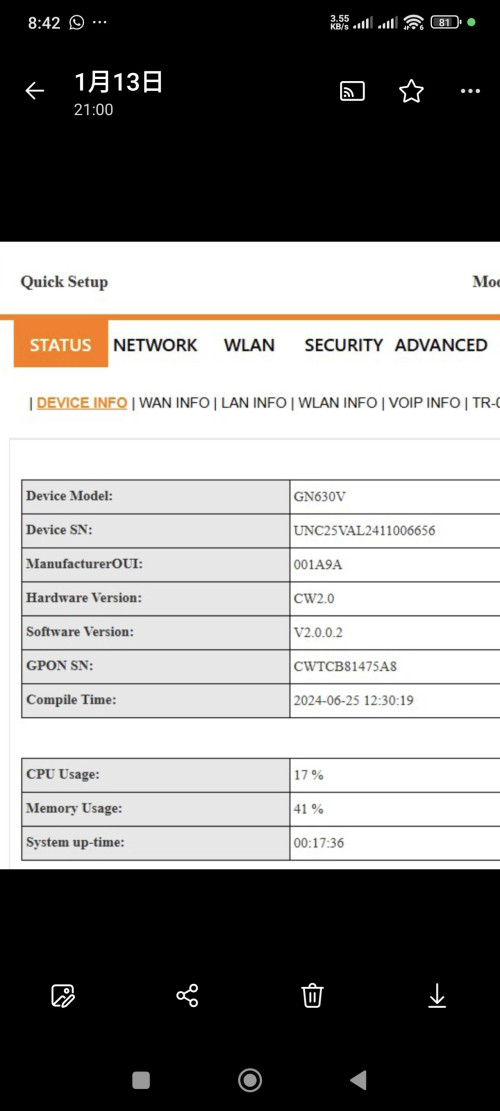
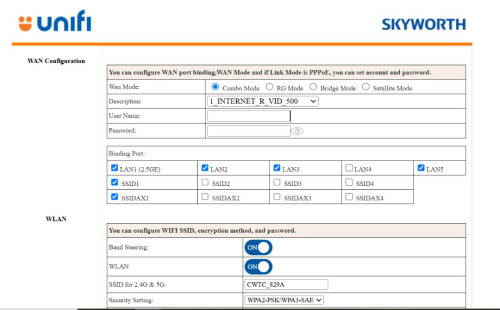
Actually, this is all i can see after i login using TMADMIN. Which is why i wonder, if that admin login is it real ADMIN login. Once i set to bridge mode, i see sooooo much lesser thing. Don't even have a location to see current version or router model info also.
hsbb
post Feb 27 2025, 12:11 PM

Casual
***
Junior Member
448 posts

Joined: Aug 2009


D: 100~300Mbps/U: 50Mbps
D: 500Mbps/U: 100Mbps
D: 800Mbps/U: 200Mbps
D: 1Gbps/U: 500Mbps
D: 2Gbps/U: 1Gbps

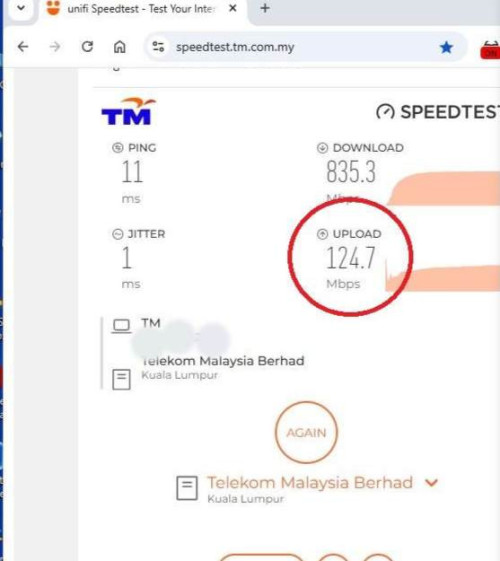
Before report lodged. I don't know how my upload speed changed to 100Mbps Whatever it is, not CPE fault because the results is same tested with different CPEs.

user posted image

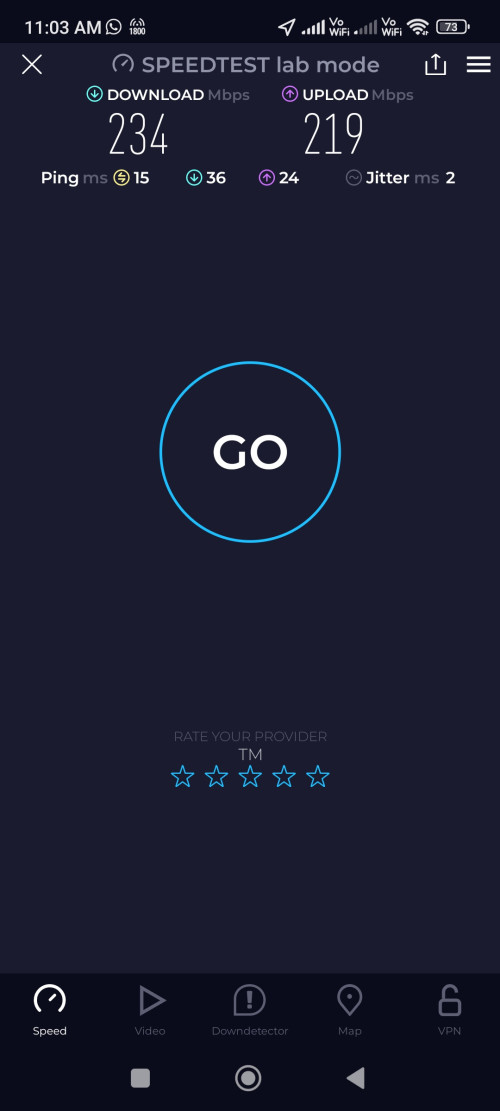
Luckily I still have the screenshot of speedtest result after installation 3years+ ago which was 800/200 to reopen last week ticket & when I check yesterday the upload speed back to normal. Ignore the other speed because it was my wifi internet speed not my broadband speed. The reason why LAN eth used to verify broadband speed.

user posted image

** Although upload speed controlled by CPE T-CONT but the speed was instructed by/in OLT PLOAM message.
christina1
post Feb 27 2025, 06:27 PM

Never stop learning, because life never stops teaching.
*******
Senior Member
2,104 posts

Joined: Sep 2008
300Mbps speed is it private ip?
go626201
post Feb 27 2025, 06:29 PM

Regular
******
Senior Member
1,882 posts

Joined: Sep 2017
QUOTE(christina1 @ Feb 27 2025, 06:27 PM)
300Mbps speed is it private ip?
*
Should be private ip. some people said they are on 300mbps,and after reboot the ip changes to private ip.
christina1
post Feb 27 2025, 06:32 PM

Never stop learning, because life never stops teaching.
*******
Senior Member
2,104 posts

Joined: Sep 2008
QUOTE(go626201 @ Feb 27 2025, 06:29 PM)
Should be private ip. some people said they are on 300mbps,and after reboot the ip changes to private ip.
*
What are the advantage of private ip ?
go626201
post Feb 27 2025, 09:28 PM

Regular
******
Senior Member
1,882 posts

Joined: Sep 2017
QUOTE(christina1 @ Feb 27 2025, 06:32 PM)
What are the advantage of private ip ?
*
No one can hack you through the private ip.Since your network will be Double NAT by unifi network.
And no more advantage compare to public ip.
Only disadvantage for private ip.

And i also ask Chatgpt after i wrote the word above.

QUOTE
For regular users, the benefits of having your Internet connection run through CGNAT (using private IP addresses) are mainly about efficiency and cost:

Better Use of Limited IPs: Your ISP can share a single public IP address among many customers. This smart use of addresses means they can keep providing service even when public IPs are in short supply.

Cost Savings: Because fewer public IP addresses need to be managed or purchased, your ISP can offer reliable internet at lower costs, which often means more affordable service for you.

Added Basic Security: Your personal device's private IP isn’t directly exposed to the public internet. This extra “shield” can help reduce the risk of unsolicited attacks on your home network.

Overall, while CGNAT might sometimes affect things like hosting your own server or port forwarding, for most home users it makes your connection reliable, cost-effective, and a bit more secure.

So conclusion no advantage for using private ip.

Edited:
Advantage for using ISP Public IP (Anwser by ChatGPT)
QUOTE
Using a public IP address instead of a private IP (CGNAT) has several advantages, especially for users who need more control over their internet connection. Here’s how public IPs compare:

Advantages of Public IP Over Private IP (CGNAT)

Direct Access to Your Devices
With a public IP, your devices can be accessed directly from the internet, making it easier to host services like websites, game servers, remote desktop connections, or CCTV cameras without extra workarounds.
With CGNAT, inbound connections are blocked unless the ISP provides a way to forward ports.

No Issues with Port Forwarding
Public IPs allow full control over port forwarding, letting you set up services like VPNs, home servers, or custom applications.
CGNAT usually blocks this functionality because multiple users share the same public IP.
Better Online Gaming Experience

Some online multiplayer games require NAT Type 1 or 2 for optimal connections. CGNAT often forces a strict NAT Type 3, which can cause connection issues, longer matchmaking times, or even prevent online play.
With a public IP, gaming consoles and PCs can connect directly to other players, improving performance.
Improved Peer-to-Peer (P2P) Performance

Services like torrenting, file sharing, and decentralized applications work better with a public IP because they rely on direct peer connections.
Under CGNAT, these services might experience slow speeds or connection failures.

Avoid Shared IP Restrictions
Many websites and services block or impose limits on users from CGNAT networks because multiple people share the same IP.
If someone on the same CGNAT IP is banned from a website or flagged for suspicious activity, you might also get blocked.

Easier Remote Access & IoT Device Management
Public IPs allow direct control of smart home devices (e.g., security cameras, smart thermostats, and automation systems) from anywhere without relying on third-party cloud services.
CGNAT makes this more complicated and sometimes impossible.

When is CGNAT Acceptable?
If you only browse the web, watch videos, or use social media, CGNAT won’t make a noticeable difference.
If your ISP offers IPv6, many of these limitations disappear since IPv6 allows every device to have a unique address.

Final Thoughts
If you need remote access, better gaming, P2P performance, or hosting services, a public IP is the better option. If your ISP only provides CGNAT, you might have to request a static or dynamic public IP as an add-on service.


Last Edit:
So far i see some people under CGNAT private ip will get lower qos connection compare to public ip,as sometimes CGNAT gateway might have congestion or else issue.

This post has been edited by go626201: Feb 27 2025, 09:34 PM

christina1
post Feb 27 2025, 10:32 PM

Never stop learning, because life never stops teaching.
*******
Senior Member
2,104 posts

Joined: Sep 2008
Guys,

Unifi offer 300Mbps RM 129 with 42inch Sharp TV

Is this deal worth it ?

PJng
post Feb 27 2025, 10:33 PM

10k Club
********
All Stars
12,052 posts

Joined: Oct 2017


unifi gain slow? very hard to load forum

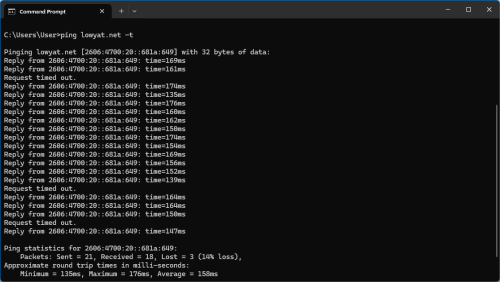
user posted image

use mobile data no problem
coolguy_0925
post Feb 27 2025, 10:46 PM

Look at all my stars!!
*******
Senior Member
4,552 posts

Joined: Jan 2003
QUOTE(PJng @ Feb 27 2025, 10:33 PM)
unifi gain slow? very hard to load forum

use mobile data no problem
*
No issue here

Ping statistics for 104.26.6.73:

Packets: Sent = 10, Received = 10, Lost = 0 (0% loss),

Approximate round trip times in milli-seconds:

Minimum = 53ms, Maximum = 88ms, Average = 59ms
OKLY
post Feb 27 2025, 10:49 PM

The Penguin Vader
Group Icon
Staff
12,090 posts

Joined: Dec 2004
From: Malaysia


QUOTE(PJng @ Feb 27 2025, 10:33 PM)
unifi gain slow? very hard to load forum

user posted image

use mobile data no problem
*
IPv6 seems to be slower during peak hours these days, I’ve disabled it temporarily.
PJng
post Feb 27 2025, 10:53 PM

10k Club
********
All Stars
12,052 posts

Joined: Oct 2017


QUOTE(coolguy_0925 @ Feb 27 2025, 10:46 PM)
No issue here

Ping statistics for 104.26.6.73:

    Packets: Sent = 10, Received = 10, Lost = 0 (0% loss),

Approximate round trip times in milli-seconds:

    Minimum = 53ms, Maximum = 88ms, Average = 59ms
*
QUOTE(OKLY @ Feb 27 2025, 10:49 PM)
IPv6 seems to be slower during peak hours these days, I’ve disabled it temporarily.
*
Then temporary i use mobile data, have a lot of quota
yenchenje
post Feb 27 2025, 11:01 PM

Enthusiast
*****
Junior Member
932 posts

Joined: Dec 2019
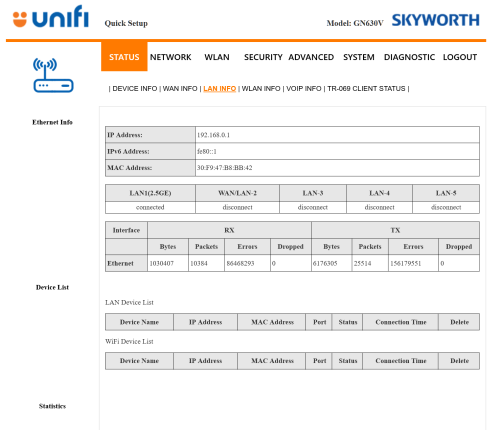
Anyone here with a GN630V able to help confirm something?

user posted image

Do any of you have as much errors as shown in the screenshot above?

Swapped out to my other ONU unit, changed LAN cables, went from SFP+ to RJ45 to just pure RJ45

Starting to suspect might be fiber issue and not my equipment, gonna lodge a report if this is not normal behavior

TIA
go626201
post Feb 27 2025, 11:15 PM

Regular
******
Senior Member
1,882 posts

Joined: Sep 2017
QUOTE(yenchenje @ Feb 27 2025, 11:01 PM)
Anyone here with a GN630V able to help confirm something?

user posted image

Do any of you have as much errors as shown in the screenshot above?

Swapped out to my other ONU unit, changed LAN cables, went from SFP+ to RJ45 to just pure RJ45

Starting to suspect might be fiber issue and not my equipment, gonna lodge a report if this is not normal behavior

TIA
*
Yes,same. You can check my replies-i got upload one picture about this error about 1-2 weeks ago on this unifi thread or mikrotik thread.

You may report to tm for check,but i dont think they going to give any further reply about this,since i dont having issue with those error.

This post has been edited by go626201: Feb 27 2025, 11:18 PM
yenchenje
post Feb 27 2025, 11:41 PM

Enthusiast
*****
Junior Member
932 posts

Joined: Dec 2019
QUOTE(go626201 @ Feb 27 2025, 11:15 PM)
Yes,same. You can check my replies-i got upload one picture about this error about 1-2 weeks ago on this unifi thread or mikrotik thread.

You may report to tm for check,but i dont think they going to give any further reply about this,since i dont having issue with those error.
*
For me, it took down my whole internet since 940AM till like 7PM, now after everything, my speeds are inconsistent and video streaming online at places like Twitch is just a cesspool of shit, constant buffering and jumping between diff quality.

VPN didn't do much honestly, so I'm kinda lost.

I am also downloading Linux ISOs but I don't think it should affect anything since it's only using like 350-400Mbps approximately via OVPN connection

The only thing I can think of is my UDM SE IDS/IPS causing issues, my htop is showing quite high usage and it's using swap, but I don't think that should cause that much issues too rclxub.gif
kwss
post Feb 27 2025, 11:49 PM

Regular
******
Senior Member
1,208 posts

Joined: Aug 2018
QUOTE(PJng @ Feb 27 2025, 10:33 PM)
unifi gain slow? very hard to load forum

user posted image

use mobile data no problem
*
Problem is with AS6453 TATA on the return route (Singapore -> Malaysia)

Viewpoint from AS4637 Telstra Global:
You can see from hop 5 to 6 the latency exploded.
CODE

1   *  *
   2403:e800:e804:1f03::2 2 msec
2  if-bundle-25-2.qcore1.svw-singapore.ipv6.as6453.net (2405:2000:ffa0:100::104) 1 msec 1 msec *
3  if-bundle-19-2.qcore2.esin4-singapore.ipv6.as6453.net (2405:2000:2a00:60::4) 2 msec 2 msec 2 msec
4   *
   if-bundle-2-2.qcore1.esin4-singapore.ipv6.as6453.net (2405:2000:2a00:50::3) 2 msec *
5  if-be-33-2.ecore1.esin4-singapore.ipv6.as6453.net (2405:2000:2a00:10::81) 2 msec 12 msec 7 msec
6  2405:2000:2a00:10::26 114 msec 111 msec 111 msec
7  2001:e68:5427:a6ff::f 116 msec 114 msec 118 msec


Viewpoint from AS6453 TATA esin4:
You can see latency after the problematic route is fine.
CODE

Router: gin-esin4-ecore1
Site: SG, Singapore, ESIN4
Command: traceroute ipv6 2001:e68:5427:a6ff::f

Thu Feb 27 15:41:41.711 UTC

Tracing the route to 2001:e68:5427:a6ff::f
1  2405:2000:2a00:10::26 1 msec 1 msec 1 msec
2  2001:e68:5427:a6ff::f 11 msec ?  ?


Most likely cause is fiber optic broken between:
if-be-33-2.ecore1.esin4-singapore.ipv6.as6453.net (2405:2000:2a00:10::81)
-and-
2405:2000:2a00:10::26

Another way to look at things:
This shit won't happen if TM stop routing traffic to Singapore. There's Cloudflare KUL and JHB and HKG

This post has been edited by kwss: Feb 27 2025, 11:51 PM
bluemind
post Feb 28 2025, 12:59 AM

Getting Started
**
Junior Member
172 posts

Joined: Oct 2008
Hmm but why often around 12AM it is always fixed, but tomorrow repeat the same issue from noon/evening till AM?
kwss
post Feb 28 2025, 01:49 AM

Regular
******
Senior Member
1,208 posts

Joined: Aug 2018
QUOTE(bluemind @ Feb 28 2025, 12:59 AM)
Hmm but why often around 12AM it is always fixed, but tomorrow repeat the same issue from noon/evening till AM?
*
I just tested and the problem is still there.
hsbb
post Feb 28 2025, 02:06 AM

Casual
***
Junior Member
448 posts

Joined: Aug 2009


QUOTE(kwss @ Feb 27 2025, 11:49 PM)
Problem is with AS6453 TATA on the return route (Singapore -> Malaysia)

Viewpoint from AS4637 Telstra Global:
You can see from hop 5 to 6 the latency exploded.
CODE

1   *  *
   2403:e800:e804:1f03::2 2 msec
2  if-bundle-25-2.qcore1.svw-singapore.ipv6.as6453.net (2405:2000:ffa0:100::104) 1 msec 1 msec *
3  if-bundle-19-2.qcore2.esin4-singapore.ipv6.as6453.net (2405:2000:2a00:60::4) 2 msec 2 msec 2 msec
4   *
   if-bundle-2-2.qcore1.esin4-singapore.ipv6.as6453.net (2405:2000:2a00:50::3) 2 msec *
5  if-be-33-2.ecore1.esin4-singapore.ipv6.as6453.net (2405:2000:2a00:10::81) 2 msec 12 msec 7 msec
6  2405:2000:2a00:10::26 114 msec 111 msec 111 msec
7  2001:e68:5427:a6ff::f 116 msec 114 msec 118 msec


Viewpoint from AS6453 TATA esin4:
You can see latency after the problematic route is fine.
CODE

Router: gin-esin4-ecore1
Site: SG, Singapore, ESIN4
Command: traceroute ipv6 2001:e68:5427:a6ff::f

Thu Feb 27 15:41:41.711 UTC

Tracing the route to 2001:e68:5427:a6ff::f
1  2405:2000:2a00:10::26 1 msec 1 msec 1 msec
2  2001:e68:5427:a6ff::f 11 msec ?  ?


Most likely cause is fiber optic broken between:
if-be-33-2.ecore1.esin4-singapore.ipv6.as6453.net (2405:2000:2a00:10::81)
-and-
2405:2000:2a00:10::26

Another way to look at things:
This shit won't happen if TM stop routing traffic to Singapore. There's Cloudflare KUL and JHB and HKG
*
https://www.submarinecablemap.com/submarine...ag-cable-system and timezones also

This post has been edited by hsbb: Feb 28 2025, 02:09 AM
YoungMan
post Feb 28 2025, 08:24 AM

Look at all my stars!!
*******
Senior Member
6,825 posts

Joined: Oct 2008
From: Kuala Lumpur


QUOTE(christina1 @ Feb 27 2025, 10:32 PM)
Guys,

Unifi offer 300Mbps RM 129 with 42inch Sharp TV

Is this deal worth it ?
*
Check if the contract is 3 years? If yes, are you willing 3 years cannot change plan?
Also, Maxis previously has offer Rm99 for 300mbps for 24 months. Can try to find out if the promo still available
nikrizal
post Feb 28 2025, 01:05 PM

Regular
******
Senior Member
1,230 posts

Joined: Oct 2005
QUOTE(waja7968 @ Feb 26 2025, 08:51 AM)
The 1st pciture , if you choose 'Bridge Mode' the GUI should change, example username and password portion should be gone.

For the 2nd picture, it is for land line telephone, the port is 5060 (for my setting), Account is +604xxxxxxx@ims.tm.com and the password you need to get from TM. After ccorrect settings is set, your phone line will not work immediately, wait 30 minutes to 1 hours and verify.
*
About the password, I just need to call unifi customer service and ask about it?


495 Pages « < 474 475 476 477 478 > » Top
Topic ClosedOptions
 

Change to:
| Lo-Fi Version
0.0181sec    0.68    6 queries    GZIP Disabled
Time is now: 18th December 2025 - 07:08 AM