Welcome Guest ( Log In | Register )

Bump Topic Topic Closed RSS Feed
495 Pages « < 454 455 456 457 458 > » Bottom

Outline · [ Standard ] · Linear+

Unifi Official TM UniFi High Speed Broadband Thread V42, READ 1ST PAGE FOR RELEVANT WIFI INFO!

views
     
NagaK
post Feb 10 2025, 12:57 AM

Regular
******
Senior Member
1,191 posts

Joined: Sep 2018


QUOTE(Rudd @ Feb 9 2025, 11:59 PM)
Any recommended affordable router with better coverage to replace SKYWORTH GN630V?

Cannot get 50Mbps with the provided router when in 2nd floor or back room. Router is in living room.
*
What speed you have subscribed?? TP Link is best budget oriented router so far but since you double story house based on post
Invest router TP Link AX23 or AX13 and wifi extender from TP link which supports easymesh should work fine....
lukemanz
post Feb 10 2025, 08:33 AM

Getting Started
**
Junior Member
249 posts

Joined: Aug 2009
QUOTE(Rudd @ Feb 9 2025, 11:59 PM)
Any recommended affordable router with better coverage to replace SKYWORTH GN630V?

Cannot get 50Mbps with the provided router when in 2nd floor or back room. Router is in living room.
*
I buy 2 set of Xiaomi Router AX3000T, 1 located on lower floor + 1 located upper floor, mesh using LAN cable. So far no issue and working great with 300Mbps unifi and unifiTV on LAN: https://www.lazada.com.my/products/i4097333...lFlag=true&mp=1
go626201
post Feb 10 2025, 12:04 PM

Regular
******
Senior Member
1,882 posts

Joined: Sep 2017
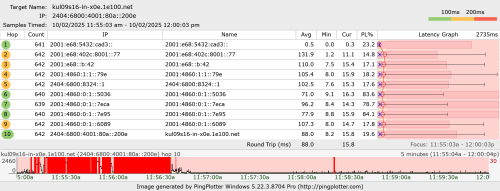
I have some strange issue with uploading after 1GFSU upgrade.
I was uploading file to Google drive at full speed first,and after that the second consistent small spike uploading to Onedrive(speed around 30-50mbps).

And the latency is keep spiking while upload file.
I think i was facing similar issue with torrenting before FSU. (Even with low upload speed)
user posted image
heLL_bOy
post Feb 10 2025, 12:30 PM

Regular
******
Senior Member
1,350 posts

Joined: Nov 2004
From: HEAVEN & HELL


QUOTE(go626201 @ Feb 10 2025, 12:04 PM)
I have some strange issue with uploading after 1GFSU upgrade.
I was uploading file to Google drive at full speed first,and after that the second consistent small spike uploading to Onedrive(speed around 30-50mbps).

And the latency is keep spiking while upload file.
I think i was facing similar issue with torrenting before FSU. (Even with low upload speed)
user posted image
*
i also encounter same issue sometime on speedtest when using VPN.
countingcrows
post Feb 10 2025, 12:42 PM

Getting Started
**
Junior Member
258 posts

Joined: Feb 2023
QUOTE(go626201 @ Feb 10 2025, 12:04 PM)
I have some strange issue with uploading after 1GFSU upgrade.
I was uploading file to Google drive at full speed first,and after that the second consistent small spike uploading to Onedrive(speed around 30-50mbps).
Just tested with 1GB test file.
Google Drive full speed all the way, uploaded in less than 1 min.
Microsoft OneDrive stalls or has hiccups but still uploaded in less than 2 mins
go626201
post Feb 10 2025, 12:56 PM

Regular
******
Senior Member
1,882 posts

Joined: Sep 2017
QUOTE(countingcrows @ Feb 10 2025, 12:42 PM)
Just tested with 1GB test file.
Google Drive full speed all the way, uploaded in less than 1 min.
Microsoft OneDrive stalls or has hiccups but still uploaded in less than 2 mins
*
I think u misunderstood my problem.
I am asking about the heavy packets lost and latency spikes while uploading data.

QUOTE(heLL_bOy @ Feb 10 2025, 12:30 PM)
i also encounter same issue sometime on speedtest when using VPN.
*
I using unifi only to upload,non-vpn.Since uploading to Google and onedrive should be okay without vpn.

This post has been edited by go626201: Feb 10 2025, 12:58 PM
tng55
post Feb 10 2025, 01:04 PM

Regular
******
Senior Member
1,440 posts

Joined: Sep 2021


QUOTE(go626201 @ Feb 10 2025, 12:04 PM)
I have some strange issue with uploading after 1GFSU upgrade.
I was uploading file to Google drive at full speed first,and after that the second consistent small spike uploading to Onedrive(speed around 30-50mbps).

And the latency is keep spiking while upload file.
I think i was facing similar issue with torrenting before FSU. (Even with low upload speed)
user posted image
*
before was 800mbps so you while upload file without heavy packets lost and without latency spikes while uploading data.
so once you upgraded 1GBPS then problem right

i think DLINK ONR ISSUE

try before ONT BTU try if without problem mean Dlink ONR bad i think so
i know OLD ONT BTU can go 940Mbps

This post has been edited by tng55: Feb 10 2025, 01:04 PM
blacktubi
post Feb 10 2025, 01:35 PM

-
Group Icon
Elite
8,409 posts

Joined: Jul 2008

QUOTE(go626201 @ Feb 10 2025, 12:04 PM)
I have some strange issue with uploading after 1GFSU upgrade.
I was uploading file to Google drive at full speed first,and after that the second consistent small spike uploading to Onedrive(speed around 30-50mbps).

And the latency is keep spiking while upload file.
I think i was facing similar issue with torrenting before FSU. (Even with low upload speed)
user posted image
*
This is a buffer bloat and traffic shaping issue with their 1Gbps plan.

Configure QoS at your router limitting upload speed to 500Mbps will solve this issue. Even better if your equipment support fq_codel/cake or ASUS AdaptiveQoS if it's OEM.
laytiong
post Feb 10 2025, 01:46 PM

p3wns noobies for bfast, lunch and dinner
*****
Senior Member
787 posts

Joined: Jan 2003
Baru went to kedai TM Perda.

Recontract swu5.0
300/50 rm119
Free disney 12mths
Free 6mths bill
Take mobile rm40x3mths
go626201
post Feb 10 2025, 01:57 PM

Regular
******
Senior Member
1,882 posts

Joined: Sep 2017
QUOTE(blacktubi @ Feb 10 2025, 01:35 PM)
This is a buffer bloat and traffic shaping issue with their 1Gbps plan.

Configure QoS at your router limitting upload speed to 500Mbps will solve this issue. Even better if your equipment support fq_codel/cake or ASUS AdaptiveQoS if it's OEM.
*
Oh okay thanks,i am using mikrotik RB5009 if enable QoS/Queue then fasttrack gone... doh.gif
syahpian
post Feb 10 2025, 02:14 PM

Enthusiast
*****
Junior Member
813 posts

Joined: Jul 2008
From: Kota Kinabalu <-> Kuala Lumpur


QUOTE(go626201 @ Feb 10 2025, 01:57 PM)
Oh okay thanks,i am using mikrotik RB5009 if enable QoS/Queue then fasttrack gone... doh.gif
*
you can hack it to enable both through biggrin.gif

This post has been edited by syahpian: Feb 10 2025, 02:15 PM
blacktubi
post Feb 10 2025, 02:19 PM

-
Group Icon
Elite
8,409 posts

Joined: Jul 2008

QUOTE(go626201 @ Feb 10 2025, 01:57 PM)
Oh okay thanks,i am using mikrotik RB5009 if enable QoS/Queue then fasttrack gone... doh.gif
*
You can setup fq_codel as interface queue which will keep fastrack enabled and it should address your issue too.

Tricky to configure though. Have fun trying!

https://help.mikrotik.com/docs/spaces/ROS/p...-InterfaceQueue
go626201
post Feb 10 2025, 02:41 PM

Regular
******
Senior Member
1,882 posts

Joined: Sep 2017
QUOTE(syahpian @ Feb 10 2025, 02:14 PM)
you can hack it to enable both through  biggrin.gif
*
QUOTE(blacktubi @ Feb 10 2025, 02:19 PM)
You can setup fq_codel as interface queue which will keep fastrack enabled and it should address your issue too.

Tricky to configure though. Have fun trying!

https://help.mikrotik.com/docs/spaces/ROS/p...-InterfaceQueue
*
Actually I already "hack" it before. tongue.gif (But i disable last week after FSU,because at that time the main reason i enable queue is for DL bufferbloat,but now occurs to upload hmm.gif )
Cake queue also partially working with fasttrack.
But it only partially fasttrack,but after the ipv6 fasttrack update live,i not sure this work well or not.
Because before that update,the ipv6 is a problem without fasttrack while running high speed with ipv6.
RB5009 could not work 100% properly with ipv6 non-fasttrack.

I know Anime4000 said before that his RB5009 work well with ipv6 and queue (without fasttrack).
syahpian
post Feb 10 2025, 02:43 PM

Enthusiast
*****
Junior Member
813 posts

Joined: Jul 2008
From: Kota Kinabalu <-> Kuala Lumpur


QUOTE(go626201 @ Feb 10 2025, 02:41 PM)
Actually I already "hack" it before. tongue.gif  (But i disable last week after FSU,because at that time the main reason i enable queue is for DL bufferbloat,but now occurs to upload  hmm.gif )
Cake queue also partially working with fasttrack.
But it only partially fasttrack,but after the ipv6 fasttrack update live,i not sure this work well or not.
Because before that update,the ipv6 is a problem without fasttrack while running high speed with ipv6.
RB5009 could not work 100% properly with ipv6 non-fasttrack.

I know Anime4000 said before that his RB5009 work well with ipv6 and queue (without fasttrack).
*
me using cake on both download and upload work for long time for me biggrin.gif
blacktubi
post Feb 10 2025, 02:45 PM

-
Group Icon
Elite
8,409 posts

Joined: Jul 2008

QUOTE(go626201 @ Feb 10 2025, 02:41 PM)
Actually I already "hack" it before. tongue.gif  (But i disable last week after FSU,because at that time the main reason i enable queue is for DL bufferbloat,but now occurs to upload  hmm.gif )
Cake queue also partially working with fasttrack.
But it only partially fasttrack,but after the ipv6 fasttrack update live,i not sure this work well or not.
Because before that update,the ipv6 is a problem without fasttrack while running high speed with ipv6.
RB5009 could not work 100% properly with ipv6 non-fasttrack.

I know Anime4000 said before that his RB5009 work well with ipv6 and queue (without fasttrack).
*
Technically RB5009 can support 1Gbps+ with cake enabled but NOT with the 2.5G ETH port as that interface is bugged on physical hardware interconnect level

BUT, if you use SFP+ port with a GPON module then yes, you can use cake and still get over 1Gbps

Cake interface queue is buggy, that's why I suggest fq_codel on interface level instead
go626201
post Feb 10 2025, 03:19 PM

Regular
******
Senior Member
1,882 posts

Joined: Sep 2017
QUOTE(blacktubi @ Feb 10 2025, 02:45 PM)
Technically RB5009 can support 1Gbps+ with cake enabled but NOT with the 2.5G ETH port as that interface is bugged on physical hardware interconnect level

BUT, if you use SFP+ port with a GPON module then yes, you can use cake and still get over 1Gbps

Cake interface queue is buggy, that's why I suggest fq_codel on interface level instead
*
Sorry for asking again.
You mean use the fq_codel or cake on interface queue?
And not using on queue tree?

Use on pppoe interface or all port interface?

This post has been edited by go626201: Feb 10 2025, 03:19 PM
YoungMan
post Feb 10 2025, 08:33 PM

Look at all my stars!!
*******
Senior Member
6,799 posts

Joined: Oct 2008
From: Kuala Lumpur


QUOTE(Khan92 @ Feb 9 2025, 09:22 PM)
Hoping with YES bringing cheap price for 300 mbps, will make TM think a bit on their price
*
It's hard. Yes cannot compete with TM on a nationwide level, and for sure Yes cannot be renting TM infra and provide such cheap plan. That cheap plan is probably very limited coverage.
kwss
post Feb 10 2025, 09:07 PM

Regular
******
Senior Member
1,207 posts

Joined: Aug 2018
QUOTE(go626201 @ Feb 10 2025, 03:19 PM)
Sorry for asking again.
You mean use the fq_codel or cake on interface queue?
And not using on queue tree?

Use on pppoe interface or all port interface?
*
In Queue -> Queue Type
Add
Kind: cake
Bandwidth Limit: 500M
NAT: true
<Changing any of the Overhead specifier will impact Fasttrack>

In Queue -> Interface Queue
Change your physical interface from "only-hardware-queue" to the queue type you just created.

Everything else under Simple Queue and Queue Tree is empty.

CLARIFICATION:
Only change the physical port that's connected to the ONU

This post has been edited by kwss: Feb 10 2025, 10:21 PM
go626201
post Feb 10 2025, 10:25 PM

Regular
******
Senior Member
1,882 posts

Joined: Sep 2017
QUOTE(kwss @ Feb 10 2025, 09:07 PM)
In Queue -> Queue Type
Add
Kind: cake
Bandwidth Limit: 500M
NAT: true
<Changing any of the Overhead specifier will impact Fasttrack>

In Queue -> Interface Queue
Change your physical interface from "only-hardware-queue" to the queue type you just created.

Everything else under Simple Queue and Queue Tree is empty.

CLARIFICATION:
Only change the physical port that's connected to the ONU
*
Thanks. I tried 1st.
Just add to the WAN Ethernet interface only right?
Or add to all WAN and LAN interface including the SFP+ interface?
kwss
post Feb 10 2025, 10:31 PM

Regular
******
Senior Member
1,207 posts

Joined: Aug 2018
QUOTE(go626201 @ Feb 10 2025, 10:25 PM)
Thanks. I tried 1st.
Just add to the WAN Ethernet interface only right?
Or add to all WAN and LAN interface including the SFP+ interface?
*
Just the physical WAN port. Don't apply it for any other port.

What this simple rule does is create an egress buffer and apply the cake algorithm.
If you want to maximize your runway, you can try 550M.

If TM still follow the practice of allowing 10% extra headroom in their HQoS config, it should work best without hitting their policer. Trial and error from 500M to 550M

495 Pages « < 454 455 456 457 458 > » Top
Topic ClosedOptions
 

Change to:
| Lo-Fi Version
0.1067sec    0.56    6 queries    GZIP Disabled
Time is now: 6th December 2025 - 10:04 PM