

QUOTE(hsbb @ Feb 11 2025, 05:29 PM)
What difference between rm99 & rm119 300mbps?

RM 99 will revert back to 100 mbps after 2 years. Other than that, it's just the same.Unifi Official TM UniFi High Speed Broadband Thread V42, READ 1ST PAGE FOR RELEVANT WIFI INFO!
|
|
 Feb 11 2025, 05:41 PM Feb 11 2025, 05:41 PM
|
 
Junior Member
162 posts Joined: Nov 2012 From: park 
|
QUOTE(hsbb @ Feb 11 2025, 05:29 PM) What difference between rm99 & rm119 300mbps? RM 99 will revert back to 100 mbps after 2 years. Other than that, it's just the same. |
|
|
|
|
|
Feb 11 2025, 05:56 PM
|

Junior Member
447 posts Joined: Aug 2009 
|
QUOTE(modecai @ Feb 11 2025, 05:41 PM) RM 99 will revert back to 100 mbps after 2 years. Other than that, it's just the same. SWU 5.0 300Mbps rm99 is 1st 24 months price. I see ... Should be in online promo, not SWU. |
|
|
Feb 11 2025, 07:16 PM
|

Junior Member
305 posts Joined: Oct 2008 From: Ellesméra - Vhoorl 
|
Hi All,
My plan was upgraded to 1gbps recently. Currently on a 2 AX86 asus router mesh setup. Apparently when they plug in the skyworth router only I can get 1gbps wifi. The asus router only can get 200mbps wifi and about 600-700 LAN(already turn off QoS). Reluctant to switch to the skyworth as my hik vision is using the free asus dns. Is there any way I could use the skyworth router together with my hik vision? (In the case only the skyworth can get max speed). Thanks. |
|
|
Feb 11 2025, 07:37 PM
|

Senior Member
6,798 posts Joined: Oct 2008 From: Kuala Lumpur 
|
QUOTE(PowerGadget @ Feb 10 2025, 10:55 PM) Anyone know is there any special promo if I were to port into Unifi fibre from CelcomDigi home fibre? Usually promo for port in is free 6 months or free TV. The process is seemless and no downtime at all. How troublesome is the process? Currently my Celcomdigi is riding on infrastructure. Firstly, go to Tmpoint or any trusted unifi agent to register your plan. Tell them you want to port over from Celcom. After registration, just wait for Celcom to approve your transfer request. Make sure you clear all outstanding bill. Once transfer is approved, just wait for TM to set installation date. Your Celcom fibre will continue to be usable until few days after Unifi installation. On the day of installation, TM will just plug in Unifi router and configure your connection. Remember that there will be a final prorated bill for your Celcom fibre. PowerGadget liked this post
|
|
|
Feb 11 2025, 07:40 PM
|

Junior Member
94 posts Joined: Sep 2024
|
QUOTE(iamyourdaddy27 @ Feb 11 2025, 04:20 PM) anyone knows how to fix SC-SC fiber optic cable from TM port pole to house DIY? if thats the case, just buy fibre cable that u think is high end that comes with the adapter and install it. direct from the port box ( at the pole ) to your ONU. easyI rather lay my own high end cable then relying TM at this point, as i doubt their service and the quality of the cables provided and would like to experiment it myself or else if u lazy, just contact any tech that previously handle your cases. kawtim with them. i usually paid around rm70 for the cable ( 40mtr) and installation. no need to go through TM as the charges is gonna be costly This post has been edited by MarcoFromTropoja: Feb 11 2025, 07:57 PM |
|
|
Feb 11 2025, 07:51 PM
|
|
Junior Member
447 posts Joined: Aug 2009
|
QUOTE(MarcoFromTropoja @ Feb 11 2025, 07:40 PM) if thats the case, just buy fibre cable that u think is high end that comes with the adapter and install it. direct from the port box ( at the pole ) to your ONU. easy What kawtim if he actually doubt with the guy services. His reason for DIYor else if u lazy, just contact any tech that previously handle your cases. kawtim with them. i usually paid around rm70 for the cable ( 40mtr) and install. no need to go through TM as the charges is gonna be costly |
|
|
|
|
|
Feb 11 2025, 07:58 PM
|
|
Junior Member
94 posts Joined: Sep 2024
|
QUOTE(hsbb @ Feb 11 2025, 07:51 PM) What kawtim if he actually doubt with the guy services. His reason for DIY then its not that hard, just buy the cable and install it.. what u need is just a ladder and a bit of effort thats all.. nothing specialThis post has been edited by MarcoFromTropoja: Feb 11 2025, 07:59 PM |
|
|
Feb 11 2025, 08:17 PM
Show posts by this member only | IPv6 | Post
#9148
|
|
Senior Member
1,207 posts Joined: Aug 2018
|
go626201
I'm starting to suspect it is your upstream problem. Either to your BNG (2001:e68:402c:8001::77) OR MPLS circuit in between (2001:e68::b:42) Instead of pinging all the way to Google, can you bi-sect it by pinging your BNG first? If it still happen then it is between you and the BNG. Next test the MPLS circuit by pinging 2001:e68::b:42. Also, can you just check your CPU are not bottlenecking? Go to Tools > Profile and monitor it. Are you running container on your router? Can you stop them if you do? EDIT: We will deal with the IPv4 problem later. I suspect that one is due to MPLS circuit too but it is very difficult to test them as an outsider. If you can get me some traceroute to: Group 1. Affected servers Group 2: Not affected servers Then I might be able to come out with a guess which place to ping. blacktubi Can you describe what problem is cake having? I just want to get a mental model to understand if it is related to his current problem. This post has been edited by kwss: Feb 11 2025, 08:26 PM |
|
|
Feb 11 2025, 08:53 PM
Show posts by this member only | IPv6 | Post
#9149
|
|
Senior Member
1,882 posts Joined: Sep 2017
|
QUOTE(kwss @ Feb 11 2025, 08:17 PM) go626201 Hi Thanks for helping me to find out the issue.I'm starting to suspect it is your upstream problem. Either to your BNG (2001:e68:402c:8001::77) OR MPLS circuit in between (2001:e68::b:42) Instead of pinging all the way to Google, can you bi-sect it by pinging your BNG first? If it still happen then it is between you and the BNG. Next test the MPLS circuit by pinging 2001:e68::b:42. Also, can you just check your CPU are not bottlenecking? Go to Tools > Profile and monitor it. Are you running container on your router? Can you stop them if you do? EDIT: We will deal with the IPv4 problem later. I suspect that one is due to MPLS circuit too but it is very difficult to test them as an outsider. If you can get me some traceroute to: Group 1. Affected servers Group 2: Not affected servers Then I might be able to come out with a guess which place to ping. blacktubi Can you describe what problem is cake having? I just want to get a mental model to understand if it is related to his current problem. I tried to speedtest and uploading again,and pinging to the hop at the same time. Both Google and second hop showing the similar spikes at the time i uploading. 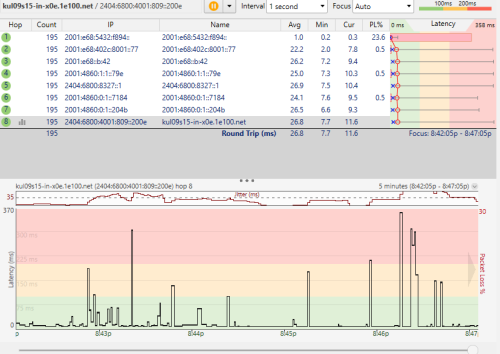 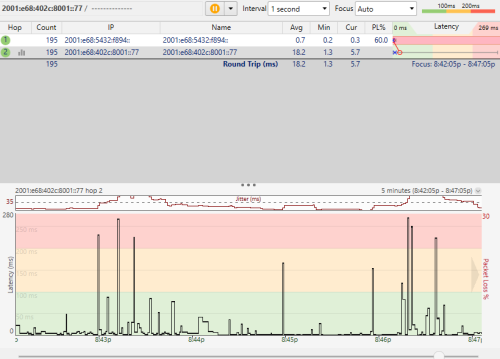 The 2001:e68::b:42 is not replying ICMP. So cant get the result. CPU no bottleneck, i never have my RB5009 at 100% usage before. No container running. Affected servers currently not sure. As far i test,i found out as long as i am uploading,the latency will spike whether i using full speed or not. (Especially uploading more than 200+mbps) Edited: As for the cake queue,i not sure currently is the issue affecting the speed or not or the cake really buggy that this morning i test can only get 200+mbps upload. (This might need a retest after the issue fix) So far i am agree about your suspicion on the BNG. (Actually i was facing similar issue with torrenting-low torrent speed also occurs before FSU,but at that time i using Queue was due to the bufferbloat on download side,but now download didn't have bufferbloat issue anymore,and this upload issue came after FSU,and i think it only occurs after hitting more than 200mbps on upload side) This post has been edited by go626201: Feb 11 2025, 09:02 PM |
|
|
Feb 11 2025, 10:22 PM
|
|
Senior Member
1,207 posts Joined: Aug 2018
|
QUOTE(go626201 @ Feb 11 2025, 08:53 PM) Hi Thanks for helping me to find out the issue. Just to clarify, this is cake setup as how I prescribed right? Nothing in Simple Queue and Queue Tree.I tried to speedtest and uploading again,and pinging to the hop at the same time. Both Google and second hop showing the similar spikes at the time i uploading. The 2001:e68::b:42 is not replying ICMP. So cant get the result. CPU no bottleneck, i never have my RB5009 at 100% usage before. No container running. Affected servers currently not sure. As far i test,i found out as long as i am uploading,the latency will spike whether i using full speed or not. (Especially uploading more than 200+mbps) Edited: As for the cake queue,i not sure currently is the issue affecting the speed or not or the cake really buggy that this morning i test can only get 200+mbps upload. (This might need a retest after the issue fix) So far i am agree about your suspicion on the BNG. (Actually i was facing similar issue with torrenting-low torrent speed also occurs before FSU,but at that time i using Queue was due to the bufferbloat on download side,but now download didn't have bufferbloat issue anymore,and this upload issue came after FSU,and i think it only occurs after hitting more than 200mbps on upload side) What limit you use in this graph? Seeing that you have problem with the BNG itself already, you can fine tune your cake a bit. In your Queue Type, set your cake RTT: 10 Since this configuration already bring massive improvement for you, I say just keep it. There is nothing much you can do about the BNG EDIT: You may also try setting: Flow mode: flows This will save you some CPU power and act like fq_codel. Could work better if you torrent a lot. This post has been edited by kwss: Feb 11 2025, 10:34 PM |
|
|
Feb 11 2025, 10:34 PM
Show posts by this member only | IPv6 | Post
#9151
|
|
Senior Member
1,882 posts Joined: Sep 2017
|
QUOTE(kwss @ Feb 11 2025, 10:22 PM) Just to clarify, this is cake setup as how I prescribed right? Nothing in Simple Queue and Queue Tree. Nope.I already change to fq_codel. (Since blacktubi said Cake is not working well on RB5009 2.5G Ethernet Interface)What limit you use in this graph? Seeing that you have problem with the BNG itself already, you can fine tune your cake a bit. In your Queue Type, set your cake RTT: 10 Since this configuration already bring massive improvement for you, I say just keep it. There is nothing much you can do about the BNG And I dont think the problem is on router qos. Since the problem is occurs on default unifi route without full speed,as i said in last replies,the problem also occurs with 200+mbps. And with VPN on,the problem does not occurs with 500mbps. Routeros ping to ipv6 gateway also having latency spikes. 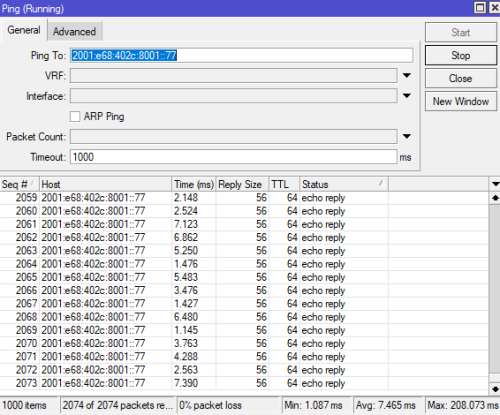 And i check my smokeping graph: Looks like this problem really happens(Or can said it because serious)started recently(Maybe after FSU). 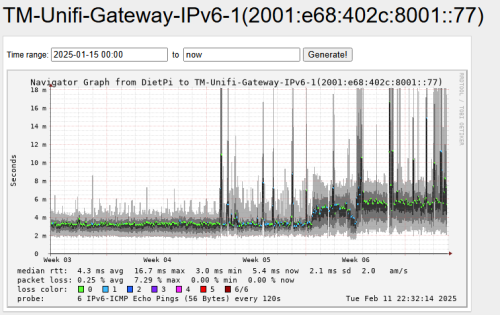 Edited: And you said at last about the config. The only improvement for enable queue after FSU(Or yesterday) is only fixing the 100% packet lost on uploading,but the latency issue is still affecting my unifi usage...  Now my smokeping will show sudden serious spikes. This post has been edited by go626201: Feb 11 2025, 10:39 PM |
|
|
Feb 11 2025, 11:00 PM
|
|
Senior Member
1,207 posts Joined: Aug 2018
|
QUOTE(go626201 @ Feb 11 2025, 10:34 PM) Nope.I already change to fq_codel. (Since blacktubi said Cake is not working well on RB5009 2.5G Ethernet Interface) Just a hunch. If you put back the old ONU, does the problem go away?And I dont think the problem is on router qos. Since the problem is occurs on default unifi route without full speed,as i said in last replies,the problem also occurs with 200+mbps. And with VPN on,the problem does not occurs with 500mbps. Routeros ping to ipv6 gateway also having latency spikes. And i check my smokeping graph: Looks like this problem really happens(Or can said it because serious)started recently(Maybe after FSU). Edited: And you said at last about the config. The only improvement for enable queue after FSU(Or yesterday) is only fixing the 100% packet lost on uploading,but the latency issue is still affecting my unifi usage... Now my smokeping will show sudden serious spikes. I find it hard to believe TM BNG is this shitty because they are selling L3 services to all ISP, using the same BNG. |
|
|
Feb 11 2025, 11:03 PM
Show posts by this member only | IPv6 | Post
#9153
|
|
Senior Member
1,882 posts Joined: Sep 2017
|
QUOTE(kwss @ Feb 11 2025, 11:00 PM) Just a hunch. If you put back the old ONU, does the problem go away? Good question,let me test it midnight later. I find it hard to believe TM BNG is this shitty because they are selling L3 services to all ISP, using the same BNG.  I thought GN630V 2.5G is better than crap Dlink black 2.5G combo box. So i ask for it. |
|
|
|
|
|
Feb 11 2025, 11:28 PM
|
|
Senior Member
1,440 posts Joined: Sep 2021
|
QUOTE(go626201 @ Feb 11 2025, 11:03 PM) Good question,let me test it midnight later. before was 800mbps so you while upload file without heavy packets lost and without latency spikes while uploading data. I thought GN630V 2.5G is better than crap Dlink black 2.5G combo box. So i ask for it. so once you upgraded 1GBPS then problem right i think DLINK ONR ISSUE try before ONT BTU try if without problem mean Dlink ONR bad i think so i know OLD ONT BTU can go 940Mbps i told you PLEASE TRY USE OLD ONT BTU try and result ONR Always problem compare OLD ONT BTU |
|
|
Feb 12 2025, 02:20 AM
Show posts by this member only | IPv6 | Post
#9155
|
|
Senior Member
1,207 posts Joined: Aug 2018
|
go626201
I decided to do the same experiment myself but using AWS and iperf3. Server: iperf3 -s -p 60000 Client: iperf3 -c 2406:da10:<snip> -p 60000 -t 60 -b 910M I use 910M to simulate QoS without actually having any QoS on my router. It shouldn't matter as I am testing upstream. With 5 ping/sec, it is a lot denser than your current 1 ping/sec. I only started the ping after the upload speed shoot past 900Mbps and hit Stop right when it stopped. So it is not measuring idle internet. Total ping packet: 283 Only 2 packets exceeded 200ms and timeout. Worst case 7.965ms with average 2.613ms 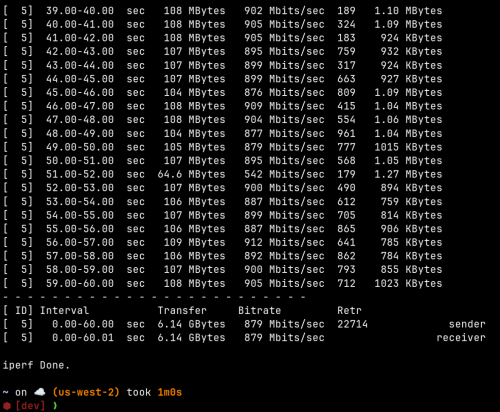 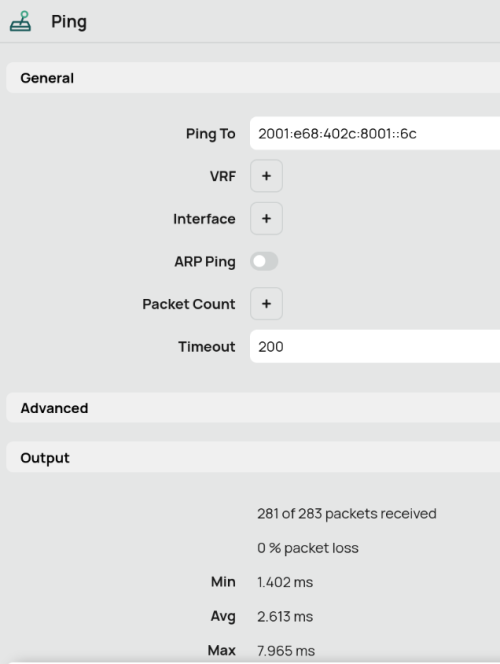 Full run client: » Click to show Spoiler - click again to hide... « Full run server: » Click to show Spoiler - click again to hide... « This post has been edited by kwss: Feb 12 2025, 02:25 AM |
|
|
Feb 12 2025, 02:44 AM
Show posts by this member only | IPv6 | Post
#9156
|
|
Senior Member
1,882 posts Joined: Sep 2017
|
QUOTE(kwss @ Feb 12 2025, 02:20 AM) go626201 I just restart all my device including RPi,and kill some of the ipv6 connection. Now the connection is abit better,let me observe tomorrow 1st and see. Thanks for helping.I decided to do the same experiment myself but using AWS and iperf3. Server: iperf3 -s -p 60000 Client: iperf3 -c 2406:da10:<snip> -p 60000 -t 60 -b 910M I use 910M to simulate QoS without actually having any QoS on my router. It shouldn't matter as I am testing upstream. With 5 ping/sec, it is a lot denser than your current 1 ping/sec. I only started the ping after the upload speed shoot past 900Mbps and hit Stop right when it stopped. So it is not measuring idle internet. Total ping packet: 283 Only 2 packets exceeded 200ms and timeout. Worst case 7.965ms with average 2.613ms Full run client: » Click to show Spoiler - click again to hide... « Full run server: » Click to show Spoiler - click again to hide... « Although spikes still occurs but not 400ms or above is an improvement for now. 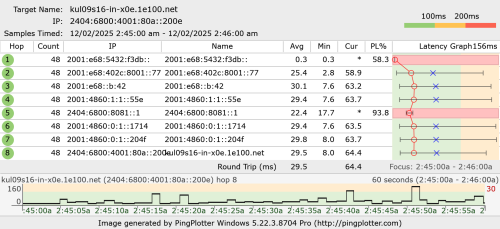 This post has been edited by go626201: Feb 12 2025, 02:46 AM |
|
|
Feb 12 2025, 03:08 PM
Show posts by this member only | IPv6 | Post
#9157
|
|
Junior Member
20 posts Joined: Feb 2025
|
recently i wanted to host l4d2 games with my friends so i went to set up port forwarding, i have public ip(confirmed with tm), but after i set it up the port is still closed
i contacted TM and they told me that i need to ask TM to open every port PLUS i can only open ONE port at a time. does anyone why this is a thing lmao everyone that i asked said it shouldnt be a problem |
|
|
Feb 12 2025, 04:03 PM
|
|
Senior Member
1,207 posts Joined: Aug 2018
|
QUOTE(go626201 @ Feb 12 2025, 02:44 AM) I just restart all my device including RPi,and kill some of the ipv6 connection. Now the connection is abit better,let me observe tomorrow 1st and see. Thanks for helping. You might not like to hear it but I kind of sus your Mikrotik is broken. Either physically broken or you configured it wrongly.Although spikes still occurs but not 400ms or above is an improvement for now. Look at all the packet loss you have on your Mikrotik. It is abnormally high. I launch a ping flood on mine and it is 0 packet lost. Maybe try swapping out network cable as a start. Then configure your ONR as router and try it out. If you have a switch or anything in between your device and Mikrotik, they are automatic a sus too. EDIT: I just pulled a fast ping on you. Assuming you didn't disconnect and your Mikrotik is still using the same IPv6 address, it is looking good. So the problem is internal to your house.  This post has been edited by kwss: Feb 12 2025, 04:11 PM |
|
|
Feb 12 2025, 04:05 PM
|
|
Senior Member
1,207 posts Joined: Aug 2018
|
QUOTE(mesf @ Feb 12 2025, 03:08 PM) recently i wanted to host l4d2 games with my friends so i went to set up port forwarding, i have public ip(confirmed with tm), but after i set it up the port is still closed What is your current plan? Care to login to your router and post the first 2 octet of your WAN IP address?i contacted TM and they told me that i need to ask TM to open every port PLUS i can only open ONE port at a time. does anyone why this is a thing lmao everyone that i asked said it shouldnt be a problem |
|
|
Feb 12 2025, 04:20 PM
Show posts by this member only | IPv6 | Post
#9160
|
|
Junior Member
20 posts Joined: Feb 2025
|
QUOTE(kwss @ Feb 12 2025, 04:05 PM) What is your current plan? Care to login to your router and post the first 2 octet of your WAN IP address? 500mbps from SWU3.0 that they then upgraded to 800 for free, but idk if its still 800 bc i havent checked in a while. i have called TM they have confirmed i have public ipfirst 2 octet is 180.73 |
|
Topic ClosedOptions
|
| Change to: |  0.0216sec 0.0216sec
 0.69 0.69
 6 queries 6 queries
 GZIP Disabled GZIP Disabled
Time is now: 5th December 2025 - 06:58 AM |
 Quote
Quote