Welcome Guest ( Log In | Register )

Bump Topic Topic Closed RSS Feed
495 Pages « < 453 454 455 456 457 > » Bottom

Outline · [ Standard ] · Linear+

Unifi Official TM UniFi High Speed Broadband Thread V42, READ 1ST PAGE FOR RELEVANT WIFI INFO!

views
     
yenchenje
post Feb 8 2025, 10:08 PM

Enthusiast
*****
Junior Member
932 posts

Joined: Dec 2019
QUOTE(sadlyfalways @ Feb 8 2025, 09:47 PM)
the fact that the cheaper cloud gateways can now get full 2.5 pppoe and your more expensive one cant is mad.

you should ask on the forums when the software will come to yours too
*
I kinda gave up to get full speed on Unifi with PPPoE, I'll buy the EFG down the line to see what it can do with IDS/IPS, currently with IDS/IPS on it's only consistently going to 1.7-1.8Gbps max with the built in speedtest, rather lose some speed than security for the devices in my LAN

QUOTE(MarcoFromTropoja @ Feb 8 2025, 09:59 PM)
what do u mean by "his pc on tm speedtest shows 2gbps down / 910mbps up while yours cant ?
*
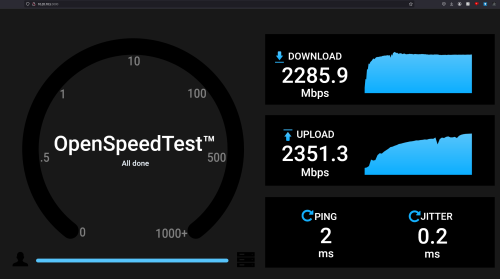
His PC while he's testing the speed after installation could get 2000Mbps+ DL on TM speedtest (Skyworth doing PPPoE), I never saw anything above 1.8Gbps with my own laptop (Ookla and/or TM Speedtest). Not sure what the issue is, can't be bothered to try and get more speed with Unifi's PPPoE situation (Bridged transparent with Skyworth).
Khan92
post Feb 8 2025, 10:37 PM

To live is to die
****
Junior Member
553 posts

Joined: Aug 2017


QUOTE(PJng @ Feb 8 2025, 09:43 PM)
Mine already updated half year ago
*
Nice
MarcoFromTropoja
post Feb 8 2025, 10:44 PM

Getting Started
**
Junior Member
94 posts

Joined: Sep 2024
QUOTE(yenchenje @ Feb 8 2025, 10:08 PM)
I kinda gave up to get full speed on Unifi with PPPoE, I'll buy the EFG down the line to see what it can do with IDS/IPS, currently with IDS/IPS on it's only consistently going to 1.7-1.8Gbps max with the built in speedtest, rather lose some speed than security for the devices in my LAN
His PC while he's testing the speed after installation could get 2000Mbps+ DL on TM speedtest (Skyworth doing PPPoE), I never saw anything above 1.8Gbps with my own laptop (Ookla and/or TM Speedtest). Not sure what the issue is, can't be bothered to try and get more speed with Unifi's PPPoE situation (Bridged transparent with Skyworth).
*
if his pc can achieve the speed and in router speedtest getting as subscribed, means its your device ( laptop ) limitations
hsbb
post Feb 8 2025, 10:48 PM

Casual
***
Junior Member
447 posts

Joined: Aug 2009


QUOTE(MarcoFromTropoja @ Feb 8 2025, 10:44 PM)
if his pc can achieve the speed and in router speedtest getting as subscribed, means its your device ( laptop ) limitations
*
Need to use 2.5G NIC or use wifi
coolguy_0925
post Feb 8 2025, 10:50 PM

Look at all my stars!!
*******
Senior Member
4,538 posts

Joined: Jan 2003
QUOTE(aspire2oo6 @ Feb 8 2025, 08:01 AM)
Great that is the speed. For 6 years I been using 300mbps/50mbps now 500mbps/100mbps
*
Almost same, I was up from 30 Mbps to 300 Mbps in 2018 (TURBO) until 2024, then FSU 500 Mbps grin.gif

QUOTE(Khan92 @ Feb 8 2025, 06:41 PM)
user posted image

Those got free upgrade from TM on 2023, the speed profile are updated accordingly.

Free upgrade, not renewal upgrade like SWU.
*
wow you are so patient

last month after 1 year plus waiting I blasted them complaints & followed with MCMC report

they manually created order and go thru usual installation route just to change my profile name

bonus: got a new router & tv box

now need to monitor coming bill in case (touch wood) kena surprise sweat.gif
tng55
post Feb 8 2025, 10:58 PM

Regular
******
Senior Member
1,440 posts

Joined: Sep 2021


QUOTE(hsbb @ Feb 8 2025, 10:48 PM)
Need to use 2.5G NIC or use wifi
*
yes 2.5G NIC only
wifi can't lol
yenchenje
post Feb 8 2025, 11:01 PM

Enthusiast
*****
Junior Member
932 posts

Joined: Dec 2019
QUOTE(MarcoFromTropoja @ Feb 8 2025, 10:44 PM)
if his pc can achieve the speed and in router speedtest getting as subscribed, means its your device ( laptop ) limitations
*
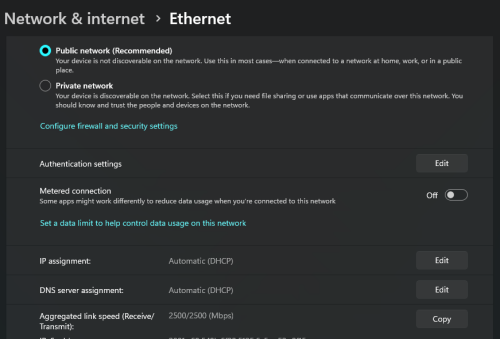
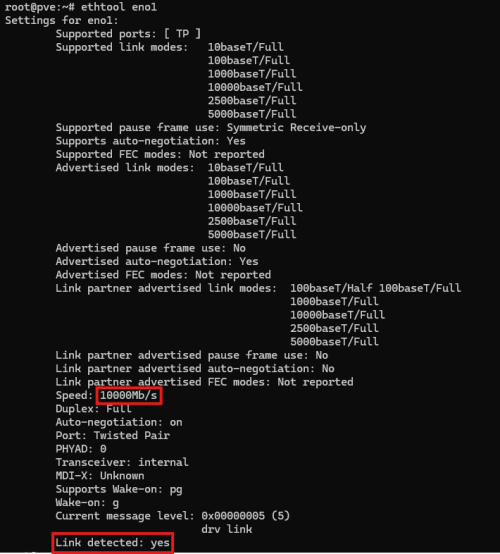
2.5G directly, not on battery, Ryzen 5 7430U, highly doubt so but I'll gladly retest once my GF's MS-A1 arrives, my server runs on 10G and my desktop runs on 2.5G

user posted image

QUOTE(hsbb @ Feb 8 2025, 10:48 PM)
Need to use 2.5G NIC or use wifi
*
If you're talking about WiFi 7 6GHz on 320Mhz with 4x4, sure, or else, no.

user posted image
user posted image
sadlyfalways
post Feb 8 2025, 11:03 PM

Regular
******
Senior Member
1,185 posts

Joined: Nov 2020
QUOTE(yenchenje @ Feb 8 2025, 10:08 PM)
I kinda gave up to get full speed on Unifi with PPPoE, I'll buy the EFG down the line to see what it can do with IDS/IPS, currently with IDS/IPS on it's only consistently going to 1.7-1.8Gbps max with the built in speedtest, rather lose some speed than security for the devices in my LAN
His PC while he's testing the speed after installation could get 2000Mbps+ DL on TM speedtest (Skyworth doing PPPoE), I never saw anything above 1.8Gbps with my own laptop (Ookla and/or TM Speedtest). Not sure what the issue is, can't be bothered to try and get more speed with Unifi's PPPoE situation (Bridged transparent with Skyworth).
*
I understand. But why not both. If they can do offloading on the cheaper ones it should not be an issue for the SE.

The clouds also came out with abysmal pppoe speeds
yenchenje
post Feb 8 2025, 11:04 PM

Enthusiast
*****
Junior Member
932 posts

Joined: Dec 2019
QUOTE(sadlyfalways @ Feb 8 2025, 11:03 PM)
I understand. But why not both. If they can do offloading on the cheaper ones it should not be an issue for the SE.

The clouds also came out with abysmal pppoe speeds
*
Just how they're programmed to be I guess, I haven't seen firmware improvements to PPPoE on their software releases in forever. Just gotta wait for newer hardware or TM somehow switches to use IPoE
Khan92
post Feb 9 2025, 12:44 AM

To live is to die
****
Junior Member
553 posts

Joined: Aug 2017


QUOTE(coolguy_0925 @ Feb 8 2025, 10:50 PM)
Almost same, I was up from 30 Mbps to 300 Mbps in 2018 (TURBO) until 2024, then FSU 500 Mbps :grin:
wow you are so patient

last month after 1 year plus waiting I blasted them complaints & followed with MCMC report

they manually created order and go thru usual installation route just to change my profile name

bonus: got a new router & tv box

now need to monitor coming bill in case (touch wood) kena surprise sweat.gif
*
Won't say patient, just didn't really care as long as the speed match
coolguy_0925
post Feb 9 2025, 12:55 AM

Look at all my stars!!
*******
Senior Member
4,538 posts

Joined: Jan 2003
QUOTE(Khan92 @ Feb 9 2025, 12:44 AM)
Won't say patient, just didn't really care as long as the speed match
*
grin.gif

Because already too long (more than a year) I worry they would casually 'forgotten' but good to know at least they are taking own sweet time to do the work

Then later on will have issue in case of relocation (someone reported here they will follow profile instead of real speed after relocation)

Anyway, case close for now until next FSU!
simmarjit
post Feb 9 2025, 06:43 AM

Enthusiast
*****
Junior Member
980 posts

Joined: Dec 2011


QUOTE(yenchenje @ Feb 7 2025, 04:54 PM)
Just a brief heads up for 1Gbps customer that might be eligible for free speed upgrade

Reported to MCMC for speed upgrade, responded within a week before CNY week

Upgrade is scheduled for tomorrow

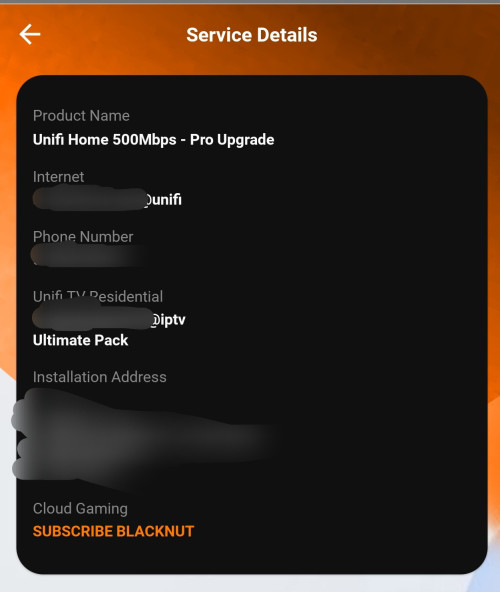
SWU 3.0 1Gbps to Unifi Home 2Gbps - Pro Upgrade

RM269 + SST per month, will see what CPE they provide, existing running FX3060V White Color x2
*
Speed upgrade from when 2023 one?
yenchenje
post Feb 9 2025, 07:43 AM

Enthusiast
*****
Junior Member
932 posts

Joined: Dec 2019
QUOTE(simmarjit @ Feb 9 2025, 06:43 AM)
Speed upgrade from when 2023 one?
*
SWU3 FSU

This post has been edited by yenchenje: Feb 9 2025, 07:43 AM
sadlyfalways
post Feb 9 2025, 11:42 AM

Regular
******
Senior Member
1,185 posts

Joined: Nov 2020
QUOTE(yenchenje @ Feb 8 2025, 11:04 PM)
Just how they're programmed to be I guess, I haven't seen firmware improvements to PPPoE on their software releases in forever. Just gotta wait for newer hardware or TM somehow switches to use IPoE
*
hopefully soon for you too

https://www.reddit.com/r/Ubiquiti/comments/...nt=share_button
dannychen
post Feb 9 2025, 02:02 PM

Regular
******
Senior Member
1,263 posts

Joined: Dec 2009
QUOTE(socratesman @ Feb 7 2025, 11:20 PM)
It seems like SWU 5.0 is worse -  SWU 4.0 300 Mbps is rm119 if my memory not faulty?
*
So far SWU 3.0 500mbps @ RM119, free mesh wifi x 2, free 6 months was the best deal so far. Luckily i was on board last minute before promo ended.
prokiller1199
post Feb 9 2025, 09:00 PM

Hi there.
*****
Senior Member
966 posts

Joined: Apr 2016


Anyone know how to set back the mesh for SR1041F model white colour with only 1 LED on top. It kinda not working after a power outage. I can only find unifi document on older generation SR1041Y one which have multiple LEDs.
https://unifi.com.my/sites/default/files/ht...rehomme-Eng.pdf
Khan92
post Feb 9 2025, 09:22 PM

To live is to die
****
Junior Member
553 posts

Joined: Aug 2017


Hoping with YES bringing cheap price for 300 mbps, will make TM think a bit on their price
tng55
post Feb 9 2025, 10:14 PM

Regular
******
Senior Member
1,440 posts

Joined: Sep 2021


QUOTE(dannychen @ Feb 9 2025, 02:02 PM)
So far SWU 3.0 500mbps @ RM119, free mesh wifi x 2, free 6 months was the best deal so far. Luckily i was on board last minute before promo ended.
*
yes i also SWU 5.0Mbps @ RM119 free mesh wifi x 2, free 6 months was the best deal so far i already luckily no more SWU 3.0 ended

now 5.0 very bad due 2gbps no offering sigh
i don't need disney 12 month not worth

waiting long. zzzzzzzz
Rudd
post Feb 9 2025, 11:59 PM

Look at all my stars!!
*******
Senior Member
4,043 posts

Joined: Jul 2010

Any recommended affordable router with better coverage to replace SKYWORTH GN630V?

Cannot get 50Mbps with the provided router when in 2nd floor or back room. Router is in living room.
hsbb
post Feb 10 2025, 12:57 AM

Casual
***
Junior Member
447 posts

Joined: Aug 2009


QUOTE(Rudd @ Feb 9 2025, 11:59 PM)
Any recommended affordable router with better coverage to replace SKYWORTH GN630V?

Cannot get 50Mbps with the provided router when in 2nd floor or back room. Router is in living room.
*
Maybe mesh owners can answer why they use mesh on 2nd floor.

495 Pages « < 453 454 455 456 457 > » Top
Topic ClosedOptions
 

Change to:
| Lo-Fi Version
0.0193sec    0.33    6 queries    GZIP Disabled
Time is now: 7th December 2025 - 01:59 AM