Welcome Guest ( Log In | Register )

Bump Topic Topic Closed RSS Feed
495 Pages « < 413 414 415 416 417 > » Bottom

Outline · [ Standard ] · Linear+

Unifi Official TM UniFi High Speed Broadband Thread V42, READ 1ST PAGE FOR RELEVANT WIFI INFO!

views
     
yenchenje
post Nov 22 2024, 06:38 PM

Enthusiast
*****
Junior Member
932 posts

Joined: Dec 2019
QUOTE(neekun @ Nov 22 2024, 06:02 PM)
The tm tech is here, the modem is in bridge mode, he can’t access the modem web interface to update firmware.  Any idea? Thanks.
*
If ONU already in O5 state, OLT might have pushed VLAN to kill web GUI, try turn it off, unplug fiber and see if you can login via with web UI
AzureSkies
post Nov 22 2024, 07:23 PM

Getting Started
**
Junior Member
148 posts

Joined: Jun 2005


QUOTE(anip94 @ Nov 22 2024, 05:42 PM)
anyone xperiencing slow browsing? download speed can go high but loading some sites takes multiple refresh and unloaded pictures
*
It's been extremely bad for me, this week. Twitter, reddit, youtube livestreams. Pretty much everything based outside Malaysia slowed down to a crawl. For the past few months, things were only bad during "peak hours", ie. 8-10 PM. But now...

VPNs not helping either. I wonder what the heck is going on? mad.gif

shebbycs
post Nov 22 2024, 07:40 PM

Casual
***
Junior Member
302 posts

Joined: Sep 2013


Since this thread is active I want to ask let say only two devices connected to wifi which are laptop and handphone. I am using 300MBPS Celcom Digi

and the result speedtest for

Laptop

user posted image

OnePlus Nord 3

user posted image

My question is why speedtest for oneplus nord 3 got half compare to the laptop got max 300mbps?
heLL_bOy
post Nov 22 2024, 08:03 PM

Regular
******
Senior Member
1,350 posts

Joined: Nov 2004
From: HEAVEN & HELL


yesterday and today unifi experiencing bottleneck and high ping on certain site , not sure what happening.

even afternoon experiencing using google and cloudflare also slow
blacktubi
post Nov 22 2024, 09:13 PM

-
Group Icon
Elite
8,421 posts

Joined: Jul 2008

QUOTE(shebbycs @ Nov 22 2024, 07:40 PM)
Since this thread is active I want to ask let say only two devices connected to wifi which are laptop and handphone. I am using 300MBPS Celcom Digi

and the result speedtest for

Laptop

user posted image

OnePlus Nord 3

user posted image

My question is why speedtest for oneplus nord 3 got half compare to the laptop got max 300mbps?
*
Try to see if you can disable MU-MIMO on your wireless router
shebbycs
post Nov 22 2024, 09:48 PM

Casual
***
Junior Member
302 posts

Joined: Sep 2013


QUOTE(blacktubi @ Nov 22 2024, 09:13 PM)
Try to see if you can disable MU-MIMO on your wireless router
*
How to disable this setting?
keewah
post Nov 22 2024, 10:13 PM

Casual
***
Junior Member
429 posts

Joined: Jan 2003
QUOTE(soonwai @ Jul 30 2024, 10:32 AM)
Want to get FSU also so susah. Anyway today got update. Randomly checked My Orders and saw something appeared dated 3 days ago.

20240108: Live chat back in Jan
20240707: Live chat for FSU
20240711: TM call to accept TnC.
20240719: 2 missed calls from TM
20240727: Modify Package order created. Current status "Order is in progress"

OK, back to waiting. Still July.

Update:
20240731: Installer called in the morning and installation done afternoon. Package name updated to "Unifi Home 1Gbps - Pro Upgrade"
*
I get mine upgraded today after the first order by TM automatically cancelled by them after 1 month no update from TM.
Then I called TM and they open a new order.


After 3 weeks of waiting, suddenly TM called and said wanna come today morning... to replace the modem (from existing Huawei to FibreHome Brand).
Asked the technician , what is the different between these 2 modems. He said, no different sleep.gif

Anyway, after 'activate' the modem, all the SpeedTest (from TM Speedtest, Fast.com) all showing upload is around 500Mpbs++ , while download only get 300Mbps ++

Gotta log case for TM to investigate.

Yes, reset the port and restart the modem after waiting 15 mins does not help

XeactorZ
post Nov 22 2024, 10:35 PM

♥ PandaDog ♥
*********
All Stars
31,612 posts

Joined: Aug 2010
QUOTE(anip94 @ Nov 22 2024, 05:42 PM)
anyone xperiencing slow browsing? download speed can go high but loading some sites takes multiple refresh and unloaded pictures
*
mostly I browse twitter/x having issue cannot load photo

other website such as youtube depends luck, sometimes vpn might help laugh.gif
Khan92
post Nov 22 2024, 11:46 PM

To live is to die
****
Junior Member
558 posts

Joined: Aug 2017


QUOTE(XeactorZ @ Nov 22 2024, 10:35 PM)
mostly I browse twitter/x having issue cannot load photo

other website such as youtube depends luck, sometimes vpn might help laugh.gif
*
yeah now enter some p2p website also slow
tng55
post Nov 23 2024, 12:52 AM

Regular
******
Senior Member
1,454 posts

Joined: Sep 2021


QUOTE(keewah @ Nov 22 2024, 10:13 PM)
I get mine upgraded today after the first order by TM automatically cancelled by them after 1 month no update from TM.
Then I called TM and they open a new order.
After 3 weeks of waiting, suddenly TM called and said wanna come today morning... to replace the modem (from existing Huawei to FibreHome Brand).
Asked the technician , what is the different between these 2 modems. He said, no different sleep.gif

Anyway, after 'activate' the modem, all the SpeedTest (from TM Speedtest, Fast.com) all showing upload is around 500Mpbs++ , while download only get 300Mbps ++

Gotta log case for TM to investigate.

Yes, reset the port and restart the modem after waiting 15 mins does not help
*
Huawei is stable then FibreHome due infra i think ONT HUAWEI that batter ask come again technician set back Huawei BTU settle
tng55
post Nov 23 2024, 12:54 AM

Regular
******
Senior Member
1,454 posts

Joined: Sep 2021


QUOTE(XeactorZ @ Nov 22 2024, 10:35 PM)
mostly I browse twitter/x having issue cannot load photo

other website such as youtube depends luck, sometimes vpn might help laugh.gif
*
QUOTE(Khan92 @ Nov 22 2024, 11:46 PM)
yeah now enter some p2p website also slow
*
same here i got slow load picture seen cannot load picture site lowyat.net
and asus.com also slow load picture

morning was fine i just come back home 9pm++ suddenly slow
PJng
post Nov 23 2024, 11:35 PM

10k Club
********
All Stars
12,059 posts

Joined: Oct 2017


look like unifi issue, very slow load video picture posted on k
but using mobile data no problem
zerorating
post Nov 23 2024, 11:51 PM

Miskin Adab
*****
Senior Member
977 posts

Joined: Aug 2007
From: Lokap Polis


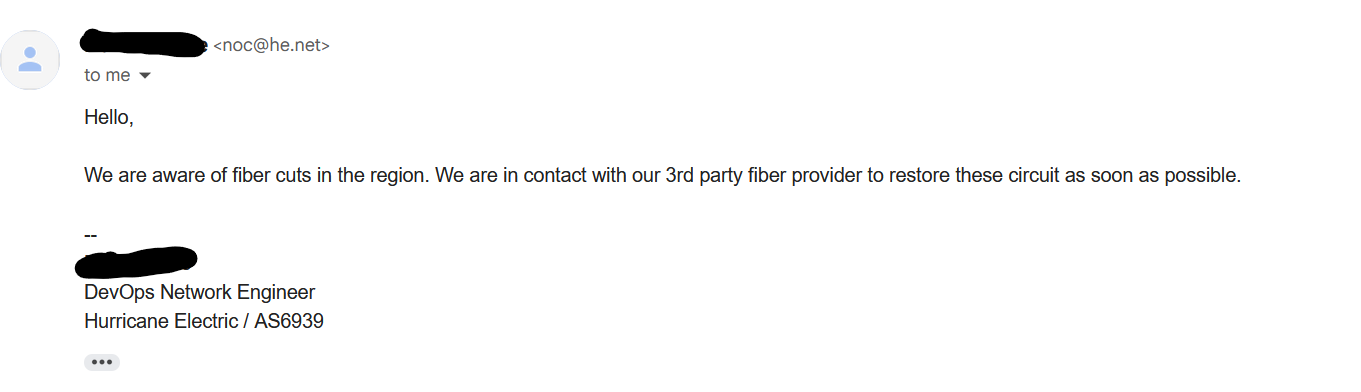
there's seems to be fiber cut on hurricane electric link. that might explain some slowness to the singapore resource.

user posted image
dayojah
post Nov 24 2024, 05:27 PM

Regular
******
Senior Member
1,276 posts

Joined: Sep 2018
From: Ampang
Lots of DNS failures today
emefbiemef
post Nov 25 2024, 11:35 AM

Getting Started
**
Junior Member
112 posts

Joined: Aug 2006
want to ask, where can we get the password for voip sip (the one like +60xxxxxxxx@ims.tm.net.my)? is it the same as unifi password?
Yluxion
post Nov 25 2024, 11:46 AM

On my way
****
Junior Member
543 posts

Joined: Sep 2005
From: Sri Petaling, KL


QUOTE(emefbiemef @ Nov 25 2024, 11:35 AM)
want to ask, where can we get the password for voip sip (the one like +60xxxxxxxx@ims.tm.net.my)? is it the same as unifi password?
*
Nope. Not same.

You need to ask the unifi installer for the VOIP password or you call technical support line.
cairokl
post Nov 25 2024, 03:29 PM

New Member
*
Junior Member
21 posts

Joined: Apr 2007


QUOTE(blacktubi @ Nov 18 2024, 02:20 PM)
1- Yes, change the combo modem router to bridge mode

2- It depends, if you can config tag VLAN 500 on the combo box then yes, you can use your China router. Currently I only tested where it's possible to do this on the GN630E. I believe your China domestic market router does not support VLAN tagging.

3- 500Mbps and above guarantee to get public IP. 500Mbps and below by request. Don't think there's a public document available. TIME switched to CGNAT recently as well.
Use GPON mode
*
Hi blacktubi, you are right, my redmi ax6000 doesn't support vlan tagging. But if found there is a way to tag the vlan by using TP-Link TL-SG105E switch from your website. I think i will use this switch to do the vlan tagging for my router, hopefully it works. Thanks for your reply and your contribution.
dayojah
post Nov 25 2024, 08:14 PM

Regular
******
Senior Member
1,276 posts

Joined: Sep 2018
From: Ampang
Failed downloads from Europe again. There must be a cable cut somewhere. I know about one at Bangladesh

This post has been edited by dayojah: Nov 25 2024, 08:18 PM
karenzayn
post Nov 25 2024, 10:44 PM

Getting Started
**
Junior Member
98 posts

Joined: Sep 2019
From: Kuching
QUOTE(emefbiemef @ Nov 25 2024, 11:35 AM)
want to ask, where can we get the password for voip sip (the one like +60xxxxxxxx@ims.tm.net.my)? is it the same as unifi password?
*
Are you able to login your ONU? what model?
emefbiemef
post Nov 25 2024, 11:23 PM

Getting Started
**
Junior Member
112 posts

Joined: Aug 2006
QUOTE(karenzayn @ Nov 25 2024, 10:44 PM)
Are you able to login your ONU? what model?
*
not onu, ata (telpo tp16) used at my workplace

495 Pages « < 413 414 415 416 417 > » Top
Topic ClosedOptions
 

Change to:
| Lo-Fi Version
0.0215sec    0.51    6 queries    GZIP Disabled
Time is now: 21st December 2025 - 05:43 PM