Outline ·
[ Standard ] ·
Linear+
Unifi Official TM UniFi High Speed Broadband Thread V42, READ 1ST PAGE FOR RELEVANT WIFI INFO!
|
karenzayn
|
 Nov 20 2024, 01:19 AM Nov 20 2024, 01:19 AM
|
Getting Started


|
QUOTE(PowerSlide @ Nov 20 2024, 01:06 AM) What you mean grab password from the aio router? depends on installer, they might reset the pppoe password, like last time, my aunt just recently renew her contract The installer resetted the password, so i had to copy down for safe keeping. |
|
|
|
|
|
PowerSlide
|
Nov 20 2024, 01:23 AM
|
|
|
QUOTE(karenzayn @ Nov 20 2024, 01:19 AM) depends on installer, they might reset the pppoe password, like last time, my aunt just recently renew her contract The installer resetted the password, so i had to copy down for safe keeping. Oh like that, see how then Now the provided equipment is all in one unit?;how to use back my own router? |
|
|
|
|
|
PRSXFENG
|
Nov 20 2024, 09:20 AM
|
|
|
QUOTE(PowerSlide @ Nov 20 2024, 01:23 AM) Oh like that, see how then Now the provided equipment is all in one unit?;how to use back my own router? there are some guides around here on the forum on how to change depending on the model of equipment you got |
|
|
|
|
|
cyberic
|
Nov 20 2024, 10:10 AM
|
|
|
QUOTE(PowerSlide @ Nov 20 2024, 01:23 AM) Oh like that, see how then Now the provided equipment is all in one unit?;how to use back my own router? If you don't know your pppoe password then call 100 to reset. New password will sent to your mobile via sms. |
|
|
|
|
|
PowerSlide
|
Nov 20 2024, 10:30 AM
|
|
|
QUOTE(PRSXFENG @ Nov 20 2024, 09:20 AM) there are some guides around here on the forum on how to change depending on the model of equipment you got Say coming today, if can't made it so I can use my own router can I just deny them fix new hardware? QUOTE(cyberic @ Nov 20 2024, 10:10 AM) If you don't know your pppoe password then call 100 to reset. New password will sent to your mobile via sms. I have pppoe password, if not I won't be able to change the router myself and also using mesh setup |
|
|
|
|
|
jusbella
|
Nov 20 2024, 10:44 AM
|
|
|
QUOTE(tng55 @ Nov 19 2024, 11:39 PM) yah fiber cable trouble but RJ45 Cable very safety wont be break and tools easy daam fiber carefull very hard my LAN Cable pull celling to floor to go OUTSIDE to go shop indoor floor see fiber not suitable its very hard U may outsource to wiring guy and they can help you settle all. They have complete tool like splicing, etc... This post has been edited by jusbella: Nov 20 2024, 10:45 AM |
|
|
|
|
|
tng55
|
Nov 20 2024, 11:55 AM
|
|
|
QUOTE(jusbella @ Nov 20 2024, 10:44 AM) U may outsource to wiring guy and they can help you settle all. They have complete tool like splicing, etc... sorry my Electrical guy don't have complete tool like splicing, etc... they have complete tool for RJ45 only its ok we don't need fiber due to risk |
|
|
|
|
|
Epic_winner091
|
Nov 20 2024, 02:01 PM
|
|
|
Apparently there was a cable cut in Seksyen 7, Shah Alam. Explains the outage I had last night. It's resolved by now. Was still down when I left for work. 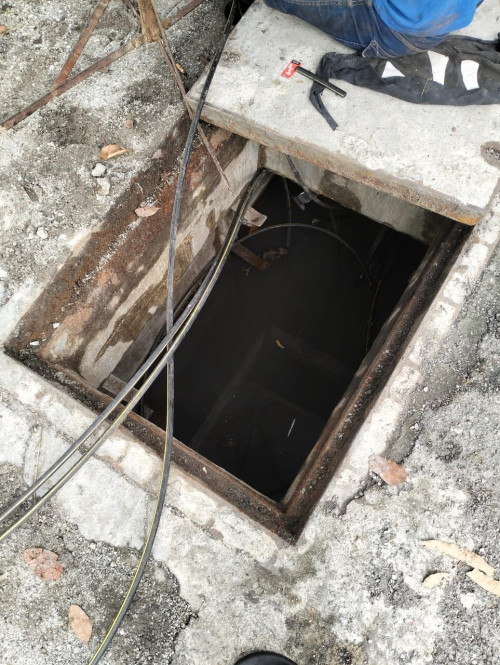 |
|
|
|
|
|
PJng
|
Nov 20 2024, 02:30 PM
|
|
|
QUOTE(iqmal123456 @ Nov 20 2024, 12:17 AM) Dunno cause I've been switching back and forth with my own router as well which is TP link-AX20 and the results are still the same. mine using ax20 for 300mbps, very stable if no downtime by TM, now 41 days uptime sometime reset due to turn off wrong plug, or TM maintenance |
|
|
|
|
|
iqmal123456
|
Nov 20 2024, 04:09 PM
|
Getting Started
|
QUOTE(tng55 @ Nov 20 2024, 01:18 AM) hmmm you still use you own router TP Link AX20 then no problem what you ip range if you ip 42.188.xxx.xxx confirm problem or you private ip ?? mine had problem public ip range 42.188.xxx.xx i had report tm now i got ip range 175.xxx.xxx prefect settle Mine public ip 175.xxx.xxx.xxx.xx. I also enabled IPV6 which helps a little but still the dropped connection very annoying putus-putus. |
|
|
|
|
|
ntw
|
Nov 20 2024, 05:40 PM
|
|
|
damn, restarted my router and now got 100.76.xx.xx nat ip for my 300Mbps subscription, was having 175.xx.xx.xx for a long time
|
|
|
|
|
|
annoymous1234
|
Nov 20 2024, 05:45 PM
|
|
|
Anyone encounter this strange issue before? Sometimes, out of the blue, wifi 2.4ghz will become "connected without internet" but 5ghz no problem. I check the router light, all seems good. What is the reason that 2.4ghz has no internet but 5ghz got?
|
|
|
|
|
|
pokchik
|
Nov 20 2024, 06:43 PM
|
|
|
QUOTE(annoymous1234 @ Nov 20 2024, 05:45 PM) Anyone encounter this strange issue before? Sometimes, out of the blue, wifi 2.4ghz will become "connected without internet" but 5ghz no problem. I check the router light, all seems good. What is the reason that 2.4ghz has no internet but 5ghz got? how old is your router, and what is the router brand/model? This post has been edited by pokchik: Nov 20 2024, 06:44 PM |
|
|
|
|
|
tng55
|
Nov 20 2024, 09:41 PM
|
|
|
QUOTE(iqmal123456 @ Nov 20 2024, 04:09 PM) Mine public ip 175.xxx.xxx.xxx.xx. I also enabled IPV6 which helps a little but still the dropped connection very annoying putus-putus. mine just disable IPV6 i never use IPV6 |
|
|
|
|
|
tng55
|
Nov 20 2024, 09:42 PM
|
|
|
QUOTE(ntw @ Nov 20 2024, 05:40 PM) damn, restarted my router and now got 100.76.xx.xx nat ip for my 300Mbps subscription, was having 175.xx.xx.xx for a long time 100.76.xxx is Private IP |
|
|
|
|
|
PJng
|
Nov 20 2024, 10:02 PM
|
|
|
pictr image so slow load, not normal
|
|
|
|
|
|
soonwai
|
Nov 21 2024, 12:44 AM
|
|
|
QUOTE(Icehart @ Nov 13 2024, 06:34 PM) Just realized my 800Mbps plan with free speed upgrade to 1Gbps not done yet. Anyone here face the same issue also? Mine was done after I chat Unifi. Once in Jan and again in July. https://forum.lowyat.net/index.php?showtopi...#entry110165751 |
|
|
|
|
|
Icehart
|
Nov 21 2024, 01:54 AM
|
|
|
QUOTE(soonwai @ Nov 21 2024, 12:44 AM) Mine was done after I chat Unifi. Once in Jan and again in July. https://forum.lowyat.net/index.php?showtopi...#entry110165751Ok, I'm following up on twitter. At least got record of conversation. |
|
|
|
|
|
anip94
|
Nov 22 2024, 05:42 PM
|
Getting Started
|
anyone xperiencing slow browsing? download speed can go high but loading some sites takes multiple refresh and unloaded pictures
|
|
|
|
|
|
neekun
|
Nov 22 2024, 06:02 PM
|
|
|
QUOTE(jonathanwhm @ Oct 22 2024, 06:03 PM) Thanks for the 2.0.3 firmware! No speed drop after four days of usage, including with VPN. Will keep monitoring it. The tm tech is here, the modem is in bridge mode, he can’t access the modem web interface to update firmware. Any idea? Thanks. |
|
|
|
|



 Quote
Quote








 0.0220sec
 0.85
0.85
 6 queries
 GZIP Disabled