

QUOTE(eds2 @ Nov 27 2024, 06:28 PM)
if a house/office only have 1 PON but require two ONT device (internet and other is for phone line, both registered to TM), is it possible to use PLC splitter?

can, you need a valid PLOAM Id for that port.Unifi Official TM UniFi High Speed Broadband Thread V42, READ 1ST PAGE FOR RELEVANT WIFI INFO!
|
|
 Nov 27 2024, 10:37 PM Nov 27 2024, 10:37 PM
Show posts by this member only | IPv6 | Post
#8321
|
 
Senior Member
2,400 posts Joined: Jul 2009 From: /dev/null  
|
QUOTE(eds2 @ Nov 27 2024, 06:28 PM) if a house/office only have 1 PON but require two ONT device (internet and other is for phone line, both registered to TM), is it possible to use PLC splitter? can, you need a valid PLOAM Id for that port. |
|
|
|
|
|
Nov 27 2024, 11:07 PM
Show posts by this member only | IPv6 | Post
#8322
|

Junior Member
101 posts Joined: Jul 2022 From: Kelantan
|
QUOTE(Anime4000 @ Nov 27 2024, 10:37 PM) can, you need a valid PLOAM Id for that port. Thanks man. 1x2 plc loss is about 4db. Still ok right? |
|
|
Nov 27 2024, 11:13 PM
Show posts by this member only | IPv6 | Post
#8323
|
|
Senior Member
2,400 posts Joined: Jul 2009 From: /dev/null
|
QUOTE(eds2 @ Nov 27 2024, 11:07 PM) Thanks man. 1x2 plc loss is about 4db. Still ok right? yea, around that,mine, originally from -16dBm with 1x2 splitter, become -20dBm each even this barely, -21dBm here will terminate the internet, need to careful when daylight, fiber will bend outdoor cause reduced dBm power |
|
|
Nov 28 2024, 09:01 AM
|

Senior Member
832 posts Joined: Jan 2003
|
QUOTE(shebbycs @ Nov 22 2024, 07:40 PM) Since this thread is active I want to ask let say only two devices connected to wifi which are laptop and handphone. I am using 300MBPS Celcom Digi did u manage to find a solution? im also facing similar problem recently after upgrade from Unifi 800mbps to 1Gbpsand the result speedtest for Laptop  OnePlus Nord 3  My question is why speedtest for oneplus nord 3 got half compare to the laptop got max 300mbps? 1. Changed Alcatel ONT to Fiberhome ONT 2. Both old setup and new setup is connected via bridge to AC86U router 3. Speedtest local TM server with new ONT via AC86U using laptop wifi - can reach almost full speed 800mbps download, 500mpbs upload. 4. Speedtest same setup and same server right after step 3, using iphone can only reach around 300mbps download, 500mps upload. (Previously can max out to ~500-600mpbs) 5. Tried changing back Fiberhome ONT to Alcatel ONT also same problem 6. If i change iphone speedtest server to random test server in malaysia, can hit 500-600mpbs download could it be something related to the speed upgrade? cant exactly complain to unifi because my laptop wifi and lan can reach near theoretical speed of 940mbps. will unifi port reset help?  |
|
|
Nov 28 2024, 09:17 AM
Show posts by this member only | IPv6 | Post
#8325
|

Senior Member
3,038 posts Joined: Dec 2011
|
QUOTE(blstz @ Nov 28 2024, 09:01 AM) did u manage to find a solution? im also facing similar problem recently after upgrade from Unifi 800mbps to 1Gbps Try check cable quality.1. Changed Alcatel ONT to Fiberhome ONT 2. Both old setup and new setup is connected via bridge to AC86U router 3. Speedtest local TM server with new ONT via AC86U using laptop wifi - can reach almost full speed 800mbps download, 500mpbs upload. 4. Speedtest same setup and same server right after step 3, using iphone can only reach around 300mbps download, 500mps upload. (Previously can max out to ~500-600mpbs) 5. Tried changing back Fiberhome ONT to Alcatel ONT also same problem 6. If i change iphone speedtest server to random test server in malaysia, can hit 500-600mpbs download could it be something related to the speed upgrade? cant exactly complain to unifi because my laptop wifi and lan can reach near theoretical speed of 940mbps. will unifi port reset help? :confused: |
|
|
Nov 28 2024, 09:54 AM
|
|
Senior Member
6,831 posts Joined: Oct 2008 From: Kuala Lumpur 
|
QUOTE(Anime4000 @ Nov 27 2024, 12:26 PM) TM have new ONR 2.5G Skyworth that replace D-Link Black, bridge mode might not possible in some OLT Well, like it or not, I believe TM implement this as too many custom ONU trigger OMCI alarm.this will follow TIME, OMCI control the ONU now |
|
|
|
|
|
Nov 28 2024, 09:58 AM
Show posts by this member only | IPv6 | Post
#8327
|
|
Senior Member
2,400 posts Joined: Jul 2009 From: /dev/null
|
QUOTE(YoungMan @ Nov 28 2024, 09:54 AM) Well, like it or not, I believe TM implement this as too many custom ONU trigger OMCI alarm. yes, there is Vendor Specific OMCI which TM can ask to add.using ONR make troubleshooting easier for them, but limit user can bridge however, I still allow to use own ONU, as long at correct OMCI specification just my bad to check my VLAN 500 suddenly exist on VEIP so I thought, if VLAN 500 exist on VEIP and PPTP logical interface, it is possible to aggregate both logical interface to solve speed issue |
|
|
Nov 29 2024, 06:15 PM
Show posts by this member only | IPv6 | Post
#8328
|

Junior Member
245 posts Joined: Apr 2009 From: The Cold-War II
|
Hi,
Is this legit? For port over sub,  QUOTE SWITCH OVER TO UNIFI PROMO 2 YEARS CONTRACT RM 89 100mbps - 100mbps free 3 months bill RM129 - 300mbps free 6 months bill RM149 - 500mbps free 6 months bill 3 YEARS CONTRACT RM89 -100mbps free 6 months bill RM129 - 300mbps free 42” sharp tv OR free smartphone RM149 - 500mbps free 55” sharp tv OR free smartphone |
|
|
Nov 29 2024, 06:53 PM
Show posts by this member only | IPv6 | Post
#8329
|

Senior Member
1,602 posts Joined: Jan 2016
|
QUOTE(kicko0o @ Nov 29 2024, 06:15 PM) Hi, This is legit, I switched from Maxis to Unifi last monthIs this legit? For port over sub, But I got 8 months free bill instead  kicko0o liked this post
|
|
|
Nov 29 2024, 07:29 PM
|

Junior Member
195 posts Joined: Apr 2019
|
currently on unifi 300mbps, rm99.
any better plan or shud i just stay with this? got free to 300mbps after contract ended. |
|
|
Nov 29 2024, 07:32 PM
|
|
Junior Member
288 posts Joined: Sep 2020
|
QUOTE(sidqara @ Nov 29 2024, 07:29 PM) currently on unifi 300mbps, rm99. just stay with it, coz if i not mistaken ur original package is RM99 for 50MBPS?any better plan or shud i just stay with this? got free to 300mbps after contract ended. |
|
|
Nov 29 2024, 08:06 PM
|
|
Junior Member
195 posts Joined: Apr 2019
|
QUOTE(kcl2006ch @ Nov 29 2024, 07:32 PM) just stay with it, coz if i not mistaken ur original package is RM99 for 50MBPS? yes, started with RM89 30MBPS, then up to RM99 for 50MBPS. got free to 100mbps, and finale 300mbps |
|
|
Nov 29 2024, 11:22 PM
Show posts by this member only | IPv6 | Post
#8333
|

Senior Member
1,011 posts Joined: Aug 2014 
|
Anyone having really slow internet tonight? Location penang???
|
|
|
|
|
|
Nov 29 2024, 11:41 PM
|

Senior Member
1,350 posts Joined: Nov 2004 From: HEAVEN & HELL
|
QUOTE(RiriRuruRara @ Nov 29 2024, 11:22 PM) Anyone having really slow internet tonight? Location penang??? yes there is slowdown, even playing games server under AWS or Cloudflare also very laggy RiriRuruRara liked this post
|
|
|
Nov 29 2024, 11:57 PM
Show posts by this member only | IPv6 | Post
#8335
|

All Stars
12,059 posts Joined: Oct 2017
|
QUOTE(RiriRuruRara @ Nov 29 2024, 11:22 PM) Anyone having really slow internet tonight? Location penang??? from time to time, video, picture posted on /k is slow to loadusing mobile data no problem RiriRuruRara liked this post
|
|
|
Nov 30 2024, 08:24 AM
Show posts by this member only | IPv6 | Post
#8336
|

Junior Member
421 posts Joined: Apr 2009
|
Hi I need recommendation, I have upgraded my unifi speed last year to 300mbps which come with the fiberhome router. Currently I'm experiencing "drop line" during streaming (Astro GO/ Netflix) and the issue exacerbate during night time. Restarting my modem does not solve this issue.
This issue happen for the past few months. I notice that TM push some kind of update setting to my router as my DNS setup has been change to TM default DNS and no longer able to login using Super Admin ID (The password has been change without my intervention). 1) Should I buy my own router? 2) Can they access my router setup if I buy my own router? 3) Could the "drop line" issue be resolve using my own purchase router? This post has been edited by febreze2xxx: Nov 30 2024, 08:25 AM |
|
|
Nov 30 2024, 08:48 AM
Show posts by this member only | IPv6 | Post
#8337
|
|
Junior Member
288 posts Joined: Sep 2020
|
QUOTE(febreze2xxx @ Nov 30 2024, 08:24 AM) Hi I need recommendation, I have upgraded my unifi speed last year to 300mbps which come with the fiberhome router. Currently I'm experiencing "drop line" during streaming (Astro GO/ Netflix) and the issue exacerbate during night time. Restarting my modem does not solve this issue. if want to use ur own router have to call 100 request to change to bridge mode,or if u got pppoe username & password, IMS username & password can try reset the combo box , make sure that TR-069 setting have to DISABLED all the option as i using the skyworth combo box also got this setting but i managed disabled itThis issue happen for the past few months. I notice that TM push some kind of update setting to my router as my DNS setup has been change to TM default DNS and no longer able to login using Super Admin ID (The password has been change without my intervention). 1) Should I buy my own router? 2) Can they access my router setup if I buy my own router? 3) Could the "drop line" issue be resolve using my own purchase router? 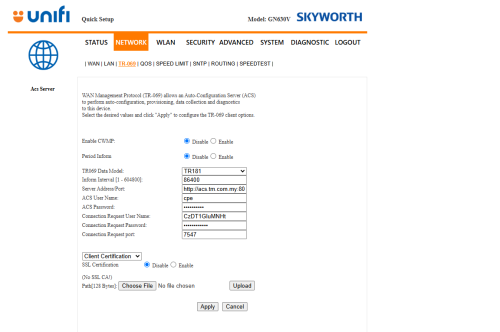 |
|
|
Nov 30 2024, 08:59 AM
Show posts by this member only | IPv6 | Post
#8338
|
|
Junior Member
421 posts Joined: Apr 2009
|
QUOTE(kcl2006ch @ Nov 30 2024, 08:48 AM) if want to use ur own router have to call 100 request to change to bridge mode,or if u got pppoe username & password, IMS username & password can try reset the combo box , make sure that TR-069 setting have to DISABLED all the option as i using the skyworth combo box also got this setting but i managed disabled it Currently my setup is the old Unifi setup. They give me Huawei ONT and the Fiberhome router. I'm not sure whether my router is the problem or Unifi problem. I have use cat5e to connect to my PC still having this "drop out / dead buffering" issue. |
|
|
Nov 30 2024, 10:07 AM
Show posts by this member only | IPv6 | Post
#8339
|
|
Junior Member
288 posts Joined: Sep 2020
|
QUOTE(febreze2xxx @ Nov 30 2024, 08:59 AM) Currently my setup is the old Unifi setup. They give me Huawei ONT and the Fiberhome router. I'm not sure whether my router is the problem or Unifi problem. I have use cat5e to connect to my PC still having this "drop out / dead buffering" issue. if old configuration (huawei ONT & fiberhome router) can change to own router, make sure that u got nthe unifi pppoe username & password |
|
|
Nov 30 2024, 10:19 AM
Show posts by this member only | IPv6 | Post
#8340
|
|
Junior Member
245 posts Joined: Apr 2009 From: The Cold-War II
|
QUOTE(QuantumEdge @ Nov 29 2024, 06:53 PM) This is legit, I switched from Maxis to Unifi last month Wow, how you got that? Have to walk into TMpoint then ask them any offer for port-over sub?But I got 8 months free bill instead Or is there any secret code that I need to say while there?  |
|
Topic ClosedOptions
|
| Change to: |  0.0288sec 0.0288sec
 0.84 0.84
 6 queries 6 queries
 GZIP Disabled GZIP Disabled
Time is now: 21st December 2025 - 05:14 AM |
 Quote
Quote