Outline ·
[ Standard ] ·
Linear+
Unifi Official TM UniFi High Speed Broadband Thread V42, READ 1ST PAGE FOR RELEVANT WIFI INFO!
|
ListenToTheWind
|
 Aug 1 2024, 11:43 AM Aug 1 2024, 11:43 AM
|

|
QUOTE(heLL_bOy @ Aug 1 2024, 11:32 AM) is normal, because TM limiting the traffic from others causing congestion. all local ISP dont have peering with TM and all traffic are exchanging at MYIX Meaning to say TM identify high usage accounts and limit their bandwidth, such as my case my bandwidth was limited to under 100kbps consistently after 9pm? I don't really understand what do you mean by peering with TM, do you mean it make no different even if I switch from Unifi to Maxis? |
|
|
|
|
|
heLL_bOy
|
Aug 1 2024, 12:17 PM
|
|
|
QUOTE(ListenToTheWind @ Aug 1 2024, 11:43 AM) Meaning to say TM identify high usage accounts and limit their bandwidth, such as my case my bandwidth was limited to under 100kbps consistently after 9pm? I don't really understand what do you mean by peering with TM, do you mean it make no different even if I switch from Unifi to Maxis? TM doesn't identify individual account on their usage by limiting your bandwidth. this congestion issue is not new anymore and has been prolonged since covid era until now. the limitation is done by TM side and are effecting all users not only yourself. peering means both ISP would exchange their traffic each others directly. you may understand more on this link below https://www.internetsociety.org/resources/d...ternet-peering/the only choice you may use VPN by pass the issue or change providers This post has been edited by heLL_bOy: Aug 1 2024, 12:18 PM |
|
|
|
|
|
ListenToTheWind
|
Aug 1 2024, 12:31 PM
|
|
|
QUOTE(heLL_bOy @ Aug 1 2024, 12:17 PM) TM doesn't identify individual account on their usage by limiting your bandwidth. this congestion issue is not new anymore and has been prolonged since covid era until now. the limitation is done by TM side and are effecting all users not only yourself. peering means both ISP would exchange their traffic each others directly. you may understand more on this link below https://www.internetsociety.org/resources/d...ternet-peering/the only choice you may use VPN by pass the issue or change providers I'm accessing my own server at the office (10km away from home). Both side got Tailscale installed. I getting the same speed after 9pm no matter I access the public IP or with Tailscale VPN. I will try to switch to Maxis. |
|
|
|
|
|
blacktubi
|
Aug 1 2024, 12:33 PM
|
-

|
QUOTE(heLL_bOy @ Aug 1 2024, 11:32 AM) is normal, because TM limiting the traffic from others causing congestion. all local ISP dont have peering with TM and all traffic are exchanging at MYIX If BGP HE is accurate, both Maxis and TIME peers with TM. |
|
|
|
|
|
michaelkkl
|
Aug 1 2024, 01:18 PM
|
|
|
QUOTE(heLL_bOy @ Aug 1 2024, 11:32 AM) is normal, because TM limiting the traffic from others causing congestion. all local ISP dont have peering with TM and all traffic are exchanging at MYIX Its depend on which ISP. AFAIK Maxis and Time have private peering with TM. Other ISP have public peering with TM (via MyIX) |
|
|
|
|
|
heLL_bOy
|
Aug 1 2024, 04:44 PM
|
|
|
QUOTE(blacktubi @ Aug 1 2024, 12:33 PM) QUOTE(michaelkkl @ Aug 1 2024, 01:18 PM) Its depend on which ISP. AFAIK Maxis and Time have private peering with TM. Other ISP have public peering with TM (via MyIX) I mean private peering in between, Currently is only public peering over MYIX |
|
|
|
|
|
heLL_bOy
|
Aug 1 2024, 04:46 PM
|
|
|
QUOTE(ListenToTheWind @ Aug 1 2024, 12:31 PM) I'm accessing my own server at the office (10km away from home). Both side got Tailscale installed. I getting the same speed after 9pm no matter I access the public IP or with Tailscale VPN. I will try to switch to Maxis. daily time there is no issue, the congestion only start as 8pm to 12am daily |
|
|
|
|
|
ListenToTheWind
|
Aug 1 2024, 04:59 PM
|
|
|
QUOTE(heLL_bOy @ Aug 1 2024, 04:46 PM) daily time there is no issue, the congestion only start as 8pm to 12am daily Unfortunately, those are the period where I will be sitting in front of the desktop remoting to my server. Sigh. My parents gonna miss their CCTV channel. |
|
|
|
|
|
trix
|
Aug 1 2024, 06:27 PM
|
|
|
QUOTE(PJng @ Jul 31 2024, 11:28 PM) tested few time, upload about 40%, error  run with -v or -vv or -vvv, see if it spits out why it failed |
|
|
|
|
|
YoungMan
|
Aug 1 2024, 07:57 PM
|
|
|
QUOTE(ListenToTheWind @ Aug 1 2024, 07:11 AM) Base on what I experience, it consistently behave the same after 9pm on daily basis. I feel like Unifi is not being fair with their subscriber. I will switch over to Maxis and see if its the same. Being loyal TM customer since 1M Streamyx 20 years ago, its about time to move on. Make sure to find reliable agent. Some agent is known to sell you the moon and stars, but after fibre installation nothing as promised. |
|
|
|
|
|
ray148
|
Aug 1 2024, 08:03 PM
|
|
|
Sigh...what's wrong with unifi now..? Suddenly every international website is loading super slow and playing Overwatch 2, the ping went above 110ms --- normally it was 39-40ms.
|
|
|
|
|
|
coolguy_0925
|
Aug 1 2024, 09:44 PM
|
|
|
QUOTE(soonwai @ Jul 31 2024, 11:34 PM) Out of contract for so long already, see what they can offer. Lemme go find Maxis agent to get transfer ID. LOL. Sekali you sent in transfer ID and TMpoint just proceed  Goodbye your RM159 1Gbps plan  |
|
|
|
|
|
PJng
|
Aug 1 2024, 11:17 PM
|
|
|
QUOTE(trix @ Aug 1 2024, 06:27 PM) run with -v or -vv or -vvv, see if it spits out why it failed CODE
[warning] recvfrom failed: An invalid argument was supplied.
[warning] Write error: 10060 (A connection attempt failed because the connected party did not properly respond after a period of time, or established connection failed because connected host has failed to respond.
multiple of same error show |
|
|
|
|
|
trix
|
Aug 1 2024, 11:25 PM
|
|
|
QUOTE(PJng @ Aug 1 2024, 11:17 PM) CODE
[warning] recvfrom failed: An invalid argument was supplied.
[warning] Write error: 10060 (A connection attempt failed because the connected party did not properly respond after a period of time, or established connection failed because connected host has failed to respond.
multiple of same error show could be your connection try with different server -L to get list of nearest servers -s serverID |
|
|
|
|
|
PJng
|
Aug 1 2024, 11:37 PM
|
|
|
QUOTE(trix @ Aug 1 2024, 11:25 PM) could be your connection try with different server -L to get list of nearest servers -s serverID tested few server same, 40% error, but app no problem, nevermind, does not affect usage for internet, thanks for suggestion  |
|
|
|
|
|
bezitagt
|
Aug 2 2024, 06:49 PM
|
Getting Started

|
QUOTE(ListenToTheWind @ Aug 1 2024, 07:11 AM) Base on what I experience, it consistently behave the same after 9pm on daily basis. I feel like Unifi is not being fair with their subscriber. I will switch over to Maxis and see if its the same. Being loyal TM customer since 1M Streamyx 20 years ago, its about time to move on. Hi there! that's true. I'm also one of the loyal TM's Streamyx customer since 2000... Also in the middle to change to others operator but in the middle of doing homework and also to get approval from my MOF...  |
|
|
|
|
|
Micky78
|
Aug 2 2024, 09:44 PM
|
|
|
QUOTE(bezitagt @ Aug 2 2024, 06:49 PM) i just learned that all telco is the same.. my friend been using maxis 100mbps for RM129 until now... no upgrade speed or lower ur price, unless u port out.. then they will try to retain u |
|
|
|
|
|
PJng
|
Aug 3 2024, 12:25 AM
|
|
|
finally change the plan name, QUOTE Dear Valued Customer,
We’re thrilled to announce that your New Free Speed Upgrade is now live and fully updated in your profile, making your online journey faster and smoother than ever before.
Your new speed package name and details are available in your Unifi bill. You can easily view them through the MyUnifi App.
It’s all there, right at your fingertips!
Unifi Service ID:***********@unifi
New Speed:300
Old Speed :100 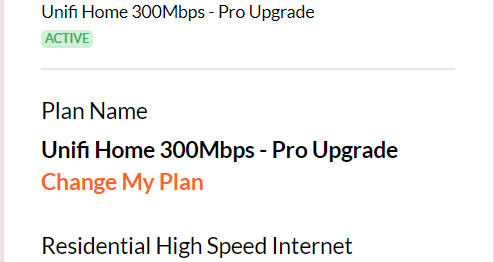 something wrong, service start date go back 2015, iirc that time my area still no unifi, using streamyx This post has been edited by PJng: Aug 3 2024, 12:28 AM |
|
|
|
|
|
abidshown
|
Aug 3 2024, 01:18 AM
|
New Member
|
QUOTE(PJng @ Aug 3 2024, 12:25 AM) finally change the plan name, something wrong, service start date go back 2015, iirc that time my area still no unifi, using streamyx i guess if u r using since zaman streamyx and directly upgrade to unifi w/o doing acc termination, tm just start counting from the days that u start subscribing to streamyx. |
|
|
|
|
|
PJng
|
Aug 3 2024, 01:21 AM
|
|
|
QUOTE(abidshown @ Aug 3 2024, 01:18 AM) i guess if u r using since zaman streamyx and directly upgrade to unifi w/o doing acc termination, tm just start counting from the days that u start subscribing to streamyx. last time my flat finally got fibre, so i go to tm point upgrade speed to 100mbps, and service start date is the date i apply, at 2021 |
|
|
|
|



 Quote
Quote





 0.0212sec
 0.37
0.37
 6 queries
 GZIP Disabled