

QUOTE(soonwai @ Aug 3 2024, 09:12 PM)
Better do one thing at a time. Later TM gets confused. Maybe do the upgrade first then only the transfer.

Ok noted. Will try live chat then.Unifi Official TM UniFi High Speed Broadband Thread V42, READ 1ST PAGE FOR RELEVANT WIFI INFO!
|
|
 Aug 4 2024, 03:44 PM Aug 4 2024, 03:44 PM
|
 
Junior Member
427 posts Joined: Mar 2010 
|
QUOTE(soonwai @ Aug 3 2024, 09:12 PM) Better do one thing at a time. Later TM gets confused. Maybe do the upgrade first then only the transfer. Ok noted. Will try live chat then. |
|
|
|
|
|
Aug 4 2024, 03:45 PM
Show posts by this member only | IPv6 | Post
#4162
|

All Stars
11,456 posts Joined: Oct 2007 From: KL 
|
QUOTE(Raymond T. @ Aug 4 2024, 04:04 AM) Yup. They talk since Dec 2023 until today. Fed up already. How many times ding-dong? What excuses they give? I only ding them once in Jan then they dong back say I need to slow slow wait Jan-July. So July, I ding again, baru dapat the upgrade last day of July.Want to complain also cannot since they said Jan- July and memang the upgrade was done 31 July.  |
|
|
Aug 4 2024, 04:00 PM
Show posts by this member only | IPv6 | Post
#4163
|
|
All Stars
11,456 posts Joined: Oct 2007 From: KL
|
QUOTE(Alpha_Tay @ Aug 4 2024, 02:12 PM) TL;DR: unifi Technician GPON ONU New Replacement Power Adapter was Different Model and Same Voltage with Different Lower Amperage Lazimnya if it came with 1.5A PSU, better get back 1.5A or higher.Yesterday after Power Outage and Back On, unifi FiberHome GPON ONU AN5506-04-BG 12V = 1.5A AN5506-04-B5G(E1) since 2017 December couldnt power back on at all, every other electrical appliance was still working well, try to contact TM via few method, 100 was the fastest to respond and record the detail, unifi easyfix could only report issue without record the detail, on-site appointment schedule was next day before 24 hour, unifi Technician arrive at schedule time, they didnt get the report detail, explain to them again, they just get a New Replacement Power Adapter from their vehicle and the unifi FiberHome GPON ONU work again without any issue including full correct speedtest with correct ping latency, however their New Replacement Power Adapter was Different Model and Same Voltage with Different Lower Amperage, is there any issues in the long run? thx in adv. FiberHome GPON ONU AN5506-04-BG 12V = 1.5A AN5506-04-B5G(E1) since 2017 December Original Power Adapter FiberHome RD1201500-C55-FYG-F Adapter Input: 100-240V~ 50/60Hz 600mA Output: 12V = 1.5A New Replacement Power Adapter Meic MN012H-U120100 Input: 100-240V~ 50/60Hz 0.3A Max Output: 12.0V = 1.0A 12.0W PN: 1U01120100-YC6C-LL00 2308 However I look at https://fccid.io/ANATEL/02429-12-06078/Manu...74E3113D82B/PDF The manual says Power Consumption is <9W, so 12V 1A PSU is sufficient. No idea why it originally came with 12V 1.5A. Maybe 1A no stock or different hardware using more power. This post has been edited by soonwai: Aug 4 2024, 04:01 PM Alpha_Tay liked this post
|
|
|
Aug 4 2024, 04:03 PM
Show posts by this member only | IPv6 | Post
#4164
|

Senior Member
1,725 posts Joined: Jan 2003
|
QUOTE(soonwai @ Aug 4 2024, 04:00 PM) Lazimnya if it came with 1.5A PSU, better get back 1.5A or higher. Thx.However I look at https://fccid.io/ANATEL/02429-12-06078/Manu...74E3113D82B/PDF The manual says Power Consumption is <9W, so 12V 1A PSU is sufficient. No idea why it originally came with 12V 1.5A. Maybe 1A no stock or different hardware using more power. the ONU itself has 12V = 1.5A as well. FiberHome GPON ONU AN5506-04-BG 12V = 1.5A AN5506-04-B5G(E1) since 2017 December i would ask that unifi Technician too, see how he respond. This post has been edited by Alpha_Tay: Aug 4 2024, 05:15 PM |
|
|
Aug 4 2024, 04:05 PM
Show posts by this member only | IPv6 | Post
#4165
|
|
All Stars
11,456 posts Joined: Oct 2007 From: KL
|
QUOTE(OKLY @ Aug 4 2024, 01:45 PM) At this moment, is TM only giving the Dlink black box (with 2.5G port) for 1gbps above plans, or are they still giving out the white box (with 1G port) depending on luck/availability? I think it depends on area and available stock. For my upgrade, I WhatsApp the installer requesting for the 2.5G ONR/ONU and he showed up with the black DLink. |
|
|
Aug 4 2024, 05:45 PM
|
|
Junior Member
180 posts Joined: Mar 2015
|
thinking of getting 2nd hand zte onu replace current black dlink combo (unstable), can we set up and use it? Or all onu tag will tag to each owner? tq
|
|
|
|
|
|
Aug 4 2024, 05:46 PM
Show posts by this member only | IPv6 | Post
#4167
|

Senior Member
1,368 posts Joined: Aug 2010
|
QUOTE(soonwai @ Aug 4 2024, 03:45 PM) How many times ding-dong? What excuses they give? I only ding them once in Jan then they dong back say I need to slow slow wait Jan-July. So July, I ding again, baru dapat the upgrade last day of July. Jan 2024 asked they say by batchedWant to complain also cannot since they said Jan- July and memang the upgrade was done 31 July. March 2024 also same respond June 2024 also same respond July 2024 made report to MCMC they replied say will assign someone but until today no one call and they close the report. 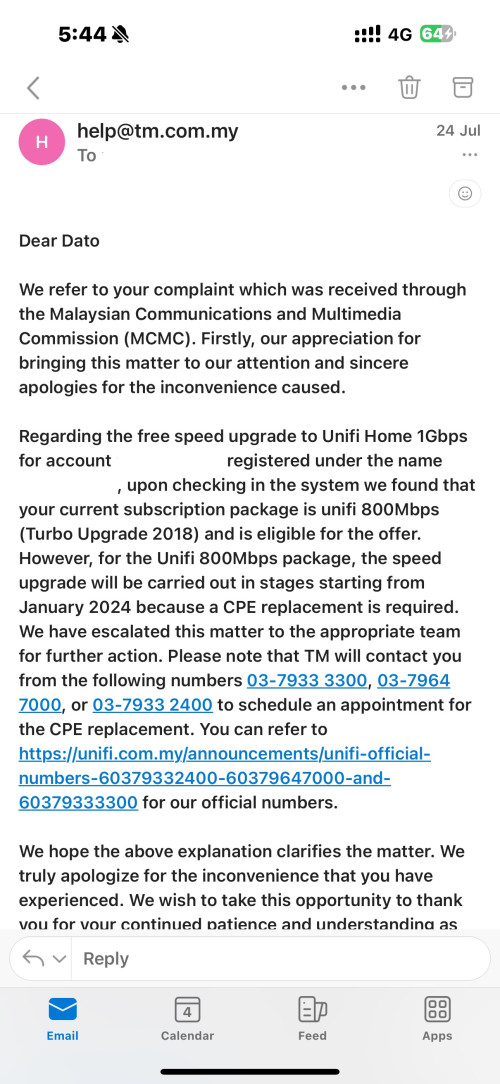 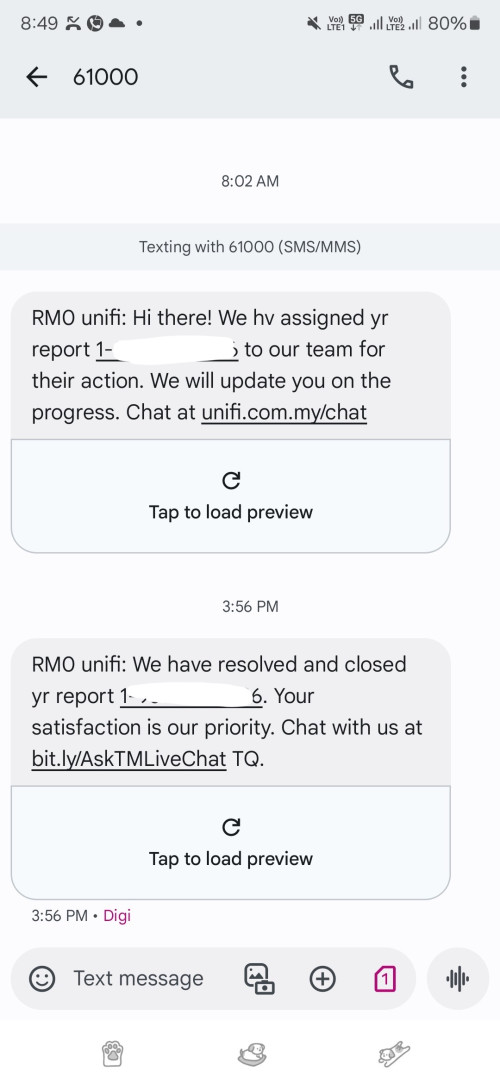 This post has been edited by Raymond T.: Aug 4 2024, 05:48 PM Singh93 liked this post
|
|
|
Aug 4 2024, 07:19 PM
Show posts by this member only | IPv6 | Post
#4168
|
|
Senior Member
1,280 posts Joined: Jan 2003
|
QUOTE(OKLY @ Aug 4 2024, 01:45 PM) At this moment, is TM only giving the Dlink black box (with 2.5G port) for 1gbps above plans, or are they still giving out the white box (with 1G port) depending on luck/availability? i got the white onu, but kept it in store, I told them i wanna used back the old huawei So far so good, no issue of speed up & down |
|
|
Aug 4 2024, 07:20 PM
Show posts by this member only | IPv6 | Post
#4169
|
|
Junior Member
224 posts Joined: Sep 2019
|
QUOTE(Raymond T. @ Aug 4 2024, 06:46 PM) Jan 2024 asked they say by batched report to mcmc again , keep doing it.March 2024 also same respond June 2024 also same respond July 2024 made report to MCMC they replied say will assign someone but until today no one call and they close the report. |
|
|
Aug 4 2024, 07:37 PM
Show posts by this member only | IPv6 | Post
#4170
|
|
Senior Member
1,368 posts Joined: Aug 2010
|
QUOTE(Singh93 @ Aug 4 2024, 07:20 PM) report to mcmc again , keep doing it. I’ve initials port out to maxis, let’s see how it goes.Since maxis offering RM159 for 1Gbps worth the jump. |
|
|
Aug 4 2024, 08:01 PM
Show posts by this member only | IPv6 | Post
#4171
|
|
Junior Member
224 posts Joined: Sep 2019
|
QUOTE(Raymond T. @ Aug 4 2024, 08:37 PM) I’ve initials port out to maxis, let’s see how it goes. haha welcome aboardSince maxis offering RM159 for 1Gbps worth the jump. |
|
|
Aug 4 2024, 09:43 PM
|

Senior Member
5,827 posts Joined: Jan 2003 From: Selayang, Selangor
|
No one else having Internet issues tonight? Went out for dinner came home and I can't get connected.
In the black dlink 2.5g ONU the PON light is on but LOS is off. Phone works but Internet doesn't. Funny thing is sometimes the router shows that it's ppoe dialling is successful but I can't browse anywhere. Tried to get in touch with the live chat and it's saying I'm 160 in the queue lol. |
|
|
Aug 4 2024, 10:05 PM
|

Junior Member
236 posts Joined: Mar 2015 
|
QUOTE(RViN @ Aug 4 2024, 09:43 PM) No one else having Internet issues tonight? Went out for dinner came home and I can't get connected. Having issues as well, but with constant internet packet drops that online game would timed out a lot.In the black dlink 2.5g ONU the PON light is on but LOS is off. Phone works but Internet doesn't. Funny thing is sometimes the router shows that it's ppoe dialling is successful but I can't browse anywhere. Tried to get in touch with the live chat and it's saying I'm 160 in the queue lol. Using mobile data (maxis) has no issues so definitely pointing to unifi |
|
|
|
|
|
Aug 4 2024, 10:36 PM
|
|
Senior Member
5,827 posts Joined: Jan 2003 From: Selayang, Selangor
|
QUOTE(RViN @ Aug 4 2024, 09:43 PM) No one else having Internet issues tonight? Went out for dinner came home and I can't get connected. Holy shit ... did they push some update to change something on the ONR??? I'm using the black dlink 2.5g one.In the black dlink 2.5g ONU the PON light is on but LOS is off. Phone works but Internet doesn't. Funny thing is sometimes the router shows that it's ppoe dialling is successful but I can't browse anywhere. Tried to get in touch with the live chat and it's saying I'm 160 in the queue lol. I called 100 and talked to the CSR and they kept insisting that my connection is working and they see no issue on their side. Which I find weird, I kept insisting that my router either stays in 'disconnected' state, or sometimes I noticed it would be in "connected" but I cant browse. They reset the port and still the same so I told them to open a report, thought maybe by ONR was faulty or something. Anyway after I put the phone down I thought I should troubleshoot by making the ONR into router mode instead of bridge mode as I've always used it. It worked. So this is weird right, set it back to bridge mode. Connected my router again, it wouldn't connect - same as before. Reset the PPPoE settings, removing the VLAN config and now it works. WTF. Its never worked like this ever since I first started using Unifi... quite concerning they can simply just change settings remotely and screw up my network. I'm lucky I tried to test with this and only wasted 40 minutes or so troubleshooting, I got lucky I could have spent many hours on this and had to wait for some technician to come over and considering most technicians I dealt with they wouldn't know what to do either. If they were going to change how things work should have at least sent out a notice to all subscribers informing this. Anyway just writing this out in case anyone faces something similar. |
|
|
Aug 4 2024, 11:01 PM
Show posts by this member only | IPv6 | Post
#4175
|
|
Senior Member
1,207 posts Joined: Aug 2018
|
QUOTE(RViN @ Aug 4 2024, 10:36 PM) Holy shit ... did they push some update to change something on the ONR??? I'm using the black dlink 2.5g one. Good finding there. Can you check your firmware version to see if they updated it remotely? I called 100 and talked to the CSR and they kept insisting that my connection is working and they see no issue on their side. Which I find weird, I kept insisting that my router either stays in 'disconnected' state, or sometimes I noticed it would be in "connected" but I cant browse. They reset the port and still the same so I told them to open a report, thought maybe by ONR was faulty or something. Anyway after I put the phone down I thought I should troubleshoot by making the ONR into router mode instead of bridge mode as I've always used it. It worked. So this is weird right, set it back to bridge mode. Connected my router again, it wouldn't connect - same as before. Reset the PPPoE settings, removing the VLAN config and now it works. WTF. Its never worked like this ever since I first started using Unifi... quite concerning they can simply just change settings remotely and screw up my network. I'm lucky I tried to test with this and only wasted 40 minutes or so troubleshooting, I got lucky I could have spent many hours on this and had to wait for some technician to come over and considering most technicians I dealt with they wouldn't know what to do either. If they were going to change how things work should have at least sent out a notice to all subscribers informing this. Anyway just writing this out in case anyone faces something similar. In my opinion having the VLAN untagged is better for user. You can put any router you like. They don't have to understand VLAN at all. I do agree it sucks they kill your connection without notice |
|
|
Aug 5 2024, 01:18 AM
|
 
Staff
12,089 posts Joined: Dec 2004 From: Malaysia
|
QUOTE(RViN @ Aug 4 2024, 10:36 PM) Holy shit ... did they push some update to change something on the ONR??? I'm using the black dlink 2.5g one. I'm trying to understand this - using own router via bridge mode still experiencing issues?I called 100 and talked to the CSR and they kept insisting that my connection is working and they see no issue on their side. Which I find weird, I kept insisting that my router either stays in 'disconnected' state, or sometimes I noticed it would be in "connected" but I cant browse. They reset the port and still the same so I told them to open a report, thought maybe by ONR was faulty or something. Anyway after I put the phone down I thought I should troubleshoot by making the ONR into router mode instead of bridge mode as I've always used it. It worked. So this is weird right, set it back to bridge mode. Connected my router again, it wouldn't connect - same as before. Reset the PPPoE settings, removing the VLAN config and now it works. WTF. Its never worked like this ever since I first started using Unifi... quite concerning they can simply just change settings remotely and screw up my network. I'm lucky I tried to test with this and only wasted 40 minutes or so troubleshooting, I got lucky I could have spent many hours on this and had to wait for some technician to come over and considering most technicians I dealt with they wouldn't know what to do either. If they were going to change how things work should have at least sent out a notice to all subscribers informing this. Anyway just writing this out in case anyone faces something similar. |
|
|
Aug 5 2024, 10:36 AM
|

All Stars
14,908 posts Joined: Jul 2005 
|
Has anyone ordered the Smart Device add-on from UniFi?
How long did it take for you to receive the device after placing the order? |
|
|
Aug 5 2024, 10:53 AM
|
|
Senior Member
5,827 posts Joined: Jan 2003 From: Selayang, Selangor
|
QUOTE(kwss @ Aug 4 2024, 11:01 PM) Good finding there. Can you check your firmware version to see if they updated it remotely? I didn't note down what firmware version I had when I originally got the ONR so I didn't check yesterday.In my opinion having the VLAN untagged is better for user. You can put any router you like. They don't have to understand VLAN at all. I do agree it sucks they kill your connection without notice QUOTE(OKLY @ Aug 5 2024, 01:18 AM) I'm trying to understand this - using own router via bridge mode still experiencing issues? Well its like this - power went out yesterday at some point, I decided to go out for dinner, came home few hours later to the internet not working.Rebooted both the ONR and my Asus router a few times, nothing changed. Turns out the configuration on the ONR was changed (not by me) to I suppose terminate the VLAN tagging on the ONR, so my router which had the same config its always had (VLAN tagging enabled with specific Unifi config) couldn't connect/route traffic any more - killing my internet. Through some experimentation I changed the router PPPoE settings to default (removing the ISP requirement for VLANs) and was able to connect then. In terms of bridge mode issues - yes I believe after a few hours my connection is still going to get limited to 300mbps instead of 1gbps which has always been a problem with this black DLINK 2.5g ONR or the OLT I'm connected to. Though I'm not sure if this same issue would occur if its used in router mode or not. This post has been edited by RViN: Aug 5 2024, 12:04 PM |
|
|
Aug 5 2024, 11:44 AM
|
|
All Stars
14,908 posts Joined: Jul 2005
|
QUOTE(Raymond T. @ Aug 4 2024, 05:46 PM) July 2024 made report to MCMC they replied say will assign someone but until today no one call and they close the report. To ensure your issue receives proper attention, please avoid allowing the MCMC ticket to be closed. There should be an appeal option available for you to re-open your case.Based on my experience, leaving the ticket open will eventually prompt an MCMC personnel to review it directly. Below is an example from my own ticket, where an MCMC representative responded after the ticket remained unresolved for a significant period. At this stage, TM typically prioritizes resolving the issue thoroughly instead of closing the ticket prematurely. 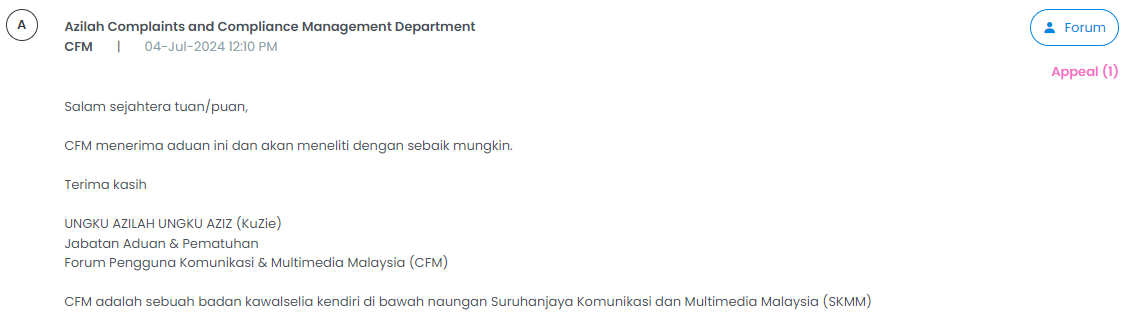 This post has been edited by sHawTY: Aug 5 2024, 11:46 AM |
|
|
Aug 5 2024, 12:11 PM
Show posts by this member only | IPv6 | Post
#4180
|

Senior Member
3,305 posts Joined: Dec 2012
|
QUOTE(RViN @ Aug 5 2024, 10:53 AM) I didn't note down what firmware version I had when I originally got the ONR so I didn't check yesterday. Is your black ONR firmware version DPN-FX3060V_V2.0.2? I just did a quick speed test and noticed that my speed dropped to 300 Mbps, the first time this has happened since I got the black ONR in early June.Well its like this - power went out yesterday at some point, I decided to go out for dinner, came home few hours later to the internet not working. Rebooted both the ONR and my Asus router a few times, nothing changed. Turns out the configuration on the ONR was changed (not by me) to I suppose terminate the VLAN tagging on the ONR, so my router which had the same config its always had (VLAN tagging enabled with specific Unifi config) couldn't connect/route traffic any more - killing my internet. Through some experimentation I changed the router PPPoE settings to default (removing the ISP requirement for VLANs) and was able to connect then. In terms of bridge mode issues - yes I believe after a few hours my connection going to get limited to 300mbps instead of 1gbps which has always been a problem with this black DLINK 2.5g ONR or the OLT I'm connected to. Though I'm not sure if this same issue would occur if its used in router mode or not. I’m not sure if this is due to my recent router firmware update or the black ONR. I’ll need a few days to minitor it. I am aware that my router firmware has issues with Wi-Fi disabling, but reverting to the old firmware will no longer have issue. Hopefully, it’s a router firmware issue and not something Unifi is doing behind the scenes. |
|
Topic ClosedOptions
|
| Change to: |  0.0212sec 0.0212sec
 0.43 0.43
 6 queries 6 queries
 GZIP Disabled GZIP Disabled
Time is now: 5th December 2025 - 07:06 AM |
 Quote
Quote