Welcome Guest ( Log In | Register )

Bump Topic Topic Closed RSS Feed

Outline · [ Standard ] · Linear+

Unifi Official TM UniFi High Speed Broadband Thread V42, READ 1ST PAGE FOR RELEVANT WIFI INFO!

views
     
PRSXFENG
post Jul 21 2024, 11:48 AM

Look at all my stars!!
*******
Senior Member
2,616 posts

Joined: Nov 2020


QUOTE(Jeffreynsx @ Jul 21 2024, 09:49 AM)
If the ISP Profile set to None in LAN > IPTV from Asus Router. The VOIP will it work if I set the stock TM router to Bridge Mode?
*
because in this case, the vlan is handled by the skyworth, not the asus
its just how these combo ones work

the voip ports on the skyworth should still work
dannychen
post Jul 21 2024, 11:49 AM

Regular
******
Senior Member
1,264 posts

Joined: Dec 2009
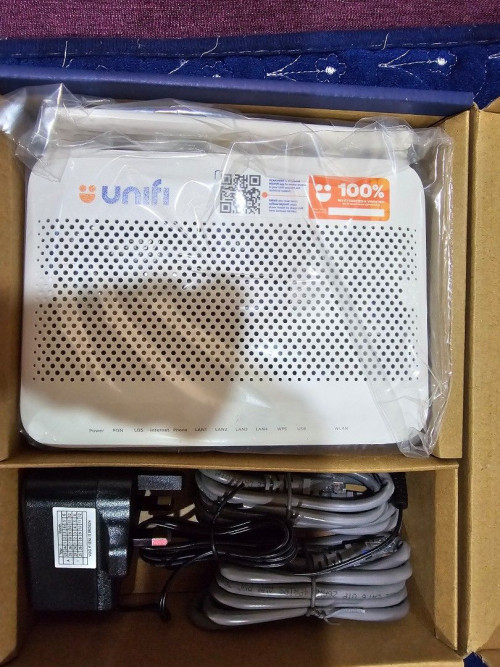
Changed to RM99 for 300mbps package (Unifi Home 300mbps Hebat Deal (Special)) via telemarketing offer. free three months and free combo box, renewed 24 months contract. yesterday evening technician came and installed it with Fiberhome AX3000 Combo Box with only 2 antennas. Look cheapskate to me.

user posted image

user posted image
Micky78
post Jul 21 2024, 11:52 AM

Regular
******
Senior Member
1,193 posts

Joined: Nov 2008
From: Cheras


wanted to change plan as not using iptv, call 100 and staff asked me to walk in unifi store.. thinking whether to port out via maxis online which is more convinient.. current at 500mbps (free upgrade fr 300mbps plan) at rm159 b4 ST

pokchik
post Jul 21 2024, 11:54 AM

I'm getting too old for this sh*t
******
Senior Member
1,304 posts

Joined: Mar 2010


QUOTE(dannychen @ Jul 21 2024, 11:49 AM)
Changed to RM99 for 300mbps package (Unifi Home 300mbps Hebat Deal (Special)) via telemarketing offer. free three months and free combo box, renewed 24 months contract. yesterday evening technician came and installed it with Fiberhome AX3000 Combo Box with only 2 antennas. Look cheapskate to me.

user posted image

user posted image
*
to be fair, 300Mbps for RM99 IS a cheapskate combo based on MY 'standard'.

but then again, tbh - you don't put your hopes up so much for TM on their provided equipment.
Micky78
post Jul 21 2024, 11:58 AM

Regular
******
Senior Member
1,193 posts

Joined: Nov 2008
From: Cheras


QUOTE(pokchik @ Jul 21 2024, 11:54 AM)
to be fair, 300Mbps for RM99 IS a cheapskate combo based on MY 'standard'.

but then again, tbh - you don't put your hopes up so much for TM on their provided equipment.
*
meaning this is the standard wifi 6 router (combo) igiven out for all?
askm
post Jul 21 2024, 12:09 PM

Getting Started
**
Junior Member
134 posts

Joined: Sep 2016


QUOTE(dannychen @ Jul 21 2024, 11:49 AM)
Changed to RM99 for 300mbps package (Unifi Home 300mbps Hebat Deal (Special)) via telemarketing offer. free three months and free combo box, renewed 24 months contract. yesterday evening technician came and installed it with Fiberhome AX3000 Combo Box with only 2 antennas. Look cheapskate to me.


*
This device combo with TM hidden t&c, it only provide 1 year warranty compared with previously separate devices (modem & router). Modem is lifetime warranty. After finish warranty once rosak, you will makan sendiri.

TM also offer me that Hebat Deal (Special) free 3mth with free combo & re-contract, but i rejected.
NotHideOnBush
post Jul 21 2024, 06:03 PM

Getting Started
**
Junior Member
59 posts

Joined: Jul 2018
Hi guys, planning to downgrade my current fibre plan with maxis 300 mbps RM129/month when contract ends in December 2024 to Unifi RM89/month 100 mbps for savings.

May I know what is the process for switching fibre provider?

Is there any better budget deals than RM89/month 100 mbps unifi?
dannychen
post Jul 21 2024, 07:44 PM

Regular
******
Senior Member
1,264 posts

Joined: Dec 2009
QUOTE(pokchik @ Jul 21 2024, 11:54 AM)
to be fair, 300Mbps for RM99 IS a cheapskate combo based on MY 'standard'.

but then again, tbh - you don't put your hopes up so much for TM on their provided equipment.
*
QUOTE(Micky78 @ Jul 21 2024, 11:58 AM)
meaning this is the standard wifi 6 router (combo) igiven out for all?
*
QUOTE(askm @ Jul 21 2024, 12:09 PM)
This device combo with TM hidden t&c, it only provide 1 year warranty compared with previously separate devices (modem & router). Modem is lifetime warranty. After finish warranty once rosak, you will makan sendiri.

TM also offer me that Hebat Deal (Special) free 3mth with free combo & re-contract, but i rejected.
*
Technician replaced 6-7years old Huawei HG8240W with Fiberhome HG6145F3 Combo Box.

Free three months, is not too bad after-all. Effective price is RM86 for 24 months.

Still lower than their usual R.R.P.

blacktubi
post Jul 21 2024, 09:28 PM

-
Group Icon
Elite
8,427 posts

Joined: Jul 2008

QUOTE(NotHideOnBush @ Jul 21 2024, 06:03 PM)
Hi guys, planning to downgrade my current fibre plan with maxis 300 mbps RM129/month when contract ends in December 2024 to Unifi RM89/month 100 mbps for savings.

May I know what is the process for switching fibre provider?

Is there any better budget deals than RM89/month 100 mbps unifi?
*
Just apply at any TM agent and call Maxis Fiber for termination.

But, Maxis retention team is amazing and they can always price match and come out with super good offer.
aa123aa
post Jul 21 2024, 11:23 PM

Getting Started
**
Junior Member
180 posts

Joined: Mar 2015
1gbps user with black dlink combo (set to bridge mode) + asus ax3000 router. having issue with speed drop to only 200download/100upload (both lan and wifi also same speed) + tested with laptop with wifi6E. Have to keep restarting modem to get the usual speed after 2/3 hours everytime.

Anyone experience similar issue ? any solution to this? thanks.
blacktubi
post Jul 21 2024, 11:35 PM

-
Group Icon
Elite
8,427 posts

Joined: Jul 2008

QUOTE(aa123aa @ Jul 21 2024, 11:23 PM)
1gbps user with black dlink combo (set to bridge mode) + asus ax3000 router. having issue with speed drop to only 200download/100upload (both lan and wifi also same speed) + tested with laptop with wifi6E. Have to keep restarting modem to get the usual speed after 2/3 hours everytime.

Anyone experience similar issue ? any solution to this? thanks.
*
Already few users reporting same problem

The only solution is to use back your old modem and live with 940Mbps for now
aa123aa
post Jul 22 2024, 12:00 AM

Getting Started
**
Junior Member
180 posts

Joined: Mar 2015
QUOTE(blacktubi @ Jul 21 2024, 11:35 PM)
Already few users reporting same problem

The only solution is to use back your old modem and live with 940Mbps for now
*
Thanks. so i'not the only one. wonder can i just unplug the all dlink cable and plug it back the fiberhome modem and use it? or do i need tm team to do some setting?

This post has been edited by aa123aa: Jul 22 2024, 12:00 AM
blacktubi
post Jul 22 2024, 12:04 AM

-
Group Icon
Elite
8,427 posts

Joined: Jul 2008

QUOTE(aa123aa @ Jul 22 2024, 12:00 AM)
Thanks. so i'not the only one. wonder can i just unplug the all dlink cable and plug it back the fiberhome modem and use it? or do i need tm team to do some setting?
*
Yea you should be able to do that usually
NagaK
post Jul 22 2024, 12:09 AM

Regular
******
Senior Member
1,196 posts

Joined: Sep 2018


QUOTE(aa123aa @ Jul 21 2024, 11:23 PM)
1gbps user with black dlink combo (set to bridge mode) + asus ax3000 router. having issue with speed drop to only 200download/100upload (both lan and wifi also same speed) + tested with laptop with wifi6E. Have to keep restarting modem to get the usual speed after 2/3 hours everytime.

Anyone experience similar issue ? any solution to this? thanks.
*
I'm the one affected with that.When I plug my old modem not worked TM technician came and changed to Skyworth combo box . But I keep and resetup and re use Fiberhome modem and live with 940mbps. So far no issues speed also consistent

This post has been edited by NagaK: Jul 22 2024, 12:11 AM
aa123aa
post Jul 22 2024, 12:29 AM

Getting Started
**
Junior Member
180 posts

Joined: Mar 2015
QUOTE(NagaK @ Jul 22 2024, 12:09 AM)
I'm the one affected with that.When I plug my old modem not worked TM technician came and changed to Skyworth combo box . But I keep and resetup and re use Fiberhome modem and live with 940mbps. So far no issues speed also consistent
*
still need to do any setting for the white fiberhome modem? or just plug in the cable already can use?
is it due to the black dlink faulty unit?

This post has been edited by aa123aa: Jul 22 2024, 12:35 AM
NagaK
post Jul 22 2024, 02:29 AM

Regular
******
Senior Member
1,196 posts

Joined: Sep 2018


QUOTE(aa123aa @ Jul 22 2024, 12:29 AM)
still need to do any setting for the white fiberhome modem? or just plug in the cable already can use?
is it due to the black dlink faulty unit?
*
Mine they said when they changed black box my profile binded with new combo box so they reset back. But others can reuse their old modem without setup by plug fiber cable. Try it if works means luck
ssslayerrr
post Jul 22 2024, 07:13 AM

Enthusiast
*****
Senior Member
805 posts

Joined: Dec 2004


QUOTE(aa123aa @ Jul 21 2024, 11:23 PM)
1gbps user with black dlink combo (set to bridge mode) + asus ax3000 router. having issue with speed drop to only 200download/100upload (both lan and wifi also same speed) + tested with laptop with wifi6E. Have to keep restarting modem to get the usual speed after 2/3 hours everytime.

Anyone experience similar issue ? any solution to this? thanks.
*
Yes another user (RViN) here has the same problem with the black onu. I have the problem with my white ONU.

I changed a setting in my mikrotik router, enabled multi-queue-ethernet-default on the hardware interface.

I thought the problem was solved, it lasted 4 days, but I checked just now, the speed is down to 300/100 again.

LIke yourself, restarting the ONU restores the speed

That site is using the Unifi Biz 1gbps plan

This post has been edited by ssslayerrr: Jul 22 2024, 07:16 AM
hussain
post Jul 22 2024, 09:30 AM

Look at all my stars!!
*******
Senior Member
2,012 posts

Joined: Dec 2007
From: Malaysia


QUOTE(aa123aa @ Jul 21 2024, 11:23 PM)
1gbps user with black dlink combo (set to bridge mode) + asus ax3000 router. having issue with speed drop to only 200download/100upload (both lan and wifi also same speed) + tested with laptop with wifi6E. Have to keep restarting modem to get the usual speed after 2/3 hours everytime.

Anyone experience similar issue ? any solution to this? thanks.
*
yes i experience speed drop yesterday too.. same setup as yours
aa123aa
post Jul 22 2024, 11:56 AM

Getting Started
**
Junior Member
180 posts

Joined: Mar 2015
have to keep restarting the modem every 30min coz the speed drop to around 100mbps only. something is wrong with dlink black box thing. technician got no solution to this.

if use back fiberhome as modem (instead of the black combo), the max speed:-
wifi - 700+-mbps
lan - 800+- mbps

are these speed consider normal due to hardware limitation? tq

This post has been edited by aa123aa: Jul 22 2024, 12:09 PM
NagaK
post Jul 22 2024, 01:04 PM

Regular
******
Senior Member
1,196 posts

Joined: Sep 2018


QUOTE(aa123aa @ Jul 22 2024, 11:56 AM)
have to keep restarting the modem every 30min coz the speed drop to around 100mbps only. something is wrong with dlink black box thing. technician got no solution to this.

if use back fiberhome as modem (instead of the black combo), the max speed:-
wifi - 700+-mbps
lan - 800+- mbps

are these speed consider normal due to hardware limitation? tq
*
Mostly hardware issue I give back black box to TM and re use fiber home modem no issue.

Topic ClosedOptions
 

Change to:
| Lo-Fi Version
0.0487sec    0.40    6 queries    GZIP Disabled
Time is now: 24th December 2025 - 03:27 AM