Welcome Guest ( Log In | Register )

Bump Topic Topic Closed RSS Feed

Outline · [ Standard ] · Linear+

Unifi Official TM UniFi High Speed Broadband Thread V42, READ 1ST PAGE FOR RELEVANT WIFI INFO!

views
     
PRSXFENG
post Jul 3 2024, 10:41 AM

Look at all my stars!!
*******
Senior Member
2,608 posts

Joined: Nov 2020


QUOTE(jaya7 @ Jul 3 2024, 10:24 AM)
Hi All,

i recently upgrade to Unifi 2gbps and using their default router+modem. What's the best way to get full 2gbps on a single lan port? i know it has been discussed few times. appreciate if you can direct me to posts related to it. Soon, ill be moving to new home and will be running router + network splitter setup to enable multiple lan ports at home. So, looking at a modem router that will bypass unifi default 1gbps segregated speed limit for future use.

thank you.
*
looks like you are looking for a solution, so I will direct you to Anime4000

https://forum.lowyat.net/index.php?showtopic=4925452
cHiLdHo0drEaMz
post Jul 3 2024, 10:49 AM

#DBAP
******
Senior Member
1,031 posts

Joined: Jun 2011
From: #KajangTop


QUOTE(xjoshualaw29 @ Jul 3 2024, 10:18 AM)
Yea, just starting. You can try your luck haha.
*
Wish to know what they offer for SWU 5.0 for 2Gbps plan 😁
jaya7
post Jul 3 2024, 10:57 AM

Getting Started
**
Junior Member
59 posts

Joined: Oct 2005


QUOTE(PRSXFENG @ Jul 3 2024, 10:41 AM)
looks like you are looking for a solution, so I will direct you to Anime4000

https://forum.lowyat.net/index.php?showtopic=4925452
*
tq. i have contacted him for solution smile.gif
jaya7
post Jul 3 2024, 10:58 AM

Getting Started
**
Junior Member
59 posts

Joined: Oct 2005


QUOTE(Oltromen Ripot @ Jul 3 2024, 10:32 AM)
you can't with the white ONR. period.
hardware limitation.
even if you somehow magically able to bond (the ONR does not support aggregation/bonding/trunking), individual network thread is limited to theoretical maximum of 940Mbps. so your application need to create 2 threads to run through 2 ports at same time in order to potentially reach 2x940Mbps.

that's why TM's  2Gbps documentation says if you want to know max speed test, you need 2 machines each with 1Gbe cable to do the test at same time, in order to saturate 2 ports of the white ONR. and then you have to summ the values from both machines.

technician TM pun menyumpah. bila mereka komplen macam mana nak buat speedtest customer minta, TM suruh mereka bawa 2 laptop ke site. gila.

that Dlink AIR app is total crap. siapa yang tulis app dlink tu patut dibuang kerja dan di blacklist daripada menjawat apa-apa kerja IT dengan mana-mana firma, kecil atau besar, seumur hidup.
*
ever since i changed to 2gps connection, my office laptop will drop connection whenever im having meeting (Teams). Same for 2g and 5g connections.. fed up already..
Oltromen Ripot
post Jul 3 2024, 11:10 AM

👍 999999 person Likes this member
*******
Senior Member
4,034 posts

Joined: Dec 2019
QUOTE(jaya7 @ Jul 3 2024, 10:58 AM)
ever since i changed to 2gps connection, my office laptop will drop connection whenever im having meeting (Teams). Same for 2g and 5g connections.. fed up already..
*
i limit the ONR to only be on 2.4GHz.
i cabled M9 Plus and use it only on 5GHz.
basically i "disabled" band steering by using separate hardware.

fast roaming 802.11k/v/r can wreak havoc.
802.11k supplies clients with list of known related APs, so client get a ready list of alternatives to switch to and does not need to perform own scan.

802.11r makes it possible for client to switch to alternative APs immediately by exchanging already-authenticated token with related AP it is switching to, instead of having to repeat the whole authentication cycle as if hooking to new unrelated AP.

802.11v is when AP pushes "better" recommendation to client. i think band steering is under here.
Anime4000
post Jul 3 2024, 11:36 AM

Look at all my stars!!
*******
Senior Member
2,399 posts

Joined: Jul 2009
From: /dev/null


QUOTE(Oltromen Ripot @ Jul 3 2024, 11:10 AM)
fast roaming 802.11k/v/r can wreak havoc.
Yes, many device not support such feature, even enable it, some laptop cannot connect
Azims
post Jul 3 2024, 12:08 PM

Getting Started
**
Junior Member
211 posts

Joined: Oct 2014
QUOTE(jaya7 @ Jul 3 2024, 10:58 AM)
ever since i changed to 2gps connection, my office laptop will drop connection whenever im having meeting (Teams). Same for 2g and 5g connections.. fed up already..
*
there might be compatibility issue with 160MHz wifi with your laptop. I'm just assuming, don't know the whole story.
kimgy86
post Jul 3 2024, 12:08 PM

Getting Started
**
Junior Member
293 posts

Joined: Jul 2011
Anyone got good wiring contractor to recommend at Subang Jaya area?
the contractor whole morning not pickup phone call...
TQ
jaya7
post Jul 3 2024, 01:35 PM

Getting Started
**
Junior Member
59 posts

Joined: Oct 2005


QUOTE(Oltromen Ripot @ Jul 3 2024, 11:10 AM)
i limit the ONR to only be on 2.4GHz.
i cabled M9 Plus and use it only on 5GHz.
basically i "disabled" band steering by using separate hardware.

fast roaming 802.11k/v/r can wreak havoc.
802.11k supplies clients with list of known related APs, so client get a ready list of alternatives to switch to and does not need to perform own scan.

802.11r makes it possible for client to switch to alternative APs immediately by exchanging already-authenticated token with related AP it is switching to, instead of having to repeat the whole authentication cycle as if hooking to new unrelated AP.

802.11v is when AP pushes "better" recommendation to client. i think band steering is under here.
*
i might try this. Off the WLAN on the Unifi DLink router and use my TendaAC1900 as wifi modem. It worked like charm when i was on 800mbps package. Steady like rock.
jaya7
post Jul 3 2024, 01:42 PM

Getting Started
**
Junior Member
59 posts

Joined: Oct 2005


QUOTE(Azims @ Jul 3 2024, 12:08 PM)
there might be compatibility issue with 160MHz wifi with your laptop. I'm just assuming, don't know the whole story.
*
5g on 80hz fixed
2.4g on 20/40
jiaen0509
post Jul 3 2024, 01:52 PM

Look at all my stars!!
*******
Senior Member
3,305 posts

Joined: Dec 2012
QUOTE(cHiLdHo0drEaMz @ Jul 3 2024, 10:49 AM)
Wish to know what they offer for SWU 5.0 for 2Gbps plan 😁
*
Hope there is info on this. Interested to know.
YoungMan
post Jul 3 2024, 02:43 PM

Look at all my stars!!
*******
Senior Member
6,817 posts

Joined: Oct 2008
From: Kuala Lumpur


QUOTE(xjoshualaw29 @ Jul 3 2024, 10:22 AM)
Yea, I just MNP from my Umobile line cuz 5G getting unstable so port over to Hotlink.

For the Maxis part, see how lo. Waiting Unifi tech team come and change the modem and then see how to resolve locally in Kuching. But if KL side still cap my speed, make SKMM lo with unsatisfied resolution and keep them piling  bruce.gif
*
Ok, keep us updated on the Maxis thread.

QUOTE(kimgy86 @ Jul 3 2024, 12:08 PM)
Anyone got good wiring contractor to recommend at Subang Jaya area?
the contractor whole morning not pickup phone call...
TQ
*
Try look for TM unifi group on FB, there are TM technician in there who might be able to help out.
Rhetoric
post Jul 3 2024, 04:08 PM

On my way
****
Junior Member
553 posts

Joined: Mar 2018
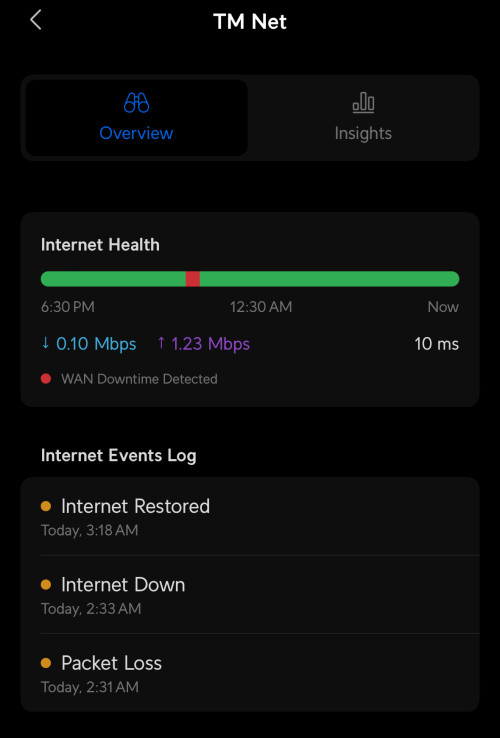
Did they ever mention the reason for last night almost nationwide internet interruption?.
yenchenje
post Jul 3 2024, 06:18 PM

Enthusiast
*****
Junior Member
932 posts

Joined: Dec 2019
Around 45 mins of downtime ystd, checked unifi alerts and apparently Permas Jaya cable got cut at around this time, but their report is later than my UDM SE detection which is weird, only know this happened when I see my little brother WhatsApp me at that time laugh.gif user posted image
Kadaj
post Jul 3 2024, 08:36 PM

On my way
****
Junior Member
586 posts

Joined: Mar 2006
I think last night incident happened nationwide.
As usual, expect no announcement from TM.
aniq8676
post Jul 3 2024, 08:52 PM

Regular
******
Senior Member
1,524 posts

Joined: Dec 2020
From: Perak


QUOTE(Kadaj @ Jul 3 2024, 08:36 PM)
I think last night incident happened nationwide.
As usual, expect no announcement from TM.
*
Maybe some users are affected,
because I didn't experience any service interruptions last night
Epic_winner091
post Jul 3 2024, 10:21 PM

Casual
***
Junior Member
338 posts

Joined: Mar 2010
From: Shah Alam


I'm not generally a believer of "xxx.xxx.xxx.xxx" IP range better.

However, I noticed I had a 115.xxx.xxx.xxx IP and I notice little to minimal slow downs during the "usual hours".

I'm now back on a 175 IP and certain sites and services started to slow down again.
olivur
post Jul 3 2024, 11:00 PM

ollie ollie oxen free
******
Senior Member
1,280 posts

Joined: Jul 2011
neither am I but 118.xx range was utter cheeks for me
dev/numb
post Jul 3 2024, 11:04 PM

On my way
****
Junior Member
691 posts

Joined: Nov 2021
QUOTE(aniq8676 @ Jul 3 2024, 08:52 PM)
Maybe some users are affected,
because I didn't experience any service interruptions last night
*
It was very weird. I was streaming football on my iPad using a VPN connected to a SG server and everything seemed normal, but my phone (not connected to VPN) suddenly gave a notification saying it couldn’t connect to my DNS provider (NextDNS). After doing some tests, I found that I couldn’t connect to NextDNS (the service wasn’t down because it worked fine on 5G data) but Cloudflare DNS was working. Pinging some VPN servers in SG showed that connections to DataPacket servers were fine while M247 servers all couldn’t connect.
sHawTY
post Jul 4 2024, 12:35 AM

Frequent Reporter
********
All Stars
14,909 posts

Joined: Jul 2005

Unifi down in Subang Jaya?

EDIT:
Yes, it appears there's an ongoing issue with Unifi in Subang Jaya. I just spoke with their live chat support, and they mentioned there will be intermittent disconnections until 6 AM due to scheduled upgrades they're working on.

This post has been edited by sHawTY: Jul 4 2024, 01:05 AM

Topic ClosedOptions
 

Change to:
| Lo-Fi Version
0.0204sec    0.33    6 queries    GZIP Disabled
Time is now: 14th December 2025 - 09:52 AM