Welcome Guest ( Log In | Register )

Bump Topic Topic Closed RSS Feed

Outline · [ Standard ] · Linear+

Unifi Official TM UniFi High Speed Broadband Thread V42, READ 1ST PAGE FOR RELEVANT WIFI INFO!

views
     
stella_purple
post Jun 29 2024, 09:42 PM

Casual
***
Junior Member
392 posts

Joined: Oct 2011
QUOTE(tng55 @ Jun 29 2024, 09:17 PM)
mine ip range 42.189 daam bad wait i going office ip range 175.xxx
QUOTE(Maxieos @ Jun 29 2024, 09:36 PM)
ping 143.92.75.82

....................
72 packets transmitted, 61 received, 15% packet loss, time 71201ms
rtt min/avg/max/mdev = 1463.327/1662.818/1791.361/76.744 ms, pipe 2

Private ip , 180.75 .Private Ip are stuck with few of it.There is no other way except vpn or using mobile network.
Been happen since 6 months ago.

Can't just buy or subcribe , need to test how good is it.Actually I don't even need vpn if everything smooth , just normal browsing and shopping.If there is hourly base vpn like rm1 = 10GB transfer i don't mind.
Hardly even use 1GB for browsing and shopping in a week.

Another issue is I need a router than can set vpn.The stock TM router doesn't have this option.

Can suggest me a vpn router option ? a cheaper router wifi 6 or 5 also can
*
try traceroute to shopee

CODE
tracert shopee.com.my


anyone with issues access shopee, can email help@tm.com.my with your Ping Plotter/traceroute/ping result.

post at forum won't help, you all need to feedback the issue to tm, else they treat like nothing happened as no user complain.

This post has been edited by stella_purple: Jun 29 2024, 09:55 PM
tng55
post Jun 29 2024, 09:43 PM

Regular
******
Senior Member
1,444 posts

Joined: Sep 2021


QUOTE(countingcrows @ Jun 29 2024, 09:22 PM)
shopee.com.my for me resolves to another IP.

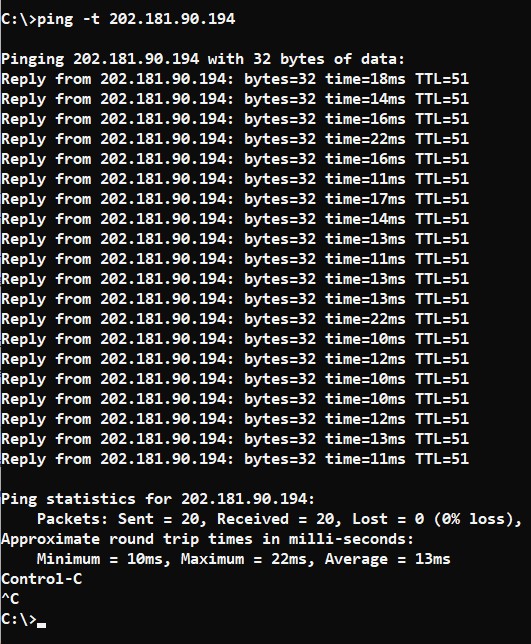
I tried pinging 202.181.90.194 like yours and its fine...
user posted image
*
hey
i already go office ip range is 115.133.xxx.xxx.xxx
ping seeen good

Attached Image

daaam i stuck ip 42.189 sigh how i get ip change sad

my office last ip was 175.xxx
suddenly my office power outage lol now become 115.133.xxx seen good resuit
syahpian
post Jun 29 2024, 09:44 PM

Enthusiast
*****
Junior Member
813 posts

Joined: Jul 2008
From: Kota Kinabalu <-> Kuala Lumpur


QUOTE(Maxieos @ Jun 29 2024, 09:36 PM)
Can't just buy or subcribe , need to test how good is it.Actually I don't even need vpn if everything smooth , just normal browsing and shopping.If there is hourly base vpn like rm1 = 10GB transfer i don't mind.
Hardly even use 1GB for browsing and shopping in a week.

Another issue is I need a router than can set vpn.The stock TM router doesn't have this option.

Can suggest me a vpn router option ? a cheaper router wifi 6 or 5 also can
*
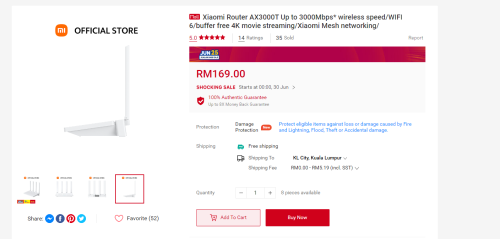
for router, maybe this, someone post it previously here. it support openwrt,

user posted image

for vpn, if you dont mind to use crypto vpn biggrin.gif

https://mathnodes.com/

it from sentinel blockchain

they have hourly and monthly sub, but for pc and mobile only

mobile version have free to use app

one more option

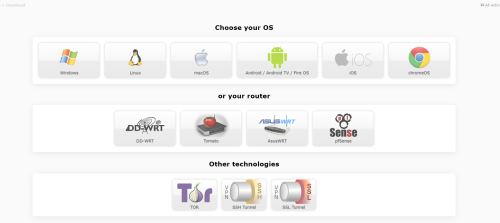
https://airvpn.org/

this one support vpn on router


user posted image

This post has been edited by syahpian: Jun 29 2024, 09:51 PM
john123x
post Jun 29 2024, 09:50 PM

Look at all my stars!!
*******
Senior Member
3,019 posts

Joined: Oct 2005


i use vpn, just to access shopee.

ironically, i access Malaysia VPN just to access shopee malaysia...
john123x
post Jun 29 2024, 09:53 PM

Look at all my stars!!
*******
Senior Member
3,019 posts

Joined: Oct 2005


QUOTE
Tracing route to shopee.com.my [202.181.90.194]
over a maximum of 30 hops:

  1    1 ms    <1 ms    <1 ms  192.168.1.1
  2    4 ms    3 ms    2 ms  100.96.63.254
  3    3 ms    3 ms    3 ms  10.233.33.93
  4    8 ms    6 ms    6 ms  10.55.100.246
  5    72 ms    16 ms    9 ms  203.116.89-53.unknown.starhub.net.sg [203.116.89.53]
  6    10 ms    10 ms    9 ms  203.116.3-74.unknown.starhub.net.sg [203.116.3.74]
  7  1825 ms    *    1632 ms  203.116.31.78
  8  1742 ms  1862 ms  1844 ms  143.92.108.198
  9  2058 ms  2060 ms  2079 ms  143.92.119.128
10  2109 ms  2067 ms  1912 ms  143.92.119.131
11    *    1809 ms  1808 ms  10.254.241.179
12  2103 ms  2118 ms  2044 ms  10.254.2.237
13  1889 ms  1882 ms    *    202.181.90.194
14  1759 ms  1638 ms    *    202.181.90.194
15  1858 ms    *    1837 ms  202.181.90.194

Trace complete.
guys , please tell me where is the problem
Maxieos
post Jun 29 2024, 09:56 PM

Look at all my stars!!
*******
Senior Member
3,765 posts

Joined: May 2008
QUOTE(stella_purple @ Jun 29 2024, 09:42 PM)
try traceroute to shopee

CODE
tracert shopee.com.my


anyone with shopee issue, can email help@tm.com.my with your Ping Plotter/traceroute/ping result.
*
I tracert before last month , it's issue with starhub
» Click to show Spoiler - click again to hide... «

stella_purple
post Jun 29 2024, 09:58 PM

Casual
***
Junior Member
392 posts

Joined: Oct 2011
QUOTE(Maxieos @ Jun 29 2024, 09:56 PM)
I tracert before last month , it's issue with starhub
» Click to show Spoiler - click again to hide... «

*
so far no issue with starhub, it seems like only affect certain IP.

only tm can fix this.

This post has been edited by stella_purple: Jun 29 2024, 10:14 PM
Maxieos
post Jun 29 2024, 10:06 PM

Look at all my stars!!
*******
Senior Member
3,765 posts

Joined: May 2008
QUOTE(john123x @ Jun 29 2024, 09:41 PM)
i have checked, your right, my ip is 180....

what do you think is the problem?

its it because Malaysia is a shithole?
*
Done , restart your router get 115.135. , everything back to normal.Not sure what will happen later.Last time all private IP also have issue.
TubeNRibbon
post Jun 29 2024, 10:29 PM

Getting Started
**
Junior Member
176 posts

Joined: May 2008
Just wanted to update my issue with the 1Gbps connection drop to below 300Mbps.

1. Reported to TM and not one came to fix the problem.
2. After reboot the router the internet connection back to normal.
3. Added a fan to cold down the router unfortunately is not related to the heat issue.

The problem is related to TM network or maybe a faulty router.


budi1413
post Jun 29 2024, 10:54 PM

Regular
******
Senior Member
1,607 posts

Joined: Aug 2013


QUOTE(Maxieos @ Jun 29 2024, 09:36 PM)
ping 143.92.75.82
PING 143.92.75.82 (143.92.75.82) 56(84) bytes of data.
64 bytes from 143.92.75.82: icmp_seq=2 ttl=55 time=1791 ms
64 bytes from 143.92.75.82: icmp_seq=3 ttl=55 time=1760 ms
64 bytes from 143.92.75.82: icmp_seq=4 ttl=55 time=1731 ms
64 bytes from 143.92.75.82: icmp_seq=5 ttl=55 time=1723 ms
64 bytes from 143.92.75.82: icmp_seq=6 ttl=55 time=1726 ms
64 bytes from 143.92.75.82: icmp_seq=7 ttl=55 time=1716 ms
64 bytes from 143.92.75.82: icmp_seq=8 ttl=55 time=1711 ms
64 bytes from 143.92.75.82: icmp_seq=9 ttl=55 time=1704 ms
64 bytes from 143.92.75.82: icmp_seq=10 ttl=55 time=1657 ms
....................
72 packets transmitted, 61 received, 15% packet loss, time 71201ms
rtt min/avg/max/mdev = 1463.327/1662.818/1791.361/76.744 ms, pipe 2

Private ip , 180.75 .Private Ip are stuck with few of it.There is no other way except vpn or using mobile network.
Been happen since 6 months ago.

Can't just buy or subcribe , need to test how good is it.Actually I don't even need vpn if everything smooth , just normal browsing and shopping.If there is hourly base vpn like rm1 = 10GB transfer i don't mind.
Hardly even use 1GB for browsing and shopping in a week.

Another issue is I need a router than can set vpn.The stock TM router doesn't have this option.

Can suggest me a vpn router option ? a cheaper router wifi 6 or 5 also can
*
my setup:

mi 4a gigabit with openwrt firmware + wireguard
+
ovh vps starter sg location
+
https://github.com/Nyr/wireguard-install

tested a lot of sg vps provider, ovh sg network is the bestest even at night time.
SUSMyProLife
post Jun 29 2024, 11:16 PM

I bully wumao & MPKL
*******
Senior Member
2,075 posts

Joined: Sep 2021
From: nowhere

QUOTE(syahpian @ Jun 29 2024, 09:44 PM)
for router, maybe this, someone post it previously here. it support openwrt,

user posted image

for vpn, if you dont mind to use crypto vpn  biggrin.gif

https://mathnodes.com/

it from sentinel blockchain

they have hourly and monthly sub, but for pc and mobile only

mobile version have free to use app

one more option

https://airvpn.org/

this one support vpn on router
user posted image
*
Note: i dont recomm buying global version if the only purpose is just for flashing owrt. You can look up their forum. Very complex to flash

If stock firmware supports vpn client, there is no reason to flash owrt
Maxieos
post Jun 29 2024, 11:29 PM

Look at all my stars!!
*******
Senior Member
3,765 posts

Joined: May 2008
QUOTE(budi1413 @ Jun 29 2024, 10:54 PM)
my setup:

mi 4a gigabit with openwrt firmware + wireguard
+
ovh vps starter sg location
+
https://github.com/Nyr/wireguard-install

tested a lot of sg vps provider, ovh sg network is the bestest even at night time.
*
Private or Public IP ?
TM stock dlink router , not possible to flash as I only have 1 router working and household all need to use it , except I have an extra router.
That is why I need to find a cheap 2nd router for backup or for vpn flashing.
yenchenje
post Jun 30 2024, 12:02 AM

Enthusiast
*****
Junior Member
932 posts

Joined: Dec 2019
1Gbps here and so far I don't think I've encountered any slowdowns even after like 2-3 IP changes for the past few days

Feels like all the slowdowns I've seen here is local Unifi GW going to overseas CDN before routing back to Shopee?

CODE
 1    <1 ms    <1 ms    <1 ms  unifi.udsmse.x.x [10.20.10.1]
 2     9 ms     5 ms     3 ms  Public IP
 3     9 ms     8 ms     8 ms  10.55.106.15
 4     8 ms     8 ms     8 ms  10.55.100.82
 5     *       10 ms     9 ms  203.116.89-53.unknown.starhub.net.sg [203.116.89.53]
 6    22 ms    10 ms    13 ms  203.116.3-74.unknown.starhub.net.sg [203.116.3.74]
 7    11 ms    10 ms    10 ms  203.116.31.78
 8    10 ms    10 ms    10 ms  143.92.108.198
 9     *        *        *     Request timed out.
10     *        *        *     Request timed out.
11    11 ms    11 ms    10 ms  10.254.241.179
12    11 ms    11 ms    11 ms  10.254.2.217
13    10 ms    10 ms    10 ms  202.181.90.194


60.x, no third party DNS, all just default TM DNS hmm.gif
SwarmTroll
post Jun 30 2024, 02:13 AM

Regular
******
Senior Member
1,402 posts

Joined: Apr 2012
Hi guys, is there any side effects if I disable IPv6? Is it okay if I just use IPv4 for now? Will be setting in router configuration.
heLL_bOy
post Jun 30 2024, 09:49 AM

Regular
******
Senior Member
1,350 posts

Joined: Nov 2004
From: HEAVEN & HELL


QUOTE(SwarmTroll @ Jun 30 2024, 02:13 AM)
Hi guys, is there any side effects if I disable IPv6? Is it okay if I just use IPv4 for now? Will be setting in router configuration.
*
No side effect, most of the sites or servers not fully implement IPv6 yet.

You may turn ipv6 off at your router configuration.
Epic_winner091
post Jun 30 2024, 11:04 AM

Casual
***
Junior Member
339 posts

Joined: Mar 2010
From: Shah Alam


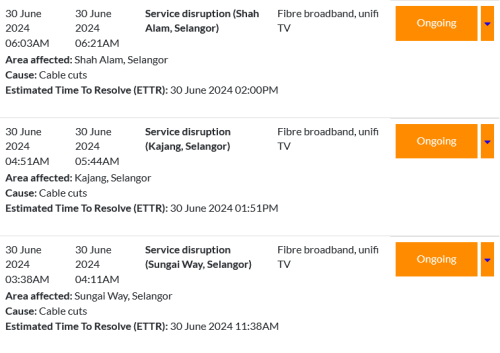
Is there an outage in the Shah Alam area?
SUSMyProLife
post Jun 30 2024, 01:26 PM

I bully wumao & MPKL
*******
Senior Member
2,075 posts

Joined: Sep 2021
From: nowhere

Suddenly cannot surf lowyat, Reddit or GitHub

Also shah Alan area.

FB seems okay
aniq8676
post Jun 30 2024, 04:23 PM

Regular
******
Senior Member
1,524 posts

Joined: Dec 2020
From: Perak


QUOTE(Epic_winner091 @ Jun 30 2024, 11:04 AM)
Is there an outage in the Shah Alam area?
*
user posted image
Cable cuts
Edlois
post Jul 1 2024, 01:47 AM

New Member
*
Newbie
28 posts

Joined: Jan 2016
From: Kuala Lumpur


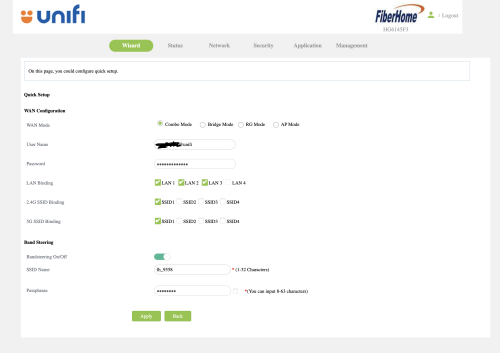
user posted image


Tm unifi just upgraded my plan to 800mbps. and gave me this Fiberhome HG6145F3.

I had an existing DECO M5 mesh wifi.

But the problem comes when. I change the combo mode -> Bridge mode. I reset my DECO mesh and authenticate the PPPOE service credentials with proper VLAN profile. it's not working.
Okay nvm then I change back the ONU/combo box to combo mode again.

suddenly. the internet led start blinking. meaning I can't access to the internet.
I had the correct PPPOE service credentials
then I didn't touch anything, other than toggling between "Combo Mode" and "Bridge Mode"

I can't find any other people who got this "HG6145F3" on the forum. so.... help...... bangwall.gif bye.gif bye.gif
PRSXFENG
post Jul 1 2024, 07:17 AM

Look at all my stars!!
*******
Senior Member
2,611 posts

Joined: Nov 2020


QUOTE(Edlois @ Jul 1 2024, 01:47 AM)
user posted image
Tm unifi just upgraded my plan to 800mbps. and gave me this Fiberhome HG6145F3.

I had an existing DECO M5 mesh wifi.

But the problem comes when. I change the combo mode -> Bridge mode. I reset my DECO mesh and authenticate the PPPOE service credentials with proper VLAN profile. it's not working.
Okay nvm then I change back the ONU/combo box to combo mode again.

suddenly. the internet led start blinking. meaning I can't access to the internet.
I had the correct PPPOE service credentials
then I didn't touch anything, other than toggling between "Combo Mode" and "Bridge Mode"

I can't find any other people who got this "HG6145F3" on the forum. so.... help...... bangwall.gif  bye.gif  bye.gif
*
try setting up with NO VLAN on the deco

Topic ClosedOptions
 

Change to:
| Lo-Fi Version
0.0194sec    0.60    6 queries    GZIP Disabled
Time is now: 14th December 2025 - 11:32 PM