Welcome Guest ( Log In | Register )

Bump Topic Topic Closed RSS Feed
495 Pages « < 158 159 160 161 162 > » Bottom

Outline · [ Standard ] · Linear+

Unifi Official TM UniFi High Speed Broadband Thread V42, READ 1ST PAGE FOR RELEVANT WIFI INFO!

views
     
kwss
post Jun 15 2024, 11:25 PM

Regular
******
Senior Member
1,208 posts

Joined: Aug 2018
QUOTE(Maxieos @ Jun 15 2024, 11:21 PM)
same cannot load apps at all. even laz also the same.
*
To everyone with this problem, do you mind going into your router and set MTU to 1280 and see if it helps?
You need to disconnect and reconnect all your device for this changes to take effect. Maybe just restart all your WiFi router, mesh, etc.
kwss
post Jun 15 2024, 11:28 PM

Regular
******
Senior Member
1,208 posts

Joined: Aug 2018
QUOTE(bluemind @ Jun 15 2024, 11:24 PM)
I am unable to connect to other IP range atm so I can't show you that certain other IP range are not affected usually, that was my experience like a year or more ago unless something has changed now and everyone is now affected. If you are currently connected via other IP range you can test it yourself easily, hence why I posted the IPs you requested earlier.
*
I double check your trace using BGP Looking Glass with the "cursed IP prefix" and my current prefix. Both routes the same via the gateway telekommalaysia-ic-380271.ip.twelve99-cust.net

You can try yourself here:
https://lg.as6453.net/lg/

So can definitely rule out routing issue. The issue must be more localized like BNG or even the OLT (including uplink)

EDIT:
AS6453 routing itself is not optimal. They go from Singapore to Hong Kong then back to Malaysia. This is outside TM control.

EDIT 2:
TM did the right thing egress to Singapore but TATA route it wrongly.

EDIT 3:
Not relevant to "cursed IP". This affects everyone. Thank you TATA

This post has been edited by kwss: Jun 15 2024, 11:36 PM
laihuhng
post Jun 15 2024, 11:50 PM

On my way
****
Junior Member
603 posts

Joined: Jun 2005


QUOTE(Jjuggler @ Jun 15 2024, 02:50 PM)
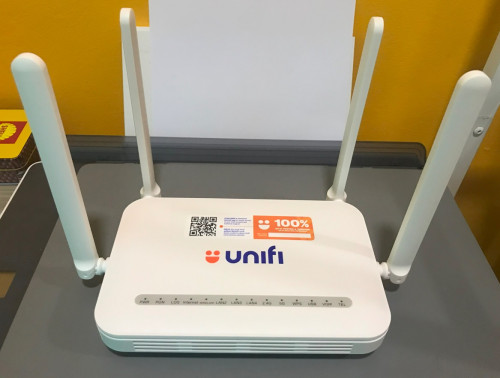
Saturday loot. Bought this for RM100.00. This skyworth unit I bought was new and unused. I can play around with this unit.

user posted image

As for my D-Link DPN3060 2.5GbE, unit is sold to laihuhng
*
Thanks, bro. The ONR is working as expected. Fast delivery, received on the next day. Box is nicely wrapped. Superb!
kwss
post Jun 16 2024, 12:28 AM

Regular
******
Senior Member
1,208 posts

Joined: Aug 2018
Lazada specific issue:
Their DNS provider (Alibaba Cloud) will randomly return an IPv6 address which route you to somewhere in Vietnam.

I am using Google DNS with DoT so it is not telco messing with it. Tested using resolvectl and not dig which enforce DoT and DNSSEC.

The offending IPv6 address:
2404:2280:1d3:0:3::c

It has like 45% packet loss too.

EDIT:
Tested with DNS.SB: No IPv6 address is returned.
Tested with Cloudflare DNS: Two IPv6 addresses are returned which is in Singapore.

Looks like something is messed up between Alibaba and Google

This post has been edited by kwss: Jun 16 2024, 12:37 AM
Ah_Huat
post Jun 16 2024, 12:51 AM

Getting Started
**
Junior Member
249 posts

Joined: Jan 2003
From: SG. Jarom


QUOTE(bluemind @ Jun 15 2024, 10:14 PM)
Unpredictable and sudden bad routing to western servers. You get very bad ping via pingplotter to certain western servers, some international sites load very slowly or not at all, especially if servers are located soley in the west. You don't know when it will hit, whether it is because of undersea cable fault or repair. No word or information from TM at all. Just lot of users complained before:

https://forum.lowyat.net/topic/5149798

https://forum.lowyat.net/topic/5453176

I think it has been some years with intermittent cable issues. Some IP ranges seem to fare better strangely, hence users trying to 'roll' other 'good' IP ranges instead but are stuck with the bad 42.x range. Some time ago you usually can avoid the bad range by reset your router but now most people are stuck in the bad range and unable to change it.

For 42.x range, in the am hours the ping is usually back to normal like <250ms, but the bad ping time can happen any time, so you get 1000+ms and packet loss. Local sites or most popular sites like Youtube/Facebook with multiple server locations are usually still okay and not affected hence the majority of users are unaware of issue.
*
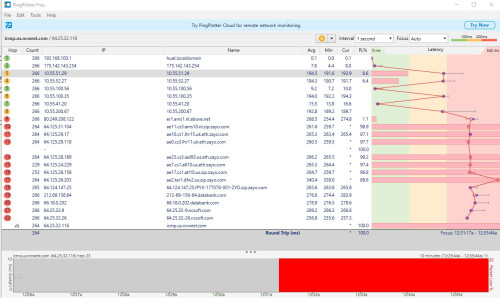
same here. game server at AWS-US East (N. Virginia).. no matter what IP range i get same problem (i can get 175 and 180 and 124 range of ip address.)

user posted image

i am not network expert. can someone explain is that unifi connect to Netherlands then to US ?

log in to game take forever or disconnect from server, if lucky get log in, still unplayable with lag spike, then disconnect from server within few minute.

kwss
post Jun 16 2024, 01:02 AM

Regular
******
Senior Member
1,208 posts

Joined: Aug 2018
QUOTE(Ah_Huat @ Jun 16 2024, 12:51 AM)
same here. game server at AWS-US East (N. Virginia)..  no matter what IP range i get same problem (i can get 175 and 180 and 124 range of ip address.)

user posted image

i am not network expert. can someone explain is that unifi connect to Netherlands then to US ?

log in to game take forever or disconnect from server, if lucky get log in, still unplayable with lag spike, then disconnect from server within few minute.
*
No, your game server is not in AWS. It is somewhere in Texas.
Yes it is. Netherlands, UK, US.
In US itself I can see it needs to cross 4 different AS from your screenshot.

In your case TM egress in Netherlands. I am not sure why but I think it is because AS30588 NCSoft Corp only has one upstream to AS13767 DataBank.

Both TM and DataBank has the same upstream provider: Zayo, Twelve99, Hurricane and Cogent.
I cannot seems to access Zayo's BGP Looking Glass so I cannot tell the reverse direction. Assuming everything is setup correctly this seems to be the most optimal route.

This post has been edited by kwss: Jun 16 2024, 01:05 AM
Ah_Huat
post Jun 16 2024, 01:21 AM

Getting Started
**
Junior Member
249 posts

Joined: Jan 2003
From: SG. Jarom


QUOTE(kwss @ Jun 16 2024, 01:02 AM)
No, your game server is not in AWS. It is somewhere in Texas.
Yes it is. Netherlands, UK, US.
In US itself I can see it needs to cross 4 different AS from your screenshot.

In your case TM egress in Netherlands. I am not sure why but I think it is because AS30588 NCSoft Corp only has one upstream to AS13767 DataBank.

Both TM and DataBank has the same upstream provider: Zayo, Twelve99, Hurricane and Cogent.
I cannot seems to access Zayo's BGP Looking Glass so I cannot tell the reverse direction. Assuming everything is setup correctly this seems to be the most optimal route.
*
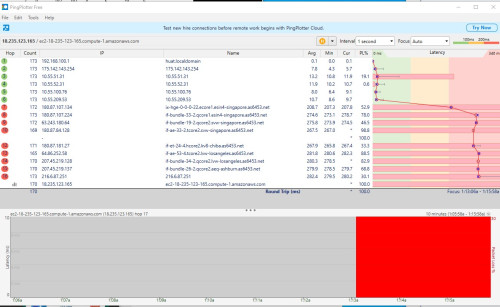
Thanks.. sorry.. i use the old server address that is in Texas, now the new server is in AWS-US East (N. Virginia).
here is the pingPlotter.

user posted image

i only know this one is connect to SG then i no know where it go.. haha
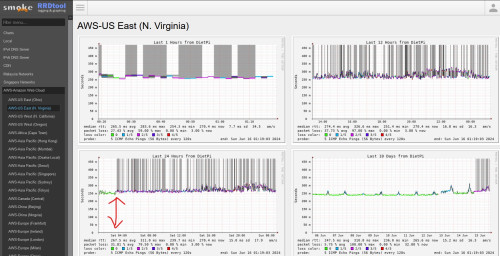
since yesterday , the game is unplayable. when check http://smokeping.mywebping.com/smokeping/?target=AWS.AWS-2 seem like same problem..

user posted image
kwss
post Jun 16 2024, 01:30 AM

Regular
******
Senior Member
1,208 posts

Joined: Aug 2018
QUOTE(Ah_Huat @ Jun 16 2024, 01:21 AM)
Thanks.. sorry.. i use the old server address that is in Texas, now the new server is in AWS-US East (N. Virginia).
here is the pingPlotter.

user posted image

i only know this one is connect to SG then i no know where it go.. haha
since yesterday , the game is unplayable.  when check http://smokeping.mywebping.com/smokeping/?target=AWS.AWS-2  seem like same problem..

user posted image
*
Your problem is the same as the other guy's problem.
My professional opinion: Bad routing by TATA
kwss
post Jun 16 2024, 02:34 AM

Regular
******
Senior Member
1,208 posts

Joined: Aug 2018
If anyone is interested, there is an article about:
Infrastructure is Only One Piece of the Internet Resilience Puzzle in Malaysia
https://pulse.internetsociety.org/blog/infr...zle-in-malaysia

Don't forget to check out links to the slides from MYNOG at the bottom.
jonathanwhm
post Jun 16 2024, 03:33 AM

Getting Started
**
Junior Member
87 posts

Joined: Jun 2011
QUOTE(Maxieos @ Jun 15 2024, 11:42 PM)
Do you really need 2GB internet connection ? what did you use it for ?
Even mine after upgrade also facing issue with slow internet to oversea , now even apps can't load , website slow and etc.
Now , almost all website ping over 100-1k ms.
*
I subscribed to the 2Gbps plan to take advantage of the 1Gbps upload speed as I often upload large content to multiple platforms simultaneously and for some digital marketing purposes across various social media platforms. Additionally, the home internet bill can be fully claimed from the company.
bluemind
post Jun 16 2024, 03:50 AM

Getting Started
**
Junior Member
172 posts

Joined: Oct 2008
Some user report that it is due to cable fault and repair in the other thread so it could be multiple causes. Anyway I checked digi seems slightly better though I don't use wifi so I can't check with the AWS server in the game itself. Now in am it seems there is new routing using kslrml02.my.bb.gin.ntt.net for instance, and ping is 200-300ms which is the best you can get. Nothing surprising or new in this scenario since it has been awhile with this issue, usually if you complain to AWS they will say it is your ISP has bad routing, and ISP will say is out of their control. In the end it is not an issue consumer can easily solve on their own besides changing ISP or using extra paid services to get better routing.
Ashren
post Jun 16 2024, 11:38 AM

Getting Started
**
Junior Member
156 posts

Joined: Dec 2010
QUOTE(kwss @ Jun 15 2024, 10:54 PM)
No they don't. This is a myth that has been circulating like forever. All of them use the same international gateway. You can easily prove this with BGP Looking Glass.
The only factor I can think of is the BNG.

All BNGs will connect to a ring network, which then connect internationally. If the ring network or the international gateway is broken it should affect everyone.
*
Nobody said anything about international gateway or peering. I said its area dependent. Your area gateway.

https://forum.lowyat.net/topic/5149798/+760

I dont plan to reply to any of this anymore since it's proven since long time ago. I agree to disagree.
kwss
post Jun 16 2024, 11:42 AM

Regular
******
Senior Member
1,208 posts

Joined: Aug 2018
QUOTE(bluemind @ Jun 16 2024, 03:50 AM)
Some user report that it is due to cable fault and repair in the other thread so it could be multiple causes. Anyway I checked digi seems slightly better though I don't use wifi so I can't check with the AWS server in the game itself. Now in am it seems there is new routing using kslrml02.my.bb.gin.ntt.net for instance, and ping is 200-300ms which is the best you can get. Nothing surprising or new in this scenario since it has been awhile with this issue, usually if you complain to AWS they will say it is your ISP has bad routing, and ISP will say is out of their control. In the end it is not an issue consumer can easily solve on their own besides changing ISP or using extra paid services to get better routing.
*
I am starting to doubt if TM misconfigured their BGP.
TM never advertise their prefix to TATA, IPv4 or IPv6.
TM only advertise their IPv6 prefix to NTT.

If you read the BGP output, all routes go to AS1299 first, including NTT (IPv4).

I didn't read the BGP output yesterday, just the Trace, hence I miss this!

That means anything that route to TATA is broken.
All IPv4 routing to NTT is also broken.

To reach AS1299 (Arelion aka Twelve99) both NTT and TATA has to egress at HK or JP. For traffic to US this is not really a problem because they will reach JP and HK before MY.
But if you go to AWS SG, it need to go to HK before coming back.

Even if you dump TATA's BGP output in ECBJ1 Cyberjaya or KT1 Kuala Lumpur, next hop is still AS1299.

NTT Looking Glass
https://www.gin.ntt.net/looking-glass-landing/

This post has been edited by kwss: Jun 16 2024, 11:45 AM

kwss
post Jun 16 2024, 01:12 PM

Regular
******
Senior Member
1,208 posts

Joined: Aug 2018
QUOTE(tng55 @ Jun 15 2024, 11:19 PM)
my home asus router and office also asus router
we don't have mikrotik
*
Can you try changing your home router MTU to 1280 and see if it's better?
Restart your router, wifi and mesh after the change to force all your device to reconnect.
neekun
post Jun 16 2024, 01:34 PM

I'm a Mac
*******
Senior Member
2,570 posts

Joined: Jun 2006


QUOTE(bluemind @ Jun 15 2024, 11:24 PM)
I am unable to connect to other IP range atm so I can't show you that certain other IP range are not affected usually, that was my experience like a year or more ago unless something has changed now and everyone is now affected. If you are currently connected via other IP range you can test it yourself easily, hence why I posted the IPs you requested earlier.
*
I’m connected to 175.141 for about 14 days, so far no issue accessing any website.
D-Zire
post Jun 16 2024, 03:17 PM

On my way
****
Senior Member
560 posts

Joined: Jul 2007
From: Pew Pew


QUOTE(Yluxion @ Jun 15 2024, 08:44 PM)
*
Thanks for the help! I managed to connect to the net finally. Simple as what you have shared, just change mode to bridge at Wan page. Leave everything else untouch. Then Deco settings do not need to enable VLAN tagging anymore. Just connect using PPPoE.

Hope this helps others that wish to have the same settings as me. Now the Skyworth box functions just like ONU only.

This post has been edited by D-Zire: Jun 16 2024, 03:45 PM
jiaen0509
post Jun 16 2024, 06:23 PM

Look at all my stars!!
*******
Senior Member
3,305 posts

Joined: Dec 2012
QUOTE(blacktubi @ Jun 15 2024, 11:26 AM)
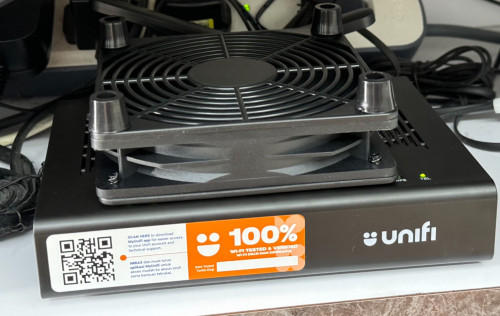
All combo box will be warmer than a pure ONU, it's expected since they are a proper router
*
QUOTE(NagaK @ Jun 15 2024, 12:29 PM)
So it might be heat throttle or just port issue?
*
QUOTE(Ashren @ Jun 15 2024, 12:48 PM)
Mine quite warm too compared to the old white huawei modem or even my asus tuf router. But so far my speed is consistent. I do have the cheap china made so called laptop cooler underneath both device including my router. Because my second floor can get to near hell hot temp on some days lol. So each time your restart the onr speed back to normal?
*
I just bought this from Shopee with RM6.12 including shipping. So far use more than 2 weeks and the speed still constantly more than 1gbps.
user posted image
TubeNRibbon
post Jun 16 2024, 07:43 PM

Getting Started
**
Junior Member
176 posts

Joined: May 2008
Again the speed from 1Gbps down to 11Mbps!

Seem like a problem either the modem or their port!

Report this case with TM and try change to old modem to test the speed

This post has been edited by TubeNRibbon: Jun 16 2024, 07:45 PM
al_madd
post Jun 16 2024, 09:19 PM

Regular
******
Senior Member
1,382 posts

Joined: Jan 2011
From: Lahad datu


Anyone get spotv when subscribe unifi?

Can you login to spotv and able to watch euro2024?
blacktubi
post Jun 16 2024, 10:29 PM

-
Group Icon
Elite
8,410 posts

Joined: Jul 2008

QUOTE(TubeNRibbon @ Jun 16 2024, 07:43 PM)
Again the speed from 1Gbps down to 11Mbps!

Seem like a problem either the modem or their port!

Report this case with TM and try change to old modem to test the speed
*
If you are not facing this issue previously, sounds like an equipment issue to me

495 Pages « < 158 159 160 161 162 > » Top
Topic ClosedOptions
 

Change to:
| Lo-Fi Version
0.0224sec    0.25    6 queries    GZIP Disabled
Time is now: 9th December 2025 - 07:50 AM